Fundamentals
Linear Search and Binary Search in Python
Learn to look for a value in a list with linear search and with binary search, count the steps of each one and see real uses with the ESP32.
By Prof. Rodrigo Faustino · Updated on · 19 min read
Metrics for this article
- Words
- 3,750
- Characters
- 20,058
- Reading time
- ~19 min
Searching is answering a question that every program asks all the time: is this value in the list, and at what position? An access card is among the authorized ones, a student code exists in the class, a sensor reading has already passed the limit. There are two classic ways to answer, and the difference between them is a good first contact with the idea of an efficient algorithm. Linear search looks at the elements one by one and works on any list. Binary search looks at the middle element and discards half of the list at each step, but only works when the list is ordered.
This article writes both by hand, counts how many comparisons each one makes, shows what happens when the binary one receives a list out of order, and presents three uses on the ESP32. All the examples were run in the simulator, and the results quoted are the ones it produces. A caveat right at the start: the computer Python's bisect module, which brings binary search ready-made, does not exist in the simulator, and so we will write the search ourselves, which is the exercise that matters anyway.
In the code, esq, dir and meio are the Portuguese names for the left end, the right end and the middle of the range, and alvo is the target. The names are kept so that the output matches the figures.
Linear search: one at a time

The idea is as natural as it gets: start at the first element, compare it with what you are looking for, and move on to the next until you find it or the list ends. The article on lists already showed in and index, and linear search is what they do underneath. Writing it by hand shows the reasoning:
def buscar(lista, alvo):
    for i in range(len(lista)):
        if lista[i] == alvo:
            return i
    return -1

nums = [2, 5, 8, 12, 16, 23, 38, 56, 72, 91]
print(buscar(nums, 23), buscar(nums, 7), buscar(nums, 2), buscar(nums, 91))
print(23 in nums, 7 in nums, nums.index(23), nums.count(5))

def buscar_contando(lista, alvo):
    comparacoes = 0
    for i in range(len(lista)):
        comparacoes += 1
        if lista[i] == alvo:
            return i, comparacoes
    return -1, comparacoes

print(buscar_contando(nums, 23))
print(buscar_contando(nums, 2))
print(buscar_contando(nums, 7))

def todas(lista, alvo):
    pos = []
    for i, v in enumerate(lista):
        if v == alvo:
            pos.append(i)
    return pos
print(todas([4, 1, 4, 7, 4], 4), todas([4, 1, 4, 7, 4], 9))

alunos = [
    {"id": 101, "nome": "Ana"},
    {"id": 102, "nome": "Bruno"},
    {"id": 103, "nome": "Carla"}
]
def achar_aluno(codigo):
    for a in alunos:
        if a["id"] == codigo:
            return a["nome"]
    return None
print(achar_aluno(102), achar_aluno(999))

def primeiro_maior(lista, limite):
    for v in lista:
        if v > limite:
            return v
    return None
print(primeiro_maior(nums, 40), primeiro_maior(nums, 100))

maior = nums[0]
for v in nums:
    if v > maior:
        maior = v
print(maior)
print("end")The output is 5 -1 0 9, then True False 5 1, then (5, 6), (0, 1) and (-1, 10), then [0, 2, 4] [], then Bruno None, then 56 None, then 91 and finally end. (The dictionary keys id and nome mean code and name, and are kept in Portuguese.)
The buscar function goes through the indexes with range(len(lista)) and, on finding the target, returns the position with return, which ends the function on the spot. If the loop finishes without finding it, execution reaches the return -1 after it. The -1 is the convention for "not found", the same as the find method of texts, because it is not a position anyone looks for. Notice where the return -1 sits: it is outside the loop, aligned with the for. This alignment is the most important detail of the function, and we will come back to it in the errors section.
The second line compares with the ready-made features. The 23 in nums answers only yes or no, the nums.index(23) returns the position, and the nums.count(5) counts how many times the value appears. They do the same linear search without you writing the loop, and are the first choice when all you need is to know whether a value exists. The difference is that index raises an error if the value is not in the list, while the buscar function returns -1.
Counting the comparisons
The buscar_contando function returns two things, the position and the number of comparisons made, with return i, comparacoes, which is actually a tuple, as seen in the article on tuples and unpacking. The results show the behavior of linear search:
- Finding the
2, which is the first, costs 1 comparison: the best case. - Finding the
23, in the middle of the list, costs 6. - Looking for the
7, which does not exist, costs 10: the worst case, in which the whole list is gone through only to then say there is none.
A linear search in a list of n elements makes, in the worst case, n comparisons. For ten elements, nobody notices. For a million, it is a million comparisons on every search.
Variations of linear search
The same skeleton solves several similar problems, and it is worth recognizing it:
- All the positions. The
todasfunction does not stop at the first find. It stores each position in a list withappend, and usesenumerateto have the index and the value. With no occurrences, it returns the empty list. - Search in records. The
achar_alunogoes through a list of dictionaries and compares a field, theid. It returns the student's name orNone. It is the pattern of any "look for the record with this code", and the article on dictionaries showed how to build these records. - The first one that passes a limit. The
primeiro_maiorreturns the value, and not the position, of the first element above the limit. - The largest value. Looking for the largest element is also a linear search: you keep the best seen so far and update it when a larger one appears. It is what the challenges Largest in the List and Largest Number ask for, and the challenge List Search asks for the search of a value read from the keyboard.
From the syllabus to a planned semester
- Teaching plan and calendar built automatically
- Class diary ready to paste into SIGA
- Slides and exercise lists with answer keys
Free Community edition · Windows
Binary search: looking at the middle
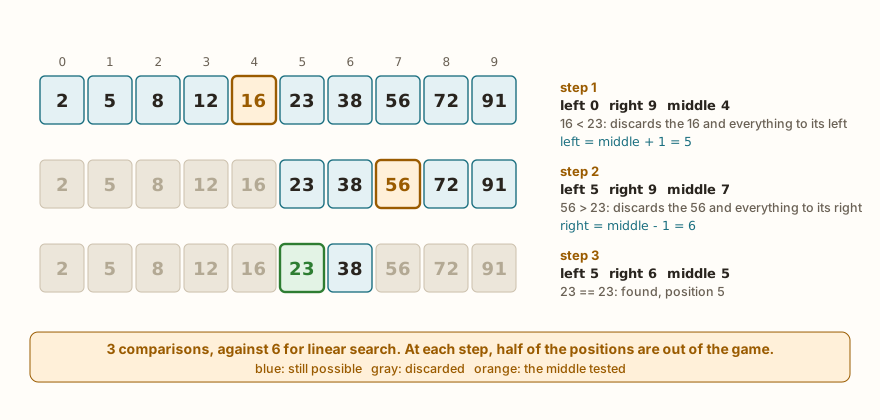
Think of a paper dictionary. To find a word, nobody starts on the first page. You open in the middle, see whether the word you want comes before or after, and repeat the idea in the right half. Binary search does exactly this, and it only works because the dictionary is in alphabetical order: without order, looking at the middle says nothing about where the rest is.
def busca_binaria(lista, alvo):
    esq = 0
    dir = len(lista) - 1
    while esq <= dir:
        meio = (esq + dir) // 2
        if lista[meio] == alvo:
            return meio
        elif lista[meio] < alvo:
            esq = meio + 1
        else:
            dir = meio - 1
    return -1

nums = [2, 5, 8, 12, 16, 23, 38, 56, 72, 91]
print(busca_binaria(nums, 23), busca_binaria(nums, 7), busca_binaria(nums, 2), busca_binaria(nums, 91))
print(busca_binaria([], 5), busca_binaria([5], 5), busca_binaria([5], 6))

def busca_binaria_passos(lista, alvo):
    esq = 0
    dir = len(lista) - 1
    passo = 0
    while esq <= dir:
        meio = (esq + dir) // 2
        passo += 1
        print("step", passo, "esq", esq, "dir", dir, "meio", meio, "value", lista[meio])
        if lista[meio] == alvo:
            return meio
        elif lista[meio] < alvo:
            esq = meio + 1
        else:
            dir = meio - 1
    return -1
print(busca_binaria_passos(nums, 23))
print(busca_binaria_passos(nums, 7))
print("end")The output starts with 5 -1 0 9 and -1 0 -1. Then comes the trace of the search for 23: step 1 esq 0 dir 9 meio 4 value 16, step 2 esq 5 dir 9 meio 7 value 56, step 3 esq 5 dir 6 meio 5 value 23 and the result 5. Next, the trace of the search for 7: step 1 esq 0 dir 9 meio 4 value 16, step 2 esq 0 dir 3 meio 1 value 5, step 3 esq 2 dir 3 meio 2 value 8 and the result -1. Finally, end.
The algorithm keeps two markers, esq and dir, that delimit the range where the target can still be. At the start, the range is the whole list, from position 0 to the last one. On each turn of the loop:
- The
meioof the range is calculated, with the integer division(esq + dir) // 2. - If the value in the middle is the target, the search is over:
meiois returned. - If the value in the middle is smaller than the target, the target can only be on the right, and the range now starts at
meio + 1. - If it is larger, the target can only be on the left, and the range now ends at
meio - 1.
The loop runs while the range has at least one position, esq <= dir. When esq passes dir, the range became empty and the target is not in the list, which leads to the return -1. The trace of the passo shows this in both cases. For 23, the range goes from 10 positions to 5, then to 2, and on the third step the middle is already the target. For 7, which does not exist, the range shrinks until it empties, and the search concludes "not there" in three steps, while the linear one needed ten.
The two edge cases appear on the second line of the output. With the empty list, dir starts at -1, the loop does not even run and the result is -1. With a single element, the middle is the element itself. The -1 0 -1 shows the empty list, the found and the not found.
The meio + 1 and the meio - 1 deserve attention. They discard meio itself, which has already been compared. If either of them were written as just meio, the range might stop shrinking, and the loop would run forever. It is the kind of error that is discovered with a print of the trace, like the one in the busca_binaria_passos function.
How much work each search takes
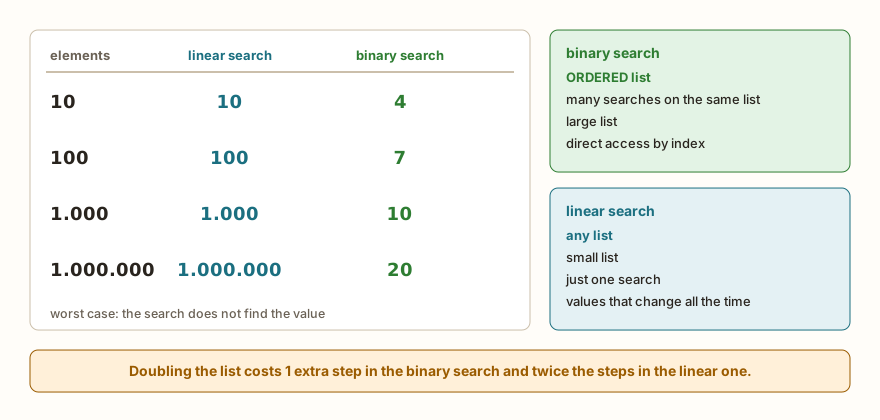
The advantage of the binary search is in the pace at which the work grows. At each step, the range falls by half, and so the number of steps in the worst case is how many times the list can be divided in half until nothing is left. The code below counts this without needing to create huge lists, simulating only the markers:
def passos_pior_caso(n):
    esq = 0
    dir = n - 1
    passos = 0
    while esq <= dir:
        meio = (esq + dir) // 2
        passos += 1
        esq = meio + 1
    return passos
for n in [10, 100, 1000, 1000000]:
    print(n, passos_pior_caso(n))
print(passos_pior_caso(0), passos_pior_caso(1), passos_pior_caso(2), passos_pior_caso(3), passos_pior_caso(4))
print("end")The output is 10 4, 100 7, 1000 10, 1000000 20, then 0 1 2 2 3 and finally end.
For a list of 1000 elements, the binary one makes at most 10 comparisons, and the linear one, 1000. For a million, it is 20 against a million. Each time the list doubles in size, the binary search makes one more step, while the linear one makes twice as many steps. This way of measuring how the work grows with the size of the data is the subject of the last article in this part, on algorithm complexity, and here it is enough to keep the picture: one grows in a straight line, the other hardly moves.
The calculation has a price. The binary search is only worth it with the ordered list, and ordering takes work. If the list changes all the time, or if only one search is made on it, ordering first to search afterwards costs more than a plain linear search. Binary search pays off when the list is large and ordered once, and the searches are many. The next articles show how to order.
What goes wrong with binary search
Binary search has prerequisites that it does not check. The most important is the order:
def busca_binaria(lista, alvo):
    esq = 0
    dir = len(lista) - 1
    while esq <= dir:
        meio = (esq + dir) // 2
        if lista[meio] == alvo:
            return meio
        elif lista[meio] < alvo:
            esq = meio + 1
        else:
            dir = meio - 1
    return -1
desordenada = [9, 2, 7, 1, 5, 3]
print(busca_binaria(desordenada, 5), 5 in desordenada)
print(busca_binaria(desordenada, 9), 9 in desordenada)
print(busca_binaria(desordenada, 2), 2 in desordenada)
print(busca_binaria(sorted(desordenada), 5))
print(busca_binaria([1, 2, 2, 2, 3], 2), busca_binaria([1, 2, 2, 2, 2, 3], 2))
print(busca_binaria(["ana", "bia", "caio", "dora"], "caio"))
print("end")The output is -1 True, -1 True, -1 True, then 3, then 2 2, then 2 and finally end. (The name desordenada means unordered.)
The first three results are the problem. The values 5, 9 and 2 are in the list, as the in confirms with True, but binary search said -1 for all three. It looked at the middle, concluded something about the order that does not exist, and went looking on the wrong side. There was no error or warning: the program just answered wrong. After passing the list through sorted, the search finds the 5 at position 3 of the ordered list, [1, 2, 3, 5, 7, 9].
The fifth result shows the behavior with repeated values. In the lists [1, 2, 2, 2, 3] and [1, 2, 2, 2, 2, 3], the search returns position 2 in both, which is a position where there is a 2, but not the first. Binary search returns one of the occurrences, the one that fell in the middle, and does not guarantee the first or the last. If the problem asks for the first, you need to adjust the algorithm, or use linear search.
The last result shows that binary search also works with texts, because the < compares texts in alphabetical order, as seen in the article on strings. The requirement is that the list is ordered by the same criterion as the comparison.
The AI that remembers your life and lives on your computer
- Long-term memory with the source of every answer
- Works offline: your data stays on your PC
- Reads PDFs, slides, photos and meeting recordings
Essential plan free forever
On the ESP32: calibration table, cards and limits
from machine import ADC, Pin

TABELA = [(0, -10), (500, 0), (1200, 10), (2000, 20), (2800, 30), (3500, 40), (4095, 50)]

def faixa(leitura):
    esq = 0
    dir = len(TABELA) - 1
    while esq < dir:
        meio = (esq + dir + 1) // 2
        if TABELA[meio][0] <= leitura:
            esq = meio
        else:
            dir = meio - 1
    return esq

for lido in [0, 499, 500, 1500, 3499, 4095]:
    i = faixa(lido)
    print(lido, i, TABELA[i][1])

CARTOES = ["A1B2", "C3D4", "E5F6"]
for lido in ["C3D4", "ZZZZ"]:
    print(lido, "allowed" if lido in CARTOES else "denied")

leituras = [310, 295, 402, 515, 530, 498]
limite = 500
for i in range(len(leituras)):
    if leituras[i] > limite:
        print("first above the limit:", i, leituras[i])
        break
else:
    print("none above")
adc = ADC(Pin(34))
adc.atten(ADC.ATTN_11DB)
print(0 <= adc.read() <= 4095)
print("end")The output is 0 0 -10, 499 0 -10, 500 1 0, 1500 2 10, 3499 4 30, 4095 6 50, then C3D4 allowed and ZZZZ denied, then first above the limit: 3 515, then True and end. (The names mean TABELA = table, faixa = range or band, leitura and lido = reading and read value, CARTOES = cards and limite = limit.)
The first use is a calibration table. The reading of the analog converter, from 0 to 4095, is converted into temperature by a table of bands, in which each row says "from this read value on, this temperature applies". The numbers in the example are made up to illustrate, and a real curve comes from the sensor's manual or from measurements. The article on the ESP32 ADC shows why the reading is not linear.
The table is ordered by the reading, so binary search fits. Only here the goal is different: you are not looking for an exact value, but for the last band that starts before the reading. That is why the faixa function changes two details: the middle is calculated with (esq + dir + 1) // 2, rounding up, and the loop runs with esq < dir, without the equality test. When the band in the middle starts at a value smaller than or equal to the reading, esq becomes meio itself, which can still be the answer. The + 1 in the calculation of the middle guarantees that the range always shrinks. With 7 rows, the difference between the two searches is a few steps, and a linear search would give the same result, but in tables with hundreds of rows the binary one pays off.
The second use is the list of authorized cards. Here the in solves it: the list is short, is not ordered and changes when someone is registered. Ordering and using the binary search would be more work with no gain. The example only illustrates the search; a real access control requires much more care, such as keeping the codes outside the program.
The third is finding the first value above a limit in a sequence of readings. The loop stops with break at the first occurrence, and the else of the for, seen in the article on break, continue and else, only runs when the loop ends without break, that is, when no reading passed the limit. The readings arrive in order of time and not of value, so only the linear search makes sense.
Finally, the last two lines create an ADC on pin 34 and confirm that the reading falls between 0 and 4095. They are not part of the search: they show where the lido would come from in a real circuit.
Common errors
The first error is using index expecting a -1:
nums = [2, 5, 8]
print(nums.index(7))ValueError: object not in sequenceIn the computer's Python, the message is 7 is not in list. The index requires the value to exist. The solution is to test first with in, or to write the buscar function, which returns -1. The error is the same when you pass a starting point that falls after the only occurrence.
The second is importing bisect, which exists in the computer's Python:
import bisect
print(bisect.bisect_left([1, 3, 5], 3))ImportError: no module named 'bisect'The simulator does not have this module, and you should not count on it on the board. The way out is to write the search by hand, as in this article.
The third is comparing different types in binary search, such as looking for the text "3" in a list of numbers:
def busca_binaria(lista, alvo):
    esq = 0
    dir = len(lista) - 1
    while esq <= dir:
        meio = (esq + dir) // 2
        if lista[meio] == alvo:
            return meio
        elif lista[meio] < alvo:
            esq = meio + 1
        else:
            dir = meio - 1
    return -1
print(busca_binaria([1, 3, 5], "3"))TypeError: unsupported types for __lt__: 'int', 'str'In the computer's Python, the text is '<' not supported between instances of 'int' and 'str'. The equality comparison, ==, accepts different types and just gives false, but the < does not. This usually happens when the target comes from input(), which always returns text, and the list has numbers. The fix is to convert the target with int().
The fourth is an error in calculating the middle with the ordinary division:
nums = [2, 5, 8, 12]
meio = (0 + 3) / 2
print(meio)
print(nums[meio])1.5
TypeError: list indices must be integers, not floatThe / returns a number with a decimal part, and the list only accepts an integer index. That is why the search uses //. In the computer's Python, the message is list indices must be integers or slices, not float.
Silent traps
Some errors generate no message at all. The worst of them in linear search is the return -1 in the wrong place:
def errada(lista, alvo):
    for i in range(len(lista)):
        if lista[i] == alvo:
            return i
        else:
            return -1
print(errada([5, 6, 7], 5), errada([5, 6, 7], 7))
def ok(lista, alvo):
    for i in range(len(lista)):
        if lista[i] == alvo:
            return i
    return -1
print(ok([5, 6, 7], 5), ok([5, 6, 7], 7))
print("end")The output is 0 -1 and 0 2, and then end. (errada means wrong.) The errada function returns -1 right at the first element that is not the target, and never looks at the others. For the 5, which is the first, it works, and that is why the simple test passes. For the 7, at the end of the list, it gives -1, and the value was there. The else stuck to the if inside the loop decides too early. The rule is: you can only say "not found" after looking at all of them, and that is what the return -1 outside the loop does.
The other is using the result -1 as if it were a position. In Python, the index -1 is valid, and it is the last element. With the list nums from before, nums[buscar(nums, 7)] gives 91, and not an error. The search said "not found", the program ignored it and took the last element. Always check the result before using it as an index.
There is also the binary search loop that loses the last candidate. If the condition is esq < dir instead of esq <= dir, the range of a single element is never examined. In a run with this swap, the search returns -1 for the 5 in [5], -1 for the 8 in [2, 5, 8] and -1 for the 12 in [2, 5, 8, 12], and only gets the 5 in [2, 5, 8] right, where the middle falls on the right value. Whoever tests only with the middle element does not see the defect.
What tends to show up in class
These are patterns that repeat with people learning search. They are not the account of a specific class.
The return -1 inside the loop. It is the most common, as shown. The function passes the test of finding the first element and fails on the others. The way back is to always test with the last element and with a value that does not exist.
Returning the value instead of the position. Writing return lista[i] or return v where the position was asked for. Since the search compares lista[i] with the alvo, the returned value is equal to the target, and the answer says nothing new.
Using the -1 as an index. Already described. The person searches, stores the result and accesses the list without checking.
Binary search on an unordered list. The result comes out wrong without warning, and the person concludes that the algorithm "does not work". The habit to build is asking, before any binary search, who guarantees the order.
Confusing binary search with "skipping every two". Some imagine that it looks at one position yes, another no. Running the function with the trace of steps, which prints esq, dir and meio, settles the doubt better than the explanation.
/ in place of //. It generates the index error with a number with a decimal part, and is almost always solved at the first try.
meio instead of meio + 1. In some cases the program hangs in a loop that does not end. Putting in a step counter that interrupts the loop after, say, 50 turns is a good safety net during testing.
Only testing with the value that exists. The three minimum tests are: a value at the start, one at the end and one that does not exist. With that, most defects appear.
Exercise: binary search with step count
Write a program that reads the quantity n of elements, then n numbers already in ascending order, and finally the value to look for. It must show the position found and in how many steps, or that the value was not found, and compare with the linear search done by the ready-made features. The block uses entradas= to provide the list [3, 7, 11, 15, 19] and the target 15.
n = int(input())
lista = []
for i in range(n):
    lista.append(int(input()))
alvo = int(input())
esq = 0
dir = n - 1
passos = 0
achou = -1
while esq <= dir:
    meio = (esq + dir) // 2
    passos += 1
    if lista[meio] == alvo:
        achou = meio
        break
    elif lista[meio] < alvo:
        esq = meio + 1
    else:
        dir = meio - 1
if achou == -1:
    print("not found in", passos, "steps")
else:
    print("position", achou, "in", passos, "steps")
print("linear search:", lista.index(alvo) if alvo in lista else -1)
print("end")The simulator repeats the typed values in the output, one per line, and then come position 3 in 2 steps, linear search: 3 and end.
On the first turn, the middle is position 2, which is worth 11 and is smaller than 15, so the range now starts at position 3. On the second, the middle is position 3, which is worth 15, and the search ends. The break leaves the loop as soon as the value is found, and the variable achou (found) stores the position, with -1 as the initial value of "not found yet". The last line uses the index guarded by an in, to never raise the ValueError.
To practice beyond that, try: looking for a value that does not exist, such as 10, and seeing how many steps the binary search spends; looking for the first and the last element; adding a check that the list read is really in order, with a loop that compares each element with the next; and showing, along with it, how many comparisons the linear search would have made.
Frequently asked questions
Which search should I use? If the list is small, is not ordered, or changes all the time, use the linear one, or simply in and index. If the list is large, is ordered and receives many searches, the binary one pays off.
Do I need to write linear search by hand if in exists? To know only whether the value exists, in is enough. Writing by hand is necessary when the search has a rule of its own, such as finding the first value above a limit, comparing a field of a record, or counting the comparisons.
Does binary search work on a list of texts? It works, as long as the list is ordered alphabetically and the target is a text. The result depends on the comparison of characters, and so upper case and lower case letters are ordered separately.
What do I do if the list has repeated values? Binary search returns one of the positions, with no guarantee of which. To find the first, adjust the algorithm to keep looking on the left after a find, or use linear search.
Why does the simulator not have bisect? Because it does not exist in the simulator, which imitates MicroPython. The search written by hand is short and serves in both places, on the computer and on the board.
Can binary search be written with recursion? It can: the function calls itself with a smaller range. As the range falls by half, the depth stays small. The article on recursion deals with the subject.
Where to go next
The challenge List Search practices linear search with a value read from the keyboard, and the challenges Largest in the List and Largest Number practice the scan that keeps the best value seen. To review the basics, it is worth going through the articles on lists, list operations and matrices, and through the Logic with Python track.
The next article deals with sorting: bubble sort and selection sort, two simple algorithms that put a list in order, explained step by step.