Fundamentals
Strings in Depth in Python: Slicing and the Most Used Methods
Master strings in Python: indexes and slices, immutability, split, join, replace, find, formatting, and what the ESP32's MicroPython does not have.
By Prof. Rodrigo Faustino · Updated on · 16 min read
Metrics for this article
- Words
- 3,019
- Characters
- 17,200
- Reading time
- ~16 min
A string, or text, is a sequence of characters. Like the list and the tuple, it has an index, a slice and len, and it is gone through with for. Unlike the list, it cannot be changed in place: every text method returns a new text and leaves the original as it was. Most of the work with strings is knowing which methods exist, what each one returns and how to combine a few of them to solve real problems, such as cleaning up what the user typed, splitting the fields of a message or aligning numbers on a screen.
The previous articles already used text in several ways: print and input, conversion with str() and int(), strip and isdigit for validating, f-strings. Here the subject gets its own space. We will see indexes and slices, immutability, the most used methods in groups, formatting, characters and escape sequences, a few recipes, uses on the ESP32, and an important part: several text methods of the computer's Python do not exist in MicroPython, and the simulator, which imitates it, reproduces that lack.
A note on the examples: the texts that the outputs depend on stay in Portuguese on purpose (Ola, Mundo is "Hello, World", casa is house, casaco is coat, programacao is programming), because the positions and counts shown would change if they were translated.
Text is a sequence
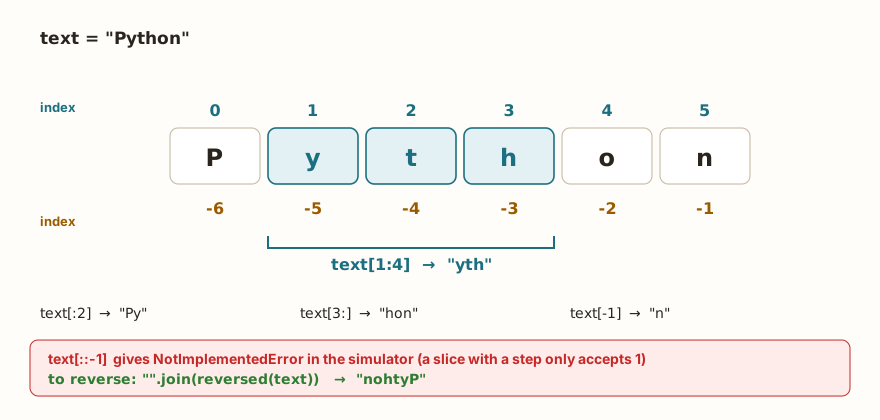
texto = "Python"
print(texto[0], texto[1], texto[-1], texto[-2])
print(texto[1:4], texto[:2], texto[3:], texto[:])
print(texto[2:100], repr(texto[4:1]))
print(len(texto), texto + "!", texto * 2)
print("th" in texto, "ht" in texto, "Py" in texto)
for letra in texto:
    print(letra, end="-")
print()
print(ord("A"), ord("a"), chr(66), chr(97))
print("a" < "b", "B" < "a", "casa" < "casaco", "10" < "9")
print("end")The output is P y n o, yth Py hon Python, thon '', 6 Python! PythonPython, True False True, P-y-t-h-o-n-, 65 97 B a, True True True True and end.
Everything the article on lists said about indexes and slices holds here: the first character is at index 0, -1 is the last, texto[1:4] goes from index 1 to before 4, and a slice outside the limits gives no error. The difference is in the result: the slice of a text is another text, and that of a list is another list.
The in operator applied to text looks for a piece, and not just a character. "th" in "Python" gives True, and "ht" gives False, because the order matters. The + joins texts, and the * repeats.
The last two lines are a reminder that the computer stores each character as a number. The ord("A") returns 65, and the chr(66) returns B. The comparison between texts uses these numbers, character by character, and that is why "B" < "a" is true, since capitals come before lowercase letters in the table. And "10" < "9" too, because "1" comes before "9": comparing numbers written as text gives alphabetical order, and not numeric. It is the same care that the article on type conversion asked for when reading data from the keyboard.
The slice with a step does not work in the simulator
In the computer's Python, texto[::-1] is the best-known recipe for reversing a text. In the simulator, which imitates MicroPython, the text slice with a step other than 1 does not exist, as already happened with the tuple:
texto = "Python"
print(texto[::-1])NotImplementedError: only slices with step=1 (aka None) are supportedThe solution is to ask reversed, which goes from the back to the front, and join the result:
texto = "Python"
print("".join(reversed(texto)))
print("".join(reversed("abc")))
print(list(texto)[::-1])
print("".join(list(texto)[::-1]))
print(texto[::1])
print(texto[0:6:1])
print("end")The output is nohtyP, cba, ['n', 'o', 'h', 't', 'y', 'P'], nohtyP, Python, Python and end. The "".join(reversed(texto)) is the shortest way. The list accepts the slice with a step, and that is why list(texto)[::-1] works, but the direct slice on the text only with step 1.
The AI that remembers your life and lives on your computer
- Long-term memory with the source of every answer
- Works offline: your data stays on your PC
- Reads PDFs, slides, photos and meeting recordings
Essential plan free forever
The text does not change: methods return another
Trying to swap a letter gives an error, and the transformation methods, like upper, do not change the variable:
s = "Ana"
print(s.upper(), s)
t = s.upper()
print(t, s)
print("a" + "b" * 3, "ab" "cd")
print("=" * 10)
print("Python".lower().startswith("py"), "x".join("abc"))
print("end")The output is ANA Ana, ANA Ana, abbb abcd, a line of ten equals signs, True axbxc and end. The s.upper() handed over ANA, and the variable s stayed Ana. To keep the result you need to assign, as in t = s.upper(), or s = s.upper() if the original is no longer needed. Methods chain: "Python".lower().startswith("py") first lowers the letters and then asks about the beginning. The "x".join("abc") uses the x as a separator between the letters of abc, and the "ab" "cd" shows that two texts written side by side join on their own.
The most used methods
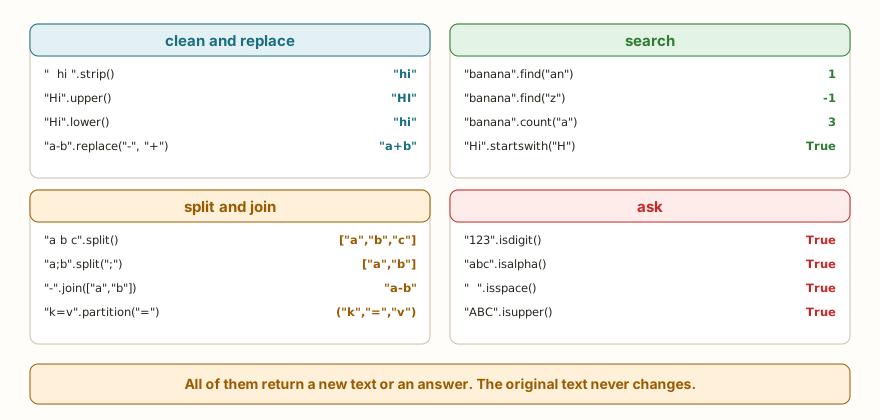
The methods that exist in the simulator fit into four families. The figure brings an example of each, and the example below runs the main ones:
s = "  Ola, Mundo  "
print(repr(s.strip()), repr(s.lstrip()), repr(s.rstrip()))
t = "Ola, Mundo"
print(t.upper(), t.lower())
print(t.replace("o", "0"), t.replace("o", "0", 1))
print(t.find("o"), t.find("z"), t.rfind("o"), t.count("o"))
print(t.index("M"))
print(t.startswith("Ola"), t.endswith("do"), t.startswith("ola"))
print(t.split(","), t.split())
print("a;b;c".split(";"), "a;b;c".split(";", 1))
print("-".join(["a", "b", "c"]), "".join(["x", "y"]), ", ".join(["1", "2"]))
print("end")The output is 'Ola, Mundo' 'Ola, Mundo ' ' Ola, Mundo', then OLA, MUNDO ola, mundo, Ola, Mund0 Ola, Mund0, 9 -1 9 1, 5, True True False, ['Ola', ' Mundo'] ['Ola,', 'Mundo'], ['a', 'b', 'c'] ['a', 'b;c'], a-b-c xy 1, 2 and end.
Cleaning and replacing. The strip removes the spaces at both ends, the lstrip only those on the left and the rstrip only those on the right. The repr was used to show the spaces that remain. The upper and lower change the case. The replace(old, new) replaces all the occurrences, and a third argument limits how many.
Searching. The find returns the position of the first occurrence, or -1 if there is none, and the rfind searches from the end. The index does the same as find, but gives an error if it does not find it. The count counts the occurrences, without overlapping. Notice that t.count("o") gave 1, and not 2: the capital O of Ola is not an o, and the search tells upper case from lower case. The startswith and endswith ask about the beginning and the end.
Splitting and joining. The split(sep) cuts the text into a list. With no argument, it cuts at any sequence of spaces, and that is why t.split() gave ['Ola,', 'Mundo']. With a separator, like ",", it cuts exactly there and keeps the spaces, and the second item was ' Mundo', with the space in front. A second argument limits the number of cuts. The join does the opposite: the separator comes before the dot, and the list goes in parentheses: "-".join(list). The items of the list need to be texts.
Two more that fit here, and the list of questions about the contents:
print("123".isdigit(), "12a".isdigit(), "abc".isalpha(), "ab1".isalpha())
print("   ".isspace(), "ABC".isupper(), "abc".islower(), "Abc".isupper(), "Abc".islower())
print("ab".center(6) + "|")
print("a,b,c".partition(","), "a,b,c".rpartition(","))
print("a b c d".rsplit(" ", 1), "a b c d".split(" ", 1))
print("line1\nline2".splitlines())
print("banana".rfind("an"), "banana".find("an"), "banana".rindex("a"))
print("end")The output is True False True False, True True True False False, ab |, ('a', ',', 'b,c') ('a,b', ',', 'c'), ['a b c', 'd'] ['a', 'b c d'], ['line1', 'line2'], 3 1 5 and end.
Asking. The isdigit, isalpha, isspace, isupper and islower give True or False. Attention: they are true only when all the characters pass, and the empty text does not pass. "Abc".isupper() and "Abc".islower() both give False, because the text has both cases. The partition(sep) cuts once and returns three parts in a tuple: before, the separator and after, and the rpartition cuts at the last occurrence. The splitlines splits by line breaks. The center(6) centers the text in a width, and here, in the simulator, it accepts only the width, without the fill character.
What the computer has and the board does not
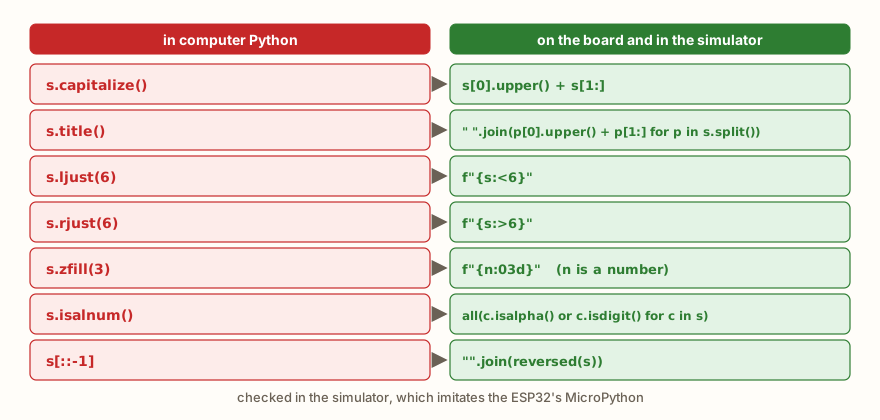
If you learned text methods in a Python course for computers, you will run into a surprise: several methods that seem basic do not exist in MicroPython. In the simulator, the following give AttributeError: capitalize, title, swapcase, casefold, ljust, rjust, zfill, isalnum, isidentifier, istitle, removeprefix, removesuffix, translate and format_map, among others. All of them exist in the computer's Python. The figure shows what to write in place of the most used ones, and the example below confirms:
frase = "a ordem dos fatores"
palavras = frase.split()
print(len(palavras), palavras)
print([p[0].upper() + p[1:] for p in palavras])
print(" ".join(p[0].upper() + p[1:] for p in palavras))
print("".join(p[0] for p in palavras))
s = "7"
print("0" * (3 - len(s)) + s, f"{7:03d}")
nome = "ana"
print(nome[0].upper() + nome[1:])
print(f"{'ab':>5}|{'ab':<5}|{'ab':^5}|")

def so_letras_e_digitos(t):
    return all(c.isalpha() or c.isdigit() for c in t)

print(so_letras_e_digitos("ab1"), so_letras_e_digitos("ab 1"))
print("end")The output is 4 ['a', 'ordem', 'dos', 'fatores'], ['A', 'Ordem', 'Dos', 'Fatores'], A Ordem Dos Fatores, aodf, 007 007, Ana, ab|ab | ab |, True False and end. (The phrase a ordem dos fatores means "the order of the factors".)
The substitute for the first capital letter is t[0].upper() + t[1:]. For title, the same calculation is joined for each word from the split. To align left, right or center, the f-string does it with :<, :> and :^. To pad with zeros on the left, the :03d does the work of zfill on numbers, and "0" * (3 - len(s)) + s does it on texts. What isalnum would ask becomes an all over the characters.
The golden rule is to test the method in the simulator before using it in a program for the board. If AttributeError: 'str' object has no attribute ... appears, the method does not exist, and the list above gives the way.
From the syllabus to a planned semester
- Teaching plan and calendar built automatically
- Class diary ready to paste into SIGA
- Slides and exercise lists with answer keys
Free Community edition · Windows
Formatting texts
F-strings were already introduced in the article on input and output. Here, the summary of the format options, and the two older forms, which still appear in code out there:
nome = "Ana"
idade = 20
nota = 8.5
print(f"{nome} is {idade} years old")
print(f"{nota:.2f} | {idade:5d}| {idade:<5d}| {idade:05d}")
print(f"{nome:>6}|{nome:<6}|{nome:^7}|")
print("{} is {} years old".format(nome, idade))
print("{0} and {1} and {0}".format("a", "b"))
print("%s is %d years old" % (nome, idade))
print("%.1f%%" % 45.5)
print(f"{255:x} {255:X} {5:08b}")
print(f"{'aspas'} {nome!r}")
print("end")The output is Ana is 20 years old, 8.50 | 20| 20 | 00020, Ana|Ana | Ana |, Ana is 20 years old, a and b and a, Ana is 20 years old, 45.5%, ff FF 00000101, aspas 'Ana' and end.
After the colon comes the specification: .2f gives two decimal places, 5d reserves five positions for an integer, <, > and ^ align left, right and center, 05d pads with zeros, and x, X and b write in hexadecimal and in binary. The !r shows the repr, with the quotes: Ana came out as 'Ana', while the literal 'aspas' ("quotes") came out with no quotes, because only !r asks for them. The format method uses {} in the text and receives the values in parentheses, with or without position numbers, and the % operator uses %s, %d and %f. The three forms give the same result, and the f-string is the most readable. If you use :d with a text, the error is ValueError, as seen further on.
Special characters, quotes and accents
print("line1\nline2")
print("column1\tcolumn2")
print("backslash \\ and quote \" and '")
print('double "quotes" inside')
print("""several
lines""")
print(r"c:\novo")
print(len("ação"), "ação"[2], "ação".upper())
print("ç" < "d", ord("ç"))
print(len("a\nb"))
print("end")The output is line1 and line2 on two lines, column1 and column2 separated by a tab, backslash \ and quote " and ', double "quotes" inside, several and lines on two lines, c:\novo, 4 ã AçãO, False 231, 3 and end.
The backslash starts an escape sequence: \n is the line break, \t is the tab, \\ is a backslash and \" is a quote inside a text delimited by quotes. Text between single quotes can have double quotes inside, and the other way around. Triple quotes hold text on several lines. The prefix r (for raw) turns the escapes off, and is useful for Windows paths like c:\novo, in which the \n is not a line break. The text "a\nb" has 3 characters, because the break counts as one.
With accents, the simulator counts the characters the expected way: len("ação") gives 4, and "ação"[2] is the ã. But there is a trap in the last two calculations: "ação".upper() returned AçãO, with ç and ã intact. In MicroPython, upper and lower only change the letters without accents. In the computer's Python, the result would be AÇÃO. The comparison "ç" < "d" also gave False, because the code of ç is 231, much greater than that of d, and so sorting accented words by direct comparison does not follow Portuguese alphabetical order. If the program needs to ignore case in text with accents, handle the accented letters by hand, or avoid depending on it.
Recipes with text
A few classic problems show the methods working together:
def eh_palindromo(t):
    t = t.lower().replace(" ", "")
    return t == "".join(reversed(t))

print(eh_palindromo("Ana"), eh_palindromo("Python"), eh_palindromo("A base do teto desaba"))

def cesar(t, k):
    r = ""
    for c in t:
        if "a" <= c <= "z":
            r += chr((ord(c) - ord("a") + k) % 26 + ord("a"))
        else:
            r += c
    return r

print(cesar("abc xyz", 3), cesar(cesar("abc xyz", 3), -3))
vogais = 0
for c in "programacao":
    if c in "aeiou":
        vogais += 1
print(vogais)
print("end")The output is True False True, def abc abc xyz and 5, followed by end. The palindrome (a text that reads the same in both directions) lowers the letters, removes the spaces and compares the text with its reverse, and the reversal uses the join with reversed that we saw. (The phrase A base do teto desaba is a Portuguese palindrome that means "the base of the roof collapses".) The Caesar cipher shifts each letter k positions in the alphabet: ord(c) - ord("a") gives the position from 0 to 25, the sum with k and the % 26 wrap around the alphabet, and the chr converts back. Characters outside a to z, such as the space, pass through unchanged, and applying the cipher with -3 undoes the one with 3. The vowel counter uses in to test whether the letter is in "aeiou". Attention: the cipher example and the vowel one only handle lowercase letters without accents.
On the ESP32: messages, commands and columns
In projects with the board, text arrives from outside in simple formats: a line with separated fields, a typed command, a sensor reply. The split and startswith solve most of them:
mensagem = "temp=24;umid=61;modo=auto"
dados = {}
for par in mensagem.split(";"):
    chave, valor = par.split("=")
    dados[chave] = valor
print(sorted(dados.items()))
temp = int(dados["temp"])
print(temp + 1)
comando = "LED ON"
if comando.startswith("LED"):
    estado = comando.split()[1]
    print("state", estado)
nomes = ["Temp", "Umid"]
valores = [24, 61]
for nome, v in zip(nomes, valores):
    print(f"{nome:<6}{v:>4}")
print(f"{24:>3}C {61:>3}%")
print("end")The output is [('modo', 'auto'), ('temp', '24'), ('umid', '61')], 25, state ON, Temp 24, Umid 61, 24C 61% and end. (The field names temp, umid and modo are temperature, humidity and mode, kept in Portuguese because they are the dictionary keys.) The first block breaks the message into pairs with split(";"), opens each pair into chave and valor with split("="), and stores it in a dictionary, as the article on dictionaries presented. The values are still texts, and the int(...) converts what is a number. The sorted in the printing avoids depending on the dictionary's order. The second block reads a command: startswith("LED") recognizes the family and split()[1] takes the next word. The third builds aligned columns with the f-string, which is useful on a screen like the one in the article on I2C with OLED and LCD, in which each line has a fixed width.
Common errors
The messages below are those of the simulator, which imitates MicroPython. The error type is usually the same on the computer's Python, and the text may change.
s = "Python"
s[0] = "J"TypeError: 'str' object doesn't support item assignmentThe text does not accept swapping a letter. The way is to build another: "J" + s[1:].
s = "Python"
print(s[6])IndexError: string index out of rangeThe text has 6 characters, and the indexes go from 0 to 5. It is the same error as lista[len(lista)].
print("age: " + 20)TypeError: unsupported types for __add__: 'str', 'int'The + between text and number is not a valid calculation. Use str(20), the comma of print or an f-string.
print("abc".index("z"))ValueError: substring not foundThe index gives an error when the piece does not exist. The find returns -1, and is the choice when absence is normal.
print("a,b".split(",")[2])IndexError: list index out of rangeThe split returned a list of two items, and index 2 does not exist. The error appears on the list, and not on the text.
print(",".join([1, 2, 3]))TypeError: join expects a list of str/bytes objects consistent with self objectThe join only joins texts. Convert first: ",".join([str(n) for n in lista]).
x, y = "a=b=c".split("=")ValueError: too many values to unpack (expected 2)The split found two equals signs and returned three parts. To cut only at the first, use split("=", 1).
print(f"{'x':d}")ValueError: unknown format code 'd' for object of type 'str'The format d is for integers. For a text, the correct format is s, or none.
print("abc"[1.5])TypeError: string indices must be integers, not floatThe index needs to be an integer, as in the list. The cause is usually a division with /, and the fix, //.
What tends to show up in class
These patterns repeat in classes of all levels.
The first is writing s.upper() on its own on a line and thinking s changed. It gives no error, and the line does nothing: the result is discarded. The other variant is s.strip() before an if, and then testing the original variable. Every time a text method "does not work", the first question is whether the result was stored.
The second is the + with a number, seen above, which remains the most frequent error of those who have just learned input.
The third is the comparison of numbers written as text. "10" < "9" gives True, and sorted(["10", "9", "100"]) sorts like a dictionary, and not like a number. The cure is to convert with int before comparing.
The fourth is the split(",") on data that has spaces, which leaves the spaces stuck to the items, and the program stops recognizing "b" because the item is " b". The strip on each item solves it.
The fifth is searching with in and then using index without remembering that the text may appear more than once, or in another case. "Python" and "python" are different texts, and the search tells them apart.
The sixth is taking the computer's methods to the board. The program runs on the PC, and in the simulator or on the ESP32 the title or the zfill give AttributeError. It is the kind of error that only shows up at the time of flashing.
The seventh is the slice [::-1], which works on the PC and does not work on the board, and it is the reason the section on slices exists.
Exercise: analyzing an e-mail
Write a program that reads an e-mail, removes the spaces at the ends, turns everything into lowercase and shows the user, the domain, the extension (the last part of the domain) and the initials of the parts of the user separated by a dot. If the text has no @, it must warn that it is invalid.
email = input("email: ").strip().lower()
if "@" not in email:
    print("invalid")
else:
    usuario, dominio = email.split("@")
    print("user", usuario)
    print("domain", dominio)
    print("extension", dominio.split(".")[-1])
print("initials", "".join(p[0].upper() for p in usuario.split(".")))With the input Ana.Silva@Escola.com.br, the last four lines are user ana.silva, domain escola.com.br, extension br and initials AS. The split("@") separates the two parts, and the unpacking from the article on tuples hands them to usuario and dominio. The split(".")[-1] takes the last part of the domain, and the comprehension takes the first letter of each part of the user. To practice, handle the case of an e-mail with two @, which today breaks the unpacking, and check whether the extension has at least two characters.
Frequently asked questions
Can I change a letter of a text? No. Build another text with slices, like "J" + s[1:], or convert to a list with list(s), change it and join it back with "".join(...).
What is the difference between find and index? The find returns -1 when it does not find it, and the index gives ValueError. Choose by what absence means in your program.
Single or double quotes? It makes no difference, and the result is the same. Use the ones that avoid escaping: "it's" or 'says "hi"'.
How do I compare texts without telling upper from lower case? Turn both to lower() before comparing. With accented letters, remember the limitation of upper and lower in MicroPython.
How do I join numbers and texts on a single line? With an f-string, which converts on its own: f"{nome} is {idade} years old".
Is split() with no argument the same as split(" ")? No. The one with no argument treats any sequence of spaces as a single separator and ignores those at the ends. The split(" ") cuts at each space, and two spaces in a row produce an empty item.
Where to go next
The challenges Name Length, Repeat Text and Compare Texts practice len, repetition and the comparison of texts. To review the basics, the articles on input and output, type conversion and dictionaries complete this one.
The next article deals with matrices: lists of lists to hold tables with rows and columns, how to go through them with nested loops and where they appear in projects with the board.