Fundamentals
Sets in Python: No Repetition and Set Operations
Learn sets in Python: create with set, remove duplicates, add and discard, union, intersection, difference, item order and uses on the ESP32.
By Prof. Rodrigo Faustino · Updated on · 13 min read
Metrics for this article
- Words
- 2,460
- Characters
- 13,348
- Reading time
- ~13 min
A set, in Python set, is a collection of values with no repetition and no position. It keeps each value only once, quickly answers the question "is this value here?" and knows how to do set math: join two, find what is in both, find what is in one and not in the other. It is written between curly braces, as in {1, 2, 3}, or with the function set(...).
It is the right structure when the question is about existence and not about quantity: which different values appeared, which students are in both classes, which sensors have not responded yet. To count occurrences, the dictionary from the previous article is the tool, and to keep values in sequence, the list. Here we will see how to create and change sets, the four basic operations, how to remove duplicates from a list, the warning about the order of items, the most common errors and two uses on the ESP32.
Creating a set

a = {3, 1, 2, 3, 1}
print(a, len(a), type(a))
vazio = set()
print(vazio, len(vazio), type({}))
print(set([1, 2, 2, 3, 3, 3]))
print(set("banana"))
print({"abc"}, set("abc"))
print(set(range(5)))
print(set((1, 2, 2)))
print(2 in a, 9 in a, 9 not in a)
print({(1, 2), (1, 2), (2, 1)})
print("end")The output is {1, 2, 3} 3 <class 'set'> and, on the next line, set() 0 <class 'dict'>. Then come {1, 2, 3}, {'a', 'n', 'b'}, {'abc'} {'a', 'c', 'b'}, {0, 1, 2, 3, 4}, {2, 1}, True False True, {(1, 2), (2, 1)} and end.
The first set was written with five values and ended up with three: the repeated ones were discarded without warning. This is the central behavior of the type. set(list) and set(text) do the same thing from other sequences, and set("banana") shows the three different letters, a, n and b.
Three details deserve attention:
{}is not an empty set. It is an empty dictionary, and the second line of the example proves it withtype({}). The empty set is writtenset().{"abc"}andset("abc")are different things. The curly braces with a text keep the whole text as a single value, andset("abc")splits the letters.- The values must be immutable. Numbers, texts and tuples go in. Lists and dictionaries do not, because they can change, as the dictionary already showed for keys. See the error in its own section.
The final points of the example confirm this. The tuple (1, 2) went in twice and ended up as one, and (2, 1) is another tuple, because the order inside it matters.
The AI that remembers your life and lives on your computer
- Long-term memory with the source of every answer
- Works offline: your data stays on your PC
- Reads PDFs, slides, photos and meeting recordings
Essential plan free forever
The order of the items
Notice the outputs of the example. The set((1, 2, 2)) was printed as {2, 1}, and not as {1, 2}. As with the dictionary, the set does not keep the order in which the values went in. In MicroPython the order is that of a hash table, and the simulator copies it. In the computer's Python, the order of the text items of a set can even change from one run to another. What holds in both places is the rule: a set has no first, no last and no position.
When the order matters for showing the result, sorted asks for it. The sorted(set) returns a sorted list, and it is what is used in the examples ahead so that the output is predictable.
A note on the examples: the letters, words and names put into sets stay as they were written (amor is love, roma is Rome, programacao is programming), because the order MicroPython prints a set in depends on the text of its items.
Changing a set
s = {1, 2}
s.add(3)
s.add(3)
print(s)
s.remove(2)
print(s)
s.discard(2)
s.discard(99)
print(s)
s.update([5, 6, 6])
print(s)
s.update({7}, [8])
print(s)
x = s.pop()
print(x in {1, 3, 5, 6, 7, 8}, len(s))
s.clear()
print(s, len(s))
print("end")The output is {1, 2, 3}, {1, 3}, {1, 3}, {6, 1, 5, 3}, {6, 1, 7, 3, 8, 5}, True 5, set() 0 and end.
The add adds a value, and adding one that already exists does nothing. The remove takes out a value, and gives an error if it is not there. The discard takes out without complaining: it makes no difference whether it is the 2, which had already left, or the 99, which was never there. The choice between the two is the same as that of [] and get in the dictionary: use remove when absence is a bug, and discard when it is normal.
The update joins several values at once, coming from a list, another set or any sequence, and accepts more than one argument. The pop takes out any one value and returns it. It is not known which, and that is why the example only checks that it was among the expected values and that five were left. The clear empties it.
Like lists and dictionaries, the set is mutable, and b = a only gives another name to the same set:
a = {1, 2}
b = a
b.add(3)
print(a, b, a is b)
c = a.copy()
c.add(4)
print(a, c)
print("end")The output is {1, 2, 3} {1, 2, 3} True, {1, 2, 3} {4, 1, 2, 3} and end. The copy() creates an independent set.
The four operations

Sets have the operations of mathematics. Each one has an operator and a method with the same result:
a = {1, 2, 3, 4}
b = {3, 4, 5, 6}
print(a | b)
print(a & b)
print(a - b)
print(b - a)
print(a ^ b)
print(a.union(b), a.intersection(b), a.difference(b), a.symmetric_difference(b))
print({1, 2} <= a, {1, 2} < a, a <= a, a < a)
print(a.issubset({1, 2, 3, 4, 5}), a.issuperset({1, 2}))
print(a.isdisjoint({7, 8}), a.isdisjoint(b))
print(a == {4, 3, 2, 1})
print(a, b)
print("end")The output is {6, 1, 2, 3, 4, 5}, {4, 3}, {1, 2}, {5, 6} and {6, 1, 2, 5} on the first five lines, and the methods line repeats the four results: {6, 1, 2, 3, 4, 5} {4, 3} {1, 2} {6, 1, 2, 5}. Then come True True True False, True True, True False, True, {4, 1, 2, 3} {4, 5, 6, 3} and end.
- Union,
a | b: everything that is ina, inbor in both, without repeating. - Intersection,
a & b: only what is in both. - Difference,
a - b: what is inaand is not inb. It is not symmetric:a - bgives{1, 2}andb - agives{5, 6}. - Symmetric difference,
a ^ b: what is in one of the two, but not in both. It is the union minus the intersection.
The line of tests shows comparisons. The <= asks whether one set is contained in the other, the < asks the same and requires the other to be larger, and so a <= a gives True and a < a gives False. The methods issubset and issuperset say the same things in words, and isdisjoint asks whether the two sets have nothing in common. The equality a == {4, 3, 2, 1} gives True, because the order does not count.
From the syllabus to a planned semester
- Teaching plan and calendar built automatically
- Class diary ready to paste into SIGA
- Slides and exercise lists with answer keys
Free Community edition · Windows
Removing duplicates from a list
The most common use of the set is to eliminate repeated values. It is worth seeing what comes out of each form:
leituras = [5, 3, 5, 2, 3, 9, 5]
print(len(leituras), len(set(leituras)))
print(sorted(set(leituras)))
unicos = []
for x in leituras:
    if x not in unicos:
        unicos.append(x)
print(unicos)
print(list(set(leituras)))
print(set("amor") == set("roma"))
print(sorted(set("banana")))
vogais = set("aeiou")
print(sorted(set("programacao") & vogais))
print(len(set("programacao") - vogais))
print({x % 3 for x in range(10)})
print({len(p) for p in ["a", "bb", "cc", "ddd"]})
print("end")The output is 7 4, [2, 3, 5, 9], [5, 3, 2, 9], [9, 5, 2, 3], True, ['a', 'b', 'n'], ['a', 'o'], 5, {0, 1, 2}, {1, 2, 3} and end.
The first line compares the sizes: seven readings, four different values. The len(set(list)) is the shortest way of counting how many distinct values there are.
The next three lines show three ways of obtaining the values without repetition, and the orders differ. The sorted(set(...)) hands over the values sorted, [2, 3, 5, 9]. The loop with not in, from the article on list operations, keeps the order of first appearance, [5, 3, 2, 9]. And the list(set(...)) hands over the values in the set's internal order, which is neither of the others. The choice depends on what you want: if the original order matters, the loop, and if sorting is enough or order does not matter, the set.
The last four lines of the block show what is done most with text. The comparison set("amor") == set("roma") gives True, because the two words have the same letters, and it is the basis of a simple anagram check, as long as repeated letters do not need to match. The set("programacao") & vogais finds the vowels that appear in the word, a and o, and the - counts how many different letters are not vowels, five. The last two lines are set comprehensions, relatives of the list and dictionary comprehensions: {x % 3 for x in range(10)} keeps the possible remainders, and {len(p) for p in ...} keeps the different word lengths.
Comparing two collections
When there are two collections and the question is about what they have in common, the set solves in one line what a double loop would solve in five:
turma_a = {"Ana", "Bia", "Caio"}
turma_b = {"Bia", "Caio", "Duda", "Edu"}
print(sorted(turma_a & turma_b))
print(sorted(turma_a | turma_b))
print(sorted(turma_a - turma_b))
print(sorted(turma_a ^ turma_b))
print("Ana" in turma_a, "Duda" in turma_a)
for nome in sorted(turma_a | turma_b):
    print(nome)
print("end")The output is ['Bia', 'Caio'], ['Ana', 'Bia', 'Caio', 'Duda', 'Edu'], ['Ana'], ['Ana', 'Duda', 'Edu'], True False, the five names one per line and end. The students who are in both classes are the intersection, the general list of names without repeating is the union, and whoever is only in class A is the difference. In all cases the sorted puts the result in alphabetical order so that the program always shows the same thing.
On the ESP32: what is missing and what is repeated
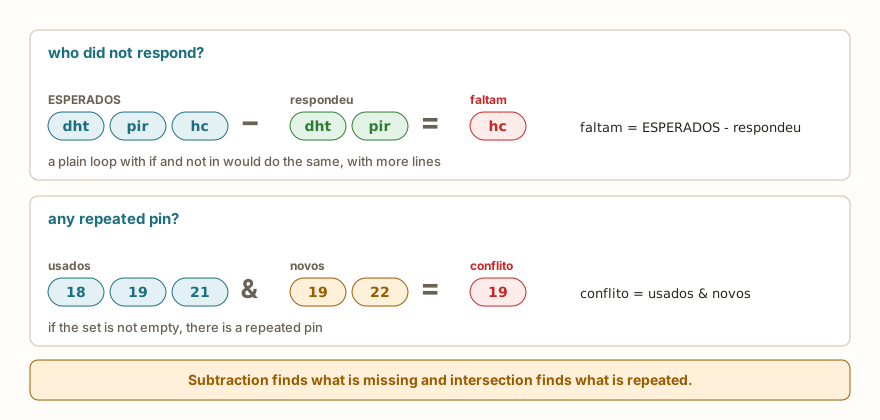
Two project problems with the board are well solved with sets. The first is knowing who did not respond: the program has a list of expected sensors, and each one that responds goes into a set. The difference between the two shows what is missing. The second is detecting a pin used twice, and the intersection between the pins already used and the new ones finds the conflict.
from machine import Pin

usados = {18, 19, 21}
novos = {19, 22}
conflito = usados & novos
print(conflito)
if conflito:
    print("repeated pins:", sorted(conflito))
livres = {18, 19, 21, 22, 23} - usados
print(sorted(livres))

ESPERADOS = {"dht", "pir", "hc"}
respondeu = {"dht", "pir"}
faltam = ESPERADOS - respondeu
print(faltam, len(faltam))
if faltam:
    print("no response:", sorted(faltam))
for pino in sorted(usados):
    Pin(pino, Pin.OUT).off()
print("end")The output is {19}, repeated pins: [19], [22, 23], {'hc'} 1, no response: ['hc'] and end. An empty set counts as false, so if conflito: and if faltam: only run when there is something to handle, without needing len. The sorted(usados) goes through the pins in order so that the program behaves the same way on every run. The pins 18, 19 and 21 are the same as the traffic light LEDs from the previous articles, and the final loop just sets them all to a low level. The names dht, pir and hc are example labels, and not read from a real sensor, which the article on DHT22, HC-SR04 and PIR treats separately.
Common errors
The messages below are those of the simulator, which imitates MicroPython. The error type is usually the same on the computer's Python, and the text may change.
s = {1, 2, 3}
print(s[0])TypeError: 'set' object isn't subscriptableThe set has no position, and therefore does not accept an index. Whoever needs "the first" wants a list, or a sorted list with sorted(s)[0].
s = {1, 2}
s.add([3, 4])TypeError: unsupported type for __hash__: 'list'A list does not go into a set, because it can change. The tuple (3, 4) does. The computer's Python says unhashable type: 'list'. The same message appears in {[1, 2], 3}.
s = {1, 2}
s.remove(9)KeyError: 9The remove requires the value to exist. With discard, the error goes away.
s = {1, 2}
s.append(3)AttributeError: 'set' object has no attribute 'append'The set's method for adding is called add. The append belongs to the list, and sort does not exist on the set either, for the same reason: without a position there is nothing to sort in place.
print({1, 2} + {3})TypeError: unsupported types for __add__: 'set', 'set'There is no + between sets. The join is the |, or the union.
print(set(5))TypeError: 'int' object isn't iterableThe set(...) expects something that can be gone through. For a set with the number 5, the way to write it is {5}.
s = set()
s.pop()KeyError: pop from an empty setThe pop needs at least one value. In the computer's Python the error text comes between quotes.
a = {1, 2}
print(a - [1])TypeError: unsupported types for __sub__: 'set', 'list'The operators |, &, - and ^ ask for sets on both sides. To mix with a list, convert first: a - set([1]).
What tends to show up in class
These patterns repeat in classes of all levels.
The most frequent is the x = {} thinking it created an empty set. The program runs, and only breaks at x.add(1), with a dictionary error, far from the cause. The sentence to remember is that the empty set is written set().
The second is expecting the list's order after list(set(list)). On the student's machine, for small numbers, the order seems preserved, and in the simulator or on the board it is not. Whoever needs the original order uses the loop with not in, or sorts with sorted.
The third is the s[0], the same reaction that d[0] causes with dictionaries: whoever comes from lists asks by position, and the set has none.
The fourth is set("abc") and {"abc"}. In one the text becomes three letters, and in the other it stays a single value, and the student swears that the set "lost" the letters.
The fifth is the remove where a discard was called for, which shows up when the value stops being in the set for a legitimate reason, such as a sensor that had already been taken out.
The sixth is swapping the order of the difference. The calculation a - b is not b - a, and the wrong result usually goes unnoticed because the two have similar sizes.
The seventh is using a set when the count matters. When removing duplicates, the information about how many times each value appeared is lost, and for that the dictionary from the previous article is the tool.
Exercise: repeated and missing numbers
Write a program that asks how many numbers will be read, reads each one and shows the list, the values without repetition in order, the values that appear more than once and the numbers from 1 to 5 that were not typed.
quantidade = int(input("how many numbers: "))
numeros = []
for i in range(quantidade):
    numeros.append(int(input("number: ")))
unicos = sorted(set(numeros))
repetidos = sorted({x for x in numeros if numeros.count(x) > 1})
faltam = sorted(set(range(1, 6)) - set(numeros))
print("numbers", numeros)
print("unique", unicos)
print("repeated", repetidos)
print("missing from 1 to 5", faltam)With the inputs 6, 3, 1, 3, 5, 1 and 3, the last four lines are numbers [3, 1, 3, 5, 1, 3], unique [1, 3, 5], repeated [1, 3] and missing from 1 to 5 [2, 4]. The numeros.count(x) asks how many times the value appears, and the set comprehension keeps only those that appear more than once. The subtraction set(range(1, 6)) - set(numeros) finds the missing ones. To practice, also show the values that appear only once and the number of distinct values. Then redo the part about repeated ones using a counting dictionary, and compare the two paths.
Frequently asked questions
When do I use a set, a list or a dictionary? List, when order and position matter, or the repeated items have meaning. Dictionary, when each value has a name, or when counting is needed. Set, when only whether the value exists matters and the calculations are of "in both", "only in one" and "missing".
Can I sort a set? Not in place, because it has no order. The sorted(s) returns a sorted list, and it is what is used.
Does the set accept mixed numbers and texts? It does, but sorting the result with sorted would give a comparison error between int and str, as with any list.
Is there an immutable set? In the computer's Python, there is the frozenset. In the simulator, the name frozenset is not defined, and gives NameError. If you need a set that does not change on the board, the way is not to change it once it is ready.
How do I join several sets? With | in sequence, a | b | c, or with update on a single set, s.update(b, c).
Where to go next
To review the basics of this reading, the articles on dictionaries, list operations and tuples complete this one. The challenge List Search works on the question "does this value exist?", which the set's in answers.
The next article deals with strings in depth: slicing and the most used methods, such as split, join, upper, replace and find. Some, such as split and lower, have already appeared in the examples, and now get the space they deserve.