Fundamentals
List Operations in Python: Searching, Filtering and Comprehensions
Learn to search, filter and transform lists in Python: the loop with append, list comprehension, any and all, sort and sorted, with ESP32 examples.
By Prof. Rodrigo Faustino · Updated on · 15 min read
Metrics for this article
- Words
- 2,924
- Characters
- 15,811
- Reading time
- ~15 min
To search, filter or transform the items of a list, the classic way is a for with an if and an append. The list comprehension is a shorter way of writing the same thing: a single line between square brackets, with the calculation, the loop and the condition. Whoever masters both forms chooses the most readable for each case, and has at hand the ready-made functions any, all, sum, max and sorted for the most common cases.
The previous article showed how to create, read, change and go through lists. This one starts from there and answers the questions asked of a list once it exists: where is this value, which items pass a test, what happens if each item is converted. We will see first the search, then the filter and the transformation with a loop, then the list comprehension, sorting, the most common errors and an example with sensor readings.
Three operations, one decision
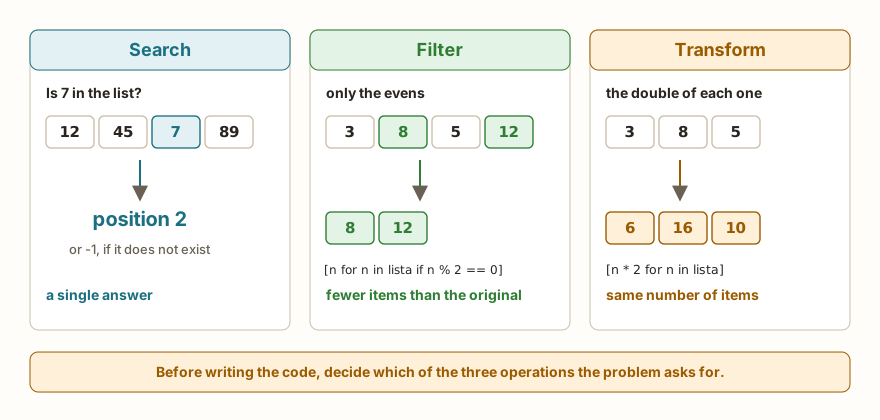
Almost everything done with a list falls into one of three operations, and identifying which one the problem asks for is half the solution.
The search asks a question and returns an answer: is the value in the list, at what position, which is the largest, how many pass the test. The result is not a list.
The filter returns a new list with only the items that pass a test. The new list has the same number of items or fewer.
The transformation returns a new list in which each item was replaced by a calculation with it, and so it has exactly the same size.
Filter and transformation have one thing in common that will be important later: neither of them changes the original list. They build another one.
The AI that remembers your life and lives on your computer
- Long-term memory with the source of every answer
- Works offline: your data stays on your PC
- Reads PDFs, slides, photos and meeting recordings
Essential plan free forever
Searching for a value
The simplest question is whether the value exists, and in answers it. To know where, the index method returns the position of the first occurrence. The problem with index is that it gives an error when the value is not in the list. Writing the search by hand solves this, and it is a classic exercise:
nomes = ["Ana", "Bia", "Caio", "Duda"]
print("Caio" in nomes)
print(nomes.index("Caio"))

def buscar(lista, alvo):
    for i in range(len(lista)):
        if lista[i] == alvo:
            return i
    return -1

print(buscar(nomes, "Bia"))
print(buscar(nomes, "Zeca"))
alvo = "Duda"
pos = buscar(nomes, alvo)
if pos == -1:
    print(alvo, "not found")
else:
    print(alvo, "is at position", pos)
print("end")The output is True, 2, 1, -1, Duda is at position 3 and end. The function buscar goes through the positions and, at the first item equal to the target, returns the index and ends. If the loop finishes without finding it, the last line returns -1. The -1 works as a "not found" signal because the search never returns that position, and whoever calls the function tests the result before using it. That return in the middle of the loop is what the article on return called leaving the function early, and the challenge List Search asks for a search of this kind.
There are similar questions with different answers. Instead of the first position, you want all of them. Or you want the first item that passes a test, and not an exact value:
leituras = [510, 520, 505, 520, 530, 520]
posicoes = []
for i in range(len(leituras)):
    if leituras[i] == 520:
        posicoes.append(i)
print(posicoes)
primeiro = None
for x in leituras:
    if x > 525:
        primeiro = x
        break
print(primeiro)
print("end")The output is [1, 3, 5], 530 and end. In the first search the loop does not stop: the list posicoes starts empty and receives each index at which the value appears. In the second, the break interrupts the loop as soon as the first item above 525 is found, and the variable starts with None so that, if none passes the test, the result is a value the program can test with if primeiro is None. The break was covered in the article on break, continue and else in loops.
Largest, smallest and their position
The max function solves the largest value, but the challenge Largest in the List asks for the loop, and there is a reason: the loop makes it possible to keep the position as well, and max alone does not give that.
valores = [12, 45, 7, 89, 23]
maior = valores[0]
pos = 0
for i in range(1, len(valores)):
    if valores[i] > maior:
        maior = valores[i]
        pos = i
print(maior, pos)
negativos = [-5, -2, -9]
errado = 0
for n in negativos:
    if n > errado:
        errado = n
print(errado)
certo = negativos[0]
for n in negativos:
    if n > certo:
        certo = n
print(certo)
print("end")The output is 89 3, 0, -2 and end. The first part keeps the largest and its position, and starts the loop at 1 because item 0 was already used as the starting point. The second part shows the trap: whoever starts the largest at 0 thinks the answer for [-5, -2, -9] is 0, a value that is not in the list. The right way is to start from the first item, as in the third part. The same goes for the smallest.
Counting and asking all of them
Counting how many items pass a test is an accumulator, like those in the previous article. The functions any and all answer two very common questions: "does any item pass?" and "do all the items pass?".
notas = [8, 4, 7, 9, 3]
aprovados = 0
for n in notas:
    if n >= 6:
        aprovados += 1
print(aprovados)
print(any([n < 4 for n in notas]))
print(all([n >= 3 for n in notas]))
print(any(n < 4 for n in notas))
print(all(n >= 6 for n in notas))
print("end")The output is 3, True, True, True, False and end. The any returns True if at least one item is true, and all, if all of them are. Here they receive a list of trues and falses built by a comprehension, which has not been explained yet, but which can be read: "for each grade, grade < 4". The last two lines ask the same question without the brackets, and that form is explained further below.
From the syllabus to a planned semester
- Teaching plan and calendar built automatically
- Class diary ready to paste into SIGA
- Slides and exercise lists with answer keys
Free Community edition · Windows
Filtering and transforming with a loop
The filter and the transformation follow the same mold. An empty list is created, the original is gone through and, for each item, you decide what to add:
numeros = [3, 8, 5, 12, 7, 20]
pares = []
for n in numeros:
    if n % 2 == 0:
        pares.append(n)
print(pares)
dobros = []
for n in numeros:
    dobros.append(n * 2)
print(dobros)
print(numeros)
print("end")The output is [8, 12, 20], [6, 16, 10, 24, 14, 40], [3, 8, 5, 12, 7, 20] and end. The filter has the if before the append, and the transformation has no if, and puts the calculation inside the append. The last line confirms that the original list stayed as it was. This is the safe way of working, and the opposite, changing the original during the for, was the mistake shown in the previous article.
The challenge Sum of the Evens mixes the two ideas: it filters by n % 2 == 0 and accumulates the sum instead of keeping the items.
List comprehension
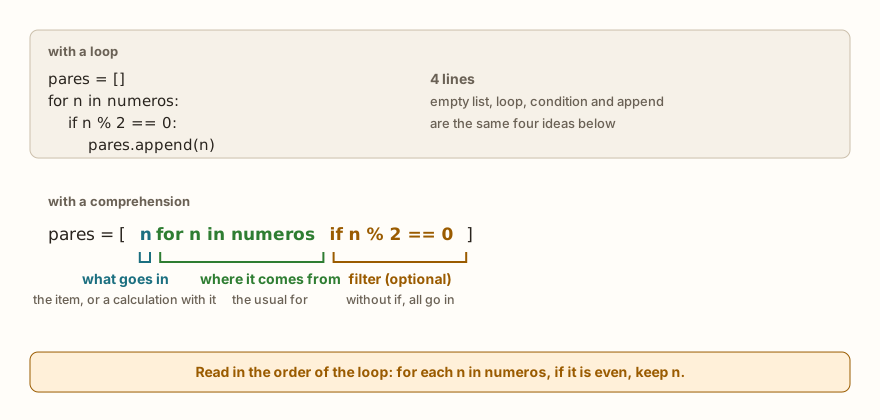
The list comprehension is the short form of these loops. It is written between square brackets and has three parts: what goes into the list, the for that says where the items come from and, if needed, an if that filters. The figure shows that the four lines of the filter loop become one.
numeros = [3, 8, 5, 12, 7, 20]
dobros = [n * 2 for n in numeros]
pares = [n for n in numeros if n % 2 == 0]
pares_dobrados = [n * 2 for n in numeros if n % 2 == 0]
rotulos = ["even" if n % 2 == 0 else "odd" for n in numeros]
quadrados = [i * i for i in range(1, 6)]
letras = [c for c in "casa"]
print(dobros)
print(pares)
print(pares_dobrados)
print(rotulos)
print(quadrados)
print(letras)
print(numeros)
print("end")The output is [6, 16, 10, 24, 14, 40], [8, 12, 20], [16, 24, 40], ['odd', 'even', 'odd', 'even', 'odd', 'even'], [1, 4, 9, 16, 25], ['c', 'a', 's', 'a'], the original list intact and end.
Each line uses a variation. dobros only transforms, with no if. pares only filters: the "what goes in" part is n itself. pares_dobrados does both, filters and transforms. In rotulos there is an if-else at the beginning, before the for, which chooses which value goes in: it is a decision per item, and all the items go in. In quadrados, the for goes through a range instead of a list, and in letras it goes through a text, because the for accepts any sequence.
The way to read it is in the order of the loop, and not from left to right like a sentence: "for each n in numeros, if it is even, keep n". The front part only says what to keep.
Where the if goes
The if appears in two different places, and each place has a role:
- After the
for: filters. The items that do not pass are left out. Thisifhas noelse. - Before the
for, next to the calculation: chooses between two values. Thisifalways comes withelse, because all the items go in and need a value.
Mixing the two is the most common confusion. If you write [n * 2 for n in numeros if n > 1 else 0], the result is a syntax error, which is in the section on errors. The fix is to decide what you want: to filter (if at the end, without else) or to choose the value (if-else at the beginning).
The loop name does not leak
Another difference from the ordinary loop: the for variable inside the comprehension exists only there. After the line, it ceases to exist:
numeros = [1, 2, 3]
dobros = [n * 2 for n in numeros]
print(dobros)
print(n)[2, 4, 6]
NameError: name 'n' isn't definedIn an ordinary for, the n would still be worth the last item after the loop. In the comprehension, it is not. This avoids name leaks, but it surprises whoever expected to read n afterwards.
Comprehension with sum, len, max and any
The comprehension fits well inside other functions, because it returns a list that they accept:
numeros = [3, 8, 5, 12, 7, 20]
print(len([n for n in numeros if n > 5]))
print(sum([n for n in numeros if n > 5]))
print(sum(n for n in numeros if n > 5))
print(max([n * 2 for n in numeros]))
print([a + b for a, b in zip([1, 2, 3], [10, 20, 30])])
print([x for x in numeros if x > 100])
print("end")The output is 4, 47, 47, 40, [11, 22, 33], [] and end. The first two lines count and add the items greater than 5. In the third, the brackets disappeared, and the result is the same: without them, Python does not create the whole list and hands the items one by one to sum, with the same result. In any and all, this form without brackets is the most common. The zip, from the previous article, joins two lists position by position, and the comprehension adds each pair. The last line shows that, if no item passes the filter, the result is the empty list, and not an error.
When to prefer the loop
The comprehension is not always better. It fits when the calculation is short and the result is a list. The loop remains the choice when:
- there is more than one thing to do per item, such as printing and accumulating at the same time;
- a
breakis needed, which the comprehension does not have; - the line would become so long that it would require rereading to understand.
A practical teaching rule: if you need to stop to decipher the comprehension, write the loop. Whoever reads the program later will be grateful.
Sorting a list
Sorting is also a list operation, and there are two forms with a difference that tends to be costly:
lista = [3, 1, 2]
r = lista.sort()
print(r, lista)
original = [3, 1, 2]
nova = sorted(original)
print(original, nova)
lista.reverse()
print(lista)
print(sorted([3, 1, 2], reverse=True))
palavras = ["pera", "uva", "banana"]
print(sorted(palavras, key=len))
palavras.sort(key=len)
print(palavras)
print("end")The output is None [1, 2, 3], [3, 1, 2] [1, 2, 3], [3, 2, 1], [3, 2, 1], ['uva', 'pera', 'banana'], ['uva', 'pera', 'banana'] and end. (The words stay in Portuguese on purpose, so the sorted output is the one the simulator was checked against: pera is pear and uva is grape.)
The method lista.sort() sorts the list itself and returns None, like the append of the previous article. The function sorted(lista) returns a new, sorted list, and leaves the original as it was. The reverse() reverses in place, and sorted(..., reverse=True) hands over the new list in descending order. The key parameter, which the article on lambda, map, filter and sorted explained, also works in both forms. Since the subject of sorting by hand comes back in the articles on algorithms, here it is enough to know how to use both.
Removing duplicates and removing all occurrences
The previous article left two questions hanging. The first: how to take the repeated values out of a list while keeping the order? The second: how to remove all the occurrences of a value, since remove only takes out the first?
leituras = [5, 3, 5, 2, 3, 9]
unicos = []
for x in leituras:
    if x not in unicos:
        unicos.append(x)
print(unicos)
d = [1, 2, 3, 2, 2]
print([x for x in d if x != 2])
print(d)
print("end")The output is [5, 3, 2, 9], [1, 3], [1, 2, 3, 2, 2] and end. In the first part, the not in asks the new list whether the item has already gone in, and only adds those that are not there yet, which keeps the order of first appearance. In the second, the comprehension builds a list without the value 2. The original, d, did not change, and that is why the result is usually stored: d = [x for x in d if x != 2]. This way of "removing" by creating a new list is the recommended one, and avoids the problem of deleting items during the loop.
On the ESP32: filtering readings before calculating

A sensor connected to the ESP32's analog converter may, once in a while, give a 0 or a 4095, the two extremes of the scale, which often indicate a sensor with no signal or saturated and not a real measurement. The simple average of those readings comes out wrong, and the filter solves it:
leituras = [512, 0, 530, 4095, 498, 0, 505]
validas = [x for x in leituras if 0 < x < 4095]
print(validas)
print(sum(validas) // len(validas))
altas = [i for i in range(len(leituras)) if leituras[i] > 520]
print(altas)
print("end")The output is [512, 530, 498, 505], 511, [2, 3] and end. The condition 0 < x < 4095 is a chained comparison, which tests both ends at once. After the filter, the average uses only the four valid readings. The last comprehension goes through the positions, and not the values, to return where the high readings are, and this is the pattern for when you want the index of the items that pass a test. The values 0 and 4095 are the extremes of a 12-bit reading, and the article on the ESP32 ADC explains the range. On a real board, leituras would come from adc.read() in a loop with sleep, and the program would have a limit for the size of the list, like the window in the previous article.
Common errors
The messages below are those of the simulator, which imitates MicroPython. The error type is the same on the computer's Python, and the text may change.
print(max([]))ValueError: arg is an empty sequencemax and min have no answer for an empty list. When the list may be empty, the if lista: before it avoids the error. The same goes for min.
print([x for x in 5])TypeError: 'int' object isn't iterableThe comprehension's for needs something that can be gone through. A number on its own is not. The cause is usually swapping range(5) for 5.
lista = [3, 1, 2]
lista = lista.sort()
print(lista)
print(lista[0])None
TypeError: 'NoneType' object isn't subscriptableIt is the same mistake as with append: the sort sorts in place and returns None, and the assignment replaces the list with None. The two correct ways are lista.sort() on its own, or lista = sorted(lista).
print(sum(["a", "b"]))TypeError: unsupported types for __add__: 'int', 'str'The sum starts at 0 and adds numbers. Texts do not fit in that calculation, and a list of texts is joined with another method, which is left for the article on strings.
print([n * 2 for n in [1, 2, 3] if n > 1 else 0])SyntaxError: invalid syntaxThe if after the for filters and does not accept else. To choose between two values, the if-else goes at the beginning: [n * 2 if n > 1 else 0 for n in [1, 2, 3]].
What tends to show up in class
The patterns below repeat in classes of beginners and also with people who have been programming for years.
The first is lista = lista.sort(), which almost everyone writes once. The error only appears on the next line, when the list has become None, and the cause is one line above, which is confusing.
The second is maior = 0 to find the largest value. It works in the tests with positive numbers and fails when the list only has negatives, which almost nobody tested. The same goes for menor = 0, and the equivalent with a "very large" value chosen off the top of the head, such as menor = 999, which stops working at the first reading of 1000.
The third is using index without asking first with in, and then discovering the ValueError in production, when the value stops being in the list.
The fourth is the unreadable comprehension. Two nested comprehensions, with an if-else in the middle and one-letter names, are quick to write and slow to debug. The golden question is whether, in a week, whoever reads this (including you) will understand it at first sight.
The fifth is expecting the comprehension to change the original list. Writing [n * 2 for n in numeros] on its own, without assigning, calculates and throws away. Without the numeros = in front, nothing changes.
The sixth is mixing up the two places of the if, seen above. The if-else that chooses the value has the form value_if_yes if test else value_if_no, and it is that form that goes before the for.
Exercise: number analysis
Write a program that asks how many numbers will be read, reads each one, keeps them in a list and shows the list, the average, the numbers above the average and the position of the largest.
quantidade = int(input("how many numbers: "))
numeros = []
for i in range(quantidade):
    numeros.append(int(input("number: ")))
media = sum(numeros) / len(numeros)
acima = [n for n in numeros if n > media]
maior = max(numeros)
posicoes = [i for i in range(len(numeros)) if numeros[i] == maior]
print("numbers", numeros)
print("average", media)
print("above average", acima)
print("largest", maior, "at positions", posicoes)With the inputs 5, 4, 9, 2, 9 and 6, the last four lines are numbers [4, 9, 2, 9, 6], average 6.0, above average [9, 9] and largest 9 at positions [1, 3]. Note that the largest appears twice and the comprehension returns both positions, which index alone would not do. To practice, also show the list of numbers below the average, and then protect the program for the case in which the user types 0 as the quantity.
Frequently asked questions
Is the list comprehension faster than the loop? It is not used for speed. The reason is clarity when the calculation is short.
Can I use lista.sort() and sorted() in the same program? You can. The rule is that sort changes the list and sorted returns another, and the choice depends on whether you want to keep the original.
Is there a comprehension for text, dictionary and set? There is a similar form for dictionaries and sets, with curly braces in place of square brackets, and the articles on those types show the details. What was learned here serves as a base.
How do I filter a list of lists? The same for and if, with each item being a list. Lists inside lists appear in the article on matrices.
When do I use any and all instead of a loop? When the question is "any" or "all". The loop with break does the same and is needed if there are more things to do in the middle.
Where to go next
The challenges List Search, Largest in the List and Sum of the Evens practice the search, the largest by hand and the filter with an accumulator. To review the basics, the articles on lists and on lambda, map, filter and sorted complete this one.
The next article deals with tuples and unpacking: the list that cannot be changed, why it exists and how a, b = b, a swaps two variables without a third.