Fundamentals
Lists in Python: Creating, Accessing, Changing and Going Through
Learn lists in Python: create, access by index and slice, change with append and pop, understand copies and iterate with for, enumerate and while.
By Prof. Rodrigo Faustino · Updated on · 18 min read
Metrics for this article
- Words
- 3,482
- Characters
- 18,609
- Reading time
- ~18 min
A list in Python is an ordered collection of values kept under a single name. It is written between square brackets, with the items separated by commas, each item has a position numbered from 0, and the program can look up, swap, add and remove items without creating a new variable for each one. This is the first of the data types that hold several values, and almost every program that goes beyond a few lines ends up using one.
This article opens the data structures module. Here we will see how to create a list, how to read a position or a piece of it, how to change it, why b = a does not make a copy, the ways of going through the items and the mistakes that show up in almost every class. At the end there are two uses on the ESP32: a window of readings from a sensor and a set of LEDs kept in a list.
Why a list
Imagine a program that reads the grades of five students and calculates the average. Without lists, the way is to create nota1, nota2, nota3, nota4 and nota5, and repeat each calculation five times. For twenty students, that is twenty variables. For a number that is only known at run time, there is no way to write the program.
With a list, the program has a single name, notas, and the for that you already know goes through each item. The size of the list can change during execution, and the code that adds, searches or counts stays the same.
The same goes for a sensor. A single reading fluctuates, and to know whether the temperature is rising you need to compare several readings. Keeping the last ten in a list is the natural way, and it is what the ESP32 example further below does.
The AI that remembers your life and lives on your computer
- Long-term memory with the source of every answer
- Works offline: your data stays on your PC
- Reads PDFs, slides, photos and meeting recordings
Essential plan free forever
Creating a list
The most common way is to write the items between square brackets. A list can be empty, can hold numbers and can mix types:
vazia = []
notas = [8, 6, 7]
aluno = ["Ana", 20, 1.75, True]
print(vazia, notas, aluno)
print(list(range(5)))
print(list(range(2, 10, 3)))
print(list("abc"))
print([0] * 5)
print([1, 2] * 3)
print(len(vazia), len(notas), len(aluno))
print(type(notas))
print("end")The output has [] [8, 6, 7] ['Ana', 20, 1.75, True] on the first line, then [0, 1, 2, 3, 4], [2, 5, 8], ['a', 'b', 'c'], [0, 0, 0, 0, 0] and [1, 2, 1, 2, 1, 2]. The next line brings 0 3 4, the sizes, and then come <class 'list'> and end.
Four things appear there. The [] creates the empty list, which is the starting point of almost every program that will build a list little by little. The list(range(...)) turns a range sequence, which you saw in loops, into a real list. The list("abc") splits a text into letters. And the * repeats the contents, which gives a ready-made list of zeros with [0] * 5. The len function returns how many items the list has.
Mixing types, as in the case of aluno, is allowed, but in practice a list holds items of the same type and the same meaning: all the grades, all the readings, all the names. When the items have different roles, such as name, age and height, what you want is another structure, and the next articles show which ones.
Accessing an item: the index

Each item has a position, called an index, and it starts at 0. The first item is at index 0, the second at 1, and so on. This confuses beginners, because in everyday life the first one is number 1, but it is the rule of the whole language and has no exception.
Negative indexes count from the end: -1 is the last item, -2 is the second to last. It is the short way of asking for the last one without having to calculate the size.
valores = [12, 45, 7, 89, 23]
print(valores[0], valores[1], valores[4])
print(valores[-1], valores[-2], valores[-5])
print(valores[len(valores) - 1])
print(valores[1:4])
print(valores[:2])
print(valores[3:])
print(valores[::2])
print(valores[::-1])
print(valores[2:100])
print(valores[3:1])
print(valores)
print("end")The output is 12 45 23, 23 89 12 and 23, which show the positive indexes, the negative ones and the manual calculation of the last. The slice lines give [45, 7, 89], [12, 45], [89, 23], [12, 7, 23], [23, 89, 7, 45, 12], [7, 89, 23] and [], and at the end the original list appears intact, followed by end.
Slices: a piece of the list
The slice uses a colon inside the brackets, lista[start:end], and delivers a new list with the items from start up to end, not including end. That is why valores[1:4] brings indexes 1, 2 and 3, and not 4. Whoever has used range(1, 4) recognizes the rule, which is the same.
When the start is omitted, the slice begins at the beginning, and when the end is omitted, it goes to the end. The third number, optional, is the step: [::2] takes every other one and [::-1] walks backwards, which gives the reversed list.
Two characteristics of slices save you from mistakes. They do not complain about exaggerated limits: valores[2:100] simply goes to the end, and valores[3:1], which asks for an impossible range, returns an empty list. And they never change the original. This is different from what happens with a single index, which gives an error outside the list, as we see further on.
From the syllabus to a planned semester
- Teaching plan and calendar built automatically
- Class diary ready to paste into SIGA
- Slides and exercise lists with answer keys
Free Community edition · Windows
Asking about the list
Some questions about a list are so common that they exist ready-made:
dados = [12, 45, 7, 89]
print(45 in dados, 50 in dados, 50 not in dados)
print(dados.index(7))
print(dados.count(45))
print(len(dados), min(dados), max(dados), sum(dados))The in says whether the value is in the list, and not in says the opposite. The index returns the position of the first occurrence, the count counts how many times the value appears, and len, min, max and sum give the size, the smallest, the largest and the sum. The output is True False True, then 2, then 1 and, finally, 4 7 89 153.
The functions min, max and sum are shortcuts. The platform's challenges ask for the hand-made versions, with a loop, so that the reasoning gets trained, and this will be picked up again in the next article.
Changing items
A list can change after it is created. Whoever comes from text, which does not accept swapping a letter, often finds this strange, but it is the central point of the structure. Assigning to an index swaps the item in that position:
lista = [10, 20, 30]
lista[1] = 25
print(lista)
lista[-1] = 99
print(lista)
lista[0] = lista[0] + 1
print(lista)
lista[0:2] = [1, 2, 3]
print(lista)The output is [10, 25, 30], [10, 25, 99], [11, 25, 99] and [1, 2, 3, 99]. The third line shows the pattern of reading the value, changing it and storing it back, which is the same as the accumulator. The last one assigns a list to a slice: the two items in positions 0 and 1 were replaced by three, and the list grew.
To add or remove items, the list has methods. Each one does a single thing, and the image below gathers the seven most used, all starting from the same list [10, 20, 30]:
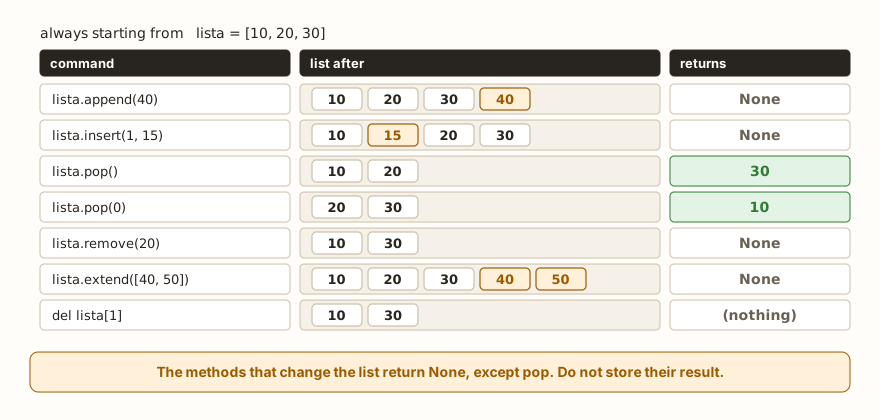
In a program, though, the commands happen in sequence, and each one starts from the result of the previous one:
lista = [10, 20, 30]
lista.append(40)
print(lista)
lista.insert(1, 15)
print(lista)
ultimo = lista.pop()
print(ultimo, lista)
primeiro = lista.pop(0)
print(primeiro, lista)
lista.remove(20)
print(lista)
lista.extend([40, 50])
print(lista)
del lista[1]
print(lista)
lista.clear()
print(lista)The output is [10, 20, 30, 40], [10, 15, 20, 30, 40], 40 [10, 15, 20, 30], 10 [15, 20, 30], [15, 30], [15, 30, 40, 50], [15, 40, 50] and [].
The append puts an item at the end and is the most used method of the list. The insert(position, value) puts it in a specific place and pushes the rest forward. The pop() takes out the last item and returns it, and pop(0) takes out the first. The remove(value) looks for the value and deletes the first occurrence, and del lista[i] deletes position i. The extend adds several items at once, and clear empties the list.
There is a difference among these commands that matters more than it seems: pop returns the item removed, and all the others return None. The reason is that they have already changed the list and have nothing to hand back. The consequence shows up in the section on errors.
append, extend and +: the difference that fools
Three ways of joining things to the list give different results, and in a hurry they get mixed up:
a = [1, 2]
a.append([3, 4])
print(a, len(a))
b = [1, 2]
b.extend([3, 4])
print(b, len(b))
print([1, 2] + [3, 4])
d = [1, 2, 3, 2, 2]
d.remove(2)
print(d, d.index(2))The output is [1, 2, [3, 4]] 3, [1, 2, 3, 4] 4, [1, 2, 3, 4] and [1, 3, 2, 2] 2. The append puts what it receives as a single item, and that is why the list [3, 4] went in whole and the list ended up with three items, one of them being another list. The extend opens what it received and puts the elements in one by one. The + joins two lists into a third, without changing the originals, and that is why it is used in an expression, not as a loose command.
The last part of the example shows that remove(2) deleted only the first 2. The other two stayed in the list, and index(2) now finds one of them at position 2. To delete all the occurrences you need a loop or the list comprehension, which the next article presents.
One list, two names
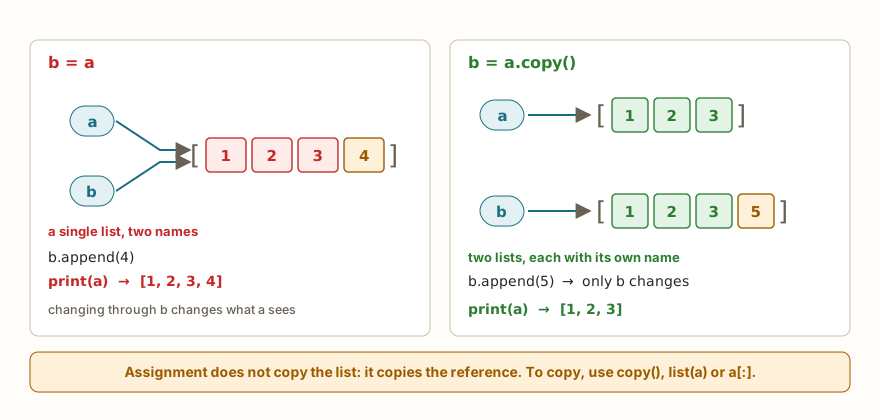
This is the point that surprises most those who come from variables with numbers and texts. With a number, b = a copies the value, and changing b does not change a. With a list it is not so. The b = a does not create a new list: it makes the name b point to the same list as a. The two names are two labels on the same box.
a = [1, 2, 3]
b = a
b.append(4)
print(a, b, a is b)
c = a.copy()
c.append(5)
print(a, c, a is c)
d = a[:]
e = list(a)
print(d is a, e is a, d == a)The output is [1, 2, 3, 4] [1, 2, 3, 4] True, then [1, 2, 3, 4] [1, 2, 3, 4, 5] False and, finally, False False True. The operator is asks whether the two names point to the same object, and == asks whether the contents are equal. After b = a, the is gives True: there is only one list. After copy(), it gives False: there are two, and changing one does not touch the other. The forms a[:] and list(a) also make a copy, and it is up to the writer to choose. The question about contents, d == a, is still true, because the copy has the same values.
This characteristic is called mutability: the list can be changed in place, and therefore whoever has its name sees the change. Numbers, texts and tuples are immutable, and so they do not have this trap.
What this changes in functions
The same principle holds when the list is passed to a function, as seen in the article on parameters and arguments. The parameter is a new name for the caller's list, and not a copy:
def adicionar(lista, x):
    lista.append(x)

def reatribuir(lista):
    lista = [0]

dados = [1, 2]
adicionar(dados, 3)
print(dados)
reatribuir(dados)
print(dados)Both lines of the output are [1, 2, 3]. In the first, the append changed the list that the caller also sees, and that is why the change survived the function. In the second, lista = [0] only made the local name point to another list, and the outside one stayed as it was. It is the same logic as the local names in the article on variable scope: changing the contents is one thing, changing what the name points to is another.
Going through a list
Going through is passing by all the items, and the language offers more than one way. Each one serves a need.
notas = [8, 6, 7]
for n in notas:
    print(n)
for i in range(len(notas)):
    print(i, notas[i])
for i, n in enumerate(notas):
    print(i, n)
for i, n in enumerate(notas, 1):
print("student", i, n)The first loop, for n in notas, hands over each item, and it is the one used when the position does not matter. The second goes through the indexes with range(len(notas)) and reads the item by notas[i], which serves when the position is needed, but takes more work. The enumerate hands over the position and the item together, and it is the cleanest way of having both. The second argument, enumerate(notas, 1), changes where the counting starts, which helps when the position will be shown to a person who counts from 1.
Three variants complete the set:
notas = [8, 6, 7]
i = 0
while i < len(notas):
    print(notas[i], end=" ")
    i += 1
print()
for n in reversed(notas):
    print(n, end=" ")
print()
for num, letra in zip([1, 2, 3], ["a", "b", "c"]):
print(num, letra)The first line of the output is 8 6 7, written by the while with an index, which is only worth it when the step is not one by one or when the list changes during the loop. The second is 7 6 8, by reversed, which walks backwards without creating a new list. Then come 1 a, 2 b and 3 c, where the zip goes through two lists at the same time, pairing the items of the same position.
Do not remove items while going through
This is the mistake that gives no message at all. Whoever goes through a list and deletes items from it at the same time ends up with a wrong result, without warning:
nums = [2, 4, 6, 8]
for n in nums:
    nums.remove(n)
print(nums)

nums = [2, 4, 6, 8]
for n in nums[:]:
    nums.remove(n)
print(nums)The output is [4, 8] and then []. In the first version the intention was to empty the list, and two items were left. The loop walks by position: it deletes the 2, the items slide to the left, and the next step looks at position 1, which now holds the 6, and the 4 was skipped. The second version goes through a copy, nums[:], and deletes from the original, and that is why it gives the expected result. The clearest way is almost always to build a new list with only what should stay. For example, [n for n in [2, 4, 6, 8, 9] if n % 2 != 0] gives [9]. This form, the list comprehension, is the subject of the next article.
Accumulators over a list
The loop patterns, such as summing, finding the largest and counting, appear with lists all the time. The structure is the same: a variable before the loop, which is updated at each item.
valores = [12, 45, 7, 89, 23]
soma = 0
maior = valores[0]
pares = 0
for v in valores:
    soma += v
    if v > maior:
        maior = v
    if v % 2 == 0:
        pares += 1
print("sum", soma)
print("largest", maior)
print("evens", pares)
print("average", soma / len(valores))The output is sum 176, largest 89, evens 1 and average 35.2. The maior starts with the first item of the list, and not with 0, because if all the values were negative the 0 would win without being in the list. The pattern of starting from the first item only works with a non-empty list, and an empty list would give an index error right on the first line. A program that receives lists from outside needs to check the len first.
Lists on the ESP32
On the ESP32, the list holds readings and holds objects. The first case is the moving window, which keeps only the last readings of a sensor to take an average and smooth out the fluctuation:
leituras = (510, 520, 505, 540, 530)
janela = []
for x in leituras:
    janela.append(x)
    if len(janela) > 3:
        janela.pop(0)
print(janela, sum(janela) // len(janela))The output is [510] 510, [510, 520] 515, [510, 520, 505] 511, [520, 505, 540] 521 and [505, 540, 530] 525. With each new reading, the append goes in at the end, and when the window goes beyond three items the pop(0) takes out the oldest. The calculation uses // for the integer average. On a real board, leituras would come from adc.read() inside a loop with sleep; the article on the ESP32 ADC shows the reading, and the window size is a choice between quick response and stable reading.
The second case is keeping the pins themselves. Instead of three variables led1, led2 and led3, a list:
from machine import Pin
from time import sleep

leds = [Pin(18, Pin.OUT), Pin(19, Pin.OUT), Pin(21, Pin.OUT)]
for led in leds:
    led.on()
    sleep(0.1)
    led.off()
print("leds:", len(leds))
print("end")The output is leds: 3 and end, and the loop turns each LED on and off in the order of the list. To add a fourth LED, just put another Pin in the list, and the loop does not change. If the program needs the position number, the loop can use range(len(leds)) and write leds[i], as in the challenge Traffic light, which asks for three LEDs and in which the order of the sequence is the problem itself.
A caveat about memory: the ESP32 has little RAM, and a list that grows without limit, for example keeping one reading per second all day long, ends up exhausting the memory. The moving window of the previous example avoids this by construction, because the list never goes beyond three items.
Common errors
Six messages cover almost everything that goes wrong with lists. The texts below are those of the simulator, which imitates MicroPython:
lista = [10, 20, 30]
print(lista[3])IndexError: list index out of rangeIndex 3 does not exist in a list of three items, because the indexes go from 0 to 2. It is the most frequent error, and the cause is almost always lista[len(lista)], which tries to read a position after the last.
lista = []
lista.pop()IndexError: pop from empty listThe pop needs at least one item. When the list may be empty, the if lista: before the pop avoids the error.
lista = [1, 2, 3]
lista.remove(9)ValueError: object not in sequenceThe remove and the index give ValueError when the value is not in the list. The computer Python message is different, but the error type is the same. The defense is to ask first with if 9 in lista:.
lista = [1, 2, 3]
print(lista[1.5])TypeError: list indices must be integers, not floatThe index needs to be an integer, and a float is refused. It appears when the index comes from a division with /, which always returns a float, and the fix is to use //. With a text in its place, the message is the same, with str at the end.
lista = [1, 2, 3]
print(lista("0"))TypeError: 'list' object isn't callableParentheses call functions and square brackets access positions. Writing lista(0) tries to call the list as if it were a function.
lista = [1, 2, 3]
lista = lista.append(4)
print(lista)
lista.append(5)None
AttributeError: 'NoneType' object has no attribute 'append'It is the effect of what the methods section announced: append returns None, and the assignment lista = lista.append(4) replaces the list with None. The print shows None, and the next append fails, because None does not have that method. The append changes the list in place and does not need an assignment.
What tends to show up in class
The patterns below repeat in almost every class that reaches lists, from beginners to people with years of programming.
The first is the index. Whoever counts from 1 ends up reading one position too many, and lista[len(lista)] gives IndexError every time. The cure is to memorize a sentence: in a list of n items, the indexes go from 0 to n - 1, and the last can also be read with -1.
The second is lista = lista.append(x), seen above. Almost everyone who writes this has already made the same assignment with texts and numbers, where it is necessary, and carries the same idea over to a method that changes in place.
The third is b = a thinking it is a copy. The symptom is a list that changes "by itself" at another point of the program, and the investigation usually ends in an assignment forgotten fifteen lines away. A useful debugging tip is to print a is b.
The fourth is deleting items inside the for, which gives no error and delivers a wrong result, which makes the problem harder to find than an error with a message.
The fifth is mixing up append with extend, and the list with a list inside, which only appears when the program tries to add or print the items. The sixth is expecting remove to delete all the occurrences. And the seventh, known to those who read the article on parameters, is using [] as the default value of a parameter, which makes the list shared among all the calls of the function.
Exercise: grade report
Write a program that asks how many grades will be read, reads each one, keeps them in a list and shows the list, the average, the highest grade and the grades above the average.
quantidade = int(input("how many grades: "))
notas = []
for i in range(quantidade):
    n = int(input("grade: "))
    notas.append(n)
media = sum(notas) / len(notas)
print("grades", notas)
print("average", media)
print("largest", max(notas))
acima = []
for n in notas:
    if n > media:
        acima.append(n)
print("above average", acima)With the inputs 3, 8, 6 and 7, the last four lines are grades [8, 6, 7], average 7.0, largest 8 and above average [8]. The list is born empty and grows with append, the average uses sum and len, and the list acima is built with the same pattern. To practice, replace the max with a loop with maior and make the program also show the grades below the average. What happens if the user types 0 at the first question? Test it and protect the program.
Frequently asked questions
What is the difference between a list and a tuple? The list can be changed after it is created and the tuple cannot. The tuple already appeared when returning several values from a function, and article 24 explains when to prefer it.
Why do the challenges talk about "vetor"? It is the name used in programming logic for a sequence of items of the same type. In Python, the vetor is a list. The challenges l49 to l54 have that word in their name, but the code written in them is an ordinary list.
Can a list have items of different types? It can, but it is only worth it when the items mean different things and the position of each one is fixed. For lists of things of the same type, mixing is usually a sign of a mistake.
Can I have a list inside another? You can, and that is how a table is represented, with rows and columns. This is the subject of article 28, on matrices.
What is the difference between pop, remove and del? The pop acts by position and returns the item. The remove acts by value. The del acts by position and returns nothing.
Where to go next
The challenges l49-vetor-primeiro, l50-vetor-len, l51-vetor-soma, l52-vetor-busca, l53-vetor-inversao and l54-vetor-medio practice exactly what was seen here, from access by index to the average of a list.
To review the basics of this reading, the articles on functions with def, return and lambda, map, filter and sorted show how functions receive and return lists.
The next article deals with operations on lists: searching, filtering and list comprehensions. It shows how to find a value without index, how to build a new list with only what matters and how to write on one line what took four here.