Fundamentals
Variable Scope in Python: local, global and nonlocal
Understand variable scope in Python: local and global names, the search order, the local variable without a value error and when to use global and nonlocal.
By Prof. Rodrigo Faustino · Updated on · 14 min read
Metrics for this article
- Words
- 2,757
- Characters
- 15,495
- Reading time
- ~14 min
Scope is the region of the program where a name exists and can be used. A variable created inside a function is local: it only exists while the function runs and is only seen from inside it. A variable created in the body of the file, outside any function, is global and can be read anywhere. When a function needs to change an outside variable, and not just read it, it declares that with global, for a name in the file, or nonlocal, for a name in an enclosing function.
So far, the functions in the series received everything as parameters and handed everything back with return, and the variables inside and outside had similar names without it mattering. This article explains why that worked, where the limit is and what to do when the function needs memory between one call and the next, as happens in ESP32 programs that count button presses. We will see the visibility rules, the errors they cause and when it is and is not worth using global.
Local variable: born and dies with the function
def calcular():
    resultado = 42
    print("inside:", resultado)

calcular()
print("outside:", resultado)The output has one correct line and then an error:
inside: 42
Traceback (most recent call last):
  File "main.py", line 6, in <module>
NameError: name 'resultado' isn't definedOn the first line of the output, the print inside found resultado. The print outside, on line 6, did not. The variable was created during the call to calcular() and disappeared when the function ended. Outside it, the name simply does not exist, and Python reports NameError.
Parameters follow the same rule, because they are local variables that are born with a value:
def fazer2(a, b):
    c = a + b
    print(c)

fazer2(1, 2)
print(a)3
Traceback (most recent call last):
File "main.py", line 6, in <module>
NameError: name 'a' isn't defineda, b and c only exist inside fazer2. This isolation is an advantage: two different functions can use i, total or n without disturbing each other, and the author of a function does not need to know the variables of the others. It is what gives meaning to the idea of "divide and conquer" from the previous articles.
The AI that remembers your life and lives on your computer
- Long-term memory with the source of every answer
- Works offline: your data stays on your PC
- Reads PDFs, slides, photos and meeting recordings
Essential plan free forever
Global variable: read from anywhere
Everything created in the body of the file, outside functions, is global. Any function can read these names with no preparation:
limite = 100

def mostrar():
    print("limit inside:", limite)

mostrar()
print("limit outside:", limite)The output is limit inside: 100 and limit outside: 100. The function has no limite of its own, so Python looks outside it and finds the one in the file. To read, nothing more is needed. This was already working in the examples with led = Pin(2, Pin.OUT) in the article on functions, where piscar() used a led created outside.
What happens when you assign inside the function

The problem starts with assignment. If the function writes total = 99 and there is already a total outside, Python does not change the outside one: it creates a new, local one.
total = 10

def mexer():
    total = 99
    print("inside:", total)

mexer()
print("outside:", total)The output is inside: 99 and outside: 10. They are two different totals, each in its own room, as the figure shows. During the call, the name total inside the function points to the local room, which holds 99. When the function ends, the local room disappears, and the global total keeps the value it always had.
Python's rule is: if a name receives a value at any point in the function, it is local throughout the whole function. The most confusing error of the subject comes from this rule.
The error of the local variable without a value
contador = 0

def somar_um():
    contador = contador + 1

somar_um()Traceback (most recent call last):
File "main.py", line 6, in <module>
File "main.py", line 4, in somar_um
NameError: local variable referenced before assignmentThe intention was to add 1 to the file's contador. But the contador = ... marks the name as local, and, when calculating the right-hand side, Python looks for the local contador, which does not have a value yet. Python on the computer uses a more specific name for this error, UnboundLocalError, and a text with the variable's name: local variable 'contador' referenced before assignment. The simulator shows NameError with the short version.
The same error appears when the function reads the name before assigning it, even if there is a global with that name:
x = 1

def f():
    print(x)
    x = 2

f()Traceback (most recent call last):
File "main.py", line 7, in <module>
File "main.py", line 4, in f
NameError: local variable referenced before assignmentThe x = 2 on line 5 makes x local in the whole function, including the print(x) on line 4, which comes before it. Python decides who is local before running the function, by looking at the whole body.
Four levels and the search order
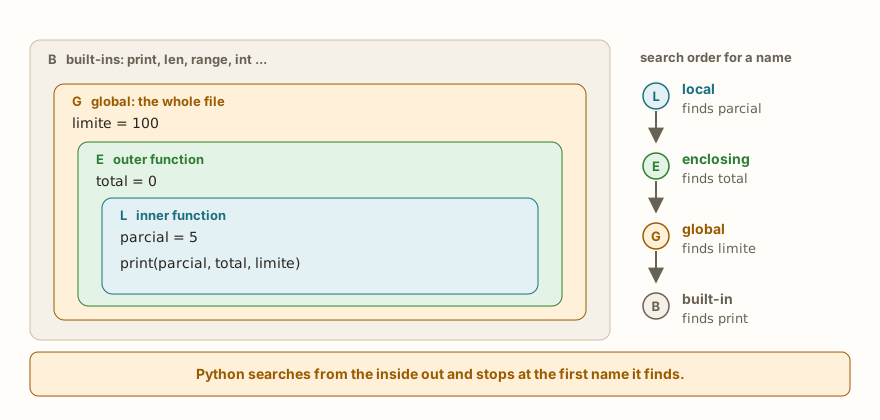
Functions can be defined inside other functions, and Python has a fixed order for searching for a name, known by the initials LEGB:
- Local: the body of the function that is running.
- Enclosing: the functions that surround this one, from the nearest to the farthest.
- Global: the file.
- Built-in: the built-in names, such as
print,lenandrange.
The search goes from the inside out and stops at the first place where the name appears:
x = "global"

def externa():
    x = "enclosing"
    def interna():
        x = "local"
        print("inner sees", x)
    interna()
    print("outer sees", x)

externa()
print("file sees", x)

def sem_local():
    print("without local sees", x)

sem_local()The output is inner sees local, outer sees enclosing, file sees global and without local sees global. Each function sees the x of its own level. sem_local has no x of its own and no outer function, so it falls back to the global one.
The last layer, that of the built-in names, explains a trap: names such as sum, max and min are ordinary functions, and it is possible to cover them by mistake with a variable.
def f():
    max = 3
    print("local", max)

f()
print(max(4, 9))The output is local 3 and 9. Inside f, the max covered the built-in function, but only there, and outside it max(4, 9) keeps working. In the global scope, though, the damage spreads over the whole file:
sum = 0
print(sum([1, 2, 3]))Traceback (most recent call last):
File "main.py", line 2, in <module>
TypeError: 'int' object isn't callableThe name sum came to hold the number 0, and sum([1, 2, 3]) tries to call a number. The message from Python on the computer is 'int' object is not callable. If a built-in function "stopped working", look for a variable with the same name.
From the syllabus to a planned semester
- Teaching plan and calendar built automatically
- Class diary ready to paste into SIGA
- Slides and exercise lists with answer keys
Free Community edition · Windows
There is no block scope
In many languages, a variable created inside an if or a for dies at the end of the block. In Python, only functions create scope. The blocks of if, for and while do not:
for i in range(3):
    dobro = i * 2
print(i, dobro)

if i > 0:
    msg = "positive"
print(msg)

while True:
    achou = 7
    break
print(achou)The output is 2 4, positive and 7. The loop's i and dobro keep existing after it, with the value from the last pass. The variable msg, created inside the if, is visible outside. This is convenient and dangerous at the same time: if the block does not run, the variable is never born.
if False:
    x = 1
print(x)Traceback (most recent call last):
File "main.py", line 3, in <module>
NameError: name 'x' isn't definedThe real case is the if that only assigns under one condition and, a line further down, uses the variable without thinking about the other paths. The solution is to give an initial value before the if, such as msg = "", or to make sure all the paths assign.
global: changing a variable of the file
When the function really needs to change a name in the file, it declares it with global before using it:
contador = 0

def somar_um():
    global contador
    contador = contador + 1

somar_um()
somar_um()
somar_um()
print(contador)The output is 3. The global contador tells Python: "this name is not local, it is the one in the file". From then on, the assignment changes the global contador, and the three calls accumulate. Without the declaration, the result would be the error from the previous section.
global is only needed to reassign a name. Changing the contents of a list, for example, is not reassigning:
lista = [1, 2]

def acrescentar():
    lista.append(3)

acrescentar()
print(lista)

def trocar():
    lista = [9, 9]
    print("inside", lista)

trocar()
print("outside", lista)

def trocar2():
    global lista
    lista = [9, 9]

trocar2()
print("after trocar2", lista)The output is [1, 2, 3], inside [9, 9], outside [1, 2, 3] and after trocar2 [9, 9]. acrescentar worked without global, because lista.append(3) uses the name to reach the list and modifies it, without linking the name to another object. trocar did lista = [9, 9], an assignment, and created a local list. Only trocar2, with global, replaced the file's list. The rule: global is for reassigning, and methods that modify the object in place do not need it.
A few syntax rules, with the errors of those who break them. The declaration must come before the use of the name in the function, and a parameter cannot be declared global:
def f():
    x = 1
global xTraceback (most recent call last):
File "main.py", line 3
SyntaxError: identifier redefined as globalPython on the computer explains it better: name 'x' is assigned to before global declaration. The same error appears with def f(n): global n. Finally, the declaration can list several names, such as global maior, menor, and it can create a global that did not exist yet:
def f():
    global z
    z = 5

f()
print(z)The output is 5. It is allowed, but it is a bad style, because whoever reads the file does not see where z is born.
nonlocal: changing the name of an outer function

In nested functions, global does not help, because the name you want to change is not in the file but in the outer function. For this case there is nonlocal:
def externa():
    total = 0
    def somar(x):
        nonlocal total
        total = total + x
    somar(5)
    somar(3)
    print("total", total)

externa()The output is total 8. The function somar changes the total of externa. Without the nonlocal, the result would be the same error as the local variable without a value:
def externa():
    total = 0
    def somar(x):
        total = total + x
    somar(5)
    print("total", total)

externa()Traceback (most recent call last):
File "main.py", line 8, in <module>
File "main.py", line 5, in externa
File "main.py", line 4, in somar
NameError: local variable referenced before assignmentnonlocal requires the name to already exist in an outer function. If it does not exist, the error comes before running:
def f():
    nonlocal y
y = 1Traceback (most recent call last):
File "main.py", line 1
SyntaxError: no binding for nonlocal foundPython on the computer says no binding for nonlocal 'y' found, with the name. The figure brings together the three situations: with no declaration, with global and with nonlocal.
One application of nonlocal is the function that carries its own state between calls, without using a global. Functions have not yet been used as values in this series, so this excerpt is a sample for those who want to go further:
def contador():
    n = 0
    def passo():
        nonlocal n
        n += 1
        return n
    return passo

a = contador()
b = contador()
print(a(), a(), a())
print(b())The output is 1 2 3 and 1. The function contador returns passo, and each counter created carries its own n along. a and b do not disturb each other. If this seems like too much for now, skip it: the essential thing is to know what nonlocal does.
When to use global, and when to avoid it
Global variables are tempting because they eliminate parameters: any function sees and changes everything. The cost is that the behavior of each function comes to depend on a scattered state, and to understand a function you need to know what all the others did with that name before. Testing it on its own also stops being possible.
The alternative is the one the previous article defended: the function receives the value as a parameter and hands the new one back with return.
def contar(n):
    return n + 1

apertos = 0
apertos = contar(apertos)
apertos = contar(apertos)
apertos = contar(apertos)
print("total", apertos)The output is total 3. The caller decides where to store it, and the function can be tested with any value. It is the preferred path whenever it is possible.
There are three legitimate uses of global names. The first is constants, values that do not change during the program and that, by convention, are written in capitals:
LIMITE = 100
VEZES = 3

def piscar():
    for i in range(VEZES):
        print("blink", i + 1)
    print("limit", LIMITE)

piscar()The output is blink 1, blink 2, blink 3 and limit 100. Read-only, with no global, and the capitalized name tells the reader that it should not be changed. The second is hardware objects created once, such as led = Pin(2, Pin.OUT), which several functions use. The third is state that needs to survive between calls when there is nobody to receive a return, which is the case of callbacks.
On the ESP32: state and callbacks
An ESP32 program usually has a main loop and functions that react to events: a button was pressed, a timer fired. These functions are called by the system, not by you, so there is nobody to receive the return. To record what happened, they change a variable of the file:
apertos = 0

def ao_apertar():
    global apertos
    apertos += 1
    print("press", apertos)

ao_apertar()
ao_apertar()
ao_apertar()
print("total", apertos)The output is press 1, press 2, press 3 and total 3. Here the calls are manual, so that the example runs without a circuit, but the format is that of an event-handling function: one global, one update and no return. The main loop reads apertos whenever it wants. The article on programming without freezing shows how to organize this state, with timers and state machines, and is worth reading as a follow-up.
When the function is called by you, in the main loop, the path of parameter and return is still better. In both cases, global should only appear where it is indispensable, and the variable's name should say what it holds.
Common mistakes and how to recognize them
The errors in this article fall into two groups. The runtime ones, NameError for a name that does not exist or that is local without a value, and TypeError for a built-in name that was covered. The syntax ones, global after the use, nonlocal with no outer name. The simulator's message is, in several cases, shorter than that of Python on the computer, and the line it points to is the one that helps: in the local variable error, what matters is the line of the assignment inside the function.
In the classroom: where scope tends to trip people up
These cases come up again and again in classes.
Expecting the inside variable to exist outside
The student calculates media inside a function and uses media afterwards, in the program. The NameError appears, and the conclusion is that "the variable vanished". The answer is return: the function hands the value back, and whoever called stores it.
The counter that does not count
The somar_um function from the beginning. The student adds contador = contador + 1 inside the function and gets an error, which they do not understand, because "the counter exists, it is right there above". What is missing is the question: does this function assign to this name? If so, it is local, unless you say otherwise.
global spread everywhere
After discovering global, the student uses it in every function, for every variable, and stops using parameters. The program works, but becomes impossible to read: no function says what it depends on. The solution is to go back to parameters and return, and leave global for what really needs to survive.
Giving a variable the name of a built-in function
Whoever chooses sum, max, min, list or len as a variable name covers the ready-made function. The message, 'int' object isn't callable, shows up far from the cause. A better name, such as soma or maior, avoids the problem.
Thinking that if and for create scope
The student coming from another language expects the loop variable to vanish at the end and is surprised to see it alive. What usually bites is the opposite: using a variable created in an if that did not run.
Parameter and outside variable with the same name
This is the case of dobrar(n) from the previous article. The student sees two ns and thinks they are the same. The way out that helps most is to draw the rooms from the figure: each function has its own.
Exercise: smallest and largest of a sequence
Write a function registrar(valor) that updates two variables of the file, menor and maior, with each value received, and then rewrite the same logic without global, returning the two values. The first version uses global maior, menor:
maior = None
menor = None

def registrar(valor):
    global maior, menor
    if maior is None or valor > maior:
        maior = valor
    if menor is None or valor < menor:
        menor = valor

for v in (512, 700, 300, 450):
    registrar(v)
print("smallest", menor, "largest", maior)The output is smallest 300 largest 700. The second version receives the current state as parameters and hands back the new one:
def atualizar(valor, menor, maior):
    if menor is None or valor < menor:
        menor = valor
    if maior is None or valor > maior:
        maior = valor
    return menor, maior

menor = None
maior = None
for v in (512, 700, 300, 450):
    menor, maior = atualizar(v, menor, maior)
print("smallest", menor, "largest", maior)The output is the same. The second version has one advantage, which is that it can be tested with atualizar(5, None, None) without preparing any variable in the file. To improve it, make a third version that also counts how many values were recorded.
Frequently asked questions
What is scope?
It is the region of the program in which a name is valid. In Python, functions create their own scopes. The whole file forms the global scope.
Do I need global to read an outside variable?
No. Only to reassign it. Reading is free, and methods that change the object in place, such as append, do not need it either.
What is the difference between global and nonlocal?
global points to a name in the file. nonlocal points to a name in the nearest outer function that has it. In non-nested functions, only global makes sense.
Are the variables of the for loop local to the loop?
No. They keep existing after it, with the value from the last pass. Inside functions, they are local to the function.
Why does Python decide that the variable is local before running?
Because it reads the whole body of the function when compiling it, and any assignment to the name marks it as local. That is why a print(x) before x = 2 fails.
Do I use global on the ESP32?
Sparingly. It is common for the state of callbacks, for constants and for hardware objects. For the rest, parameters and return make the program easier to read and to test.
Where to go next
Reread the articles on functions, parameters and arguments and return, which form the basis of this one. The challenges Double Function and Calculator with Functions show the preferred path: values come in as parameters and go out with return, with no global variable. The Logic with Python path gathers them all.
The next article deals with recursion: the function that calls itself, how it ends, why the recursion limit is lower in MicroPython and when a loop does the job better.