Fundamentals
Functions in Python: def, Calling and Divide and Conquer
Learn to create functions in Python with def, call them by name, understand the order of execution and divide a program into small parts.
By Prof. Rodrigo Faustino · Updated on · 15 min read
Metrics for this article
- Words
- 2,930
- Characters
- 16,290
- Reading time
- ~15 min
A function is a block of code with a name. You write the block once, with def, and later run it whenever you want by calling the name followed by parentheses. Defining and calling are two different moments: the def only stores the block, and what makes the block run is the call.
This article opens the functions module. Until now the programs in the series were a sequence of lines that ran from top to bottom, with decisions and loops along the way. When the program grows, that queue of lines becomes a problem: the same piece appears in three places, nobody remembers what the block in the middle was for, and a simple change requires hunting for copies. The function solves all three at once. We will see how to define and call, in what order things run, the mistakes that show up the first few times and how to use functions to divide a problem into small parts, including in ESP32 programs.
You already call functions
Since the first article in the series you have been using functions without having defined any. The print("hello") is a call: the name print, the parentheses and, inside them, what you want to show. The same goes for input(), int(), len() and range(). Someone wrote the block that shows text on the screen, gave it the name print, and you just call it.
Defining your own function is doing the same thing from the other side: you write the block and choose the name. The difference is only who wrote it. The way of using it, name and parentheses, is identical.
The AI that remembers your life and lives on your computer
- Long-term memory with the source of every answer
- Works offline: your data stays on your PC
- Reads PDFs, slides, photos and meeting recordings
Essential plan free forever
Anatomy of a function

The figure shows the smallest useful function. The first line is the header: the word def, the name of the function, a pair of parentheses and the colon. The following lines, indented by four spaces, form the body. The call, saudar(), sits outside the body, at the margin, because it is a command of the main program and not part of the function.
Each piece has its own role in the header:
defis the reserved word that tells Python a definition is coming. It cannot be used as a variable name.- The name follows the rules of any variable name: letters, numbers and underscore, not starting with a number and with no spaces. The custom is to use lowercase, with an underscore between the words, as in
ligar_ventilador. - The parentheses hold the parameters, which are the values the function receives. Here they are empty. The next article in the series fills that space.
- The colon opens the body, in the same way as in the
if, thewhileand thefor. - The indentation marks what belongs to the function. The first line back at the margin ends the body.
Defining and calling
def saudar():
    print("hello")
    print("welcome")

saudar()
saudar()
print("end")The output is hello, welcome, hello, welcome and end. The first two indented lines were written once, and the greeting appeared twice, because saudar() was called twice. A third call would be a third greeting, without the body being copied.
The parentheses of the call are mandatory. Writing just saudar, without them, runs nothing: Python understands that you are referring to the function as an object, and not that you want to run it.
def piscar():
    print("turned on")
    print("turned off")

piscar
print("nothing happened")The output is only nothing happened. The line piscar alone gives no error and does nothing, which makes it one of the most silent mistakes in the module. If you print the name without the parentheses, Python shows the function object:
def aviso():
    print("ran")

print(aviso)
print(type(aviso))<function aviso at 0x3ffb0010>
<class 'function'>The number after the at is the address of the function in memory and changes from one run to another. What matters is the <function aviso ...>: if this line appears in your output, the call is missing its parentheses.
The order in which things run

This is the most important part of the article, because it breaks the habit of "reading from top to bottom". The program below has a print inside the function, written before another print, and even so the output comes in another order:
print("start")
def aviso():
    print("inside the function")
print("after the def")
aviso()
print("after the call")The output is start, after the def, inside the function and after the call. In order of execution, Python did the following:
- Executed the
print("start"). - Reached the
def, stored the body under the nameavisoand moved on. No line of the body ran. - Executed the
print("after the def"). - Reached the call
aviso(), jumped to the body and executedprint("inside the function"). - With the body finished, went back to the point of the call and continued on the next line,
print("after the call").
The figure numbers the lines in the real order of execution: 1, 2, 5, 3, 4 and 6. The body, which is on line 3 of the text, is the fifth step. That is why reading the code from left to right and from top to bottom shows where the functions are, but not the order in which they run. For that you need to follow the calls, as the finger does when the teacher asks you to trace a program on paper.
A direct consequence: the function must be defined before it is called, in the sense of execution.
aviso()

def aviso():
print("ran")Traceback (most recent call last):
File "main.py", line 1, in <module>
NameError: name 'aviso' isn't definedOn line 1 Python has not yet passed through the def, so the name aviso does not exist. The computer's message is the same with a difference in text, is not defined. The opposite, on the other hand, is allowed: a function can call another one that was written further down, as long as both are defined when the call happens.
def a():
    b()

def b():
    print("b ran")

a()The output is b ran. When a() runs, on the last line, the def b has already been executed. If the call a() were before the def b, the error would be the same as above, only inside the function a.
From the syllabus to a planned semester
- Teaching plan and calendar built automatically
- Class diary ready to paste into SIGA
- Slides and exercise lists with answer keys
Free Community edition · Windows
One function calling another
The body of a function can call other functions, and each one only finishes after the next one finishes. The output shows the nesting:
def a():
    print("a starts")
    b()
    print("a ends")

def b():
    print("b starts")
    c()
    print("b ends")

def c():
    print("c runs")

a()The output is a starts, b starts, c runs, b ends and a ends. The function a called b, which called c. The c finished first, then the b, and last the a: the last call to start is the first to finish. This idea of "nested calls" comes back in the article on recursion, in which a function calls itself.
In real programs this appears all the time. A function mostrar_relatorio calls titulo, which calls linha, and each one takes care of a small part:
def linha():
    print("-" * 20)

def titulo(texto):
    linha()
    print(texto)
    linha()

titulo("Report")
print("data here")
titulo("End")The output is two strips of 20 hyphens around Report, the line data here and another strip with End. Notice that titulo(texto) already has a value between parentheses: it is a parameter, the text that the call passes into the function. Article 17 explains this in full. For now, read it like this: "draw the line, write the text I sent, draw the line".
Why use functions
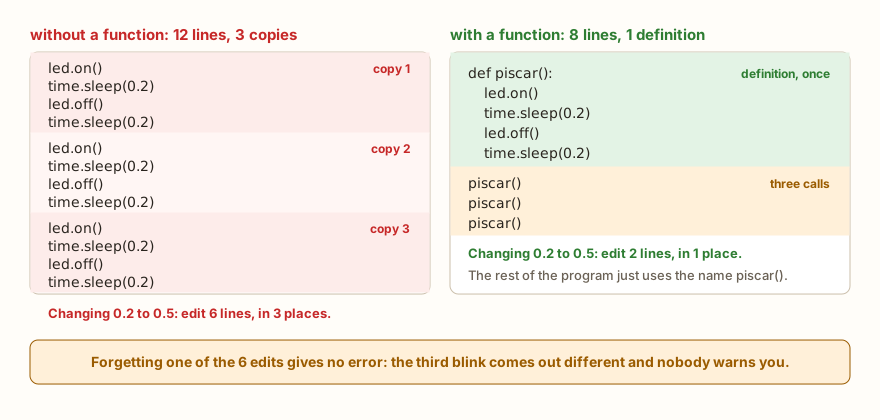
The figure compares the same program in two ways. Blink an LED three times, without a function, and the block led.on(), wait, led.off(), wait appears three times. With a function, the block exists once, and the program calls the name three times. In code for the ESP32, the version with a function looks like this:
from machine import Pin
import time

led = Pin(2, Pin.OUT)

def piscar():
    led.on()
    time.sleep(0.2)
    led.off()
    time.sleep(0.2)

print("three blinks")
piscar()
piscar()
piscar()
print("end")The text on the Serial is three blinks and end, and the LED on GPIO2 blinks three times in the simulator circuit. The function uses the variable led, which was created outside it. Reading a variable from outside works with no preparation. The rules for changing those variables are left for the article on scope.
There are four gains from using functions, and all of them appear in this example:
- Less repetition. The four-line block exists in one place only.
- A change in one place. Replacing
0.2with0.5is editing two lines, and not six. The figure shows the worst case of copying: forgetting one of the six edits gives no error, and the third blink comes out different from the others with no warning at all. - A name that explains.
piscar()says what happens, and whoever reads the main program does not need to understand how the LED is turned on. - Testing in parts. You call the function on its own, check that it works and only then use it in the rest of the program.
A function also does not need to be called several times to be worth it. A function called only once, with a good name, already separates the "what" from the "how", and is often the reason a program becomes readable.
Divide and conquer
The expression in the title is a method. A big problem becomes several small problems, each solved by a function, and the main program becomes a list of calls that reads like a recipe. The example below is a menu with three options, in the style of the article on choosing among many options, in which each action went into a function:
def ligar():
    print("fan on")

def desligar():
    print("fan off")

def status():
    print("fan on standby")

print("1 turn on, 2 turn off, 3 status")
op = input("option: ")
if op == "1":
    ligar()
elif op == "2":
    desligar()
elif op == "3":
    status()
else:
print("invalid option")With the answer 2, the output is the menu, option: 2 and fan off. The main program, from the menu print downwards, fits in a glance and says what it does. When the turn-on action grows, with a relay, a timestamp record and a confirmation message, only the function ligar changes. The if and the elif stay as they are.
A traffic light has the same design. Each color is a function, and the loop just calls the three in order:
def vermelho():
    print("red 3s")

def amarelo():
    print("yellow 1s")

def verde():
    print("green 3s")

for ciclo in range(2):
    print("cycle", ciclo + 1)
    verde()
    amarelo()
vermelho()The output repeats the sequence green 3s, yellow 1s and red 3s twice, each round marked by cycle 1 and cycle 2. The main program is the whole traffic light in five lines. On the board, the prints would give way to lighting the LEDs and to time.sleep, and the loop would not change. The challenge Traffic light asks for this behavior with three LEDs, and SOS in Morse code asks for functions (def) for the dot and the dash.
A practical criterion for deciding where to cut: if you need an "and" to describe what the function does ("reads the grade and calculates the average and shows the result"), it should probably be two or three. A good function does one thing, and the name says which.
Common mistakes and how to recognize them
Function errors come in two groups: the ones Python reports and the ones that pass in silence. Those of the first group come with a message.
Wrong number of arguments
Calling with more or fewer values than the definition expects is a TypeError:
def saudar():
    print("hello")

saudar("ana")Traceback (most recent call last):
File "main.py", line 4, in <module>
TypeError: function takes 0 positional arguments but 1 were givenThe opposite error, a function that expects a value and is called with none:
def saudar(nome):
    print("hello", nome)

saudar()Traceback (most recent call last):
File "main.py", line 3, in <module>
TypeError: function takes 1 positional arguments but 0 were givenPython on the computer writes the message with the name of the function (saudar() takes 0 positional arguments but 1 was given), which helps find the culprit. The simulator's, which imitates MicroPython, is more economical and says only function. Look at the line number, which points to the call.
Missing colon, indentation or body
def saudar()
print("hello")Traceback (most recent call last):
File "main.py", line 1
SyntaxError: invalid syntaxPython on the computer is more specific and says SyntaxError: expected ':'. The same goes for a body without indentation and for a function that only has a comment. Python on the computer reports IndentationError: expected an indented block after function definition, and the simulator answers with SyntaxError: invalid syntax. The symptom is the same in both: the program does not even start. When a body does not have code yet, the pass is the marker that the syntax accepts:
def saudar():
    pass

saudar()
print("pass ok")The output is pass ok. The function exists, does nothing, and can be filled in later.
Function name equal to a variable name
A function is a name like any other, and an assignment can cover it:
dobro = 5
print(dobro(3))Traceback (most recent call last):
File "main.py", line 2, in <module>
TypeError: 'int' object isn't callableThe name dobro now holds the number 5, and calling a number makes no sense. The same happens when a function is redefined. The last definition wins, without warning:
def f():
    print("a")

def f():
    print("b")

f()The output is only b. With two defs of the same name in a long file, the first version disappears. When a change "has no effect", look for a second definition of the same name further down.
In the classroom: where functions tend to trip people up
These cases repeat in classes. In almost all of them, the program runs without an error.
Defining the function and never calling it
The student writes the def, clicks run and nothing happens. The output stays empty, and the conclusion is that the computer "did not work". The body of a function only runs when someone calls it, and the def alone does not call. The checking question: on which line of this function did I write the name with parentheses?
Forgetting the parentheses in the call
It is the case of piscar alone on a line. It also gives no error. When the output shows <function ... at 0x...>, the problem is the same, only inside a print.
Calling before defining
The program is all right, but the call was written at the top and the def below. The error, NameError, is clear, and the fix is to move the definition above the first call. When the call happens inside another function, the order of writing stops mattering, as the example of a and b showed.
The function that does everything
To "use a function" without understanding what for, the student puts the whole program inside a single one, def main():, and calls it at the end. It runs, but they gained nothing: no block became reusable, and the name says nothing. The question is how many things the function does. If the answer is "everything", divide.
Copying the function instead of calling it again
piscar1, piscar2 and piscar3 appear, with the same body. The function exists precisely to avoid this: one piscar called three times.
Showing on screen what should be returned
A function that does a calculation and uses print inside it solves the exercise of the moment, but does not let you use the result in another calculation. This becomes clear when the student tries to add two results and discovers that the function "returns" None:
def dobro(n):
    return n * 2

print(dobro(4))
print(dobro(dobro(4)))
x = dobro(5)
print(x)

def sem_retorno():
    print("only prints")

r = sem_retorno()
print(r)The output is 8, 16, 10, only prints and None. The function dobro returns the value with return, and the value can be used in another call or stored in a variable. The sem_retorno only prints, and what it hands to the program is None, the value that means "nothing". The return is the subject of a whole article, number 18. Here it is enough to see that there are two distinct things: what the function shows and what it returns.
Exercise: SOS with functions
Write a program that builds the SOS signal in Morse with functions. Three dots, three dashes and three dots, separated by spaces. Create ponto() and traco(), which write one signal each, espaco(), which writes a space, and the functions letra_s() and letra_o(), which call the previous ones. The main program only calls the letters.
def ponto():
    print(".", end="")

def traco():
    print("-", end="")

def espaco():
    print(" ", end="")

def letra_s():
    ponto()
    ponto()
    ponto()

def letra_o():
    traco()
    traco()
    traco()

letra_s()
espaco()
letra_o()
espaco()
letra_s()
print()
print("end")The output is ... --- ... and end. The end="" keeps the print from jumping to a new line after each signal, and the lone print(), after the last letter, closes the line. Notice that letra_s and letra_o use functions that the main program does not even need to know, and that the main one has seven readable lines. To improve it, replace the three repeated dots with a for inside letra_s, and then think about how you would make the number of signals configurable. The next article shows how.
Frequently asked questions
Does a function need parameters?
No. The saudar() at the start has none. Parameters let the function work with different values on each call, and are the subject of the next article.
Can I define the function after calling it in the file?
Only if the call happens after the def has run. At the top of the file, a loose call before the def gives NameError. Inside another function, the order of writing does not matter, as long as both are defined when the call is executed.
What is the difference between defining and calling?
Defining is writing the def and storing the body under a name. Calling is writing the name with parentheses, which makes the body run. You can define without ever calling, but you never call without having defined.
How many functions can a program have?
As many as are needed. The practical limit is the device's memory: on the ESP32, it is much smaller than the computer's, and each function takes up a little. In teaching programs, this does not show.
Can I call a function inside a loop?
You can, and it is a very common use. The traffic light in the article calls verde(), amarelo() and vermelho() inside a for. The function is a command like any other and can sit inside if, while and for.
What does a function return when it has no return?
None, as the sem_retorno example showed. It is the value Python uses to say "there is no result".
Where to go next
Reread the article on if/else and the one on loops: everything said there holds inside a function. If you want to practice with hardware, the challenge SOS in Morse code asks for functions for the dot and the dash, and Traffic light is a good case for separating one function per color. The challenges Double Function and Triple Function use a parameter and return, and work better after the next two articles. The Logic with Python track gathers all the challenges.
The next article covers parameters and arguments: how to pass values to the function, in what order, how to name them in calls, how to define default values and how to accept any number of arguments with *args.