Fundamentals
Why Repeat: An Introduction to Loops in Python
Understand what a loop is in Python, the three questions every loop answers, how to follow the passes by hand and why a loop can never end.
By Prof. Rodrigo Faustino · Updated on · 15 min read
Metrics for this article
- Words
- 2,977
- Characters
- 15,699
- Reading time
- ~15 min
A loop is the structure that tells the computer to repeat a block of code while a condition holds, or once for each item in a group. Python has two forms, the while ("as long as") and the for ("for each"), and both answer the same question: how to do the same thing many times without writing the code many times. Every loop has to settle three things, which are what to repeat, when to stop and what changes on each pass. When one of the three is missing, the program stops behaving: it either repeats too little or repeats forever.
This is the first article of the repetition module. It does not teach all the syntax of while and for, which are left for the next two articles. The goal here is to understand the idea: why a loop exists, how to read a loop pass by pass, which variables appear in almost all of them and where the mistakes that trap students most are.
The problem: copying and pasting does not scale
Imagine a countdown from 5 to 1 followed by a final message. With what has already been seen in the series, the program comes out straight away:
print(5)
print(4)
print(3)
print(2)
print(1)
print("liftoff!")The output is 5, 4, 3, 2, 1 and liftoff!, one per line. The program works, and for five numbers it is acceptable. Now consider three change requests. The first is to count from 10, which requires rewriting the five lines and adding five more. The second is for the user to choose where the count starts: the program will only know the number when someone types it, and no print written in advance covers that. The third is to count from 1000 down to 1.
The three requests show the limits of copying and pasting. The code grows along with the number of repetitions, a typing mistake becomes a mistake in every copy, and, in the user's case, the number of repetitions is only known at run time. The solution is to write the block once and tell Python how many times, or until when, it should run.
From the syllabus to a planned semester
- Teaching plan and calendar built automatically
- Class diary ready to paste into SIGA
- Slides and exercise lists with answer keys
Free Community edition · Windows
The idea: go around until the condition ends
Think of a person washing dishes. They do not have 40 written instructions ("wash plate 1, wash plate 2..."), but a rule: while there is a dirty plate in the sink, pick one up, wash it and put it on the rack. The rule has a question at the start ("is there still a dirty plate?"), an action that repeats and something that changes on each pass (one plate fewer in the sink). When the sink is empty, the question gets a "no" and the person moves on to the next task.
The while is that rule written in Python:
n = 5
while n >= 1:
    print(n)
    n = n - 1
print("liftoff!")The output is the same as before: 5, 4, 3, 2, 1 and liftoff!. But now, changing to a countdown from 1000 to 1 is a matter of swapping one number. The word while opens the loop, followed by the condition and the colon, as in the if. The indented block below is what repeats, and the indentation works the same way as in the article on if and else: the first line without indentation, the print("liftoff!"), is outside the loop and only runs after it ends.
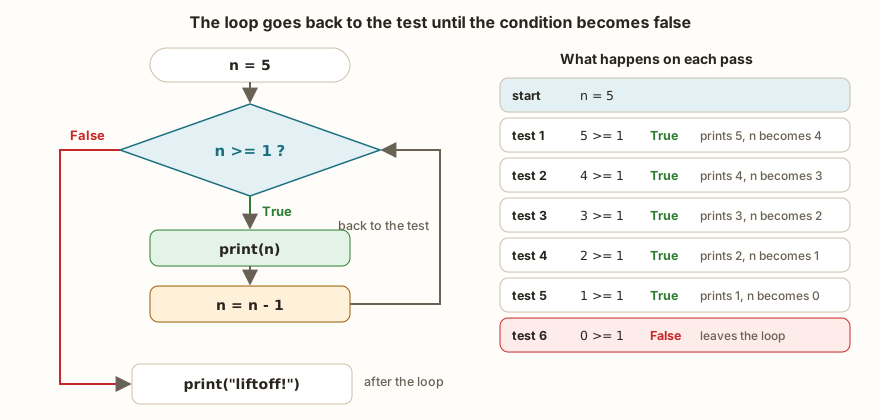
The figure follows the program. The test n >= 1 is made before each pass. As long as it is true, the program prints n, decreases n by 1 and goes back to the test. The sixth time the test is made, n is 0, the condition gives False, the program skips the indented block and moves on to the next line. The loop makes five passes, but the test happens six times, one more than the passes, and this detail matters in the mistakes further on.
The three questions of every loop

Whoever writes a loop without thinking about it usually gets one of these three points wrong, and that is why it is worth answering them before typing:
- When to stop? It is the condition of the
while. It says "as long as this is true, do one more pass". In the countdown, it isn >= 1. - What to repeat? It is the indented block. Only the lines with indentation are part of the loop. In the countdown, it is the
print(n)and the update ofn. - What changes on each pass? Something has to change, otherwise the condition never becomes false. In the countdown,
nstarts at 5 and decreases by 1 per pass. It is the loop's control variable, and it needs an initial value before thewhile, then = 5on the first line.
Notice that the third question has two parts: where the variable starts and how it moves. Counters grow (i = i + 1, or the short form i += 1 from the article on arithmetic operators), but they can also decrease, like the n of the countdown, or move two by two, or double on each pass.
Two tools for the same job
The while is the general tool: it works when the only thing known is the stopping condition. When the program already knows what it wants to go through, such as "the numbers from 1 to 5" or "each day of the week", the for does the same job with fewer lines and without the explicit control variable:
for n in range(5, 0, -1):
    print(n)
print("liftoff!")The output is the countdown from 5 to 1 and liftoff! again. The range(5, 0, -1) produces the numbers from 5 down to 1, descending by 1: the 5 is where it starts, the 0 is where it stops (without including it) and the -1 is the step. The for takes the variable n and updates it by itself on each pass. The article on range() details the three numbers of this function, and the article on the while shows the test at the start with more cases. For now, the rule of thumb is that the for fits when the number of passes is known when writing the loop, and the while fits when the end depends on something the program only finds out by running.
The examples in the previous articles already used the for over a sequence of values, such as for nota in (10, 9, 8.5). It is the same mechanism: instead of range, the loop goes through the items of a group, one per pass.
The AI that remembers your life and lives on your computer
- Long-term memory with the source of every answer
- Works offline: your data stays on your PC
- Reads PDFs, slides, photos and meeting recordings
Essential plan free forever
Tracing the loop by hand
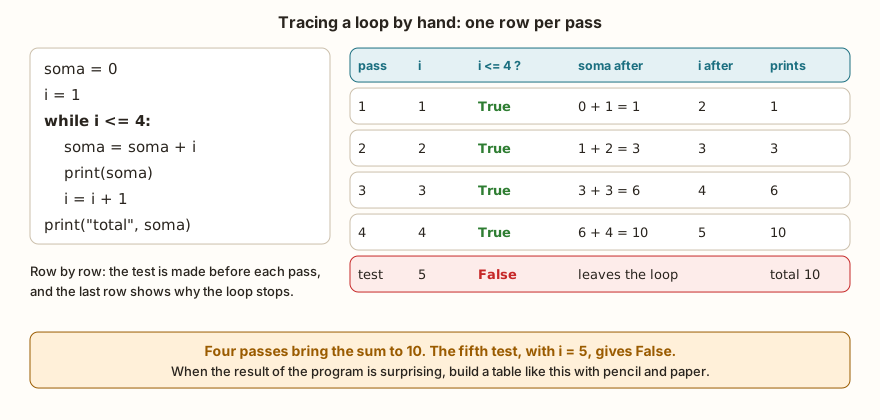
There is a way to understand any loop: do Python's work on paper. Each row of the table is a pass, and each column is a variable. The example adds the numbers from 1 to 4:
soma = 0
i = 1
while i <= 4:
    soma = soma + i
    print(soma)
    i = i + 1
print("total", soma)The output is 1, 3, 6, 10 and total 10. The table in the figure shows what the output hides. On the first pass, i is 1 and soma goes from 0 to 1. On the second, i is 2 and the sum goes to 3. On the third, 6; on the fourth, 10, and i becomes 5. The next test, 5 <= 4, gives False, and the loop ends with the total 10 printed afterwards.
Two roles appear here in almost every loop:
- Counter: a variable that counts passes or occurrences, such as
i. It starts at a known value (0 or 1) and moves one step per pass. - Accumulator: a variable that gathers results, such as
soma. It starts at the neutral value of the operation and receives something new on each pass.
The neutral value is the choice that causes the most mistakes. For adding, the neutral is 0, because adding 0 changes nothing. For multiplying, the neutral is 1:
soma = 0
produto = 1
for n in (2, 3, 4):
    soma = soma + n
    produto = produto * n
print(soma, produto)
errado = 0
for n in (2, 3, 4):
    errado = errado * n
print(errado)The output is 9 24 and 0. The sum of 2, 3 and 4 is 9, and the product is 24. If the accumulator of the product starts at 0, the result is 0 in any case, because 0 times anything is 0, and the program does not complain about anything. The defense is the tracing table: the first row, before the first pass, shows the initial value, and whoever sees 0 * 2 = 0 notices the problem.
When nobody knows how many passes
The while is most needed when the number of passes depends on the user. A program that adds values until someone types 0 does not know, when it starts, whether there will be three numbers or thirty. The zero works as a sentinel, an agreed value that means "it's over":
total = 0
n = int(input("Value (0 to stop): "))
while n != 0:
    total = total + n
    n = int(input("Value (0 to stop): "))
print("total", total)Value (0 to stop): 10
Value (0 to stop): 25
Value (0 to stop): 5
Value (0 to stop): 0
total 40The read appears twice on purpose. The first, before the loop, gives the initial value for the test. The second, at the end of the block, is what changes on each pass: without it, n would never change and the loop would not end. If the first value typed is already 0, the loop does not run at all and the total stays at 0, which is the right answer for "add no values". That is a point the while has and the for does not: the test comes before the first pass, and so the loop can run zero times.
The int() converts the typed text into a number, and the != compares with the agreed value, as in the article on type conversion. The challenge Until Zero asks for exactly this format.
The loop that never ends
If the condition never gives False, the loop does not stop. It is the best-known mistake of repetition, and all it takes is forgetting to update the variable:
i = 1
while i <= 3:
print(i)Nothing in the block changes i, so i <= 3 is true on the first pass, on the second, on the thousandth. The program prints 1 without stopping. In Python on the computer, it only ends when someone interrupts it with Ctrl+C. In the simulator, a loop like this does not freeze the page: the execution is cut off by an instruction count, and the stop button also works. On the board, the interruption also comes through Ctrl+C in the terminal, or through the reset button, as the article on first steps with MicroPython explains.
An infinite loop is not always a mistake. An ESP32 program normally has a while True: in the main.py file, which reads sensors, decides and acts, forever or until the device is switched off. The condition True is always true, and that is exactly what is wanted. What changes is that the programmer decided on the infinity on purpose, and still needs to take care of what runs inside, the subject of the article on programming without freezing.
What changes on the ESP32
The structure of the loop is the same in MicroPython. Two points call for attention. The first is the common use in hardware: repeating an action a fixed number of times, such as blinking an LED three times:
from machine import Pin
import time
led = Pin(2, Pin.OUT)
for vez in range(3):
    led.value(1)
    print("blink", vez + 1, "on")
    time.sleep(0.5)
    led.value(0)
    print("blink", vez + 1, "off")
    time.sleep(0.5)
print("end")The output has six lines, from blink 1 on to blink 3 off, and then end. The range(3) produces 0, 1 and 2, so the vez + 1 gives the human count from 1 to 3. The time.sleep(0.5) pauses half a second between each change, without which the LED would turn on and off too fast for the eye to see. The details about pins and LEDs are in the datasheet card of the ESP32 DevKit V1.
The second point is the 32-bit float, which causes a classic defect in loops with decimals. Adding 0.1 ten times should give 1:
x = 0.0
for i in range(10):
    x = x + 0.1
print(x, x == 1.0, x >= 1.0)
y = 0.0
voltas = 0
while y < 1.0 and voltas < 20:
    y = y + 0.1
    voltas = voltas + 1
print(voltas, y)In the simulator, the output is 1.0000001 False True and 10 1.0000001. The 0.1 does not exist exactly in binary, and the error of each addition accumulates. In the 32-bit version, after 10 additions the value went past 1 by a hair, and the == gives False even with the right math on paper. In Python on the computer, with the 64-bit float, the same program gives 0.9999999999999999 False False and the while makes 11 passes, because the value stayed a little below 1 and the test y < 1.0 still passed on the tenth pass. The two results differ, and both are "wrong" for whoever expected 1. The defense in loops is to never use == or != with a float as a stopping condition: use < or >=, count the passes with an integer (like the voltas in the example, which also works as a safety stop) or work with integers.
In the classroom: where loops tend to trip people up
The cases below repeat in the classes that reach the repetition module. In almost all of them Python shows no error at all, and what appears is a program that does something else.
Forgetting to update the variable
It is the example of the i that never changes. The symptom is the screen filling with identical lines, or the program that seems stuck. The question that solves it is the third of the three: what changes on each pass? If the answer is "nothing", the loop does not end.
One too many, one too few
The difference between < and <= changes the number of passes:
i = 1
while i < 5:
    print("less", i)
    i = i + 1
print("---")
i = 1
while i <= 5:
    print("less or equal", i)
    i += 1
print("end, i is", i)The output has four less lines (from 1 to 4), the separator, five less or equal lines (from 1 to 5) and end, i is 6. Whoever wants the numbers from 1 to 5 and uses < loses the 5, and whoever uses <= with a wrong limit gains one extra pass. Notice also that, on leaving, i is 6 and not 5, because the last update happens before the test that ends the loop. The test in the tracing table solves this at a glance.
Print at the wrong indentation
The indentation defines what is inside the loop, as in any block:
total = 0
for n in (10, 20, 30):
    total = total + n
print("partial total", total)
print("---")
total = 0
for n in (10, 20, 30):
    total = total + n
print("partial total", total)The output is partial total 60, the separator and then partial total 10, partial total 30 and partial total 60. The first print is outside the loop and runs once, at the end. The second is inside and runs on every pass. Neither gives an error, and which one is right depends on what the task asks for.
Resetting the counter inside the loop
The initial value belongs before the loop. Placed inside, it goes back to the start on every pass and wipes out what was accumulated:
n = 3
while n > 0:
    contador = 0
    contador = contador + 1
    n = n - 1
print(contador)The output is 1, and not 3. The program made three passes, but the contador = 0 undid the progress of each one. A similar defect, with the control variable reset inside the loop, leaves the program stuck forever.
if in place of while
Whoever has just learned the if tends to use it where repetition was needed:
n = 3
if n > 0:
    print("if runs once", n)
    n = n - 1
print("---")
n = 3
while n > 0:
    print("while runs while", n)
n = n - 1The output is one line from the if (if runs once 3), the separator and three lines from the while, from 3 to 1. The if tests once and moves on, while the while goes back to the test after each pass. It is the same syntax of a condition and a colon, and that is why the swap goes unnoticed.
The wrong neutral initial value
The product that starts at 0, shown earlier, is the classic case, and the same goes for the smallest grade that starts at 0 or the largest number that starts at 0 and never meets a negative number. In each case, the question is: which value does not interfere with the result of this operation?
Exercise: the week's expenses
A person noted down what they spent each day of the week: 35, 80, 12, 64, 0, 95 and 41 reais. The program must calculate the total, count on how many days the spending went above 50 reais and show the daily average. It is an exercise in accumulator, counter and decision in the same loop, and the average can only be calculated after the loop ends.
gastos = (35, 80, 12, 64, 0, 95, 41)
total = 0
caros = 0
for g in gastos:
    total = total + g
    if g > 50:
        caros = caros + 1
print("total", total)
print("days above 50:", caros)
print("average", total / len(gastos))The output is total 327, days above 50: 3 and average 46.714288. The total is the accumulator and starts at 0. The caros is the counter and only moves when the if is true, which shows that a loop can have decisions inside it. The len(gastos) counts how many values there are, 7, and the division stays outside the loop, with the indentation at the margin. The value 46.714288 is what the simulator shows with the 32-bit float, and Python on the computer would show 46.714285714285715. The two agree up to the fifth decimal place.
To practice, change the limit from 50 to 30 and confirm in the tracing table that the counter rises to 5.
Frequently asked questions
Which loop is better, while or for?
Neither is better in general. The for is shorter when the program knows what to go through, and the while is necessary when the end depends on something that only appears while running, such as user input or a sensor reading.
Can a loop run zero times?
It can. If the while condition is already false the first time, the block does not run at all. If the for goes through an empty group, it does not either.
Can I put a loop inside another?
You can, and it is common, as in times tables. Each inner loop runs completely on every pass of the outer loop. The following articles show the use calmly.
What is i += 1?
It is the short form of i = i + 1. There is a version for each operator, such as -= and *=. Python has no i++.
What is while True?
It is a loop with a condition that never becomes false. It only ends by a break (the subject of a later article) or when the program is interrupted. On the ESP32 it is the format of the main loop.
Where to go next
The Logic with Python track has repetition challenges. Countdown 5–1 and Times Table of 2 are the first contact, Sum from 1 to 10 asks for an accumulator, and Until Zero uses the sentinel. If the while condition still raises doubts, reread the article on if, elif and else, which uses the same form of test.
The next subject is the while in detail: the test at the start, the counter, accumulator and sentinel patterns, and how to write a loop that always ends.