Fundamentals
Choosing Among Many Options in Python: elif, in and Dictionaries
Learn when to use an elif chain, the in operator or a dictionary to choose among many options in Python, and why MicroPython has no match/case.
By Prof. Rodrigo Faustino · Updated on · 15 min read
Metrics for this article
- Words
- 2,817
- Characters
- 15,319
- Reading time
- ~15 min
To choose among many options in Python there are three tools, and the best one depends on what the condition compares. When the program decides by ranges of values, such as a grade or a temperature, the elif chain is the right tool. When it compares with two or three exact values, the in operator shortens the condition. When it needs to translate many exact values into answers, such as a month into a name or an error code into a message, the dictionary does the same job with fewer lines and keeps the data in one place. MicroPython has no match and case, so that is the complete list of paths on the ESP32.
The previous article showed elif for ranges. This one shows what to do when the ladder gets too long, introduces the dictionary at the size the decision needs (the series has a whole article about it further on) and explains why code copied from the internet with match does not run on the board.
A ladder that only grows
The calculator with a menu is the classic example: the user chooses an operation, and the program does the math.
for op in ("+", "-", "*", "/", "%", "?"):
    a = 12
    b = 5
    if op == "+":
        r = a + b
    elif op == "-":
        r = a - b
    elif op == "*":
        r = a * b
    elif op == "/":
        r = a / b
    else:
        r = "invalid operation"
print(a, op, b, "=", r)The output shows 12 + 5 = 17, 12 - 5 = 7, 12 * 5 = 60, 12 / 5 = 2.4 and, for the last two lines, 12 % 5 = invalid operation and 12 ? 5 = invalid operation. The program works, and the final else did the job the previous article asked of it: the ? does not exist, and the % has not been programmed yet. Notice the detail about the %: it is a valid operation in Python, but the ladder has no step for it, so the message says "invalid" for a calculation the program could do. Each new operation needs two more lines, and no mental arithmetic guarantees that all the comparisons are written correctly.
Here the ladder is still small. The discomfort shows up when it reaches twelve steps, as in a program that converts the month number into a name, and the decision at each step is the same: "is the value equal to this?".
From the syllabus to a planned semester
- Teaching plan and calendar built automatically
- Class diary ready to paste into SIGA
- Slides and exercise lists with answer keys
Free Community edition · Windows
Range or exact value
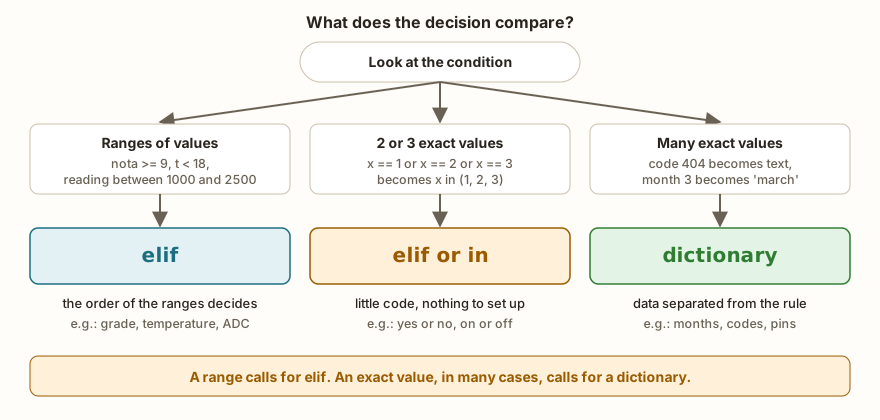
The question that organizes the choice is what the condition compares. A grade from 0 to 10 has infinite possible values (7, 7.5, 7.0001), and the decision treats each range as a block. No dictionary helps there, because you would have to list all the values. A month, on the other hand, can only be 1, 2, 3 up to 12, and each value has its answer.
- If the conditions use
>,>=,<or<=, use theelifchain, and the order of the ranges matters, as in the previous article. - If the conditions are only
==against the same value repeated, think ofinor a dictionary.
A dictionary with ranges even seems to work, and that is the trap students run into. To see it, consider a dictionary in which the grade 7 is worth "B":
nota = 7
niveis = {10: "A", 9: "A", 8: "B", 7: "B"}
print(niveis.get(nota, "?"))
print(niveis.get(7.5, "?"))The output is B and ?. The grade 7 is in the list, but 7.5 is not, because the dictionary only knows the values that were written into it. For ranges, elif.
The in operator: several values, one question
When the same answer holds for several values, the condition with or repeats the variable in each comparison:
x = 3
if x == 1 or x == 2 or x == 3:
    print("inside")
if x in (1, 2, 3):
    print("inside with in")
if x in [1, 2, 3]:
    print("inside with list")
c = "b"
if c in "abc":
    print("b is in abc")
print("bc" in "abc", "ac" in "abc")The output has inside, inside with in, inside with list, b is in abc and, on the last line, True False. The question x in (1, 2, 3) is "does the value of x appear in this sequence?", and the parentheses (a tuple) and the square brackets (a list) work equally well here. With text, in asks whether one piece is inside the other: "bc" in "abc" is true because bc appears in sequence, and "ac" in "abc" is false because the two letters are not side by side.
The most classic mistake with several values is to write the or with only the second half:
op = "%"
if op == "+" or "-":
    print("entered")
if op in ("+", "-"):
    print("does not enter")
else:
print("correct else")The output is entered and correct else. It was already the subject of the article on logical operators: the "-" part alone is a non-empty text, which Python treats as true, and the or lets the whole condition pass. The in fixes the mistake for free, because there is only one side to write.
The dictionary: key and value
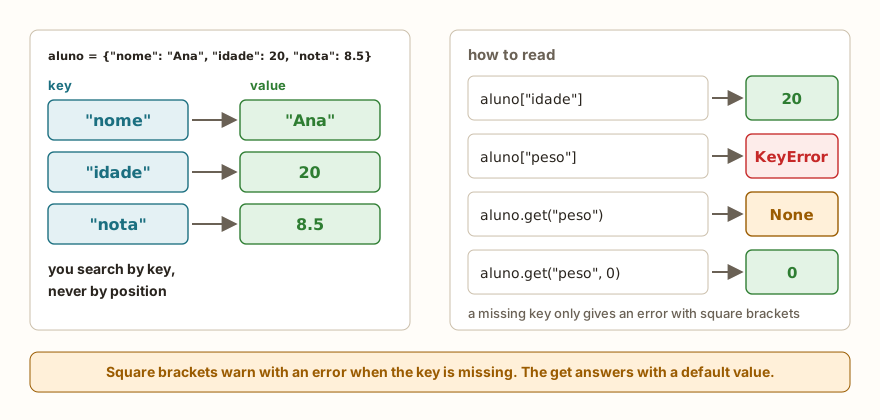
A dictionary is a set of pairs. Each pair links a key to a value, and looking up by the key returns the value. It is written between braces, with a colon between each key and its value, and commas between the pairs:
nomes = {1: "january", 2: "february", 3: "march", 12: "december"}
for m in (1, 3, 12, 7):
    print(m, nomes.get(m, "invalid month"))
print(nomes[3])
print(3 in nomes, 7 in nomes)
print(len(nomes))The output is 1 january, 3 march, 12 december, 7 invalid month, then march, then True False and 4. There are four ways of using the dictionary in this snippet:
nomes[3]looks up the key 3 and returns"march".nomes.get(7, "invalid month")looks up the key 7, and since it does not exist it returns the second argument, the default value.3 in nomesasks whether the key exists, without fetching the value. Theinof a dictionary looks at the keys, never at the values.len(nomes)counts the pairs.
The brackets carry a risk that get does not have. If the key does not exist, the program stops:
nomes = {1: "january", 2: "february"}
print(nomes[7])Traceback (most recent call last):
File "main.py", line 2, in <module>
KeyError: 7KeyError means "key not found", and the number after the colon is the key that was missing. The practical rule: use get with a default value when the absence of the key is a normal case (an unknown code, a mistyped month), and brackets when the absence is a defect of the program that deserves to stop with a clear error.
A dictionary also changes. You can add a pair, change the value of a key and delete a pair:
pinos = {"led": 2, "button": 4, "buzzer": 5}
print(pinos["led"])
pinos["relay"] = 15
print(pinos["relay"], len(pinos))
pinos["led"] = 13
print(pinos["led"])
del pinos["buzzer"]
print("buzzer" in pinos)
print({}, len({}))The output is 2, 15 4, 13, False and {} 0. The assignment pinos["relay"] = 15 creates the pair when the key is new and replaces the value when the key already exists. An empty dictionary is written {}.
The AI that remembers your life and lives on your computer
- Long-term memory with the source of every answer
- Works offline: your data stays on your PC
- Reads PDFs, slides, photos and meeting recordings
Essential plan free forever
Swapping the ladder for the dictionary
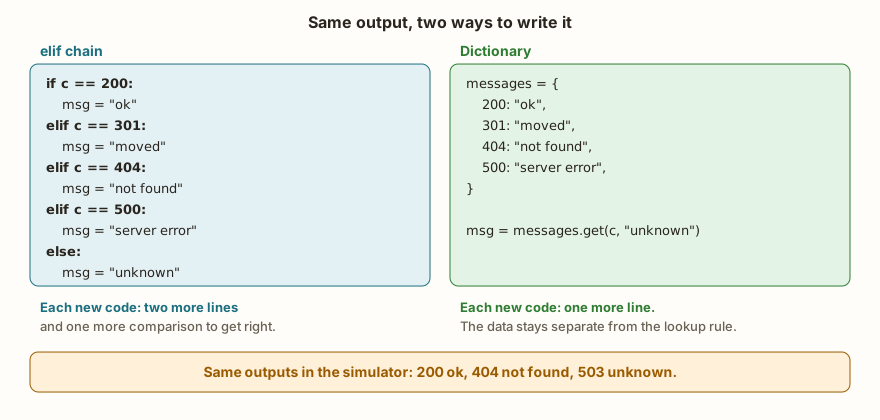
The response codes of a web server, such as the 404 of "page not found", are the perfect example: each number has a message. Here are the two versions, one after the other, with the same input:
for c in (200, 301, 404, 500, 503, 418):
    if c == 200:
        msg = "ok"
    elif c == 301:
        msg = "moved"
    elif c == 404:
        msg = "not found"
    elif c == 500:
        msg = "server error"
    else:
        msg = "unknown"
    print(c, msg)
for c in (200, 404, 503):
print(c, {200: "ok", 404: "not found"}.get(c, "unknown"))The first part prints 200 ok, 301 moved, 404 not found, 500 server error, 503 unknown and 418 unknown. The second, with a smaller dictionary to fit on one line, prints 200 ok, 404 not found and 503 unknown. The result is the same for the codes that both know.
In practice, the dictionary goes into a named variable, such as mensagens, and the logic stays on a single line: msg = mensagens.get(c, "unknown"). Adding a new code is adding a pair. Whoever reads the program sees the data in one block and the rule in one line, and whoever wants to fix a message edits one line of data, without worrying about the : and the indentation of the blocks. That is the main gain. The dictionary does not make the program faster in a way anyone would notice on an ESP32 with few options, and does not need to: the advantage is one of organization.
Keys need to be of the same type
In a dictionary with the key 404 (an int), the lookup for "404" (a text) finds nothing, because the two values are different:
mensagens = {200: "ok", 404: "not found"}
print(mensagens.get("404", "unknown"))
print(mensagens.get(int("404"), "unknown"))
print(404 == "404")The output is unknown, not found and False. It is the input() trap again: what the user types is always text, and the key 404 only appears when the program converts. The article on type conversion has the cause, and the defense here is the same: convert with int() before looking up, or write the dictionary keys as text from the start.
Uppercase and spaces
When the key is typed text, "MON" and "mon" are different keys. The defense is to normalize what the user typed before looking it up:
dias = {"mon": "monday", "tue": "tuesday"}
for entrada in ("mon", " MON ", "Mon", "xyz"):
    c = entrada.strip().lower()
print(repr(entrada), repr(c), dias.get(c, "?"))The output shows that 'mon', ' MON ' and 'Mon' become the key 'mon' and result in monday, and 'xyz' ends up as ?. The strip() removes the spaces at the ends, the lower() turns everything into lowercase, and the repr() function prints the text with quotes so the spaces are visible.
The order of a dictionary
No example so far depends on the order of the pairs, and that is no accident. Going through a dictionary with for hands out the keys in an order that the program does not choose:
d = {"x": 1, "y": 2}
print(list(d))
print(sorted(d))
for chave in sorted(d):
print(chave, d[chave])In the simulator, the output is ['y', 'x'] for list(d), then ['x', 'y'] for sorted(d) and then x 1 and y 2. Python on the computer would show ['x', 'y'] already on the first line, because CPython keeps the pairs in the order they went in. MicroPython does not promise that order, so a program that needs a predictable sequence should ask for it with sorted(), which returns the keys in alphabetical or numerical order.
One more warning: if the same key appears twice when writing the dictionary, Python does not complain. In {"a": 1, "a": 2, "b": 3}, the a is worth 2, and the dictionary has two pairs. When copying and pasting a line, it is worth checking that the key was changed.
Why MicroPython has no match/case
Python 3.10, from 2021, gained a new structure for choosing among many values, the match with several cases. Whoever searches for "switch in Python" finds examples like this:
codigo = 404
match codigo:
    case 200:
        print("ok")
    case 404:
        print("not found")
    case _:
print("other")In Python on the computer, the output is not found. In the simulator and on the ESP32 the result is different:
Traceback (most recent call last):
  File "main.py", line 2
SyntaxError: invalid syntaxMicroPython implements Python 3.4 and a selection of features from newer versions, and match is not among them yet. The page of differences from Python 3.10, in the official MicroPython documentation, lists PEP 634, which defines match, as a subject under discussion. The program, then, does not even start: the error appears at compile time, before the first line runs. This catches students who copy a recent tutorial, and it is worth recognizing the symptom: a SyntaxError right on the match line.
The replacements are the ones this article presented. For exact values, the dictionary (or the elif chain with ==); for several values with the same answer, the in; for ranges, the elif. The case _ of the match, which catches whatever is left, is the else of the chain or the default value of get. None of these swaps loses anything compared with match for the uses of a board program.
What changes on the ESP32
The dictionary works the same way in MicroPython, and two uses appear a lot in hardware projects. The first is giving names to pins, which makes the program easier to read:
from machine import Pin
pinos = {"led": 2, "relay": 15}
for nome in ("led", "relay", "motor"):
    if nome in pinos:
        saida = Pin(pinos[nome], Pin.OUT)
        saida.value(1)
        print(nome, "connected to pin", pinos[nome], saida.value())
    else:
print(nome, "does not exist")The output is led connected to pin 2 1, relay connected to pin 15 1 and motor does not exist. The in before the lookup avoids the KeyError for a name nobody registered, and the else says which name was unknown. The second use is the translation of error codes from a web server, like the example of the response codes, when the board talks to the internet, the subject of the article on Wi-Fi, HTTP and MQTT.
Each pair of a dictionary takes up memory on the ESP32, which has far less RAM than a computer. For dozens of pairs, such as the months, the days of the week or the pins of a project, this is not a problem. A table with thousands of items is another conversation, and that kind of calculation usually only appears in larger projects.
In the classroom: where the choice tends to trip people up
The cases below repeat in the classes that reach this subject. Each one produces a program that runs and gets it wrong, or gets it wrong in a way that is not the one the student is looking for.
The repeated step
When copying and pasting an elif block, the student forgets to change the value, and the program gets two identical steps. Python does not complain, and the second one never runs:
op = "+"
if op == "+":
    print("sum")
elif op == "-":
    print("subtraction")
elif op == "+":
print("sum again, never runs")The output is only sum. Each step is tested in order, and the first one that matches decides, as in the previous article. The defect shows up when the student thinks the - does not work and looks at the wrong block. In the dictionary, the version of this mistake is the repeated key, which also passes without warning.
The forgotten case
The % of the calculator, which fell into the else. A list on paper with all the values the program needs to handle, before typing, solves a good part of these oversights.
The KeyError on the first test
The student learns the dictionary, uses brackets everywhere and types a key that does not exist during the test. The program stops with KeyError, and the fright is bigger than the defect. The question that helps is: "is the absence of this key a normal case?". If it is, get with a default or in.
Parentheses in place of brackets
Whoever comes from print(...) and other functions writes meses(1) instead of meses[1]. Python understands meses(1) as a call, and since a dictionary is not a function:
Traceback (most recent call last):
  File "main.py", line 2, in <module>
TypeError: 'dict' object isn't callableThe simulator message says isn't callable, and the one from Python on the computer says is not callable, with the same meaning. "Callable" is what can be called with parentheses, and a dictionary is looked up with brackets.
The dictionary for ranges
The student likes the dictionary so much that they try to use it for the grade, list the values from 0 to 10 and discover that 7.5 is not there. The right reasoning is the question in the figure at the start of the article: a range calls for elif.
The type of the key
The input() returns text, the key is a number, and the lookup never finds anything, with no error and no warning, as in the 404 example. The same goes for uppercase against lowercase and for the space left at the end of the typed text.
Exercise: the snack bar
A menu has four items, each with a name and a price: 1, bread and cheese at 6; 2, juice at 5; 3, coffee at 4; 4, cake at 8. The program receives a list of orders, says what each one is, accumulates the total and warns when the code does not exist. Each value of the dictionary is a tuple with two elements, and the line nome, preco = cardapio[codigo] separates the two at once.
cardapio = {1: ("bread and cheese", 6), 2: ("juice", 5), 3: ("coffee", 4), 4: ("cake", 8)}
total = 0
for codigo in (2, 1, 4, 9, 3):
    if codigo in cardapio:
        nome, preco = cardapio[codigo]
        total = total + preco
        print(codigo, nome, preco)
    else:
        print(codigo, "no such item")
print("total", total)The output is 2 juice 5, 1 bread and cheese 6, 4 cake 8, 9 no such item, 3 coffee 4 and total 23. The code 9 does not exist, and the program carries on without adding anything and without stopping. To ask the user for a single code, replace the for with a read:
cardapio = {1: ("bread and cheese", 6), 2: ("juice", 5), 3: ("coffee", 4), 4: ("cake", 8)}
codigo = int(input("Item code (1 to 4): "))
if codigo in cardapio:
    nome, preco = cardapio[codigo]
    print(nome, "costs", preco)
else:
print("no such item")Item code (1 to 4): 3
coffee costs 4With the input 9, the output is no such item. Since the int() converts before the lookup, the key has the right type. If the user types a word, the int() fails before the dictionary comes into play, and that is a conversion problem, covered in the article on type conversion.
Frequently asked questions
Which is faster, elif or a dictionary?
With few options, the difference does not show on an ESP32. The choice is worth it for clarity: if the condition is a range, elif; if it is an exact value in a large group, a dictionary. The elif chain compares one step at a time, and the dictionary goes straight to the key, which would only make a difference with hundreds of items.
Can I use text as a key?
You can, and it is common: {"led": 2}. Numbers, texts and tuples work as keys. A list does not, because it can change.
What does get return if I do not pass the second argument?
It returns None, the value that represents "nothing". It is handy for testing afterwards, with if resultado is None. If the program is going to print the result, pass a text as the default.
Can I put a dictionary inside another?
You can. Each value can be anything, including another dictionary, a list or a tuple, as in the menu. The article on dictionaries in the series shows the uses calmly.
How do I do the equivalent of C's switch?
With the elif chain for a few cases or with a dictionary for many. The values of a dictionary can also be functions, which gives a menu of commands with no elif at all. That use comes with the functions module.
Where to go next
The Logic with Python track has challenges with many options. Calculator with Menu asks for the ladder of operations, Access Level combines values and rules, Months of the Year asks for the translation of a number into a name, and Error Code is the case of messages. If elif is still confusing, reread the article on if, elif and else.
With this, the decision module is complete: the program already chooses what to do. The next subject is making the same piece of code run many times, the loops, starting with the reason for repeating.