Fundamentals
Relational and Logical Operators in Python: ==, !=, <, and, or and not
Learn to compare values in Python with ==, != and <, to combine conditions with and, or and not and to decide which route to follow or when to recalculate.
By Prof. Rodrigo Faustino · Updated on · 17 min read
Metrics for this article
- Words
- 3,287
- Characters
- 18,331
- Reading time
- ~17 min
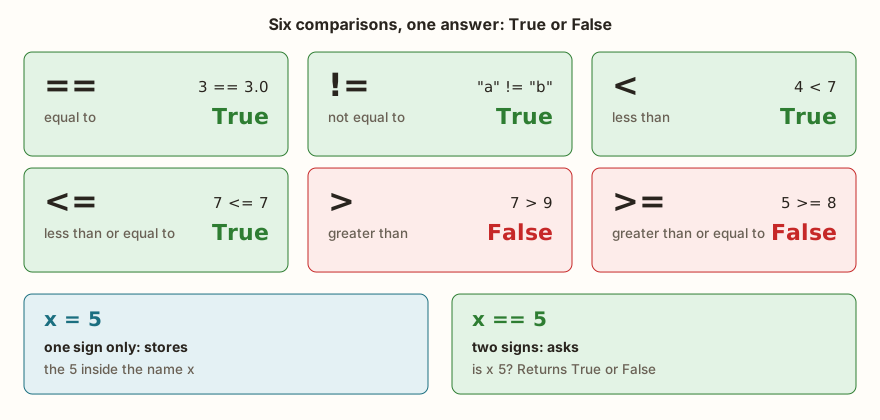
Relational operators compare two values and always answer with True or False. There are six: == (equal), != (not equal), < (less), <= (less or equal), > (greater) and >= (greater or equal). The logical operators, and, or and not, combine answers of that kind: and requires both to be true, or requires at least one to be, and not flips the value. Together, they form the conditions that make the program choose between paths.
It is the part of programming that most resembles what we do all day without thinking. Before leaving home, you compare the time with the meeting's, check whether it is raining and decide which way to go. This article shows how Python writes each of those questions, where it surprises, what changes on the ESP32 and how the same reasoning serves to choose a route and to recalculate when the road changes.
The problem: the question the program needs to answer
Think of the maps app on your phone. While you drive, it repeats dozens of yes-or-no questions: has the remaining time exceeded the forecast? Is there a blocked road ahead? Is there an alternative path that arrives sooner? Is there enough fuel for the detour? Each question has a "yes" or a "no" as its answer, and it is their combination that decides whether the app keeps the route or proposes another.
A program does the same thing, only with values stored in variables. The reading of a temperature sensor, the distance measured by an ultrasonic sensor, the text typed by someone: all of this becomes a question when it is compared with another value. And the answer is neither a text nor a number, it is a value of a separate type, bool, which accepts only two values, True and False. Whoever understands this type and the operations on it can write any decision, from the simplest to the one most full of exceptions.
The AI that remembers your life and lives on your computer
- Long-term memory with the source of every answer
- Works offline: your data stays on your PC
- Reads PDFs, slides, photos and meeting recordings
Essential plan free forever
The six comparisons
print(3 == 3.0, 3 != 4, 5 > 3, 2 <= 2, 7 < 7, 7 >= 8)
print("5" == 5, 5 == 5.0, True == 1, None == 0)
print(type(3 > 2), int(3 > 2), True + True)The first line gives True True True True False False, and each value answers one of the comparisons. Notice the first: 3 == 3.0 is true. Python compares the value, not the type, so an integer and a decimal that represent the same number are equal. On the second line the opposite appears: "5" == 5 is False, because a text and a number are never equal, even if they are written the same on the screen. This is the same lesson from the article on type conversion, now applied to comparisons.
The third line shows the type of the result, <class 'bool'>, and that the boolean behaves like a number in a calculation: int(3 > 2) is 1 and True + True is 2. This is useful for counting how many conditions were true, and it is the reason True == 1 also gives True.
The equals sign: one to store, two to ask
The oldest confusion in programming fits on one line. The = sign stores a value in a name. The == sign asks whether two values are equal. Whoever writes x = 5 is saying "x is now 5". Whoever writes x == 5 is asking "is x 5?", and the answer is True or False. In an if, the subject of a nearby article, using the wrong sign keeps the program from running:
x = 5
if x = 5:
print("ok")SyntaxError: invalid syntaxThe error is a syntax one, and appears before any line runs. In recent versions of Python on the computer the message even suggests the fix (Maybe you meant '==' or ':=' instead of '='?). MicroPython only says invalid syntax, and you have to remember the difference between one sign and two on your own.
Comparing texts
Texts can be compared too, and the order follows the computer's character table, not the dictionary's.
print("a" == "a", "a" < "b", "Z" < "a", "abc" < "abd", "10" < "9", "House" == "house")
print("House".lower() == "house", "ab" < "abc", "" < "a")
print(ord("Z"), ord("a"), ord("1"))The first line gives True True True True True False. The last two values deserve attention. "10" < "9" is true, because Python compares character by character: the first of "10" is "1", which comes before "9" in the table, and the comparison ends there, without looking at the zero. And "House" == "house" is false, because the uppercase and the lowercase letter are different characters. On the third line, ord() shows the number of each character: Z is 90 and a is 97, and that is why "Z" < "a" is true and all uppercase letters come before all lowercase ones. When what matters is the content, and not the case, the way out is to convert both sides with .lower() before comparing, as the second line does.
The case of grades read from the keyboard shows the risk of comparing text as if it were a number:
a = input("A: ")
b = input("B: ")
print(a < b, int(a) < int(b), a == "10", int(a) == 10)Typing 10 and 9, the output is:
A: 10
B: 9
True False True True
The comparison of the texts says that "10" comes before "9", and the one of the numbers says the opposite. Whoever forgot to convert the input() gets an answer with no error and no sense.
Comparing decimals
With decimals, == calls for care, because many numbers such as 0.1 do not exist exactly in binary and the calculation keeps a tiny residue:
print(0.1 + 0.2 == 0.3, abs(0.1 + 0.2 - 0.3) < 1e-6)
print(1.1 + 2.2 == 3.3, abs(1.1 + 2.2 - 3.3) < 0.001)In the simulator, the output is True True and False True. In Python on the computer, the first line gives False True. The same comparison 0.1 + 0.2 == 0.3 answers differently depending on the number of bits of the float, and the second (1.1 + 2.2 == 3.3) gives false on both. Neither answer is reliable: == between calculated decimals depends on luck. What works on both machines is to compare the difference with a tolerance, abs(a - b) < 0.001, which is the second comparison on each line, and gives True in every case.
Chained comparison and the in and is operators
Python lets you write a range of values the way it is written in math, with the variable between two comparisons:
x = 7
print(1 < x < 10, 10 <= x < 20, 0 < x < 5 < 10)
print(1 < x and x < 10, 5 < x > 6)
print("a" in "banana", "z" in "banana", 3 in [1, 2, 3], "ana" in "banana", 4 not in [1, 2, 3])
y = None
print(y is None, y is not None, y == None)
print(not x == 5, x != 5, not (x == 5))The first line gives True False False. 1 < x < 10 is equivalent to 1 < x and x < 10, which is the first expression on the next line, and it is the most readable way to say "x is between 1 and 10". It works with as many comparisons as you like, and 5 < x > 6 is also valid (it is True for 7), but nobody reads that without stopping to think. On the third line the in appears, which asks whether one text contains another ("ana" in "banana") or whether a value is in a collection, and the not in, which asks the inverse question. is None compares with the special value None, which means "nothing", and is the recommended way to test it. On the last two lines, not x == 5 and x != 5 give the same answer, and the second is easier to read.
The three logical operators
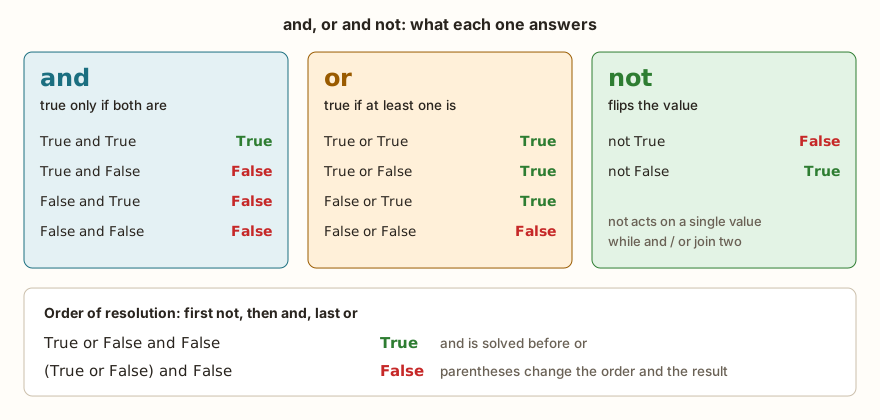
and is true only when both sides are. or is true when at least one side is, and only gives false when both are false. not flips. For three operators, the order in which Python solves them is fixed: first not, then and, last or.
print(True and True, True and False, False or True, False or False, not True, not False)
print(True or False and False, (True or False) and False)
print(not True or True, not (True or True))
print(1 < 2 and 2 < 3, 1 < 2 or 1 / 1 > 0)The first line checks the combinations from the figure: True False True False False True. The second is the one that tends to fool people. True or False and False is True, because the and is solved first: False and False gives False, and True or False gives True. With parentheses, (True or False) and False is False. On the third line, not True or True is read as (not True) or True and gives True, while not (True or True) gives False. Writing conditions with parentheses costs nothing and makes the intention visible, the same advice as in the article on arithmetic operators.
Short-circuiting
Python does not do work it does not need to do. In an and, if the left side is already false, the result is false and the right side is not even calculated. In an or, if the left side is already true, the right one is ignored.
print(False and (1 / 0 > 1))
print(True or (1 / 0 > 1))
divisor = 0
print(divisor != 0 and 10 / divisor > 2)The output is False, True and False, with no error, although 1 / 0 would raise ZeroDivisionError if it were calculated. This allows a very commonly used protection pattern: put on the left the question that guarantees the calculation on the right is safe. On the third line, since divisor != 0 is false, the division 10 / divisor never runs. If the order were reversed, the program would break.
and and or return one of the sides, not just True or False
There is a detail that surprises people coming from other languages: and and or return one of the two original values, not necessarily a boolean. or returns the first value Python considers true, or the last, if none is. and returns the first false value, or the last, if all are true.
print(0 or "default", "" or "anonymous", "Ana" or "anonymous")
print(5 and 7, 0 and 7, 5 or 7, None or 0)
print(not 0, not "", not [], not "0", not 5, not None)The first line gives default anonymous Ana, and shows a practical use: nome or "anonymous" delivers the name when it exists and a default value when it is empty. The second gives 7 0 5 0. The third shows that not always returns a boolean: True True True False False True. The "false" values are zero, the empty text, the empty list and None. Everything else counts as true, including the text "0", which is not empty and so makes not "0" equal to False.
Worked example: recalculating the route
Back to the maps app: it should propose a new route when there is a delay or a blocked road, but only if there is an alternative that the fuel allows. In program language, that is three questions and two logic gates.

minutos_previstos = 30
minutos_agora = 47
via_interditada = False
combustivel_km = 40
distancia_alternativa_km = 55
atraso = minutos_agora > minutos_previstos * 1.25
alternativa_viavel = distancia_alternativa_km <= combustivel_km
recalcular = (atraso or via_interditada) and alternativa_viavel
print(minutos_previstos * 1.25, atraso, alternativa_viavel, recalcular)
print(atraso or via_interditada and alternativa_viavel)
combustivel_km = 60
alternativa_viavel = distancia_alternativa_km <= combustivel_km
print(alternativa_viavel, (atraso or via_interditada) and alternativa_viavel)
via_interditada = True
minutos_agora = 28
atraso = minutos_agora > minutos_previstos * 1.25
print(atraso, via_interditada, (atraso or via_interditada) and alternativa_viavel)The output is 37.5 True False False, True, True True and False True True. On the first line, the delay limit is 37.5 minutes (30 plus 25%), and the trip is already at 47, so atraso is true. But the alternative is 55 km and the fuel only lasts for 40, so alternativa_viavel is false and recalcular ends up False: there is no point proposing an impossible detour.
The second line is the one the diagram shows in red. Without the parentheses, the and is solved first, and the expression becomes "there is a delay, or (the road is blocked and the alternative is viable)". Since there is a delay, the result is True, and the app would send the driver to a detour with no fuel. With the parentheses, the answer is the right one. It is the precedence error from the previous article, now with a consequence.
After refueling (60 km of fuel), the third line shows True True: the alternative becomes viable and recalcular ends up true. The last line changes the scenario: the time is back to normal, atraso is false, but the road became blocked. The result is still True, and it is the or that guarantees this: either of the two reasons is enough.
Choosing between routes
When there are three paths, the decision is to compare the times. The detail is in choosing between < and <=:
tempo_a = 34
tempo_b = 29
tempo_c = 29
print(tempo_a < tempo_b, tempo_b == tempo_c, tempo_b <= tempo_c, min(tempo_a, tempo_b, tempo_c))
print(tempo_b < tempo_a and tempo_b < tempo_c, tempo_b <= tempo_a and tempo_b <= tempo_c)The output is False True True 29 and False True. Route B is the fastest, but ties with C. Asking "is B strictly the best?" (< in both comparisons) gives False, because in a tie neither is better than the other. Asking "is B at least as good as the others?" (<=) gives True. Both questions are right and answer different things, and the error lies in using one when the problem asked for the other.
From the syllabus to a planned semester
- Teaching plan and calendar built automatically
- Class diary ready to paste into SIGA
- Slides and exercise lists with answer keys
Free Community edition · Windows
What changes on the ESP32
The operators behave the same in MicroPython and in Python on the computer. The difference is in two places. The first is the 32-bit float, which already appeared in the article on variables and types: comparing decimals with == can give different answers on each machine, as seen above. On the ESP32 the problem gets bigger, because the value comes from a sensor, and temperature or distance readings almost never repeat exactly. Instead of temperatura == 25.0, write a range: 24.5 <= temperatura <= 25.5. The second place is the error message for a comparison that makes no sense:
| Situation | MicroPython | Python on the computer |
|---|---|---|
"5" < 5 | TypeError: unsupported types for __lt__: 'str', 'int' | TypeError: '<' not supported between instances of 'str' and 'int' |
if x = 5: | SyntaxError: invalid syntax | SyntaxError: invalid syntax. Maybe you meant '==' or ':=' instead of '='? |
== and != never give TypeError: "5" == 5 is simply False. Only the ordering comparisons (<, <=, >, >=) require types that can be ordered against each other. This explains why a program can run for hours with a text in place of a number and only break when it reaches the first ordering comparison.
On the boards, digital readings also enter conditions. The value of a pin read with pin.value() is 0 or 1, and pin.value() == 1 is a comparison like the others. The article on sensors shows how these values arrive from the hardware.
Classroom experience: which route to follow and when to recalculate
There is an activity that works well for fixing these operators, because it starts from something everyone has already lived: the trip to school or to work. The proposal for the class is to list, before writing a line of code, the questions a route app needs to answer. The list that comes out usually has the same format, and each item becomes a condition.
Choosing the best route. The person compares the time of three paths and picks the smallest. It is a min() or a chain of <. The interesting discussion comes from the tie: if two paths take 29 minutes, which of the two is "the best"? The class realizes that the answer depends on a second criterion (distance, toll, traffic lights), and that this is one more and or or in the condition.
Recalculating when something changes. Unforeseen traffic, a closed road, an accident. The program needs a condition that becomes true when any of these reasons appears, and that is an or. The question "is there a possible detour?" is an and: it is only worth detouring if the detour exists and fits in the fuel. The class reproduces the diagram's example with its own numbers.
Not switching routes for just any difference. If the app switched paths every time the other one became a minute faster, the driver would spend the whole trip turning onto other streets. The solution is to compare with a margin:
tempo_rota_atual = 34
tempo_rota_nova = 31
margem = 5
print(tempo_rota_nova < tempo_rota_atual, tempo_rota_nova < tempo_rota_atual - margem)
tempo_rota_nova = 27
print(tempo_rota_nova < tempo_rota_atual, tempo_rota_nova < tempo_rota_atual - margem)The output is True False and then True True. With the new route 3 minutes faster, the simple comparison says "switch" and the one that uses a margin says "stay". Only when the gain exceeds 5 minutes is the switch worth it. The same reasoning holds for a thermostat, which does not turn the fan on and off at every reading that oscillates half a degree, and for any noisy sensor. It is one of the most practical uses of < with a calculation inside.
The same problem on a board. The activity closes when the class swaps the car for a robot with a distance sensor in front and two others on the sides. The questions are the same: is there an obstacle? Can it swerve left? And right? And if neither side is free, the robot stops.
distancia_frente = 15
distancia_esq = 40
distancia_dir = 25
obstaculo = distancia_frente < 20
livre_esq = distancia_esq > 30
livre_dir = distancia_dir > 30
desviar_esq = obstaculo and livre_esq
desviar_dir = obstaculo and not livre_esq and livre_dir
parar = obstaculo and not livre_esq and not livre_dir
print(obstaculo, livre_esq, livre_dir)
print(desviar_esq, desviar_dir, parar)
distancia_esq = 20
livre_esq = distancia_esq > 30
desviar_esq = obstaculo and livre_esq
desviar_dir = obstaculo and not livre_esq and livre_dir
parar = obstaculo and not livre_esq and not livre_dir
print(desviar_esq, desviar_dir, parar)
distancia_dir = 45
livre_dir = distancia_dir > 30
desviar_esq = obstaculo and livre_esq
desviar_dir = obstaculo and not livre_esq and livre_dir
parar = obstaculo and not livre_esq and not livre_dir
print(desviar_esq, desviar_dir, parar)The output has four lines: True True False, True False False, False False True and False True False. The first says there is an obstacle, that the left is free and that the right is not. The second shows the result, and the robot swerves left. With the left at 20 cm, it stops being free and the right remains blocked, so only parar is True. With the right at 45 cm, the detour goes to the right. Notice that each scenario activates exactly one of the three outputs. This is the test the class learns to do: the conditions cannot overlap (two actions at once) nor leave a case out (no action). Whoever forgets the not livre_esq in desviar_dir discovers the problem in the first scenario where both sides are free.
Errors that even people who have programmed for years make
The routes example exposes some of the most common stumbles, and none is exclusive to beginners.
- Forgetting the "no alternative" case. Whoever writes the conditions for left and right usually forgets to say what to do when both fail. The robot goes straight into the wall.
- Conditions that overlap. Two "best" routes at the same time, two true detours. It usually arises from using
<=where<was enough, or from forgetting anot. - Mixing and and or without parentheses. The diagram's case, which shows up in production code. The golden rule: if there are
andandorin the same expression, add parentheses, even if the result coincides with Python's order. - Comparing a decimal with
==. A height, a distance and a temperature that are calculated should never be tested for exact equality. Use a range or a tolerance. - The
orwith a loose value. Whoever writescidade == "SP" or "RJ"imagines they are comparing with two cities. Python reads it as(cidade == "SP") or "RJ", and the text"RJ"is always true. It is the error that goes most unnoticed, and the example is right below.
x = 5
print(x == 1 or 2)
print(x == 5 or 2)
print(x in (1, 2), x in (4, 5))The output is 2, True and False True. For x equal to 5, the first expression does not give False, it gives the number 2, which counts as true in a decision. The fix is to repeat the variable (x == 1 or x == 2) or use in, as on the third line.
Exercise: the route with a toll
There are three paths to the same destination. A takes 34 minutes, B takes 29 and has a toll, and C takes 31. The driver only agrees to pay the toll if the saving over the best toll-free path is at least 5 minutes. Write the two questions in Python: whether the fastest toll-free path is C, and whether B is worth it. Then change B's time to 24 and see whether the answer changes.
Think first: the best toll-free path is the smallest time between A and C. B is worth it when its time is less than or equal to that best minus 5.
tempo_a = 34
tempo_b = 29
tempo_c = 31
sem_pedagio_melhor = tempo_c < tempo_a
b_vale_a_pena = tempo_b <= min(tempo_a, tempo_c) - 5
print(sem_pedagio_melhor, b_vale_a_pena)
tempo_b = 24
b_vale_a_pena = tempo_b <= min(tempo_a, tempo_c) - 5
print(b_vale_a_pena)The output is True False and then True. The best toll-free path takes 31 minutes, and B with 29 only saves 2, so it is not worth it. With 24 minutes the saving rises to 7, and exceeds the margin of 5. A good test is to put B's time at 26, exactly at the limit, and check which of the two comparisons, < or <=, gives the result the statement asks for.
Frequently asked questions
What is the difference between = and ==?
= stores a value in a name: x = 5. == compares two values and answers True or False: x == 5. In an if, using = in place of == gives SyntaxError.
Can I compare a text with a number?
With == and !=, yes: the result is False and True, because they are different types. With <, <=, > and >=, no: Python raises TypeError. Convert first, with int() or float().
Is and the same as &?
No. and is the logical operator, which works with conditions and short-circuits. & is a bitwise operator, which operates on the bits of integers. For conditions, always use and and or.
When should I use is instead of ==?
== compares values. is compares whether two names point to the same object. For day-to-day use, use is only with None (x is None) and == for everything else.
Where to go next
The Logic with Python track has challenges that exercise each comparison. Compare Texts works == with text, Of Legal Age and Even or Odd use >= and == with the remainder of the division, and Range 10–20 demands the range with and. If some concept was left loose, the articles on input and output and on type conversion explain where the values compared here come from.
The next subject is truth tables in practice: how to build, from any expression with and, or and not, the list of all possible cases, and how to use it to check whether two conditions that look different say the same thing.