Fundamentals
Variables and Data Types in Python: int, float, str and bool
What a variable is, how to choose names, what int, float, str, bool and None are, and why the ESP32's decimals give different results from the computer's.
By Prof. Rodrigo Faustino · Updated on · 13 min read
Metrics for this article
- Words
- 2,535
- Characters
- 14,415
- Reading time
- ~13 min
A variable is a name that points to a value stored in memory. The type says what kind of value it is and, as a consequence, what can be done with it. Four types cover almost everything at the start: int for whole numbers, float for numbers with a decimal part, str for text and bool for true or false. Python finds out the type by looking at the value you wrote, and the same name can point to different types along the program.
In the previous articles you already used variables without much ceremony: preco = 3.5, nome = input(...). Here the subject is doing it consciously. Knowing which type is inside each name explains most of the strange results that appear in the first weeks, from the sum that gives 53 to the decimal comparison that works on the computer and fails on the board, or the other way around.
The problem: to the machine, five is not just five
Write 5 in a notebook and the reader knows what to do with it. To the computer there are at least three different things that are written in a similar way: the whole number 5, the decimal 5.0 and the text "5", a character that happens to be a digit. Each one takes up memory in its own way, responds to different operations and appears differently on the screen. The type is what resolves this ambiguity.
A useful image is the label. In a kitchen, the sugar jar has a label that says "sugar". The label is not the sugar, it is just a name stuck on a content. If you remove the label and stick it on another jar, the name now points to something else. In a variable, the name is the label and the value is the content of the jar. The type belongs to the content: sugar is sugar, whatever the label.
From the syllabus to a planned semester
- Teaching plan and calendar built automatically
- Class diary ready to paste into SIGA
- Slides and exercise lists with answer keys
Free Community edition · Windows
Variables: creating, naming and swapping
Creating a variable is writing the name, the = sign and the value. There is no special word to "declare", as in other languages: the variable comes into existence on the first line where it receives a value. That is what the memory figure showed in the first article of the series.
Rules for the name
A variable name can have letters, digits and the underscore _, but it cannot start with a digit, cannot have a space or a hyphen and cannot be a reserved word of the language. Violations show up as syntax errors, and the message does not help much:
2nota = 5          →  SyntaxError: invalid syntax for integer with base 10
class = 5          →  SyntaxError: invalid syntax
nome-completo = 5 → SyntaxError: can't assign to expressionIn the first case, the board read 2nota whole as if it were a number and complained that it is not a valid integer in base 10. In the last, Python read nome - completo as a subtraction, and a subtraction cannot receive a value. Uppercase and lowercase letters are different: total and Total are two names. The simulator also accepted names with accents, such as média, but the convention among programmers is to avoid them and write in ASCII, so the code works in any editor and any terminal.
Python's convention for variable names is snake_case: lowercase letters and words separated by an underscore, such as nota_final and preco_item. Constants, values that do not change during the program, are usually written in uppercase (PI = 3.14159), although Python does not stop you from changing them. The best name is the one that needs no comment: d says nothing, dias_de_atraso says everything.
Swapping the value and swapping the type
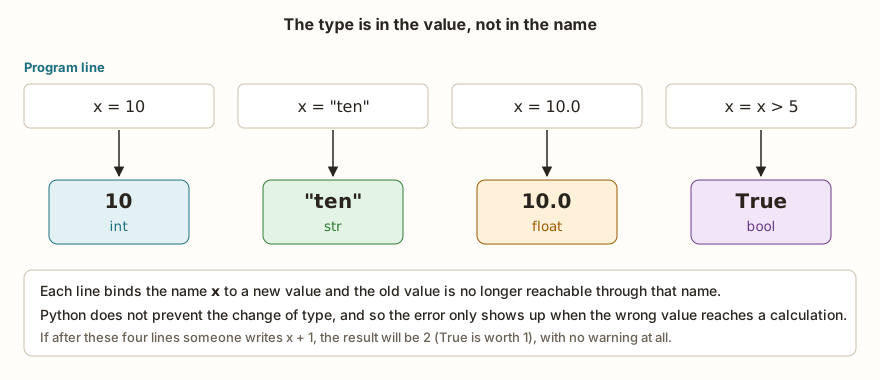
A variable can receive new values as many times as it wants, including of different types. The figure shows four consecutive lines for the same name:
x = 10
print(type(x))
x = "ten"
print(type(x))
x = 10.0
print(type(x))
x = x > 5
print(x, type(x))Python complains about none of the swaps. The flexibility is handy in small programs and dangerous in large ones, because the error only shows up when the wrong value reaches a calculation. After these four lines, for example, x + 1 gives 2 with no warning: True is worth 1 in calculations. A practical rule is to keep the same type in each variable for the whole program, unless there is a good reason.
Two forms of assignment are worth knowing. You can give the same value to several names at once, with a = b = 0, and you can assign several values in parallel, with a, b = 1, 2. The second form lets you swap two values with no helper variable: a, b = b, a. It works because Python calculates everything on the right before storing anything on the left.
The four basic types
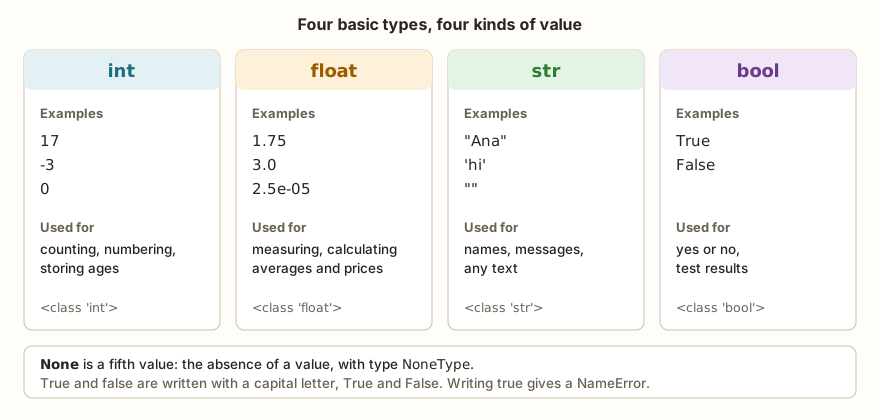
type() function.The type() function shows the type of any value, and it is the first tool when a calculation behaves strangely.
idade = 17
altura = 1.75
nome = "Ana"
aprovado = True
nada = None
print(type(idade), type(altura), type(nome), type(aprovado), type(nada))
print(idade, altura, nome, aprovado, nada)
int: whole numbers
int holds numbers with no decimal part, positive, negative or zero. It is the type of counts, ages, quantities and positions. In Python, an integer does not have a fixed size limit as in other languages: 2 ** 100 calculates 1267650600228229401496703205376 without overflowing, and the only limit is the available memory. The simulator runs that calculation normally. When the calculation involves two integers, the result is an integer, with one exception the operators article will explain: division with / always returns float, even when the calculation comes out even (10 / 2 is 5.0).
float: numbers with a decimal part
float holds numbers with decimal places, written with a point: 1.75, 3.0, 0.001. It also accepts scientific notation, in which 2.5e-5 means 2.5 times ten to the power of minus five. It serves for measurements, averages, prices and any continuous quantity.
Here there is a difference between Python on the computer and MicroPython on the ESP32 that deserves attention. The computer uses a 64-bit float, with about 15 to 17 significant digits. The ESP32 with MicroPython uses 32 bits, with about 7. This changes what appears on the screen and, in some cases, the result of a comparison.

print(0.1 + 0.2)
print(0.1 + 0.2 == 0.3)
print(1 / 3)
print(16777216.0 + 1)
print(1e39)In the simulator, these lines show 0.3, True, 0.33333334, 16777216.0 and inf. In Python on the computer, the same lines show 0.30000000000000004, False, 0.3333333333333333, 16777217.0 and 1e+39. The values in the ESP32 column come from the simulator, which reproduces MicroPython's 32-bit float. Since they have not all been checked on a lab board yet, it is worth repeating the test on a real ESP32 and comparing.
Two points are easy to remember. First, from 16777216 (which is 2 to the power of 24) the 32-bit float can no longer represent all integers, and 16777216.0 + 1 remains 16777216.0. Second, the largest value of the type is about 3.4 times ten to the power of 38. Going past that becomes inf, infinity, instead of generating an error.
In practice, none of these cases matters for a student's grade. It matters when the program adds many times (a clock, an energy accumulator, a sensor read for hours) or compares decimals with ==. The solution is usually one of two: compare with a tolerance, abs(a - b) < 0.0001, or work with integers. For money, the second is the safest:
preco_centavos = 1999
quantidade = 3
total_centavos = preco_centavos * quantidade
print(total_centavos)
print(total_centavos // 100, total_centavos % 100)
print(f"R$ {total_centavos // 100},{total_centavos % 100:02d}")The program stores R$ 19.99 as 1999 cents and only at display time separates reais and cents. The // division returns the whole part of the quotient and % returns the remainder, which are the subjects of the next article in the series. The :02d inside the f-string pads with a leading zero so there are always two digits of cents.
str: text
str holds text between single or double quotes, from one word to a paragraph, including the empty text "". Two operations are enough for now: + joins two texts and * repeats a text, and len("Ana") returns the length, 3. Texts and numbers do not mix in calculations: "5" + 5 is an error, and "5" + "5" is "55". The article on strings, in the data structures module, will show how to slice and transform text.
bool: true or false
bool has only two values, True and False, written with a capital first letter. Writing true in lowercase ends in NameError: name 'true' isn't defined, because Python looks for a variable with that name. bool values appear mainly as the result of comparisons (nota >= 6) and are the fuel of decisions, the subject of module 2.
The most surprising thing is that any value can be treated as a bool. The bool() function converts, and the rule is the same across Python: "empty" or null values become False, and everything else becomes True.
print(bool(0), bool(1), bool(-3))
print(bool(0.0), bool(0.5))
print(bool(""), bool("a"), bool(" "), bool("False"), bool("0"))
print(bool(None))The output shows False True True, False True, False True True True True and False. Zero, the empty text and None give False. The text "0", the text "False" and even a text with a single space give True, because they are texts that are not empty. It also works the other way around: True is worth 1 and False is worth 0 in any numeric calculation, and that is why True + True is 2.
None: the absence of a value
None is the value Python uses to say "there is nothing here". It has its own type, NoneType, and it is what a function returns when it deliberately returns nothing. It often shows up by accident, as you will see in the errors further on.
Errors that even people who have programmed for years make
The scenarios below are not beginner ones. They tend to appear even in experienced people's code, almost always under pressure or tiredness, and in several of them the costliest error is the one that gives no message at all.
The almost identical name
A person with years of practice writes the line that accumulates the total and types a different name by mistake:
total = 10
totl = total + 1
print(total)The program runs with no error and shows 10. Line 2 created a new variable called totl and total was never changed. It is the hardest typo to find, because Python does not tell a new name from a mistake. Editors with name highlighting help, and so does the desk check: the totl column, which should not exist, shows up in the table.
The loose == and the = inside the if
Comparison with == and assignment with = are so alike that people who program in several languages swap them. Writing idade == 18 on a line by itself gives no error: Python calculates the comparison, gets False and throws the result away. The variable remains 17.
idade = 17
idade == 18
print(idade)The Serial shows 17. The inverse error is louder: if idade = 18: ends in SyntaxError: invalid syntax, because inside an if Python expects a comparison and not an assignment.
Overwriting a Python function
Names such as str, input and several others already exist in the language as functions. Nothing stops you from using them as variable names, and the person only finds out when the function disappears:
str = "hi"
print(str)
print(str(5))The first print shows hi, and the second ends in TypeError: 'str' object isn't callable. The same happens with input = "keyboard" followed by input("Name: "). The variable covered the function. The symptom is a message saying "an object cannot be called", and the fix is to rename the variable to something more specific, such as texto or entrada.
The text "False" that is worth True
A value read as text, from a keyboard or a configuration file, arrives as str. If the person then writes if valor: thinking "False" is false, the program enters the if:
valor = "False"
if valor:
print("entered the if")The Serial shows entered the if, because a non-empty text is true, whatever its content. When the data comes from outside, conversion to the right type is an explicit step, and comparing with the text (valor == "True") is more honest than counting on bool().
The decimal comparison that changes with the board
Someone writes a test with == between two decimals, runs it on the computer and sees False, which is the classic answer. On the ESP32, the same line shows True. The opposite also happens: a program that worked on the laptop thanks to the 64 bits stops working on the board because of the 32. The habit that protects you is to compare with a tolerance, never with ==.
The None that got into a calculation
The print() function shows a value, but returns nothing. Storing its result in a variable is a common mistake, and the variable ends up with None:
soma = print("Calculating...")
print(soma)
soma + 1The program shows Calculating..., then None, and ends in TypeError: unsupported types for __add__: 'NoneType', 'int'. The message talks about the type and not the name, and so it is useful to remember that NoneType almost always indicates a variable that received the result of something that did not return a value.
The AI that remembers your life and lives on your computer
- Long-term memory with the source of every answer
- Works offline: your data stays on your PC
- Reads PDFs, slides, photos and meeting recordings
Essential plan free forever
Exercise: the student record
Write a program that stores a student's name (text), age (integer) and grade (decimal), works out whether he passed with a grade of at least 6 and shows each value together with its type. Think about the four variables before writing, and predict which type each one will have.
nome = "Ana"
idade = 17
nota = 7.5
aprovado = nota >= 6
print(nome, type(nome))
print(idade, type(idade))
print(nota, type(nota))
print(aprovado, type(aprovado))The output brings Ana <class 'str'>, 17 <class 'int'>, 7.5 <class 'float'> and True <class 'bool'>. The aprovado variable did not receive True written by hand, it received the result of a comparison, which is always a bool.
To practice prediction, try guessing the type of these expressions and check with type(): 7 / 2, 7 // 2, "7", 7 > 2 and None. The answers, in this order, are float, int, str, bool and NoneType. If you get any wrong, go back to the rule: division with / always gives float, the one with // between integers gives int, and a comparison always gives bool.
Frequently asked questions
Do I need to declare a variable's type?
No. Python infers the type from the value. There is a way to annotate the type in the code (idade: int = 17), but it serves as documentation and the interpreter does not use it to check anything.
What is the difference between 5, 5.0 and "5"?
The first is an int, the second is a float and the third is a str. In a comparison, 5 == 5.0 is True because the numeric value is the same, and 5 == "5" is False, because a number is never equal to a text.
Is the ESP32's float always less precise?
It has fewer significant digits, about 7, against 15 to 17 on the computer. To measure temperature, distance or voltage in a classroom project, 7 digits are plenty. The difference weighs on accumulated calculations and exact comparisons.
Why does Python accept changing a variable's type?
It is what is called dynamic typing: the type is checked at the moment the operation happens, not at the moment of writing. The advantage is speed in trying out ideas. The price is that type errors only show up at run time, such as the TypeError from adding text to a number.
Where to go next
The Logic with Python track has challenges that exercise each type. Sum of Two and Average of Grades work with numbers and conversions. Name Length uses len() on text, and Compare Texts returns a bool. In each one, first write the type you expect for each variable.
The next subject in the series is arithmetic operators, with integer division, the remainder and the precedence of calculations. To see types at work in a hardware project, the article on the ESP32 ADC shows how a voltage becomes a number that the program has to handle with care, and the previous article in the series shows input() always handing over text.