Fundamentals
Arithmetic Operators and Precedence in Python: /, //, % and **
Learn to use +, -, *, /, //, % and ** in Python, the order in which calculations are solved and the precedence errors that fool even experienced programmers.
By Prof. Rodrigo Faustino · Updated on · 12 min read
Metrics for this article
- Words
- 2,216
- Characters
- 12,732
- Reading time
- ~12 min
Python has seven arithmetic operators: +, -, *, /, //, % and **. The first four are the usual ones. The other three deserve attention: / returns the division with decimals, // returns only the whole part of the division, % returns the remainder, and ** raises to a power. When a calculation mixes several operators, Python solves the powers first, then the multiplications and divisions, left to right, and last the additions and subtractions. Parentheses change this order.
It seems like little, and it is little, but almost every program that does any calculation depends on getting these rules right. An average calculated with the wrong precedence gives no error, it gives a plausible and wrong number, and that is much worse than a red message. This text shows each operator with what it answers, the order of calculations and the errors that tend to appear, even in the code of people with plenty of miles on the road.
The problem: the head's calculation and the computer's calculation
When you read 8 + 6 / 2, your head solves it in the right order without asking permission: six divided by two is three, eight plus three is eleven. School math taught that priority, and Python follows the same one. The problem appears when the intention was different. If the idea was the average of 8 and 6, the correct calculation is (8 + 6) / 2, which gives 7. Without the parentheses Python calculates 8 + 3, which gives 11, and complains about nothing.
This is the kind of error no message warns about. To the computer, a + b / 2 is a perfectly valid expression. Whether it represents the average is something only you know. That is why knowing the order of resolution is not an exam detail: it is the difference between a program that does the calculation you imagined and one that does another.
The AI that remembers your life and lives on your computer
- Long-term memory with the source of every answer
- Works offline: your data stays on your PC
- Reads PDFs, slides, photos and meeting recordings
Essential plan free forever
The seven operators
| Operator | Name | Example | Result |
|---|---|---|---|
+ | addition | 7 + 2 | 9 |
- | subtraction | 7 - 2 | 5 |
* | multiplication | 7 * 2 | 14 |
/ | division | 7 / 2 | 3.5 |
// | integer division | 7 // 2 | 3 |
% | remainder of the division | 7 % 2 | 1 |
** | power | 7 ** 2 | 49 |
print(7 + 2, 7 - 2, 7 * 2, 7 / 2, 7 // 2, 7 % 2, 7 ** 2)
print(17 / 5, 17 // 5, 17 % 5)
print(divmod(17, 5))
print(10 / 2, type(10 / 2), 10 // 2, type(10 // 2))
print(7.0 // 2, 7 // 2.0, 7.5 % 2)The first line shows the seven results from the table. The second and third reappear right below. The fourth confirms a rule from the previous article: 10 / 2 is 5.0, a float, even when the calculation comes out even, and 10 // 2 is 5, an int. The last shows that // and % also work with decimals, but the result of // is still a value "rounded down", now in the form of a float (3.0).
Three divisions, three questions
Dividing 17 by 5 has three answers, and each operator gives one of them.
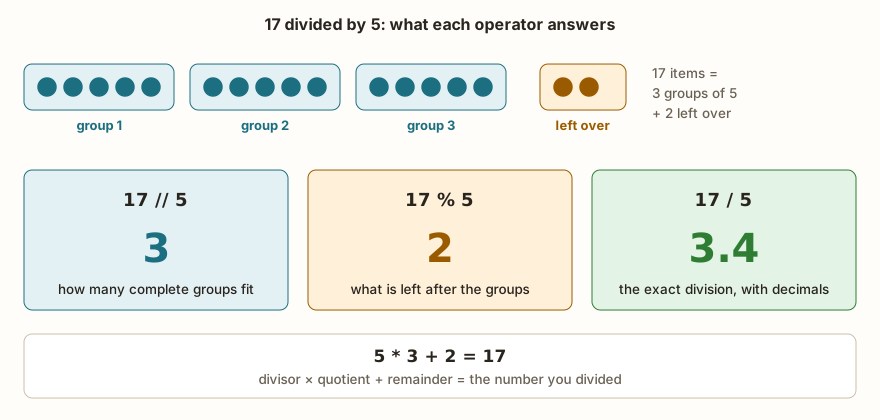
// answers "how many complete groups of 5 fit in 17": three. % answers "what is left after those groups": two. / answers "what the exact division comes to": 3.4. The three answers are related by an identity that serves as a check: 5 * 3 + 2 gives 17 again. The divmod(17, 5) function returns the quotient and the remainder at once, as the pair (3, 2).
When to use each depends on the question. To divide 47 stickers among 6 friends, // says how many each one gets (7) and % says how many are left (5). To calculate an average, / is the right one, because the answer has decimals.
Negative numbers: rounding is downward
// does not "cut off" the decimal part: it rounds to the smaller integer. With positive numbers that is the same thing. With negatives, it is not:
print(-7 // 2, -7 % 2)
print(7 // -2, 7 % -2)
print(-7 // 2, int(-7 / 2))
print(-7 % 3, 7 % 3)The output shows -4 1, -4 -1, -4 -3 and 2 1. Notice the third line: -7 // 2 gives -4, and int(-7 / 2) gives -3, because int() cuts off the decimal part instead of rounding down. The two forms look like the same operation and give different answers. In Python, the remainder % has the same sign as the divisor, and that is what makes -7 % 3 equal 2 and not -1. This choice keeps the identity divisor * quotient + remainder = dividend always true.
The remainder serves more than it seems
% is one of the most useful operators in programming, and almost all its uses revolve around cycles. The remainder of the division by 2 says whether a number is even (n % 2 == 0). The remainder by 24 makes a clock wrap around: after 22 o'clock, plus 5 hours, it is 3 in the morning, and (22 + 5) % 24 is 3. The remainder by 7 does the same with the days of the week. And (0 - 1) % 7 is 6: going back one day from Sunday leads to Saturday, with no special calculation for the negative case.
Power and root
** raises a number to a power: 2 ** 10 is 1024. The exponent can be negative (2 ** -1 is 0.5) or fractional (16 ** 0.5 is 4.0, the square root). For the square root, the math module has its own function, math.sqrt(16), which also returns 4.0. There are also math.floor(), which rounds down, and math.ceil(), which rounds up.
import math
print(math.sqrt(16), math.floor(3.7), math.ceil(3.2), math.floor(-3.2))
print(abs(-5), abs(-2.5), pow(2, 10), min(3, 1, 2), max(3, 1, 2))
print(round(3.14159, 2), round(2.5), round(3.5), round(7.0))The abs(), pow(), min(), max() and round() functions already come with Python and need no import. A surprise in round(): round(2.5) gives 2 and round(3.5) gives 4. When the number is exactly in the middle, Python rounds to the nearest even integer. Whoever comes from another language, or remembers the school rule, expects 3 in both cases.
From the syllabus to a planned semester
- Teaching plan and calendar built automatically
- Class diary ready to paste into SIGA
- Slides and exercise lists with answer keys
Free Community edition · Windows
The order in which calculations are solved
When an expression has more than one operator, Python follows a fixed order, from the one that "sticks strongest" to the one that sticks least.
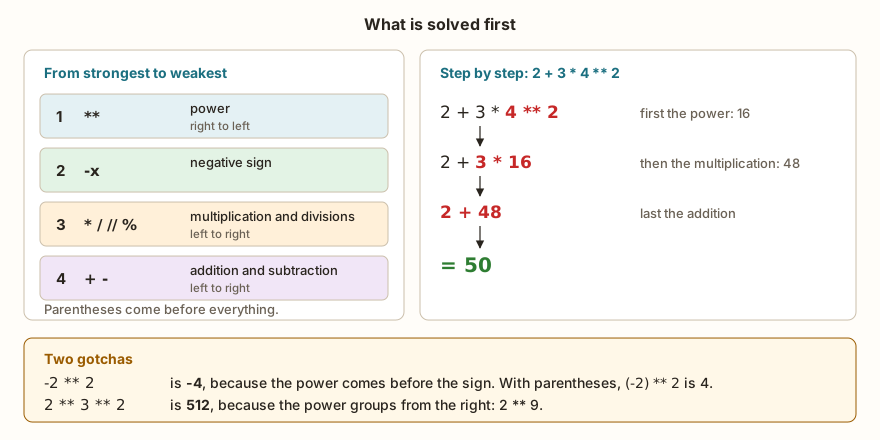
First comes the power, then the negative sign, then multiplications and divisions (*, /, // and %, all on the same level), and last addition and subtraction. Operators of the same level are solved left to right. That is why 10 - 2 - 3 is 5 (first 10 - 2, then 8 - 3), and 8 / 2 * 4 is 16.0, not 1.0: Python divides first and multiplies afterward.
print(2 + 3 * 4)
print((2 + 3) * 4)
print(2 + 3 * 4 ** 2)
print(-2 ** 2, (-2) ** 2)
print(2 ** 3 ** 2, (2 ** 3) ** 2)
print(10 - 2 - 3, 10 - (2 - 3))
print(8 / 2 * 4, 8 / (2 * 4))
print(10 % 4 * 2, 10 % (4 * 2))The power is the exception to the left-to-right rule: it groups from the right. So 2 ** 3 ** 2 calculates 3 ** 2 first, which gives 9, and then 2 ** 9, which gives 512. And -2 ** 2 is -4, not 4, because the power is solved before the sign, which acts only on the result. In both cases, whoever writes the calculation almost always wanted something else. When in doubt, use parentheses: they cost nothing, make the intention visible to whoever reads later and are never wrong.

Augmented assignment
When the calculation updates its own variable, Python offers a short form. Instead of x = x + 5, you write x += 5. There is a version for each operator.
x = 10
x += 5
print(x)
x -= 3
print(x)
x *= 2
print(x)
x //= 5
print(x)
x **= 2
print(x)
x %= 7
print(x)
x /= 2
print(x)The output is 15, 12, 24, 4, 16, 2 and 1.0. Notice the last value: /= turned the integer into a float, because division with / always returns a decimal. Python has no x++ or x--, which exist in C and Java. Whoever tries to write x++ gets SyntaxError: invalid syntax, and the correct form is x += 1.
What changes on the ESP32
The operators behave the same in MicroPython and in Python on the computer, with one difference that has already appeared in the series: the ESP32's float has 32 bits. Calculations with decimals, therefore, can give different results.
print(100 * 1.1)
print(0.1 * 3)
print(7 / 3)
print(2 ** 100)In the simulator, these lines show 110.0, 0.3, 2.3333332 and 1267650600228229401496703205376. In Python on the computer, the first three show 110.00000000000001, 0.30000000000000004 and 2.3333333333333335. Integers, like the one on the fourth line, do not have this problem: the precision is exact and limited only by memory. The article on variables and types has the full table of this difference.
The division-by-zero error messages also change. For 10 / 0, 10 // 0 and 10 % 0, MicroPython always shows ZeroDivisionError: divide by zero. Python on the computer distinguishes: division by zero, integer division or modulo by zero, integer modulo by zero and, with decimals, float division by zero. The cause is the same: the divisor was zero. When the program receives the divisor from outside (from an input(), a sensor, the size of a list), it is worth protecting the calculation with a decision, the subject of the next module.
Worked example: seconds into hours, minutes and seconds
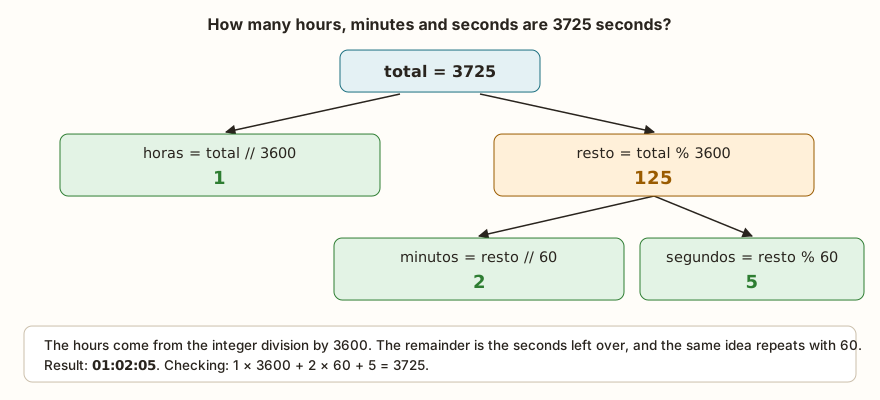
A classic use of // and % together is converting a total of seconds into hours, minutes and seconds. The idea applies to any unit conversion in which a larger quantity is split into smaller ones.
total = 3725
horas = total // 3600
resto = total % 3600
minutos = resto // 60
segundos = resto % 60
print(horas, minutos, segundos)
print(f"{horas:02d}:{minutos:02d}:{segundos:02d}")// with 3600 says how many complete hours there are in 3725 seconds: one. % with 3600 keeps what was left over: 125 seconds. With that remainder, the same pair repeats: // 60 gives 2 minutes and % 60 gives 5 seconds. The :02d inside the f-string pads with a leading zero, and the output becomes 01:02:05. To check, go back the other way: 1 * 3600 + 2 * 60 + 5 gives 3725.
Precedence and operator errors that even people who have programmed for years make
The scenarios below are not only for beginners. They appear in experienced people's code, usually from haste or from a habit brought from another language.
The average without parentheses
Someone writes the average of two grades in a hurry: media = nota1 + nota2 / 2. With the grades 7 and 8, the program shows 11.0, an average larger than both grades, which should already raise an alarm. With the parentheses, (nota1 + nota2) / 2 shows 7.5. The error survives because the calculation runs with no message, and is often only noticed when someone checks the result with a calculator.
The ^ that is not a power
In several languages and on calculators, the caret represents the power. In Python, 2 ^ 3 is not eight. It is a bitwise operator called "exclusive or", and the result is 1. The program keeps running and the number is wrong. The power in Python is always **. The other bitwise operators exist (&, |, << and >>) and are important for anyone working with hardware, but they do not do math.
The remainder with a different sign
Whoever works with C, Java or JavaScript gets used to -7 % 3 being -1. In Python, it is 2. If a program is translated from one of those languages without attention to this, cycle calculations (days of the week, position in a circular buffer) start giving different values only when the number is negative, which makes the defect hard to find: the program passes every test with positive numbers.
The int() in place of //
Another case of language of origin. Whoever wants to "divide and keep the whole part" writes int(a / b). With positives, the result is the same as a // b. With negatives, it is not: we have already seen that int(-7 / 2) is -3 and -7 // 2 is -4. Before swapping one for the other, decide which behavior the problem asks for.
The x++ and implicit multiplication
Two syntax errors that keep repeating. The first is x++, which ends in SyntaxError: invalid syntax. The second is writing 2(3 + 4) as in math, expecting the number touching the parentheses to multiply. Python understands this as a function call, and the result is TypeError: 'int' object isn't callable. Multiplication always asks for the *: 2 * (3 + 4).
Exercise: change in bills
A cashier needs to give back R$ 289 in bills of 50, 20, 10, 5 and 2 reais, using the smallest number of bills. Write the program that shows how many bills of each value. Think first about the idea: how many 50 bills fit in 289, what is left, and the same question for the next bill.
valor = 289
n50 = valor // 50
valor = valor % 50
n20 = valor // 20
valor = valor % 20
n10 = valor // 10
valor = valor % 10
n5 = valor // 5
valor = valor % 5
n2 = valor // 2
valor = valor % 2
print("50:", n50, "20:", n20, "10:", n10, "5:", n5, "2:", n2, "left:", valor)The output is 50: 5 20: 1 10: 1 5: 1 2: 2 left: 0. Each // and % pair repeats the reasoning from the seconds: the quotient is the number of bills and the remainder is what is left for the next bill. Test with other values. The left shows what could not be paid with these bills, and with valor = 1 you see the result left: 1. Then, try rewriting the program using divmod() at each step.
Frequently asked questions
Why does / return 5.0 and not 5?
Because division with / always returns float, even when both parts are integers and the calculation is exact. That way the type of the result does not depend on the values. If you need an integer, use //.
What is the difference between ** and pow()?
For two arguments, none: 2 ** 10 and pow(2, 10) give 1024. The operator is shorter and goes in the precedence table; the function is useful for passing as an argument to other functions.
Does Python have ++ and --?
No. Use += 1 and -= 1. ++ exists in the syntax of C and Java, and in Python it would be read as two plus signs in a row, which makes no sense.
Do I need to memorize the precedence table?
Only the order of the four levels, which is that of math. For everything that is not obvious, parentheses solve it. Python's full table has more levels (comparisons, logical operators and others), and they appear in the next articles, one module at a time.
Where to go next
The Logic with Python track has challenges that use each operator. Simple Multiplication is the warm-up, Integer Division and Remainder of the Division exercise // and %, and Weighted Average demands precedence with parentheses.
The next subject in the series is type conversion: int(), float(), str() and the errors that appear when the text does not have the form of a number. Before it, it is worth rereading the article on input and output, because the calculations in this text make more sense when the values come from input().