Fundamentals
Type Conversion in Python: int(), float(), str() and the Most Common Errors
Learn int(), float() and str() in Python, how to turn the text from input() into a number and how to read ValueError and TypeError when a conversion fails.
By Prof. Rodrigo Faustino · Updated on · 16 min read
Metrics for this article
- Words
- 3,186
- Characters
- 18,203
- Reading time
- ~16 min
Converting one type into another, in Python, is asking a function to build a new value from a value you already have. int() returns an integer, float() returns a decimal, str() returns a text and bool() returns true or false. The most important conversion at the start is the one for input(): it always hands over text, so to do arithmetic with what the person typed, you need to pass it through int() or float(). And that conversion fails with ValueError when the text does not have the form of a number.
It seems like a detail, but it is the source of a good part of the errors of beginners and of some of those who have been programming for a while. This article shows what each conversion accepts and what it refuses, the difference between cutting and rounding, how to handle the number the user types with a comma, what changes on the ESP32 and which problems repeat most in the classroom.
The problem: the text that looks like a number
In the article on input and output the rule appeared that input() always returns a str. Whoever reads that once tends to forget it, and the forgetting shows up like this:
a = input("A: ")
b = input("B: ")
print(a + b)
print(int(a) + int(b))
print(a * 3)Typing 7 and 8, the output on the Serial is this:
A: 7
B: 8
78
15
777The first calculation did not add: it joined two texts, "7" and "8", and formed "78". The third did not multiply: it repeated the text three times. Only the second line did the calculation that was imagined, because each value went through int() before the +. Python has no way of guessing that "7" was meant to be a number. The text "7" and the number 7 are different things in memory, and + looks at the type to decide what to do.
That is why input() does not return a number directly: whoever types may be giving a name, a password, a date or an age, and only the programmer knows which hypothesis holds. Text is the common denominator, and the conversion is left to whoever writes the program.
The AI that remembers your life and lives on your computer
- Long-term memory with the source of every answer
- Works offline: your data stays on your PC
- Reads PDFs, slides, photos and meeting recordings
Essential plan free forever
The four conversions
| Function | What it returns | Example | Result |
|---|---|---|---|
int() | whole number | int("42") | 42 |
float() | decimal number | float("3.5") | 3.5 |
str() | text | str(42) | "42" |
bool() | true or false | bool("x") | True |
print(int("42"), int(3.9), float("3.5"), float(7), str(42), bool("x"))
print(int(" 42 "), int("-5"), int("+5"), int("007"))
print(float(" 2.5 "), float("1e3"), float("3"))
print(str(3.0), str(True), str(None))
print(type(int("42")), type(str(42)))
print(int("ff", 16), int("101", 2))The output shows 42 3 3.5 7.0 42 True on the first line. Notice that int(3.9) is 3 and not 4: converting from decimal to integer cuts off the decimal part, with no rounding. The second line shows that int() tolerates spaces at the ends, accepts a sign and ignores leading zeros: the result is 42 -5 5 7. The third shows the same for float(), which also understands scientific notation: float("1e3") is 1000.0. The last line uses int()'s second argument, the base. int("ff", 16) reads the text as hexadecimal and gives 255, and int("101", 2) reads it as binary and gives 5. For anyone working with registers and bit masks on the ESP32, this comes up early.
What int() and float() accept and what they refuse
Both functions read the text with fixed rules. They accept digits, an optional sign at the start and spaces at the ends. float() also accepts the decimal point and the exponent. Everything that departs from this is refused with ValueError.

Four cases deserve to be memorized, because they are the ones that bring programs down the most. The first is int("3.5"): the text has a point, and int() only accepts digits, so it errors, although int(3.5) with the number directly works and returns 3. The second is the empty text, int("") or float(""), which is what arrives when someone presses Enter without typing anything. The third is text with junk at the end, like int("12abc"). The fourth is the space in the middle, int("4 2"): the ends are tolerated, the middle is not.
And there is a fifth, which is not ValueError, but TypeError: int(None). None is neither text nor number, and Python does not know what to do with it. This usually happens when a function returns None because the return was forgotten and the result is passed straight to int().
str() and joining with text
str() takes the opposite path: it turns any value into text, which is necessary when you want to join a number to a sentence with +. Without the conversion, Python refuses the calculation.
n = 7
print("You are " + str(n) + " years old")
print("You are", n, "years old")
print(f"You are {n} years old")
print("5" * 2, int("5") * 2)
print(str(3) + str(4), 3 + 4)
print(len(str(12345)), len(str(-12)))
print(str(12345)[0], int(str(12345)[0]) + 1)The first three lines show the same sentence, You are 7 years old, in three ways. The print() comma and the f-string convert on their own, and only + demands str(). The fourth line repeats the lesson from the start: "5" * 2 is 55 and int("5") * 2 is 10. The fifth shows 34 against 7. The last two use an idea that shows up in exercises: turning a number into text to look at its digits. len(str(12345)) is 5, the number of digits, and str(12345)[0] is the text "1", the first digit, which becomes a number again with int() and adds 1 to give 2.
bool() and the surprise of the text "False"
bool() returns False for what is empty or zero (0, 0.0, "", [], None) and True for the rest. The uncomfortable consequence is that the text "0", the text "False" and even a space are all true, because none of them is empty. If you read an answer with input() and pass it through bool(), the user who types False will get True. The decision about what to do with text answers is left for the next module of the series, which deals with if and comparisons.
Implicit and explicit conversion
In some calculations Python converts on its own, and in others it refuses. It is worth knowing the difference, because the error always comes from the same place: expecting an automatic conversion that does not exist.
print(3 + 4.0, type(3 + 4.0))
print(True + 1, type(True + 1))
print(5 == 5.0, "5" == 5, 1 < 2.5)
print(int("5") + 5, "5" + str(5))The output has 7.0 <class 'float'> on the first line. When mixing an integer with a decimal, Python promotes the integer to float and returns a decimal. On the second line, True + 1 is 2, because the boolean behaves like the integer 1 in a calculation. The third shows that 5 == 5.0 is true, but "5" == 5 is false: the text and the number are never equal, even if they are written the same. The last line shows the two ways to resolve a mix: convert the text to a number and add (10), or convert the number to text and join (55).
The rule that sums it all up: Python converts on its own from integer to decimal and from boolean to integer inside a calculation. Between text and number, never. That conversion has to be written in the code, and that is why it is called explicit conversion.
int() cuts, round() rounds, // goes down
The conversion from decimal to integer has three paths, and they give different answers.
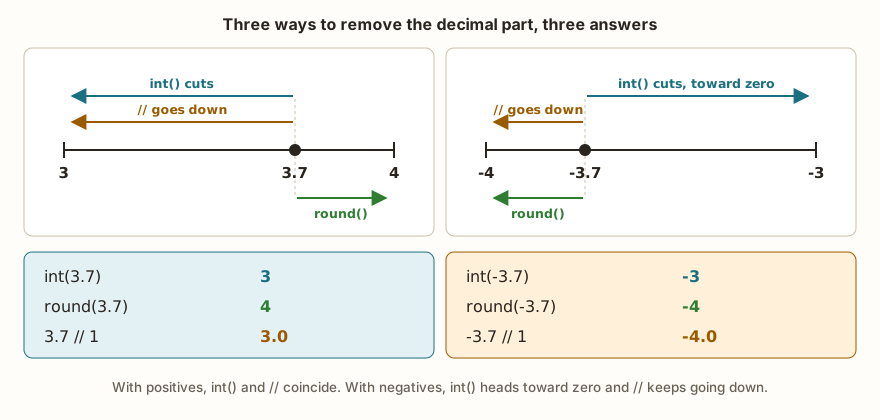
print(int(3.7), round(3.7), 3.7 // 1)
print(int(-3.7), round(-3.7), -3.7 // 1)
print(round(3.5), round(4.5), round(-2.5))
print(type(round(3.7)), type(round(3.7, 1)), type(3.7 // 1))The first line gives 3 4 3.0: int() cut, round() went to the nearest integer and // went down, keeping the float type. The second line, with the negative number, shows the difference that goes unnoticed with positives: -3 -4 -4.0. int() goes toward zero, and // keeps going down. The third line repeats the surprise already seen in the article on arithmetic operators: round(4.5) is 4 and round(-2.5) is -2, because, exactly halfway between two integers, Python picks the even one. The last line shows that round(x) with one argument returns int, but round(x, 1) with two decimal places returns float, and that // with decimals returns float.
In practice, the question that picks the tool is: "what do I want to do with the decimal part?". To discard it, int(). To reach the nearest integer, round(). For the largest integer that does not exceed the number, // or math.floor().
From the syllabus to a planned semester
- Teaching plan and calendar built automatically
- Class diary ready to paste into SIGA
- Slides and exercise lists with answer keys
Free Community edition · Windows
Converting what comes from input()
The most common usage pattern puts the two functions on one line:
idade = input("Age: ")
print(type(idade))
idade = int(idade)
print(type(idade), idade + 1)Typing 17, the output is:
Age: 17
<class 'str'>
<class 'int'> 18In practice, the conversion and the reading usually stay together: idade = int(input("Age: ")). Reading that line goes from the inside out. First input() shows the question and returns the text. Then int() receives that text and returns the number. Only at the end does the name idade point to the integer. The original text disappears, because no name was left pointing to it.
The Brazilian decimal comma
Whoever types a grade in Brazil writes 7,5. float("7,5") gives ValueError, because Python only knows the point as a decimal separator. The way out is to replace the comma with a point before converting, with the .replace() method:
n1 = float(input("Grade 1: ").replace(",", "."))
n2 = float(input("Grade 2: ").replace(",", "."))
print("Average:", (n1 + n2) / 2)With 7,5 and 8 as input:
Grade 1: 7,5
Grade 2: 8
Average: 7.75
The chain input(...).replace(",", ".") reads the text and already swaps the comma; the outer float() converts. The swap is harmless for whoever typed with a point, because if there is no comma the text passes unchanged. The reverse path, to show the result with a comma, also exists: str(7.5).replace(".", ",") gives 7,5.
The same goes for a value that comes with a symbol. The text "R$ 12,50" needs to lose the "R$ " and gain the point before float(), and that is written with two .replace() calls in a row, which give 12.5.
When the text is not a number
If the person types three when the program asks for a number, the conversion raises the error and the program stops:
n = int(input("How many? "))How many? three
Traceback (most recent call last):
File "main.py", line 1, in <module>
ValueError: invalid syntax for integer with base 10The message points to the line, but does not show the text that failed. This is one of the points where MicroPython is more economical than Python on the computer, as the table below details. For programs that need to survive what the user types, there are two defenses, and the series returns to them calmly further on.
The first is to ask the text whether it is made only of digits, with the .isdigit() method, and to remove the spaces at the ends with .strip():
print("42".isdigit(), "-5".isdigit(), "3.5".isdigit(), "".isdigit(), "abc".isdigit())
print(" 7 ".isdigit(), " 7 ".strip().isdigit())The output is True False False False False on the first line and False True on the second. .isdigit() only accepts digits, so it refuses negatives and decimals, and .strip() takes care of the space left over from the keyboard. It is a filter for positive integers, and nothing more.
The second defense is to try to convert and react to failure. The try block runs the code that may fail, and except ValueError says what to do if the failure is that error:
texto = "3.5"
try:
    n = int(texto)
except ValueError:
    n = 0
print(n)Here the output is 0. Swapping texto for "42", the output becomes 42. The subject gets its own article further on in the series, along with the other kinds of error. For now, it is enough to know that try exists and that it catches exactly the ValueError from int() and float().
What changes on the ESP32
The behavior of conversions is the same in MicroPython and in Python on the computer. The error messages change and, because of the 32-bit float, so do some results of calculations with decimals.
| Situation | MicroPython | Python on the computer |
|---|---|---|
int("3.5") | ValueError: invalid syntax for integer with base 10 | ValueError: invalid literal for int() with base 10: '3.5' |
float("abc") | ValueError: invalid syntax for number | ValueError: could not convert string to float: 'abc' |
int(None) | TypeError: can't convert NoneType to int | TypeError: int() argument must be a string, a bytes-like object or a real number, not 'NoneType' |
5 + "5" | TypeError: unsupported types for __add__: 'int', 'str' | TypeError: unsupported operand type(s) for +: 'int' and 'str' |
"a" < 1 | TypeError: unsupported types for __lt__: 'str', 'int' | TypeError: '<' not supported between instances of 'str' and 'int' |
The difference that gets in the way most when debugging is the first one: Python on the computer shows the text that failed ('3.5'), and MicroPython does not. When the ValueError appears on a board, print the text before converting, with print(repr(texto)). repr() shows the quotes and makes visible the spaces and the empty text, which normal reading hides.
The cents calculation
The second difference is subtler and affects whoever works with money. Converting with int() a calculation that came out a hair below the exact value takes away a cent, and the "a hair below" calculation depends on how many bits the float has.

print(19.99 * 100)
print(int(19.99 * 100))
print(round(19.99 * 100))
print(int(0.29 * 100), round(0.29 * 100))
print(int((0.1 + 0.7) * 10), round((0.1 + 0.7) * 10))In the simulator, the output is 1999.0, 1999, 1999, 29 29 and 8 8. In Python on the computer, the same lines show 1998.9999999999998, 1998, 1999, 28 29 and 7 8. The computer's 64-bit float cannot store 19.99 exactly, and the multiplication by 100 leaves a tiny remainder below 1999. int() cuts off that remainder and loses a cent. On the ESP32, the float has fewer bits, the internal rounding falls on the other side and the calculation closes at 1999.
It is not a case where the ESP32 gets it right and the computer gets it wrong. The number 19.99 does not exist exactly on either machine, and a program that depends on the calculation landing on the right side is wrong on both, only the defect shows up in different places. Two ways out really solve it. The first is to swap int() for round(), which gives 1999 on both machines. The second is to never store money as a decimal: store cents as an integer (1999) and only divide by 100 when displaying. Python integers are exact.
Problems that appear in the classroom
The problems below repeat from class to class and from year to year. Whoever teaches programming recognizes each one, and whoever is learning tends to go through several.
The comma the student types
Someone asks the user for the grade, types 7,5 to test their own program and sees the ValueError. The reaction is to think float() is broken, because, after all, "7,5 is a number". The error is in the expectation: Python only recognizes the point. The way out is the .replace(",", ".") seen above, and it is worth turning that into a habit of every decimal reading.
The Enter pressed to see what happens
The program runs well in the tests, with all the nice values. When showing it to a classmate, the classmate presses Enter without typing anything, and int("") brings the program down with ValueError. It is the easiest error to provoke and one of the most forgotten at test time. A good testing habit is, before handing in, to run the program and press Enter on every question.
The decimal where only an integer fit
Whoever writes idade = int(input("Age: ")) and types 17.5 gets ValueError, and is surprised, because they have the impression that int() "converts any number". It converts number into number. Text with a point is not an integer. If the program needs to accept both, the way is to read as a decimal and then decide what to do with the decimal part: int(float(texto)) cuts, and round(float(texto)) rounds.
The conversion result thrown away
This is the error of someone who believes int() transforms the variable:
idade = "17"
int(idade)
print(idade + 1)Traceback (most recent call last):
File "main.py", line 3, in <module>
TypeError: unsupported types for __add__: 'str', 'int'Line 2 calls int(), which returns the number 17, and that number goes nowhere. The variable idade keeps pointing to the text. The function returns a new value and does not alter the old one. The fix is to store the result: idade = int(idade). The same goes for str(), float() and almost every text method.
The 53 in place of 8
No error, just the wrong result: the program asks for two numbers, adds them and shows 53 instead of 8. The error lies in the missing conversion, and since the program runs without complaint, it is the one that takes longest to be found by beginners. The fastest diagnosis is to print the type, print(type(a)), or the value with quotes, print(repr(a)). If '5' appears in quotes, it is text.
Converting only one of the two
Someone remembers to convert the first value and forgets the second: int(a) + b. The result is the TypeError from the table above, unsupported types for __add__: 'int', 'str'. The message is correct, but does not say which of the two variables is text, and it is common to look at the wrong variable. When the TypeError appears in a sum, check the type on both sides.
int() used as round()
Whoever converts a grade of 6.9 with int(6.9) and gets 6 usually thinks Python got it wrong. The conversion cut, as it always does. In average, discount and percentage calculations, the choice between cutting and rounding changes the final result and must be a decision, not an accident. When writing int(...) in a calculation, it is worth asking yourself whether the "downward" is really what the problem asks for.
Exercise: the restaurant bill
A restaurant charges 10% for service. Write a program that reads the bill amount as the user types it, with a comma, and shows the total with service, with two decimal places and with a comma. Think first about the steps: read the text, swap the comma, convert, multiply by 1.10, round and swap the point back to a comma.
texto = input("Bill amount: ")
valor = float(texto.replace(",", "."))
total = valor * 1.10
print("Total with 10%:", round(total, 2))
print("Total with 10%:", str(round(total, 2)).replace(".", ","))
centavos = round(valor * 100)
print(centavos, centavos * 110 // 100)With 47,90 as input, the output is:
Bill amount: 47,90
Total with 10%: 52.69
Total with 10%: 52,69
4790 5269The first line shows the result with a point, which serves Python. The second turns the number into text, swaps the point and shows 52,69, as the user expects to read it. The last two lines do the same calculation in whole cents: round(valor * 100) gives 4790, and 4790 * 110 // 100 gives 5269. Notice that round() appears again in the conversion to cents, for the reason in the previous section. Test with 47 (no comma at all), with abc and with the empty field, to see what happens in each case and check whether the program does what the user expects.
Frequently asked questions
Why does int("3.5") give an error and int(3.5) does not?
Because they are two inputs of a different nature. With the number, int() cuts off the decimal part. With the text, it tries to read an integer written in digits, and the point is not a digit. To convert "3.5" into an integer, go through float() first: int(float("3.5")) gives 3.
Do I need to convert to show a number with print()?
No. print() accepts any type and converts on its own to show it. Conversion with str() is only mandatory when you join the number to a text with the + sign.
How do I show a decimal with two decimal places?
With the f-string: f"{x:.2f}". For x = 52.69, it shows 52.69. The :.2f does not change the value, only the way of showing it. If you need the rounded value to keep calculating, use round(x, 2).
Does float() accept the comma if I change the computer's setting?
No. Python does not consult the regional setting to read a number. The point is always the decimal separator in the code and in conversions, and .replace() is the way to handle input in Portuguese.
Where to go next
The Logic with Python track has challenges that demand exactly these conversions. Sum of Two and Double of a Number are the warm-up with int(input()), Average of Grades combines conversion and division, and 10% Discount demands care with decimals. If some point was left loose, reread the article on variables and types, which explains the four types that appear here in motion, and the text on arithmetic operators.
The next subject in the series opens the decision module: relational and logical operators, ==, <, and, or and not. With them, the program stops repeating the same sequence always and starts choosing the path according to the value that was just converted.