Fundamentals
Input and Output in Python: print() and input() in Practice
Learn to show results with print() and to read data from the keyboard with input(): sep, end, f-strings, the text input() returns and the most common errors.
By Prof. Rodrigo Faustino · Updated on · 12 min read
Metrics for this article
- Words
- 2,371
- Characters
- 13,349
- Reading time
- ~12 min
print() shows values on the Serial, the text channel the program uses to talk to whoever runs it. input() does the opposite: it stops the program, waits for the person to type a line and press Enter, and returns what was typed. There is a rule worth remembering from now on: input() always returns text, even if the person types only numbers.
The two commands form the program's border with the world. Everything a program receives comes in through some input door, and everything it produces goes out through some output door. We saw in the article What an Algorithm Is and How Python Runs Your Program that every algorithm has an output. Here you learn to control that output and to open the input door, so the same program serves different values without having to be rewritten.
The problem: the program that only knows one answer
A program that calculates the double of 21 has the 21 written inside the code. It works, but it only solves that problem. To calculate the double of another number, someone has to open the file, find the 21, change the value and run again. With data input, the program asks, receives the answer and calculates with it. The code does not change and the answer changes with each run.
The same goes for the output. A program that works out the change from a purchase but shows nothing is useless to whoever uses it, and one that shows a bare 14.0, without saying what it is, forces the person to guess. Building a clear message is part of the job, and print() has features for that which most beginners only discover after months.
The AI that remembers your life and lives on your computer
- Long-term memory with the source of every answer
- Works offline: your data stays on your PC
- Reads PDFs, slides, photos and meeting recordings
Essential plan free forever
print(): showing values
The simplest use is to pass a value in parentheses. Text goes between quotes, and numbers and variables go without quotes. To show several values on the same line, separate them with commas: print() puts a space between them.
print("a", "b", "c")
print("a", "b", "c", sep="-")
print("loading", end="")
print("...")
print()
print("done")Run the example and compare each line of code with the output. The first shows a b c. The second uses the sep parameter to swap the space for a hyphen. The third uses end to not jump to a new line at the end, and so the fourth continues on the same line and the screen shows loading.... An empty print() just skips a line, and that is how you leave a blank line in the output.
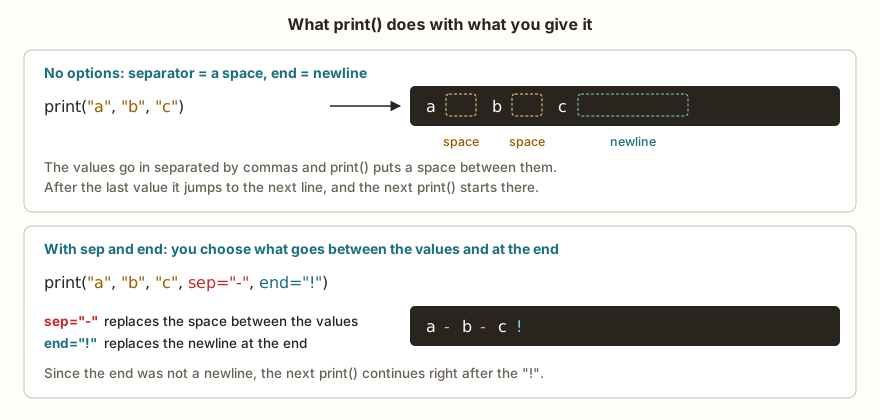
sep (for separator) and end are named parameters, always written after the values. The default values are a space and a newline. Changing end is useful when you want to write a question and leave the cursor on the same line, or build an output line in pieces inside a loop, a subject of the repetition module.
Quotes, quotes inside quotes and special characters
Text can go between double quotes or single quotes, it makes no difference, as long as the opening and the closing are the same. This solves the problem of text that contains quotes: if the sentence has double quotes, wrap everything in single quotes, and vice versa. When both appear, the backslash \ warns that the next character is part of the text.
print("She said: \"hi\"")
print('double "quotes" inside')
print("line 1\nline 2")
print("column\tcolumn")\n is a line break inside the text and \t is a tab, a wide space that aligns columns. They exist because the keyboard has no key for writing "skip a line here" in the middle of a sentence.
Three ways to build a message
To join text and variables in a single sentence, Python offers different paths. Each has its place.
nome = "Ana"
idade = 17
print("Name:", nome, "Age:", idade)
print("Name: " + nome + ", Age: " + str(idade))
print(f"{nome} is {idade} years old")
preco = 3.5
print(f"Price: R$ {preco:.2f}")The first form uses commas and lets print() convert each value on its own. It is the easiest and serves almost everything at the start. The second uses + to glue pieces of text, and requires each piece to already be text: that is why the age goes through str(). The third is the f-string, a text with an f before the quotes in which whatever is between braces is replaced by the variable's value. It makes the sentence readable, almost as if written by hand.
Notice the last line. The :.2f part inside the braces says to show the number with two decimal places, and that is why 3.5 appears as 3.50. It is the right format for money, and you will use it many times.
input(): reading what the person types
When Python reaches a line with input(), the program stops there. No following line runs until the person types something and presses Enter. The text between parentheses, called the prompt, is shown before the wait to say what is expected to be typed.
nome = input("What is your name? ")
print("Hello,", nome)
print("Hello, " + nome + "!")If someone types Ana, the Serial looks like this:
What is your name? Ana
Hello, Ana
Hello, Ana!This example has no "Open in the simulator" button because it depends on an answer from you. Copy the code into the PyPlaca editor, click Run and type in the Input field below the Serial tab. What you type appears next to the prompt, as in a real terminal.
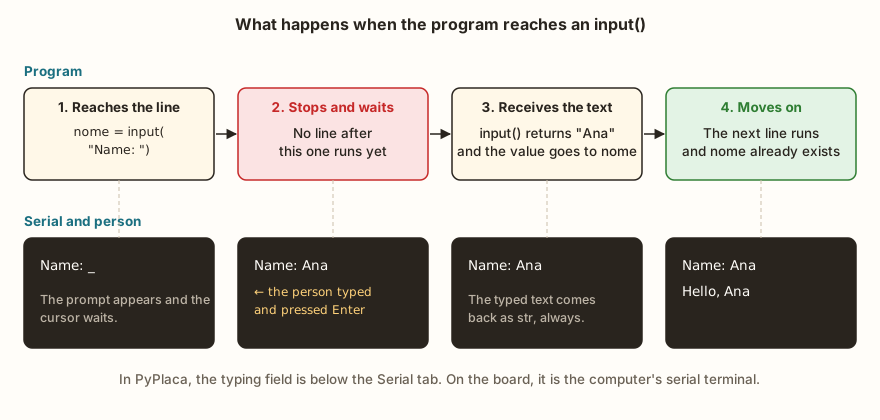
At each step, the program is frozen during the wait and resumes exactly from the point where it stopped. On the real board, the input comes through the computer's serial terminal, connected by the USB cable, and works the same way. A program with input() running on an ESP32 with no computer connected would wait forever, because there is no keyboard attached to it. In real projects, buttons and sensors play the role of input, and that is the reason input() is more a learning and testing tool than a final product. The digital inputs track shows how to read a button.
The prompt and the trailing space
The prompt needs to end with a space, or the typed text sticks to it. With input("Name:"), the output becomes Name:Ana, with no separation. It is a finishing detail and breaks nothing, but it makes the program look careless. Write input("Name: "), with the space inside the quotes.
input() with no prompt at all also exists. It works, but the person is left staring at a blank screen without knowing the program is waiting for something. When there is no prompt, use a print() beforehand to explain.
What input() returns is always text
This is the point that trips up beginners the most. If the person types 5, input() does not return the number 5. It returns the text "5", a character between quotes, which the computer treats like any other word. Texts and numbers respond differently to the same calculations.
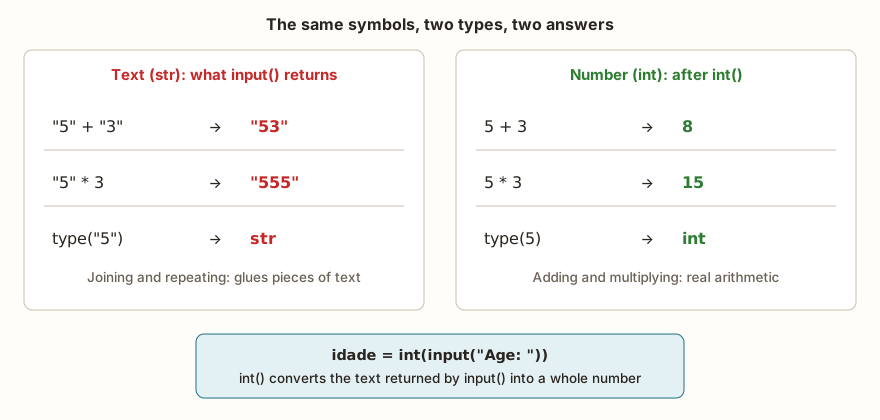
With text, + joins pieces and * repeats. With numbers, they do arithmetic. The code below shows the difference with fixed values, with no need to type anything:
a = "5"
b = "3"
print(a + b)
print(a * 3)
print(int(a) + int(b))
print(type(a), type(int(a)))The output shows 53, then 555, then 8, and finally <class 'str'> <class 'int'>. The type() function reveals the type of a value, and it is the first tool to reach for when a calculation gives a strange result.
The conversion that solves the problem is int(), which turns a text of digits into a whole number, and float(), which does the same for numbers with a decimal part. Normally you apply the conversion on the same line where you read the data:
a = int(input("a: "))
b = int(input("b: "))
print(a + b)With the inputs 5 and 3, the Serial shows a: 5, b: 3 and 8. The input() function stays on the inside, returns the text, and the int() on the outside turns it into a number before storing it in the variable. The article on type conversion, further along in the series, covers the rules of these functions more calmly.
A difference from Python on the computer appears when the conversion fails. For int("abc"), MicroPython writes ValueError: invalid syntax for integer with base 10. Python on an ordinary computer writes invalid literal for int() with base 10: 'abc', and shows the text that caused the problem. MicroPython does not show that text. The cause is the same in both cases: the text does not have the form of a number.
From the syllabus to a planned semester
- Teaching plan and calendar built automatically
- Class diary ready to paste into SIGA
- Slides and exercise lists with answer keys
Free Community edition · Windows
Common beginner errors
The scenarios below are the ones that most often appear in the first lab classes. In almost all of them, the program looks right to whoever wrote it.
The sum that gives 53
The student asks for two numbers, adds them and sees 53. He checks the calculation in his head, looks at the code, sees that he used + and concludes that the computer made a mistake. In fact the computer did exactly what was asked: it joined two texts. The error is treacherous because it generates no message at all, and the program ends as if everything were right. When the result of a sum looks "glued", think of type() and int().
The grade with a comma
The student types 7,5, which is how the grade appears on the report card, and the program breaks with ValueError: invalid syntax for number. Python's way of writing numbers uses the point as the decimal separator, and the comma is not recognized by float(). Two ways out exist: ask the person to type with a point, or replace the comma before converting.
texto = input("Grade: ")
nota = float(texto.replace(",", "."))
print(nota)
print(nota * 2)With the input 7,5, the Serial shows Grade: 7,5, 7.5 and 15.0. The replace() method swaps every piece of text equal to the first argument for the second, and the one calling it is the text itself, before float() receives the result.
A similar case is typing 7.5 when the program converts with int(). int() only accepts whole digits, and int("7.5") gives the same ValueError. If the value may have decimal places, use float().
Enter without typing anything
The student presses Enter to "see what happens" and the program crashes. When the person types nothing, input() returns an empty text, "". int("") has no digit at all to convert and gives ValueError, with the same message as the case with letters. The program will only be proof against this problem when you learn to handle errors, in the last module of the series, but it is already worth testing with an empty field to see how your code behaves.
A number glued to text
It is common to write print("Total: " + total) when total is a number. Python complains, on the print line, with TypeError: unsupported types for __add__: 'str', 'float'. The + between text and number does not know what to do. There are three ways out, and all of them work: convert with str(total), use the comma (print("Total:", total)) or use an f-string (print(f"Total: {total}")). In practice, all three show Total: 14.0 for the same value.
The name in quotes that is not a variable
Another classic scenario: the student writes print("Hello, nome") and the program shows Hello, nome, literally, instead of the typed name. The quotes say "this is text, copy it as is", so the word nome inside them is just a word. The error becomes the opposite when the quotes are missing: print(Ana) looks for a variable called Ana and ends in NameError. The rule is simple: text goes between quotes, a variable goes without.
print without parentheses
Old Python videos and handouts taught print "hi", which was the syntax of version 2 of the language. Whoever copies from that material gets SyntaxError: invalid syntax, and no line of the program runs, as we saw in the previous article. In the current version, print is a function like the others and needs parentheses.
Exercise: splitting the restaurant bill
Write a program that asks for the name of the person paying, the total amount of the bill and the number of people, and shows how much each one pays, with two decimal places. Think first about the steps in plain English: three inputs, one division, one output.
One possible answer:
nome = input("Name: ")
conta = float(input("Bill amount: "))
pessoas = int(input("People: "))
cada = conta / pessoas
print(f"{nome}, each one pays R$ {cada:.2f}")With the inputs Maria, 90 and 4, the Serial shows:
Name: Maria
Bill amount: 90
People: 4
Maria, each one pays R$ 22.50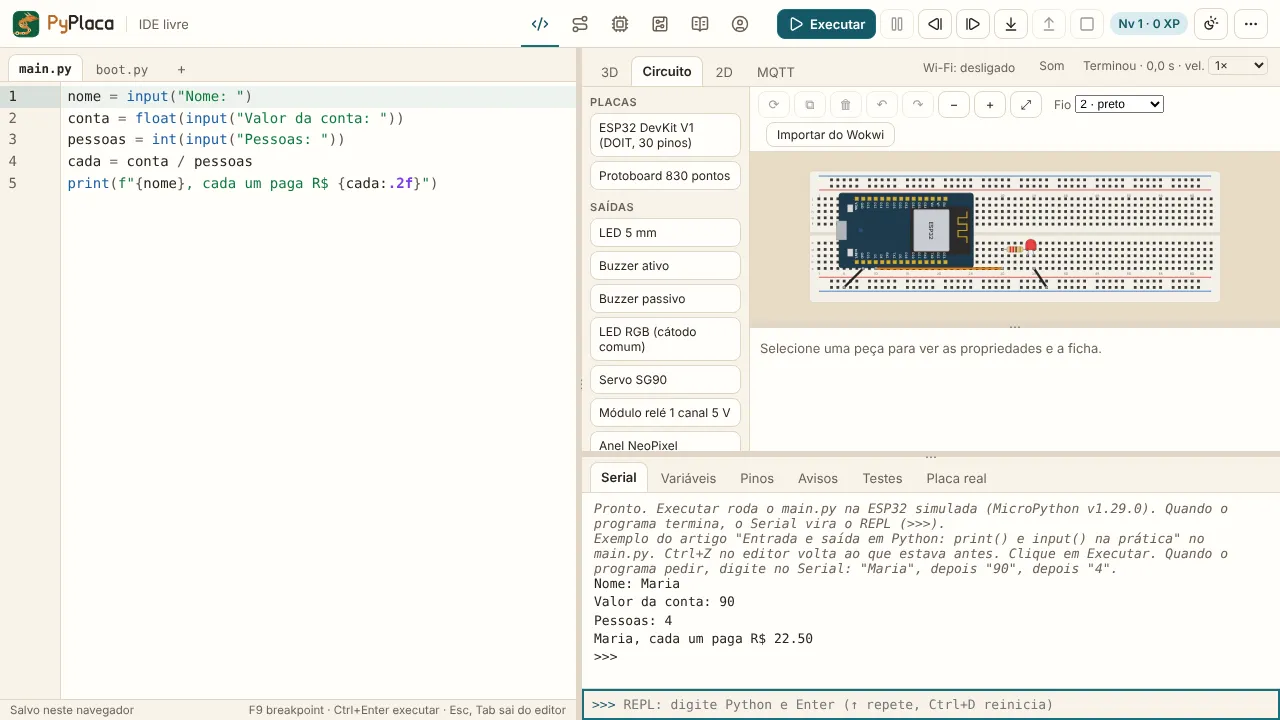
The bill may have cents, so it uses float(). The number of people is always a whole number, so it uses int(). If you wrote print("Unformatted:", cada), the output would be 22.5, without the trailing zero, and the f-string with :.2f is what guarantees 22.50.
To get the result with a comma, as it is written in Brazil, swap the point after formatting: f"{cada:.2f}".replace(".", ",") produces 22,50. Also try changing the program to show the total bill in the same text, and then think about what happens if someone types 0 people. The answer for that last case comes when we get to decisions, with an if that protects the division.
Frequently asked questions
Can I ask for a number and use it as a number right away?
Not directly. input() delivers text, and the conversion with int() or float() is an explicit step you write. The most common way is to wrap input() in the conversion on the same line, as in int(input("Age: ")).
What happens if I type spaces before or after the text?
input() keeps the spaces, because they are part of what was typed. If the person types Ana , the variable receives those same spaces. The strip() method removes the extra ones at the ends, and input().strip() is a useful habit for names and codes.
Can I use input() without PyPlaca's input field?
Yes, in any Python environment. On the computer, input() reads from the keyboard through the terminal. On the ESP32, MicroPython reads from the USB serial port, the same one print() writes to, and so a serial terminal connected to the board also works. The ESP32 DevKit V1 datasheet shows the board the simulator reproduces.
Are print() and input() the only forms of input and output?
They are the simplest. In a program for the ESP32, the output can also be an LED, a display or a message over the network, and the input can be a button, a sensor or a received message. The logic is the same: receive, process and show.
Where to go next
The Logic with Python track has challenges that use exactly what was seen here. Echo the Name is the shortest, just read and show. Double Information asks for two values in the same output, and Double of a Number requires the conversion with int(). To practice built messages, try Custom Greeting.
The next subject in the series is variables and data types: int, float, str and bool, and what each one accepts. To see print() working together with the hardware, the article Getting Started with MicroPython on the ESP32 uses the Serial to check a blinking LED.