Fundamentals
What an Algorithm Is and How Python Runs Your Program Line by Line
Learn what an algorithm is, how Python reads the file from top to bottom, what memory holds after each line and how to recognize your first errors.
By Prof. Rodrigo Faustino · Updated on · 18 min read
Metrics for this article
- Words
- 3,424
- Characters
- 18,860
- Reading time
- ~18 min
An algorithm is a finite sequence of unambiguous steps that leads from an input to a result. Python runs your program the way a very obedient reader would follow a recipe: it starts at the first line of the file, does exactly what it says, goes down to the second, then the third, one instruction at a time, until the text ends or something goes wrong.
Almost every beginner's mistake comes from forgetting one half of that sentence. Either the step was vague (whoever wrote it knew what they meant, the computer did not), or the order was swapped (the line that uses a value came before the line that creates it). The text that follows shows how to see both things in a small program, with code you open and run in PyPlaca. The examples use only the Serial, with no circuit at all. The ESP32 appears only at the end, to show where this foundation will be used.
The problem: the computer does not guess
Imagine a classmate receives a note: "work out the class average for me". He needs nothing else. He knows the grades are in the teacher's spreadsheet, he knows an average means adding everything up and dividing by the number of students, he knows the result goes in the minutes. That was three gaps and all of them were filled without effort, because people complete what is missing.
The computer completes nothing. If you write only "calculate the average", it is left without an answer to questions nobody asked. The average of which numbers? Where are they stored? What should be done with the result: store it, show it, send it? Each unanswered question is a step that was missing from the algorithm, and the machine does not ask back. It runs what is written or stops with an error message.
A helpful comparison is directions given over the phone. Someone who has never been to your neighborhood calls, lost, and you say "go straight to the market and turn onto the bakery street". To you it is clear. To the listener there are three markets and two bakeries. For the person to arrive, the route has to come in steps that allow only one reading: "follow Flower Street for two blocks, turn right on the first street after the traffic light, the school is the blue gate on the left". That is an algorithm. The order is also part of the instruction, because turning before walking the two blocks leads somewhere else.
The same happens in the lab. A common scenario: the teacher asks "write a program that calculates the class average" and two students hand in different answers, both defensible. One added the grades of the 30 students and divided by 30. The other calculated only the average of those who passed, because they understood "class" as the ones who passed. Neither made a mistake in Python. The flaw was in the request, which left open which numbers go into the calculation. Only after the class agrees on where the values come from and what should appear at the end does the code have a right answer.
The AI that remembers your life and lives on your computer
- Long-term memory with the source of every answer
- Works offline: your data stays on your PC
- Reads PDFs, slides, photos and meeting recordings
Essential plan free forever
What an algorithm is, after all
An algorithm is the idea of how to solve a problem, written in steps. It does not depend on a computer: the directions above are one, a recipe's method is another, the way of working out change at the market is another. What separates an algorithm from a list of good intentions are four characteristics:
- Finite: it reaches an end. "Keep adding numbers forever" is not an algorithm, it is a problem.
- Precise: each step has a single meaning. "Add a little salt" will not do; "add 5 grams" will.
- Ordered: the sequence is part of the answer. Swapping two steps usually changes the result or keeps it from existing.
- With an output: it may have an input (the numbers to be added) or not, but it always produces something you can observe, such as a value on the screen or a lit LED.
An algorithm and a program are not the same thing. The algorithm is the idea, and the program is that idea written in a language the machine accepts. The same idea can become a program in Python, another in C, a drawing on the board or a text in a notebook, and it is still the same idea.
There is an apparent exception to the "finite" rule that shows up when you get to the boards. A microcontroller program usually has a while True: that never ends, because the board exists to repeat the task as long as it is on. Each pass of that loop is finite and has a beginning, middle and end. What does not end is the repetition, and that is a choice of whoever designed the program. The article on programming without freezing shows what happens inside that repetition.
Three ways to write the same algorithm
Let's use a small problem: calculate the average of two grades, 7.5 and 8.5, and show the result. The figure shows the same solution written three ways.
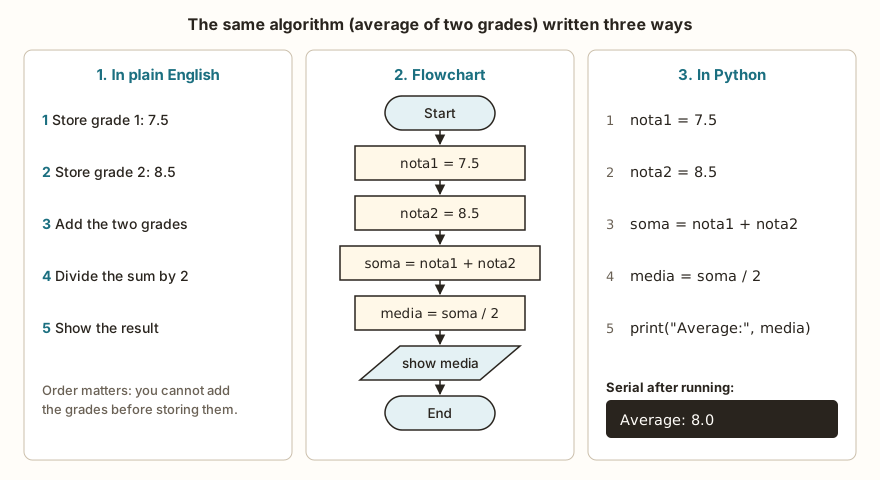
Each form serves a different moment of the work.
| Form | Who reads it | When it helps |
|---|---|---|
| Plain English, step by step | people | at the start, to understand the problem before choosing the language |
| Flowchart | people | when decisions and repetitions come in, because the drawing shows the paths |
| Python | the computer and people | when the reasoning is already clear and it is time to test |
If you cannot explain the algorithm in plain words, the code will come out confusing, and no language fixes that. For this reason it is worth writing the steps on a sheet of paper before opening the editor. The flowchart gains importance in the next module of the series, when decisions appear: with if and else the program stops having a single path, and the drawing shows the forks better than a paragraph.
Now the same algorithm in Python. Click Open in the simulator, then Run, and look at the Serial tab.
nota1 = 7.5
nota2 = 8.5
soma = nota1 + nota2
media = soma / 2
print("Average:", media)Line by line, what each one does:
nota1 = 7.5reads "store the value 7.5 under a name called nota1". The name stays on the left and the value on the right. The=sign here is an order, not a question about equality.soma = nota1 + nota2first calculates the right-hand side, using whatnota1andnota2hold at that moment, and only then stores the result insoma.print("Average:", media)sends text to the Serial, the channel through which the program talks to whoever is running it. On the real board, the Serial reaches the computer through the USB cable. In PyPlaca, it is the Serial tab. On an ordinary computer it would be the terminal window.
The result appears as Average: 8.0 and not as Average: 8. Python's / always returns a decimal number, even when the calculation comes out even: 10 / 2 shows 5.0. The division that returns only the whole part exists, and it is another slash (//), which is left for the article on operators.
How Python reads your file
When you press Run, two phases happen, in this order.
In the first, Python reads the whole file and checks that each line is written in a way it understands: closed parentheses, quotes in the right place, language words spelled correctly. It is not running anything yet, only checking the grammar. If a line fails that check, the program does not start. None of the earlier lines run, even the ones that were perfect.
The second phase only begins if the first one passed. Then Python executes the instructions from top to bottom, one after the other. Each time a line creates a variable, the name and the value go into memory and stay there for the next lines to use. A detail that explains a lot: Python does not look ahead. When it is on line 3, it does not know what line 7 will create. It only knows what has already been executed above.
preco = 3.5
quantidade = 4
total = preco * quantidade
print("Total:", total)The next figure follows this four-line program. On the left is the code; on the right, what memory and the Serial hold after each line.
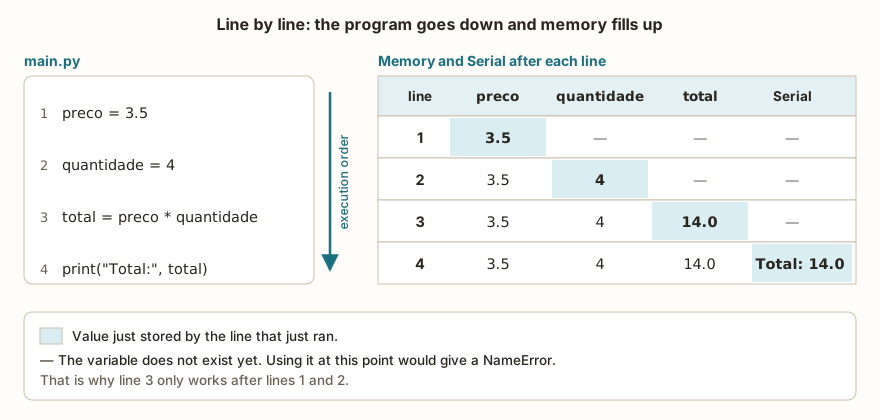
After line 1, only preco exists. After line 2, preco and quantidade exist. Only on line 3 does Python have everything it needs to calculate preco * quantidade, and only on line 4 does anything appear on the Serial. If you reverse the order and put the calculation before the first two lines, Python gets to the calculation with nothing stored and complains. This comes up further on, in the part about errors.
Storing again under the same name
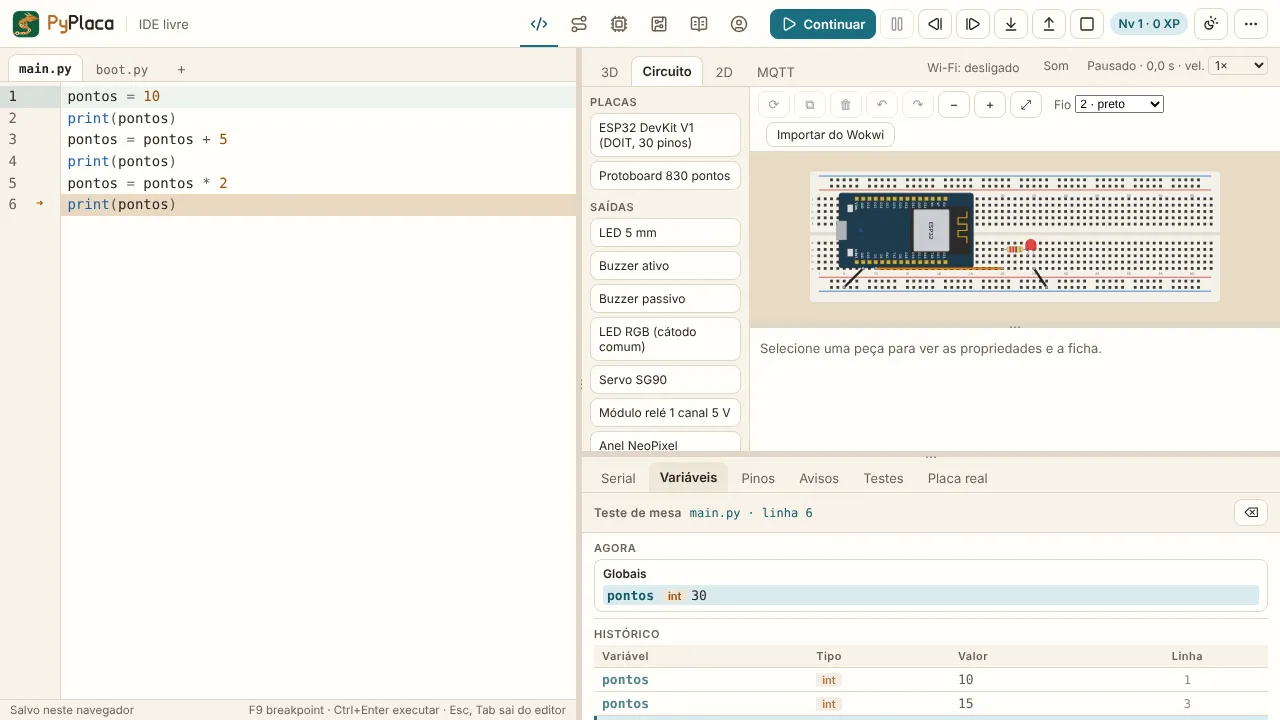
A variable name can receive a new value as many times as you like. The old value disappears, and the name now points to the new one.
pontos = 10
print(pontos)
pontos = pontos + 5
print(pontos)
pontos = pontos * 2
print(pontos)The line pontos = pontos + 5 scares people coming from math, where no number equals itself plus five. In Python there is no contradiction, because the = does not assert equality, it orders a store. The computer first works out the calculation on the right (10 plus 5, which gives 15) and then stores the 15 under the name on the left. On the next line, pontos is 15, and multiplying by 2 produces 30. This pattern of taking the current value, calculating and storing it back is the most common in all of programming: counters, running sums and game scores work this way.
What Python ignores
Not everything in the file is an order. Python discards everything after a # up to the end of the line, and also blank lines.
# this is a comment: Python ignores it
x = 2   # it also ignores from here to the end of the line

y = 3

print(x + y)Comments are for you, not for the machine. A good comment explains why a line exists, it does not repeat what it does.
Spaces at the start of a line, on the other hand, are not ignored. In Python, the indentation is part of the syntax, and an ordinary line cannot start further in than the previous one without a reason. Writing print("a") and, on the line below, print("b") with four spaces in front produces IndentationError: unexpected indent, a first-phase error, which keeps the whole program from starting. Indentation takes on a central role when we get to decisions and loops, and at that point it stops being a nuisance and becomes the way of saying which lines belong to what.
From the syllabus to a planned semester
- Teaching plan and calendar built automatically
- Class diary ready to paste into SIGA
- Slides and exercise lists with answer keys
Free Community edition · Windows
Two errors that behave in opposite ways
Beginners tend to treat every red message as the same thing. In practice there are two families, and knowing which one you fell into saves a lot of time.

The syntax error (SyntaxError) comes from the first phase. Since Python checks the whole file before running, nothing gets to execute. In the left panel of the figure, line 1 is a perfect print("before"), but it does not appear, because line 2 was malformed. Whoever sees the Serial showing only the error usually thinks the program "never even started", and that is exactly what happened.
The runtime error comes from the second phase. The file was grammatically correct, Python started, went running line by line and fell on an instruction it cannot carry out, such as dividing by zero or using a name that does not exist. What was executed before still counts and has already come out on the Serial. What comes after never runs.
How to read the message
PyPlaca shows errors in the same format as MicroPython. This program has the calculation before the variables:
total = preco * quantidade
preco = 3.5
quantidade = 4
print("Total:", total)And the message on the Serial is this:
Traceback (most recent call last):
  File "main.py", line 1, in <module>
NameError: name 'preco' isn't definedThe most productive reading starts with the last line, which carries the error type and the explanation: NameError, the name preco is not defined. The line above says where: main.py, line 1. The in <module> part means the error is at the main level of the file and not inside a function (functions come in module 4). With these two pieces of information, you already know what to look for: on line 1 there is a name that has not been created yet.
MicroPython's messages are a little different from those of Python on a computer. MicroPython writes name 'preco' isn't defined, and Python on an ordinary computer, name 'preco' is not defined. For division by zero, MicroPython says divide by zero and Python on the computer, division by zero. For syntax errors, recent versions of Python on the computer even suggest what was missing ("Perhaps you forgot a comma?"), and MicroPython says only invalid syntax. The cause is the same in both cases, only the text changes.
Desk check: following the program with your finger
There is an old technique for finding out what a program does without running it: the desk check. You draw a table with a column for each variable and a row for each step, and fill it in by hand, executing the program as if you were Python. For the points program, it looks like this:
| After line | pontos | Serial |
|---|---|---|
| 1 | 10 | |
| 2 | 10 | 10 |
| 3 | 15 | |
| 4 | 15 | 15 |
| 5 | 30 | |
| 6 | 30 | 30 |
It seems laborious for such a short program, and it is. The value shows up when the program does not do what you expected. Instead of looking at the code and trying to "feel" what is wrong, you compare what the table says should happen with what the Serial actually showed, and the first line where the two diverge is where the defect is.
PyPlaca makes this table for you. Use the Step button (shortcut F10) to execute one line at a time and open the Variables tab. The program stops before running the line marked in the editor, and the table shows the value of each variable at that instant, in alphabetical order. If you go too far, the step-back button (Ctrl+Shift+F10) undoes the last line, and what already came out on the Serial stays there, as in a real terminal. It is the memory figure, only happening on screen with your program.
Common beginner errors
Comma instead of a point
In Brazil we write 7,5. In Python, the decimal separator is the point, and the comma has another meaning: separating values. The problem is that nota1 = 7,5 is valid. Python does not complain on line 1, because it understands that you want to store two values together, 7 and 5, in a collection called a tuple.
nota1 = 7,5
nota2 = 8,5
soma = nota1 + nota2
media = soma / 2
print(media)This program runs the first three lines without any warning. The error only appears on line 4:
Traceback (most recent call last):
  File "main.py", line 4, in <module>
TypeError: unsupported types for __truediv__: 'tuple', 'int'If you put print(nota1) right after line 1, you would see (7, 5) on the Serial, and the clue would be clear. There is a lesson here that holds for many defects: the line Python points to is where it noticed the problem, and not necessarily where you created it. When the error seems to make no sense on that line, go back and check where the values it uses came from.
The scene is usually this in the lab: the student writes 7,5 because that is how he writes the grade in his notebook, runs the program and gets an error on line 4 that talks about tuple. He rereads line 4, rewrites the calculation, swaps the operator, and nothing changes, because the defect was never there. What undoes the knot is the desk check. When filling in the table the value of nota1 after line 1, (7, 5) appears where 7.5 was expected, and the doubt ends.
Calculating and not showing
This program runs from start to finish with no error and shows nothing:
preco = 3.5
quantidade = 4
total = preco * quantidadeThe calculation was done, the result is in memory, and nobody asked to show it. The print is missing. That is why "the program does nothing" does not always mean it is broken: sometimes it just was not told to show the result.
Uppercase and lowercase
To Python, total and Total are different names, and so are print and Print. This program:
total = 10
print(Total)ends in NameError: name 'Total' isn't defined, because the only variable created was total with a lowercase t. When the error says a name is not defined and the name looks right, check the capital letters.
Text without quotes
Writing print(Maria) instead of print("Maria") also produces a NameError. Without quotes, Python thinks Maria is the name of a variable and goes looking for it in memory. The quotes say "this is text, it is not a name". Quotes that are opened and not closed, as in print("Hello), are a first-phase syntax error, and the whole program stops running.
Exercise: the change from a purchase
You buy 4 items at R$ 3.50 each and pay with a R$ 20 bill. Write the algorithm that shows the amount of the bill and the change. Try first in plain English, on paper, and only then write the Python.
One possible answer, in plain English:
- Store the price of each item: 3.50.
- Store the number of items: 4.
- Calculate the bill: price times quantity.
- Store the amount paid: 20.
- Calculate the change: amount paid minus the bill.
- Show the bill and the change.
In Python, each step becomes a line, in the same order:
preco_item = 3.5
quantidade = 4
conta = preco_item * quantidade
pago = 20
troco = pago - conta
print("Bill:", conta)
print("Change:", troco)The desk check for this program shows a new variable at each step, and the change can only be calculated after conta and pago exist:
| After line | preco_item | quantidade | conta | pago | troco |
|---|---|---|---|---|---|
| 1 | 3.5 | ||||
| 2 | 3.5 | 4 | |||
| 3 | 3.5 | 4 | 14.0 | ||
| 4 | 3.5 | 4 | 14.0 | 20 | |
| 5 | 3.5 | 4 | 14.0 | 20 | 6.0 |
Lines 6 and 7 only show these values on the Serial: Bill: 14.0 and Change: 6.0. To practice, change the price, the quantity and the amount paid and write on paper what you expect to see before running. Then swap lines 4 and 5 and try to predict the error message, the name and the line, before executing.
In a class, this problem usually yields two solutions. One writes the bill directly, conta = 3.5 * 4, and it works. The other stores price and quantity in variables before calculating, as in the code above. Both show Change: 6.0 today. The difference appears when the statement changes to 5 items at R$ 4.20: in the first, you have to hunt for the numbers inside the calculations, and in the second you just edit the first two lines. It is worth comparing the two side by side before deciding which is better.
Frequently asked questions
Do I need to know how to draw a flowchart to program?
No. The flowchart is a reasoning tool, and many people prefer to write the steps in plain words or make a table. It pays off more when the problem has many paths, and you will notice that starting with decisions.
Does Python read the whole file before executing?
It does, but only to check the writing. The real execution happens afterward, line by line. That is why a syntax error on the last line keeps the first one from being executed, while a runtime error on the last line lets everything before it run.
Does Python on the ESP32 run the same as on the computer?
The core of the language is the same, and everything this article showed works the same. The differences appear in the details: the text of some error messages, as seen above, and decimal numbers, which on the board use 32 bits of precision. Because of that, 10 / 3 shows 3.3333332 on the board and in the simulator, while Python on the computer shows more digits. There are also standard library modules that, on the board, have fewer functions than on the computer. Each article in the series warns when one of these differences matters.
Where to go next
The natural path is to practice in the Logic with Python track, with 60 logic challenges in Python. Three of them fit directly with what was seen here: Hello World, with a single print line; Sum of Two, to practice the calculation and the output; and Average of Grades, which is the algorithm from the first figure with different values. When solving, do the desk check on paper before submitting the answer and use the Step button if the result does not match.
The next subject in the series is input and output, that is, how to make the program ask for a value with input() and answer with print(). If you want to see the same idea of running line by line moving a real pin, the article Getting Started with MicroPython on the ESP32 makes an LED blink with the same main.py, and the ESP32 DevKit V1 datasheet shows the board this code will run on. The hardware tracks start at First steps.