Fundamentals
Truth Tables in Python: Checking Conditions with and, or and not
Build truth tables in Python to test conditions with and, or and not, check whether two expressions are equivalent and find the case that was left out.
By Prof. Rodrigo Faustino · Updated on · 13 min read
Metrics for this article
- Words
- 2,473
- Characters
- 13,274
- Reading time
- ~13 min
A truth table lists all the possible combinations of True and False for the variables of an expression and shows, beside each combination, the result of the expression. With one variable there are two rows, with two there are four, with three there are eight: the calculation is 2 to the power of the number of variables. In Python, you can print such a table with a few lines of code, and it serves three practical purposes: checking a condition before using it, finding out whether two expressions that look different say the same thing and finding the case nobody foresaw.
The previous article introduced the operators and, or and not. This one shows how to trust them. A badly written condition gives no error, it gives the wrong behavior at the wrong time, and the table is the cheapest way to catch that before the program gets anywhere near a board, a motor or a student.
The problem: two conditions that look the same
An alarm should go off when the door or the window is open. When writing the condition for the opposite case, the "does not go off", someone thinks like this: "it does not go off when the door is not open and the window is not either". Another person, in a hurry, writes: "it does not go off when the door is not open or the window is not open". The two sentences sound alike, and in code they look like this:
nao_dispara = not (porta or janela)
outra = (not porta) or (not janela)Do they give the same result? Intuition is divided, and that is exactly what the table is for. Before building it, it is worth seeing how it is constructed.
The AI that remembers your life and lives on your computer
- Long-term memory with the source of every answer
- Works offline: your data stays on your PC
- Reads PDFs, slides, photos and meeting recordings
Essential plan free forever
What a truth table is
Each variable becomes a column, and each row is a combination of values. The way to avoid missing any is to count in binary, with False in place of 0 and True in place of 1: the last column alternates every row, the middle one every two rows, the first one every four.

Each extra variable doubles the number of rows. Two variables give 4, three give 8, four give 16, five give 32 and ten give 1024. This explains why the table is a tool for small conditions: with three or four variables it fits on the screen, and with ten it is already a job for the machine.
For two variables, the table of the and and or operators can be written row by row:
print(2 ** 1, 2 ** 2, 2 ** 3, 2 ** 4, 2 ** 5, 2 ** 10)
print("a     b     and   or")
print(False, False, False and False, False or False)
print(False, True, False and True, False or True)
print(True, False, True and False, True or False)
print(True, True, True and True, True or True)The first line confirms the row count: 2 4 8 16 32 1024. The next four are the table itself, and each one has the two variables, the result of the and and that of the or. Only the last row has True in both columns, and only the first has False in both. Whoever writes the table like this, by hand, learns to read each row, but the method does not scale: with three variables it would be eight rows and with four, sixteen.
Building the table with a nested for
for is a subject of the repetition module, but it solves this problem so well that it is worth a preview. In for a in (False, True):, the variable a takes one value at a time, first False and then True, and the indented block runs once for each value. Putting one for inside another, all the combinations appear:
print(f"{'a':<6}{'b':<6}{'and':<6}or")
for a in (False, True):
    for b in (False, True):
print(f"{str(a):<6}{str(b):<6}{str(a and b):<6}{a or b}")The output is the same table, now aligned in columns. The :<6 inside the f-string reserves six characters and aligns the text to the left. The str() around each value is not decoration. A boolean formatted directly, as in f"{a:<6}", appears as 1 or 0 instead of True or False, both in Python on the computer and in the simulator. Converted to text beforehand, it appears with the right name.

With three variables, one more for inside the others is enough. The order of the rows follows the same binary count as in the figure.
Checking whether two expressions are equivalent
Back to the alarm. Two expressions are equivalent when they give the same result in every row of the table. Instead of looking row by row, the program can compare the columns with == and print one answer per row:
for porta in (False, True):
    for janela in (False, True):
        nao_dispara = not (porta or janela)
        certa = (not porta) and (not janela)
        errada = (not porta) or (not janela)
print(porta, janela, nao_dispara == certa, nao_dispara == errada)The output has four rows: False False True True, False True True False, True False True False and True True True True. The first comparison column, nao_dispara == certa, is true in all four rows: the two expressions are equivalent. The second, nao_dispara == errada, fails in the rows where only one of the sides is open, which are precisely the ones that matter: with the door open and the window closed, the wrong version would say the alarm does not go off, and it should.
This result is one of De Morgan's laws, which are worth keeping in mind: negating an or is negating each part and swapping it for and, and negating an and is negating each part and swapping it for or.
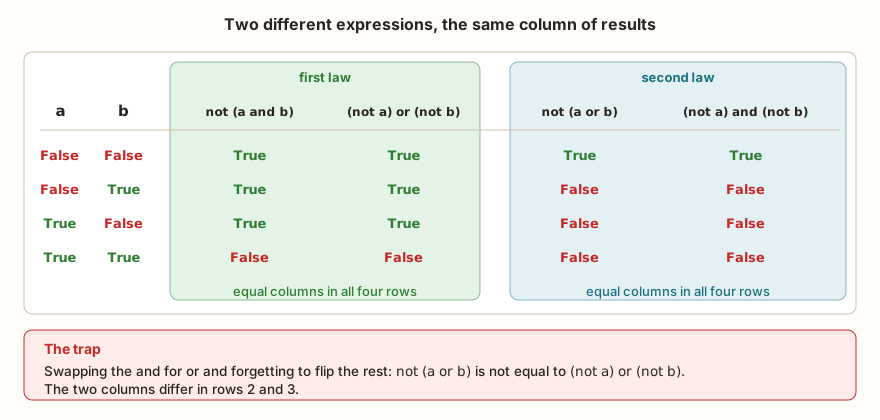
for a in (False, True):
    for b in (False, True):
print(a, b, not (a and b), (not a) or (not b), not (a or b), (not a) and (not b))The four final columns of the output show what the figure shows: the first two are equal in every row (True True, True True, True True and False False), and so are the last two (True True in the first row and False False in the other three). The most common mistake is applying only half of the rule, negating the parts and forgetting to swap the operator. The table exposes this at once.
Other useful equivalences
There are equivalences that help simplify long conditions. Absorption says that a or (a and b) is the same as a, and that a and (a or b) is too. If a is true, the first expression is already true, and if a is false, the inner and is false and the result depends only on a. The table confirms it, and shows along the way the "exclusive or", the "one or the other" of everyday speech, which Python writes as a != b:
for a in (False, True):
    for b in (False, True):
print(a, b, (a or (a and b)) == a, (a and (a or b)) == a, a != b)The output is False False True True False, False True True True True, True False True True True and True True True True False. The two middle columns are always True, and the last is the "exclusive or": true when the two values are different. Python's or is inclusive, that is, True or True gives True. When the idea is "one or the other, but not both", != solves it. The ^ operator also exists, but it works with the bits of integers and can return 1 and 0 instead of True and False, which makes it a worse choice for conditions.
From the syllabus to a planned semester
- Teaching plan and calendar built automatically
- Class diary ready to paste into SIGA
- Slides and exercise lists with answer keys
Free Community edition · Windows
A truth table for a real case
An irrigation pump connected to an ESP32 should run when the soil is dry, the tank has water and it is not raining. That is three questions, and the rule is seco and agua and not chuva. Since there are three variables, the table has eight rows.
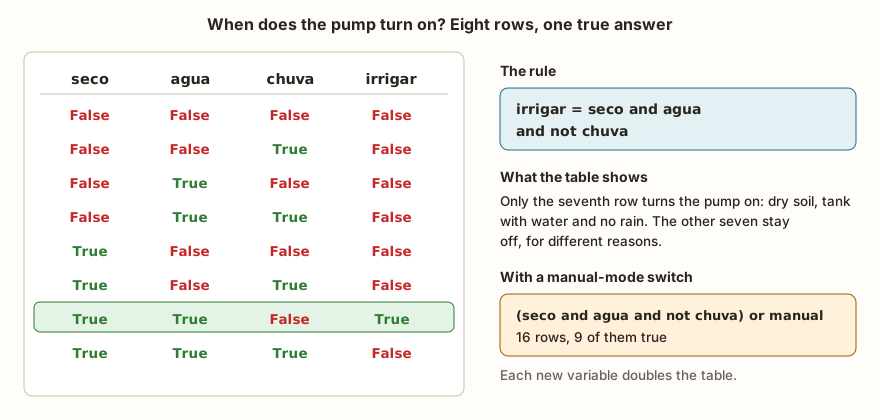
print(f"{'seco':<6}{'agua':<6}{'chuva':<6}irrigar")
for seco in (False, True):
    for agua in (False, True):
        for chuva in (False, True):
            irrigar = seco and agua and not chuva
            print(f"{str(seco):<6}{str(agua):<6}{str(chuva):<6}{irrigar}")
total = 0
for seco in (False, True):
    for agua in (False, True):
        for chuva in (False, True):
            for manual in (False, True):
                irrigar = (seco and agua and not chuva) or manual
                total += irrigar
print(total, 2 ** 4)The printed table has a single row with True in the last column, the seventh, in which the soil is dry, there is water and it is not raining. That is what the rule is expected to give, and it is good to check, because the table is the only place where the programmer sees the seven combinations in which the pump stays off. One of them, dry soil and an empty tank, is the one that protects the pump from running dry. Another, dry soil and rain, avoids wasting water.
The second snippet adds a variable, manual, which forces the pump on. Now there are 16 rows, and the total += irrigar calculation counts how many give True: the boolean adds up as 1 and 0. The output is 9 16. Of the 16 combinations, 8 have manual true and turn the pump on regardless, and 1 more turns it on by the original rule, which makes 9. It is a way to check the logic without building anything: if the number of true rows does not match what you expected, the condition is wrong.
What changes on the ESP32
Logical operations behave the same in MicroPython and in Python on the computer. What changes is where the values come from. On a board, almost no variable is born as a boolean: pin.value() returns the number 0 or 1, and it is the comparisons with sensors (temperatura > 30) that produce True and False. For the table, each comparison becomes a variable, and what matters is testing the logic without having to wire anything.
The case of the button with a pull-up resistor deserves a table of its own. With the pull-up, the pin reads 1 when the button is released and 0 when it is pressed, the opposite of what intuition asks for:
for valor in (0, 1):
print(valor, valor == 0, not valor, bool(valor), valor == True)The output is 0 True True False False and 1 False False True True. When the pin is 0, valor == 0 and not valor are both true, and that is how you write "the button is pressed": pressionado = pino.value() == 0. The last two columns show that 1 also behaves as True in a comparison, and 0 as False. The article on pull-up and the floating pin explains why the logic is inverted and how to avoid unstable readings.
In the classroom: where tables tend to appear
The points below repeat whenever a class starts writing conditions, and each one is solved by looking at the table.
The everyday "and" that becomes "or" in code
The rule "people over 65 and under 12 pay half price" sounds natural, and the translation to Python creates a condition that is never true. In everyday speech, the "and" joins two groups of people. In logic, a person cannot be over 65 and under 12 at the same time, and whoever joins groups is saying or.
for idade in (8, 30, 70):
    print(idade, idade >= 65 and idade < 12, idade >= 65 or idade < 12)
for x in (3, 5, 9):
print(x, x < 5 or x >= 5, x < 5 and x > 10)The first part of the output is 8 False True, 30 False False and 70 False True. The and column is false for all ages, and the or column gives the right result: 8-year-old children and 70-year-old seniors pay half, 30-year-old adults do not. The second part shows the other classic defect, the condition that never changes value. x < 5 or x >= 5 is true for any x, and x < 5 and x > 10 is false for any x. The values 3 True False, 5 True False and 9 True False confirm it. A condition like this never decides anything, and the table makes that evident.
The "or" that in conversation is exclusive
"Do you want coffee or tea?" almost never means "it can be both". Python's or is inclusive and accepts both. Whoever needs the "one or the other" uses !=, as in the section above, and checks in the table that the row where both are true comes out false.
The table with missing rows
With three variables, the table needs eight rows, and it is common to hand in six, because the person built the combinations in their head and skipped two. The defense is to count in binary, as in the figure at the start, and to check the count with 2 ** n.
The not distributed by half
The trap in De Morgan's figure appears in almost all code written in a hurry: each term is negated, but the and or or is left as it was. The program runs, gives no error, and the condition holds for half the cases. It is the kind of defect that only shows up when someone tests precisely the combination the wrong version handles badly.
The case where nothing holds
For every decision with several outputs, the question the table asks without being called is: and when none of the conditions is true? The robot in the previous article, which swerves left, swerves right or stops, is only safe because someone drew the row in which both sides are blocked. Whoever builds the table sees that row. Whoever writes only the "happy" cases does not even know it exists.
Exercise: the garage gate
A gate opens when someone presses the remote or the sensor detects a car, but never if there is an obstacle in front. Three people wrote the condition in different ways:
- A:
(controle or carro) and not obstaculo - B:
(controle and not obstaculo) or (carro and not obstaculo) - C:
controle or carro and not obstaculo
Before running, bet on which ones are equivalent. Then build the table and count the rows where A and C disagree.
dif = 0
for controle in (False, True):
    for carro in (False, True):
        for obstaculo in (False, True):
            a = (controle or carro) and not obstaculo
            b = (controle and not obstaculo) or (carro and not obstaculo)
            c = controle or carro and not obstaculo
            dif += a != c
            print(controle, carro, obstaculo, a, b, c, a == b)
print(dif)The output has eight rows and ends in 2. In the last column, a == b is True in all eight: B is just A with the not obstaculo distributed, a property called distributive. C is another story. Without the parentheses, the and is solved first, and the expression becomes controle or (carro and not obstaculo). The dif counter ends at 2, in the rows where the remote is pressed and there is an obstacle: A keeps the gate closed, and C opens it. It is the kind of error that, in a real garage, traps a car or a person. Notice also the dif += a != c: the result of the comparison, a boolean, is added as 1 or 0, and the counter counts the disagreements.
Frequently asked questions
How many rows does a truth table have?
2 to the power of the number of variables. With 3 variables there are 8 rows and with 4 there are 16. Each new variable doubles the table.
Do I need to build the table by hand?
For two variables, by hand is quick. From three on, it is worth letting Python generate it with nested for loops, as in the examples above, because the computer does not forget rows.
Can I use 0 and 1 in place of False and True?
In operations, yes: zero counts as false and any other number as true. But and and or return one of the operands, and the table will show numbers where you expected True and False. Prefer booleans.
Why the str() inside the f-string?
Because a boolean formatted with a width, like f"{a:<6}", appears as 1 or 0. Converted with str(a), it appears as True or False.
Does Python have an xor operator?
Not by that name. For two booleans, a != b does the "exclusive or". The ^ is a bitwise operator and may return a number instead of a boolean.
Where to go next
The Logic with Python track has challenges that put these conditions to work. Of Legal Age and Range 10–20 demand comparisons and ranges, School Approval joins two conditions with and, and Access Level asks for a rule with several cases, where building the table beforehand helps a lot. If some comparison or operator was left loose, the article on relational and logical operators is the starting point of this series.
The next subject takes these conditions into the program: the if and else structure, which chooses a path according to the value of an expression like the ones we have just tested.