Fundamentals
The if and else Structure in Python: Decisions, Indentation and Indentation Errors
Learn to use if and else in Python so the program chooses between two paths, understand indentation as part of the syntax and fix indentation errors.
By Prof. Rodrigo Faustino · Updated on · 14 min read
Metrics for this article
- Words
- 2,700
- Characters
- 14,852
- Reading time
- ~14 min
The if makes the program run a block of code only when a condition is true, and the else defines what to do when it is false. The block is the set of indented lines right after the line that ends in a colon. In Python, this indentation is not formatting decoration: it is part of the syntax, and it is what says which lines belong to the if, which belong to the else and which are already outside both.
So far, the programs in this series have run from top to bottom, one line after the other, without choosing anything. With if and else the program starts to decide, and all the work with conditions from the two previous articles finds a place to go. This text shows the structure, what can go in place of the condition, the short forms, what changes on the ESP32 and the indentation errors that appear in every class, including the oldest fight in programming: tabs or spaces.
The problem: the program that always does the same thing
Imagine a thermostat that reads the temperature of a room. If a program only knew how to go in a straight line, it would always turn the fan on or never turn it on, and the sensor reading would be useless. What you want is the opposite: at 31 degrees, turn the fan on, and at 22, leave it off. That is a decision, and a decision needs three things: a yes-or-no question, what to do if the answer is yes and what to do if it is no.
The question is the condition, the expression that becomes True or False, like the ones in the articles on relational and logical operators and on truth tables. The two answers are the blocks. The structure that puts it all together is written like this:
temperatura = 31
if temperatura > 30:
    print("turn fan on")
else:
    print("fan off")
print("end of check")
temperatura = 22
if temperatura > 30:
    print("turn fan on")
else:
    print("fan off")
print("end of check")The output is turn fan on, end of check, fan off and end of check. The same code, with different values, took different paths. And the line print("end of check") ran in both cases, because it sits at the margin, outside both blocks.
The AI that remembers your life and lives on your computer
- Long-term memory with the source of every answer
- Works offline: your data stays on your PC
- Reads PDFs, slides, photos and meeting recordings
Essential plan free forever
The anatomy of the if
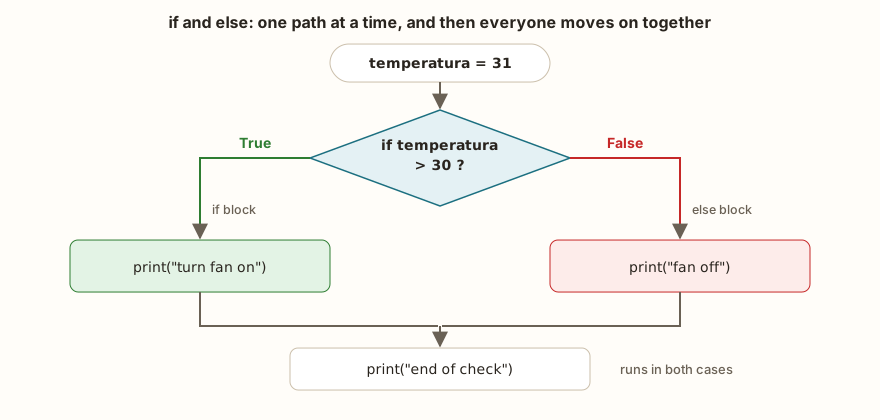
An if structure has four parts. The word if, which opens the decision. The condition, which can be any expression that gives true or false. The colon at the end of the line, which says "the block starts here". And the block, the lines indented by the same number of spaces. The else is optional and has only two parts: the word, with the colon, and its block. It takes no condition, because it means "in all other cases". If the if and the else appear together, one and only one of the two blocks runs.
After the last block, the program returns to the margin and carries on. That is the rule the figure shows: the two paths join again at the first line that is not indented.
What can go in place of the condition
Any expression will do, and Python decides by its truth value. It can be a comparison (nota >= 6), a combination with and, or and not (x > 5 and x < 20), a variable that already holds a boolean (via_interditada) or even a value that is not a boolean. In that last case, the rule is the same as in the previous article: zero, the empty text, the empty list and None count as false, and everything else counts as true.
for v in (0, 1, "", "text", [], [0], None, "False", " "):
    if v:
        print(repr(v), "true")
    else:
print(repr(v), "false")The output has nine lines: 0 false, 1 true, '' false, 'text' true, [] false, [0] true, None false, 'False' true and ' ' true. Notice the last two. The text "False" is true, because it is not empty, and so is a single space. It is a practical way to test "did the user type something?": if nome: is true if there is any text. But it is also the origin of a well-known mistake, in which someone reads "False" from the keyboard and expects the program to understand it as false.
The for that appears here repeats the block for each value in the list, and the repetition module will explain it calmly. What matters in this example is the if and the else inside it.
The short forms
Python has three shortcuts that appear in real code, and they are worth recognizing.
nota = 7
situacao = "approved" if nota >= 6 else "failed"
print(situacao)
if nota >= 6: print("passed")
if nota < 6: print("did not pass")
else: print("ok")
if nota > 5:
    pass
else:
    print("never")
print(5 == True, 1 == True, bool("False"))The output is approved, passed, ok and False True True. The first shortcut is the conditional expression, value1 if condition else value2, which chooses a value instead of a block: it is useful for short assignments, but the longer the condition, the worse the reading. The second is the one-line if, with the command right after the colon, which only works when the body is a simple statement. The third is pass, a command that does nothing and exists to fill a block that the syntax requires. In the last line, a trap: 5 == True is False, even though 5 is true in a decision. That is why if x == True: is almost always wrong, and the right thing is to write just if x:.
Ifs inside ifs
A block can contain another if. The indentation grows by one level and Python understands that the inner if is only evaluated if the outer one is true.
x = 10
if x > 5:
    print("a")
    if x > 8:
        print("b")
    print("c")
print("d")
nome = ""
if not nome:
    print("no name")
if x > 5 and x < 20:
    print("range")
if 5 < x < 20:
    print("range 2")
if x == 10:
    print("ten")
if x != 10:
    print("not ten")
else:
print("is ten")The output starts with a, b, c and d: the b sits at the second level, the c goes back to the first level of indentation and the d comes out of everything. Then come no name, range, range 2, ten and is ten. Chained ifs and the choice among more than two options are the subject of the next article, with elif. For now, the golden rule is simple: each level of indentation opens a new block, and going back to the left margin closes everything.
The indentation decides which block the line belongs to
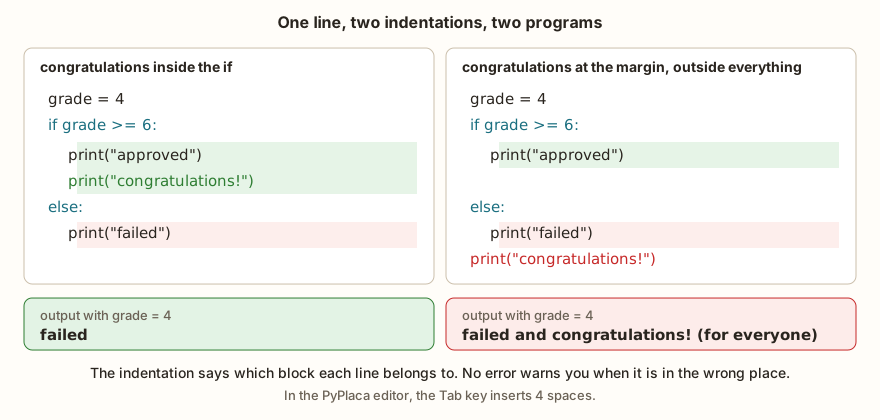
Indentation is what makes Python so readable, and also what makes a one-line mistake turn into a different behavior without any warning. The figure shows two versions of the same text.
nota = 4
if nota >= 6:
    print("approved")
    print("congratulations!")
else:
    print("failed")
print("---")
if nota >= 6:
    print("approved")
else:
    print("failed")
print("congratulations!")The output is failed, a separator line, failed and congratulations!. In the first version, the print("congratulations!") is inside the if, and only those who passed get the congratulations. In the second, the line is at the margin, after the else, and everyone gets it, including those who failed the year. Neither version gives an error, and the program runs normally. Whoever writes the second version by accident only finds out when someone complains about the message.
Python's convention, defined in the PEP 8 style guide, is to use four spaces per level. It does not have to be four, but it does have to be always the same within the same block. In the PyPlaca editor, the Tab key inserts four spaces, so you can press Tab without thinking about the subject.
In the classroom: indentation errors
The errors below repeat in every class that starts writing if, and each one has its own message. Knowing the message is half of the fix.

The colon is missing
The most frequent error for beginners and one of the most frequent for those coming from another language, where the block opens with braces or with the word then:
x = 5
if x > 3
print("bigger")Traceback (most recent call last):
File "main.py", line 2
SyntaxError: invalid syntaxThe MicroPython message is generic and points to the line of the if. Python on the computer is kinder and says SyntaxError: expected ':'. When an invalid syntax appears on a line that starts with if, else, for or while, look at the end of it before anything else.
The body without indentation
x = 5
if x > 3:
print("bigger")Traceback (most recent call last):
File "main.py", line 3
SyntaxError: invalid syntaxThe colon is right, but the next line stayed at the margin, so the if was left without a body. In Python on the computer the error is more specific: IndentationError: expected an indented block after 'if' statement on line 2. The error points to line 3, the one that should be indented.
The extra indentation
x = 5
if x > 3:
    print("bigger")
print("again")Traceback (most recent call last):
File "main.py", line 4
IndentationError: unexpected indentA line that sits further in than the previous one, without the previous one ending in a colon, is an indentation that Python does not know where it came from. It is common after pasting a piece of code into the middle of another, or after pressing the space bar without noticing.
The indentation that does not match
x = 5
if x > 3:
        print("a")
print("b")Traceback (most recent call last):
File "main.py", line 4
IndentationError: unindent doesn't match any outer indent levelThe first line of the block has eight spaces, and the second went back to four, a level that was never opened. Python does not know whether the second line is inside or outside. The same error appears when the else has a different indentation from the if it belongs to. An else with no if before it at all gives only SyntaxError: invalid syntax.
The space nobody sees
Whoever copies code from a PDF, a slide or a chat sometimes brings along a special space, the "non-breaking space" (NBSP). It looks the same as a regular space and is not. The result is a SyntaxError: invalid syntax on a line that looks perfect to the eyes. In Python on the computer, the message is clearer: SyntaxError: invalid non-printable character U+00A0. If a line is visibly right and Python insists that it is not, delete the spaces at the start of it and type them again.
The error that gives no error
The trickiest case is the one in the previous section, when the wrong indentation is still a valid program. There is no message to consult, only strange behavior. The defense is to read the code looking at the margin column, and not just the text, and to check for each line of a block the question "which block does this line belong to?". A teacher's trick: ask the student to run a finger down the vertical line of the indentation and say out loud where the block ends.
Tabs or spaces: the fight that never ends
There is a discussion that has soured teams, code reviews and even dinners: is the indentation made with the Tab key or with the space bar? In the HBO series Silicon Valley, the theme became a joke, with a nervous breakdown included. In the third season, the protagonist, Richard Hendricks, is on the tabs team, and while programming next to an old flame who uses spaces, he cannot stand hearing the sound of the space bar and ends up cancelling the invitation he had made. In Richard's mind, the matter is closed: programmers use tabs, and the discussion has no second round.
Python, which takes indentation more seriously than any other language, settled the impasse in its own way: with either choice the program works, but mixing the two in the same block, in a way that leaves the indentation ambiguous, is forbidden. In Python 3, the result is a TabError, and it is the only case in which the fight ends in an error message. Peace, in practice, is simple. Press the Tab key if you like, but ask the editor to write four spaces in its place, as the PyPlaca one already does. Richard stays happy with his key, the colleague stays happy with the space bar, and Python only demands that nobody mixes them.
From the syllabus to a planned semester
- Teaching plan and calendar built automatically
- Class diary ready to paste into SIGA
- Slides and exercise lists with answer keys
Free Community edition · Windows
What changes on the ESP32
The structure and the rules are the same in MicroPython and in Python on the computer. The error messages change, and one of them changes the behavior. The table summarizes what the simulator shows and what Python on the computer (3.13) shows for the same errors:
| Error | Simulator (MicroPython) | Python on the computer |
|---|---|---|
missing : in the if | SyntaxError: invalid syntax | SyntaxError: expected ':' |
| body without indentation | SyntaxError: invalid syntax | IndentationError: expected an indented block after 'if' statement on line 2 |
| extra indentation | IndentationError: unexpected indent | IndentationError: unexpected indent |
| indentation that does not match | IndentationError: unindent doesn't match any outer indent level | IndentationError: unindent does not match any outer indentation level |
else without if | SyntaxError: invalid syntax | SyntaxError: invalid syntax |
| NBSP space | SyntaxError: invalid syntax | SyntaxError: invalid non-printable character U+00A0 |
| Tab on one line and eight spaces on the next | runs without complaint | TabError: inconsistent use of tabs and spaces in indentation |
The last row is the one that matters. In the simulator, the indentation is measured in columns, and a Tab is worth eight. So a line with one Tab and another with eight spaces look the same to it and the program runs. In Python on the computer, the mix is refused with TabError. The same file can work on the board and fail on the computer, or the other way round, and the safe way out is the usual one: four spaces everywhere, no tabs in the file.
The if on the ESP32 usually decides based on a pin. With a button and a pull-up resistor, the pin reads 0 when the button is pressed, and the program turns an LED on or off:
from machine import Pin
import time

botao = Pin(4, Pin.IN, Pin.PULL_UP)
led = Pin(2, Pin.OUT)

while True:
    if botao.value() == 0:
        led.value(1)
    else:
        led.value(0)
time.sleep_ms(50)The while True: repeats the block forever, and inside it the if chooses what to do every 50 milliseconds. Notice the levels of indentation: the while opens the first, the if and the else sit in it, and the led.value() lines sit one level further in. The time.sleep_ms(50) is aligned with the if, so it runs on every pass, whatever the result. The article on pull-up and the floating pin explains why the button reads zero when pressed.
Exercise: leap year
Write a program that says whether a year is a leap year. The rule: a year is a leap year if it is divisible by 4, except those divisible by 100, unless they are also divisible by 400. Think about the condition first, with and and or, and use % to test divisibility. Check with 2024, 1900, 2000 and 2023.
for ano in (2024, 1900, 2000, 2023, 2100, 1996):
    if ano % 4 == 0 and (ano % 100 != 0 or ano % 400 == 0):
        print(ano, "leap")
    else:
print(ano, "not leap")The output is 2024 leap, 1900 not leap, 2000 leap, 2023 not leap, 2100 not leap and 1996 leap. 1900 is divisible by 4 and by 100, but not by 400, so it is left out, and 2000 gets through the exception to the exception. Notice the parentheses: without them, the and would be solved before the or and the condition would change meaning, as in the article on the logical operators. To read the year from the keyboard, replace the for with ano = int(input("Year: ")), as in the article on type conversion. A good test is to build the truth table of the condition and check that the program follows it.
Frequently asked questions
Do I always need the else?
No. The if alone is the most common form: if the condition is true, the block runs, and if it is not, the program simply moves on. The else only comes in when there is an action for the opposite case.
Can I use parentheses around the condition?
You can, and if (x > 3): works. But they are not necessary, and Python's convention is to leave them out. Parentheses are for grouping parts of the condition, as in the leap year example.
How many spaces should I use for indentation?
Four, which is the community convention. What Python requires is that they always be the same within the same block. Set the editor to insert four spaces when you press Tab and avoid mixing tabs and spaces in the same file.
What is the difference between if x: and if x == True:?
if x: asks whether the value of x is true in Python's sense, which holds for any nonzero number and any non-empty text. if x == True: asks whether x is equal to True, which is false for the number 5. Use the first form.
Why does my if do nothing, but also give no error?
It is usually the condition that is never true, or a line with wrong indentation that left the block. Print the condition before the if to see its value and check, line by line, the column where each command starts.
Where to go next
The Logic with Python track has challenges that use the structure. Of Legal Age and Even or Odd are the warm-up with an if and an else, School Approval asks for a compound condition, and Positive or Negative asks for more than two answers, which prepares the ground for the next article.
The next subject is if, elif and else in Python: how to choose among three or more paths without stacking ifs, and how nested conditions behave when the indentation grows.