Fundamentals
The while Loop in Python: Repetition with the Test at the Start
Learn the while loop in Python: the four pieces, the counter, sentinel and flag patterns, compound conditions and the mistakes behind infinite loops.
By Prof. Rodrigo Faustino · Updated on · 15 min read
Metrics for this article
- Words
- 2,820
- Characters
- 15,097
- Reading time
- ~15 min
The while repeats a block of code as long as a condition is true, and the test happens before each pass, including the first. That is why the block can run many times, once or not at all. For the loop to end, something inside it has to change the result of the test. When that happens, the program leaves the block and continues at the first line without indentation; when it does not, the loop runs forever.
The previous article showed why loops exist and which questions every loop answers. This one is devoted to the while: the four pieces that make it up, the three patterns that solve most problems, the conditions with and and not, the or that creates infinite loops, the while inside another and the use on the ESP32.
The four pieces

A well-written while has four pieces, and the figure numbers them in the order in which Python runs them:
i = 1
while i <= 5:
    print("2 x", i, "=", 2 * i)
    i += 1
print("end")The output is the times table of 2 up to the fifth term, from 2 x 1 = 2 to 2 x 5 = 10, and then end. The pieces are:
- The initial value,
i = 1, which sits before the loop and creates the variable the test will look at. - The test,
i <= 5, which Python evaluates before each pass. If it givesTrue, it enters the block; if it givesFalse, it jumps to what comes after it. - The body, the
print, which is the repeated work. - The update,
i += 1, which changes the variable so that the test, at some point, givesFalse.
Piece 5 in the figure, the print("end") without indentation, is not part of the loop. It runs once, when the test fails. Whoever learns the while usually gets the position of one of these pieces wrong: the initial value inside the loop, the update outside it, or the test that does not look at the variable that changes.
The loop that does not run at all
Since the test comes before the body, a while whose condition starts out false does not execute the block:
n = 0
while n > 0:
    print("never appears")
    n = n - 1
print("the loop did not run, n is", n)The output is only the loop did not run, n is 0. This is a useful characteristic, not a defect: a program that adds the values typed and receives zero right at the start should add nothing and answer 0, without needing a special if. The while with the test at the start handles that case for free. There is another type of loop, which runs the body before testing, and Python has no word of its own for it. The article on the "do-while" shows how to simulate it.
From the syllabus to a planned semester
- Teaching plan and calendar built automatically
- Class diary ready to paste into SIGA
- Slides and exercise lists with answer keys
Free Community edition · Windows
Three patterns that solve almost everything
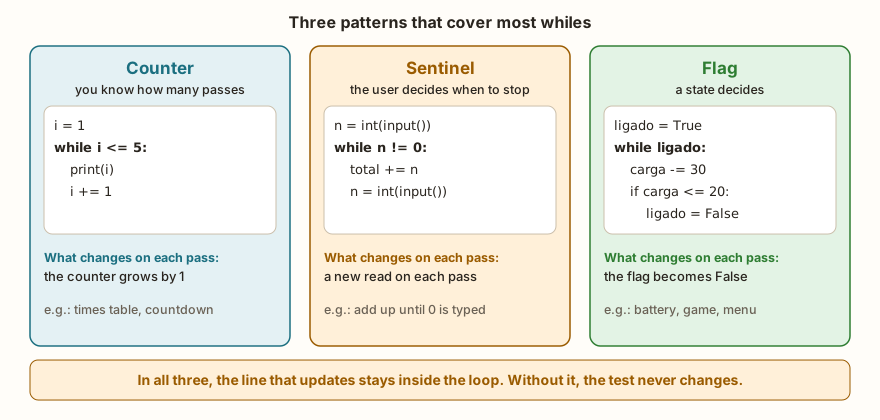
Most of the whiles you write at the beginning fall into one of these patterns. Recognizing the pattern helps you write the loop without trial and error.
The counter
When you know how many passes to make, a variable counts up to the limit. It is the pattern of the times table above: initial value, test against the limit and += 1 at the end of the block. The counter can grow, decrease (n -= 1) or move two by two (i += 2), and the test uses <, <=, > or >= according to the direction. For this pattern, the for with range() is usually shorter, and it is the subject of the next article in the series.
The sentinel
When it is the user who decides when to stop, the program does not know in advance how many passes will be needed. An agreed value, the sentinel, signals the end. The example calculates the average of grades, and the -1 closes the list:
soma = 0
contador = 0
nota = float(input("Grade (-1 to stop): "))
while nota != -1:
    soma = soma + nota
    contador = contador + 1
    nota = float(input("Grade (-1 to stop): "))
if contador > 0:
    print("average", soma / contador)
else:
print("no grades")With the inputs 8, 6.5, 9 and -1, the last line of the output is average 7.8333336. Python on the computer would show 7.833333333333333, the same calculation with the 64-bit float (the simulator uses 32 bits, like the board). If the first grade typed is already -1, the loop does not run, the counter stays at 0 and the program prints no grades. The if contador > 0 exists for that reason: without it, the division soma / contador would be a division by zero. The challenge Average of N Numbers uses a variation: the first number read says how many values will come afterwards, and the loop is a counter.
Notice the read, which appears twice. The first, before the loop, gives the test the value to compare. The second, on the last line of the block, is the update of the pattern: it is what changes on each pass. Whoever writes only the first read builds a loop that reads once and repeats the same value forever.
The flag
Sometimes the loop depends on a state of the program, and not on a number. A boolean variable, the flag, holds that state and becomes False when the repetition should end:
carga = 100
ligado = True
while ligado:
    carga = carga - 30
    print("charge", carga)
    if carga <= 20:
        ligado = False
print("switched off with", carga)The output is charge 70, charge 40, charge 10 and switched off with 10. The while ligado: dispenses with the comparison, because ligado is already a boolean. The one who decides to stop is the if inside the body, and note that the pass in which the charge reaches 10 ends normally: the test is only made again at the start of the next pass. This pattern appears in games (the match continues while the player has lives), in menus (the menu repeats while the user does not choose to quit) and in board programs (the device works while there is no error).
A condition that consumes the value
A fourth way is the loop in which the test variable itself is used up. Counting the digits of a number is the classic example, and it uses the integer division and the remainder seen in the article on arithmetic operators:
n = 4821
digitos = 0
soma = 0
while n > 0:
    soma = soma + n % 10
    n = n // 10
    digitos = digitos + 1
print(digitos, soma, n)The output is 4 15 0. The n % 10 takes the last digit, and the n // 10 discards it. On each pass the number shrinks: 4821, 482, 48, 4, 0. When it reaches 0, the test n > 0 fails. The program counted 4 digits, added 4 + 8 + 2 + 1 = 15 and left n at zero, which shows that the loop destroys the original value. If the number needs to be used later, keep a copy in a variable before the loop.
Compound conditions: and, not and counting attempts
The condition of the while is a boolean expression like those of the if, and accepts and, or and not. A very common use is to combine "there are still attempts left" with "has not got it right yet", and the password example shows both:
tentativas = 0
acertou = False
while tentativas < 3 and not acertou:
    senha = input("Password: ")
    tentativas = tentativas + 1
    if senha == "1234":
        acertou = True
    else:
        print("wrong password")
if acertou:
    print("access granted")
else:
print("blocked")With the inputs 1111 and 1234, the program shows wrong password and then access granted. If all three passwords are wrong (1111, 2222 and 3333), it shows wrong password three times and ends with blocked. The loop has two reasons to stop, and each one is half of the condition: the attempts ran out or the user got it right. The and requires both to stay true for it to repeat. After the loop, the if acertou finds out which of the two reasons ended the repetition, a trick that works for any loop with two exits. The challenge Password 1234 is the simplest version of this idea, with no limit of attempts: it repeats the read until the right password.
The AI that remembers your life and lives on your computer
- Long-term memory with the source of every answer
- Works offline: your data stays on your PC
- Reads PDFs, slides, photos and meeting recordings
Essential plan free forever
The mistake with or

The question "repeat while the answer is neither s nor n" is a logic trap, and almost everybody writes it wrong at least once, because the sentence in Portuguese has "nem" and the code asks for and. (The letters s and n are the first letters of sim and não, Portuguese for yes and no.) The table in the figure shows the calculation:
for resp in ("s", "n", "x"):
print(resp, resp != "s" or resp != "n", resp != "s" and resp != "n", resp not in ("s", "n"))The output is s True False False, n True False False and x True True True. The second column, the one with or, gives True in all three rows. Whoever types s passes the test resp != "n", and whoever types n passes the test resp != "s", so no answer makes the loop stop, not even the right answer. The and and the not in give False for s and for n, and True only for the invalid answer. The correct version, with the error message and the new read inside the loop, is this:
resp = input("Continue (s/n)? ")
while resp != "s" and resp != "n":
    print("Answer s or n")
    resp = input("Continue (s/n)? ")
print("answer", resp)With the inputs x, q and s, the output asks for the answer again twice and ends with answer s. It is the same situation as in the truth tables: when the condition seems right but the program misbehaves, build the table with the possible values. De Morgan's laws, covered in that article, explain why "not s and not n" is the same as "not (s or n)".
A while inside another
The body of a while can contain another while. The inner loop runs completely on each pass of the outer one, and the result is a grid:
i = 1
while i <= 3:
    j = 1
    while j <= 3:
        print(i * j, end=" ")
        j += 1
    print()
i += 1The output is the times table from 1 to 3 in three lines: 1 2 3, 2 4 6 and 3 6 9. The end=" " replaces the line break of the print with a space, so the numbers sit side by side, and the empty print(), at the indentation of the outer loop, breaks the line at the end of each row. Notice that the j = 1 sits inside the outer loop: it needs to go back to 1 on each row. Forgetting this, or placing the j = 1 before both loops, is the classic defect, because on the second row j is already 4 and the inner loop does not run at all.
What changes on the ESP32
The MicroPython while is the same as in Python on the computer. Two uses show up all the time in board programs. The first is the main loop, the while True: of the main.py, which reads sensors, decides and acts until the board is switched off. It needs a pause with time.sleep or time.sleep_ms inside the body, otherwise it runs as fast as the processor allows. The article on programming without freezing shows how to do several tasks inside it.
The second is waiting for something with a time limit, a wait with a timeout. The test compares the time that has passed with a limit:
import time
inicio = time.ticks_ms()
voltas = 0
while time.ticks_diff(time.ticks_ms(), inicio) < 200:
    voltas = voltas + 1
    time.sleep_ms(50)
print("at least 3 passes:", voltas >= 3)The output is at least 3 passes: True. The function time.ticks_ms() returns a millisecond counter, and time.ticks_diff calculates the difference between two values without getting confused when the counter wraps around, which the plain - does not guarantee, as the article on ticks explains. The loop repeats while less than 200 ms have passed. The program only prints whether there were at least three passes, and not the exact number, because it changes from one run to another, and on the board it also depends on the speed of the reading. It is the basis of waits such as "wait for the sensor's answer for up to two seconds". A waiting loop always needs a time exit, so the board does not get stuck on a sensor that never answers.
Loops with float call for the care of the previous article: comparing with == or != a value accumulated in steps of 0.1 may never work, and an integer count of passes as a safety stop is the simplest defense.
In the classroom: where the while tends to trip people up
The cases below repeat in classes, and the infinite loop ones are the ones that call the teacher over the most. In all of them the program runs, and what fails is the behavior.
The update outside the loop
The update line leaves the indentation and the test never changes:
i = 1
voltas = 0
while i <= 3 and voltas < 5:
    print("i is", i)
    voltas += 1
i = i + 1
print("passes", voltas, "i", i)The output has five lines i is 1, then passes 5 i 2. The i = i + 1 is at the margin, after the loop, so it runs only once, at the end. The i stays at 1 throughout the loop. Without the voltas stop, the program would print i is 1 forever. The stop is a good debugging practice: a safety counter that cuts the loop at the expected value plus some slack.
The equals sign in the test
The = is assignment and the == is comparison, and a while n = 0: does not work. The messages vary:
| Error | Simulator (MicroPython) | Python on the computer |
|---|---|---|
while n = 0: | SyntaxError: invalid syntax (line 2) | SyntaxError: invalid syntax. Maybe you meant '==' or ':=' instead of '='? |
while n > 0 without the colon | SyntaxError: invalid syntax (line 2) | SyntaxError: expected ':' |
| body without indentation | SyntaxError: invalid syntax (line 3) | IndentationError: expected an indented block after 'while' statement on line 2 |
The simulator says only invalid syntax and the line. The clue is to look at the line indicated: the = where there should be ==, the colon missing at the end of the while line and the next line that is not indented. The article on if and else covers indentation errors in more detail.
The second read that does not exist
In the sentinel pattern, whoever reads the value only before the loop ends up with an infinite loop: the test variable never changes. It is the same mistake as the forgotten update, with an excuse that is harder to see, because the input() sits right above the while and gives the impression that the read "is already there". The test question is: where, inside the block, does the value of nota change?
Forgetting the zero-passes case
The average with no grades at all, the sum of an empty list, the password of a user who gives up before starting. If the program divides by the counter, the if contador > 0 of the average example exists for that. The test worth doing on every while is the first pass already false.
The or in place of the and
The mistake in the figure, with the truth table. The sentence in Portuguese "enquanto não for s nem n" is an and, and the or produces a loop that never ends, and that passes without any warning.
The j that does not go back to the start
In nested loops, the variable of the inner loop needs to be reset on each pass of the outer one. The symptom is the second row of the grid empty, with no error at all.
Exercise: guess the number
The program draws (here, fixes) a secret number and the player guesses until getting it right. On each wrong guess, the program says whether the secret is higher or lower, and at the end it reports how many attempts were needed. It brings together the sentinel (getting it right is the end), an if inside the loop and a counter.
segredo = 65
palpite = int(input("Guess: "))
tentativas = 1
while palpite != segredo:
    if palpite < segredo:
        print("higher")
    else:
        print("lower")
    palpite = int(input("Guess: "))
    tentativas = tentativas + 1
print("got it in", tentativas, "attempts")With the guesses 50, 75, 62, 68 and 65, the output alternates higher, lower, higher, lower and ends with got it in 5 attempts. The counter starts at 1 because the first guess is read before the loop, and each read inside the loop adds one more attempt. To extend it, add a limit of attempts to the condition, while palpite != segredo and tentativas < 7, and a defeat message after the loop, as in the password example.
Frequently asked questions
What is the difference between while and if?
The if tests once and moves on. The while goes back to the test after each execution of the block and only moves on when it fails.
When to use while and when to use for?
Use for when you already know what to go through (the numbers from 1 to 10, the items of a group). Use while when the end depends on something that only appears while running, such as a user's answer, a sensor reading or a condition that changes by itself.
What is while True?
It is a loop whose condition never becomes false. It ends through a break inside the body or when the program is interrupted. It is the structure of the ESP32's main loop, and the article on break and continue shows the other uses.
Can the while have an else?
It can, and the else block runs when the test fails, but not when the loop is interrupted by a break. The subject belongs to the article on break, continue and the else of loops.
How do I find out why my loop does not end?
Put a print with the test variable inside the loop and follow the values, as in the tracing table of the previous article. If the value does not change, the update is missing. If it changes but never reaches the limit, the direction is wrong or the condition is badly written.
Where to go next
The Logic with Python track has the repetition challenges. Until Zero is the simplest sentinel, Dynamic Sum adds values with the sentinel, Password 1234 repeats the read until it is right, and Average of N Numbers combines counter and accumulator. For the basics, reread Why Repeat.
The next subject is the for loop and the range() function: the short way to repeat a known number of times, without writing the four pieces by hand.