Fundamentals
The for Loop and the range() Function in Python
Learn the for loop in Python with range() of one, two and three arguments, loop over text and sequences and avoid the trap of the excluded limit.
By Prof. Rodrigo Faustino · Updated on · 13 min read
Metrics for this article
- Words
- 2,536
- Characters
- 13,329
- Reading time
- ~13 min
The for goes through a sequence of values and runs the block once for each value. When the program needs to repeat something a known number of times, the sequence comes from the range() function: range(5) hands out the numbers 0, 1, 2, 3 and 4, and the loop makes five passes. The point that catches beginners most is that the limit never enters the count: range(1, 6) goes from 1 to 5.
The previous article showed the while, in which the person writes the initial value, the test and the update. The for puts those three pieces on a single line and lets Python take care of them. This article explains range() with one, two and three arguments, shows that the for works for text and for groups of values, goes through the most common uses (sums, maximums, tables) and lists the mistakes that appear in classes.
From while to for
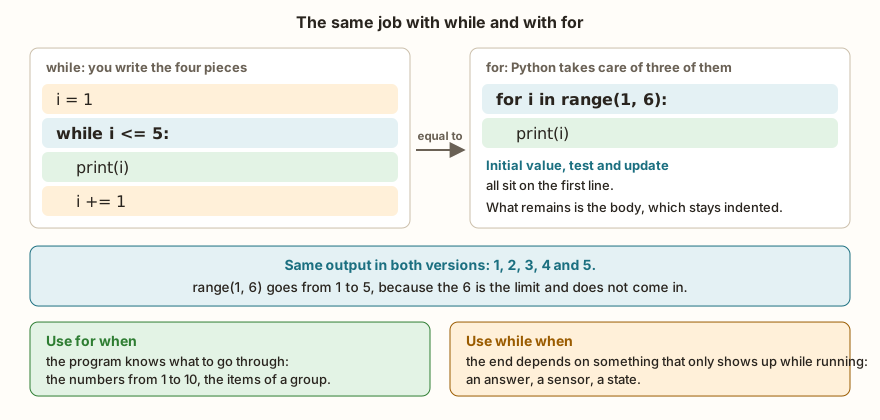
Here is the times table of 2 written with for:
for i in range(1, 6):
    print("2 x", i, "=", 2 * i)
soma = 0
for n in range(1, 11):
    soma = soma + n
print("sum from 1 to 10:", soma)
print(sum(range(1, 11)))The output is the times table from 2 x 1 = 2 to 2 x 5 = 10, then sum from 1 to 10: 55 and, on the last line, 55 again. The first line of the loop has the word for, the name of the variable that receives each value (i), the word in, the sequence (range(1, 6)) and the colon. The indented block below is the body. There is no i = 1 before and no i += 1 inside: the for takes the first value from the range on the first pass, the second on the second, and ends when the values run out.
The second part of the example is the accumulator pattern, seen in the article on why repeat: the variable soma starts at 0 and receives each n. The result, 55, is the sum of the first ten numbers. The sum() function does the same calculation at once, and it is worth knowing, but the loop with an accumulator is what you learn first because the same design works for products, counts and maximums.
The choice between the two loops follows a simple rule. Use for when the program already knows what to go through: the numbers from 1 to 10, the items of a group, the letters of a text. Use while when the end depends on something that only appears while the program runs, such as a typed answer or a sensor reading.
From the syllabus to a planned semester
- Teaching plan and calendar built automatically
- Class diary ready to paste into SIGA
- Slides and exercise lists with answer keys
Free Community edition · Windows
The range() function
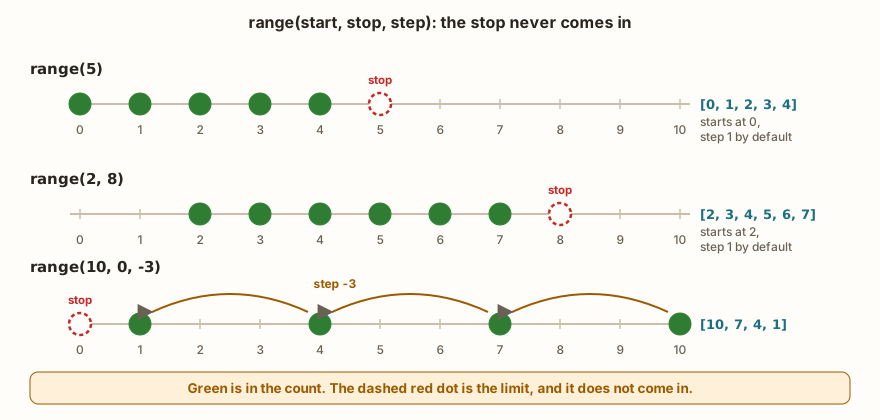
The range() has three forms, and the figure shows each one on a number line. To see the numbers it produces, the example converts them into a list with list():
print(list(range(5)))
print(list(range(2, 8)))
print(list(range(10, 0, -3)))
print(list(range(0, 10, 3)))
print(list(range(5, 2)))
print(list(range(0)))
print(range(5))
print(len(range(0, 10, 3)))
print(3 in range(5), 5 in range(5))The output has nine lines: [0, 1, 2, 3, 4], [2, 3, 4, 5, 6, 7], [10, 7, 4, 1], [0, 3, 6, 9], [], [], range(0, 5), 4 and True False. The forms are:
range(stop)starts at 0, moves one by one and stops before the stop value.range(5)gives 0, 1, 2, 3, 4.range(start, stop)starts at the start value.range(2, 8)gives 2, 3, 4, 5, 6, 7.range(start, stop, step)movesstepbystep.range(0, 10, 3)gives 0, 3, 6, 9, andrange(10, 0, -3), with a negative step, counts backwards: 10, 7, 4, 1.
Three details show up in the output. The first is that range(5, 2) and range(0) are empty: a for over them does not run at all, and the program carries on without an error. To count backwards you need a negative step, as in range(10, 0, -3). The second is that print(range(5)) does not show the numbers but range(0, 5): the range is a description of the sequence, and not a ready-made list. The list() is what builds it. The third is that len() and in work directly on it.
The range does not use up memory
Since the range only keeps the start, the stop and the step, and produces each number when the loop asks for it, it works for huge sequences at no cost:
for i in range(1000000):
    if i == 3:
        break
print("stopped at", i)
print(len(range(1000000)))The output is stopped at 3 and 1000000. The program never built a list of a million items. This matters on the ESP32, which has little memory: a loop with range(10000) costs the same as one with range(10), whereas a list with ten thousand numbers would take up a part of the board's RAM. The break that appears in the example leaves the loop before the end, and is the subject of a later article.
The variable after the loop
After the for, the loop variable keeps existing and holds the last value it received:
for i in range(5):
    print(i)
print("afterwards, i is", i)The output goes from 0 to 4 and afterwards, i is 4. The i is 4, and not 5: the 5 was never handed to the loop. That is why it is said that range(5) makes five passes and i reaches 4.
Counting backwards and step by step
The negative step makes the countdown, and a step greater than 1 is used to skip values, such as the multiples of 5 or the angles of a servo:
for i in range(10, 0, -3):
    print(i)
for i in reversed(range(3)):
    print("rev", i)
for graus in range(0, 181, 45):
print(graus)The output is 10, 7, 4, 1, then rev 2, rev 1, rev 0 and finally 0, 45, 90, 135, 180. The reversed() function is a second way of reversing the range. Notice the limit of the last loop: for the 180 to come in, the stop is 181, and this kind of "one more" adjustment is what raises the most doubts.
Going through text and groups
The for does not need range(): it goes through any sequence. A text hands out the letters, a tuple hands out the items:
for letra in "ESP32":
    print(letra)
for dia in ("mon", "tue", "wed"):
    print(dia)
for i in range(3):
    for j in range(3):
        print(i * j, end=" ")
print()The output is E, S, P, 3 and 2, then mon, tue and wed and, at the end, a three-line grid: 0 0 0, 0 1 2 and 0 2 4. The third loop is a for inside another, and the same rule as in the while holds: the inner one runs completely on each pass of the outer one. The grid shows the times table from 0 to 2.
When you need the number of the pass along with the value, the enumerate() function hands out both:
for i, dia in enumerate(("mon", "tue", "wed")):
    print(i, dia)
for i, dia in enumerate(("mon", "tue"), 1):
    print(i, dia)
for a, b in ((1, 2), (3, 4)):
print(a + b)The output is 0 mon, 1 tue, 2 wed, then 1 mon and 2 tue and, finally, 3 and 7. The enumerate numbers from 0, or from the number given as the second argument (the 1 of the second loop). The third loop shows that the for can split a pair into two variables, a and b, on each pass. The example uses tuples because lists, with all their features, are the subject of an article further along in the series.
The AI that remembers your life and lives on your computer
- Long-term memory with the source of every answer
- Works offline: your data stays on your PC
- Reads PDFs, slides, photos and meeting recordings
Essential plan free forever
The usual patterns, now with for
The accumulator, the counter and the maximum are the same as in any loop. With the readings from a sensor stored in a tuple, the program calculates the average, finds the largest value and shows each position:
leituras = (512, 530, 498, 505, 521)
soma = 0
for v in leituras:
    soma = soma + v
print("average", soma / len(leituras))
maior = leituras[0]
for v in leituras:
    if v > maior:
        maior = v
print("largest", maior)
for i in range(len(leituras)):
print(i, leituras[i])The output is average 513.2, largest 530 and five lines from 0 512 to 4 521. The leituras[0] takes the item at position 0, the first one, and leituras[i] takes the one at position i. Positions start at 0, which matches range(len(leituras)): it goes from 0 to the last index, 4. The maximum pattern starts with the first value, and not with 0, because that way it also works when all the values are negative. When only the value matters, and not the position, the first style (for v in leituras) is clearer and shorter than range(len(...)).
Leaving early or skipping a pass
Two commands change the rhythm of the loop: break leaves it at once and continue jumps to the next pass.
for i in range(5):
    if i == 3:
        break
    print(i)
for i in range(5):
    if i % 2 == 0:
        continue
print("odd", i)The output is 0, 1, 2, then odd 1 and odd 3. In the first loop the break interrupts everything when i reaches 3, and the 3 is not printed. In the second, the continue abandons the rest of the body when i is even and goes to the next pass, so only the odd numbers are printed. The details of break and continue are left for the article dedicated to them.
What changes on the ESP32
The for and the range are the same as in Python on the computer. The most common use in hardware is sweeping a range of values, such as the brightness of an LED with PWM:
from machine import Pin, PWM
import time
led = PWM(Pin(2), freq=1000)
for duty in range(0, 1024, 256):
    led.duty(duty)
    print("duty", duty)
    time.sleep_ms(100)
led.duty(0)
print("end")The output is duty 0, duty 256, duty 512, duty 768 and end. The range(0, 1024, 256) gives four brightness steps, and the time.sleep_ms holds each one for a moment, so the change can be seen. The article on PWM, LED, buzzer and servo explains the duty and the range of values; what matters here is that the step of the range adjusts the smoothness of the transition.
The range() only accepts integers. For decimal values, the way is to calculate from the integer of the pass, and not to add a decimal step several times:
for i in range(0, 11, 5):
    print(i / 10)
x = 0.0
for i in range(10):
    x = x + 0.1
print(x, x == 1.0)The output is 0.0, 0.5 and 1.0 in the first part, and 1.0000001 False in the second. The division i / 10 starts from an exact integer and gives 0.5 without error. The sum of 0.1 ten times accumulates the rounding error of the 32-bit float: the result ends at 1.0000001 and the comparison with 1 fails. In Python on the computer, the 64-bit float gives 0.9999999999999999, also different from 1. The for with range avoids the problem of the while loop with decimals, because the number of passes is fixed, but the accumulated value still carries the error.
Common mistakes and how to recognize them

The first two cards in the figure are logic errors that Python does not report. range(1, 5) hands out 1, 2, 3 and 4, and whoever wanted up to 5 loses the last one. range(5, 1) hands out nothing, and the loop does not run, with no message. The next two give a real error:
for i in range(2.5):
print(i)Traceback (most recent call last):
File "main.py", line 1, in <module>
TypeError: can't convert float to intThe messages from the simulator (MicroPython) and from Python on the computer differ in wording:
| Error | Simulator (MicroPython) | Python on the computer |
|---|---|---|
range(2.5) | TypeError: can't convert float to int | TypeError: 'float' object cannot be interpreted as an integer |
range(1, 10, 0) | ValueError: zero step | ValueError: range() arg 3 must not be zero |
for i in 5: | TypeError: 'int' object isn't iterable | TypeError: 'int' object is not iterable |
missing : in the for | SyntaxError: invalid syntax (line 1) | SyntaxError: expected ':' |
| body without indentation | SyntaxError: invalid syntax (line 2) | IndentationError: expected an indented block after 'for' statement on line 1 |
"Iterable" means "something that can be gone through", and a loose number, like the 5 in for i in 5:, is not. What the student wanted was range(5).
In the classroom: where the for tends to trip people up
The cases below repeat in classes that have just learned the range.
The limit that does not come in
It is mistake number one. The exercise asks for the numbers from 1 to 10 and the program shows from 1 to 9, because the student wrote range(1, 10). The sentence that solves it: the first number of the range comes in, the second does not. To go up to 10, the stop is 11.
Changing the i inside the loop
Some students think that adding something to i inside the body will "skip" passes. It does not skip:
for i in range(3):
    print("before", i)
    i = i + 10
print("after", i)The output is before 0, after 10, before 1, after 11, before 2 and after 12. The i changes inside the pass, but on the next pass the for takes the next value from the range and ignores the change. To skip values, the way is the step of the range; for a loop that changes its own counter, the while.
Expecting a list
The print(range(5)) shows range(0, 5), and the student thinks something broke. The list(range(5)) shows the numbers.
Using the for where the while was needed
A program that asks for grades until the user types -1 does not know how many passes it will make, so the range does not apply. The deciding question is: is the number of passes known before the loop starts?
The variable name that repeats
In two nested loops with the same variable (for i inside for i), the inner one overwrites the outer one and the result is confusing. Different names, such as i and j, or meaningful names, such as linha and coluna, avoid the problem. When the loop variable is not used in the body, the convention is to call it _, as in for _ in range(3):, which repeats three times without needing the number.
The indentation and the colon
The syntax errors of the for are the same as those of the if and the while: a forgotten colon and a body without indentation. The simulator says only invalid syntax and the line. The article on if and else has the list of indentation errors.
Exercise: temperature table
Convert degrees Celsius into Fahrenheit, from 0 to 100 in steps of 25, with the formula F = C * 9 / 5 + 32. It is an exercise in range with a step, and the table shows the loop working.
for c in range(0, 101, 25):
    f = c * 9 / 5 + 32
print(c, "C =", f, "F")The output has five lines: 0 C = 32.0 F, 25 C = 77.0 F, 50 C = 122.0 F, 75 C = 167.0 F and 100 C = 212.0 F. The 101 is the stop that lets the 100 in. The division with / returns a float, and that is why the results appear with .0.
For an interactive version, the times table of the number the person types uses input() and int() before the loop:
n = int(input("Times table of: "))
for i in range(1, 11):
print(n, "x", i, "=", n * i)With the input 5, the output goes from 5 x 1 = 5 to 5 x 10 = 50. The int() is the one from the article on type conversion, and the for loop only starts after the number has been read.
Frequently asked questions
Can the range start at 1?
It can: range(1, 11) goes from 1 to 10. Without the first argument, the range starts at 0, and that matches the way Python numbers positions.
Does the range accept negative numbers?
It does, at the start, the stop and the step. range(-3, 3) goes from -3 to 2, and range(5, -1, -1) counts from 5 to 0.
How do I make a loop from 0 to 1 in steps of 0.1?
Use range(0, 11) and divide each value by 10, as in the i / 10 example. The range only works with integers.
What is the difference between for i in range(len(x)) and for item in x?
The first goes through the positions, and the second goes through the values. Prefer the second when the position is not needed.
Can the for have an else?
It can, and the else block runs when the loop ends without a break. It is the subject of the article on break, continue and the else of loops.
Where to go next
The Logic with Python track has the for and range challenges. Times Table of 2 and Sum from 1 to 10 are the most direct, Evens from 1 to 10 and Multiples of 5 ask for the step and the limit with care. If the while is still the first idea that comes to mind, reread the article The while Loop.
The next subject is the "do-while": how to repeat a block that needs to run at least once, with while True and break, since Python has no command of its own for that.