Fundamentals
Do-While in Python with while True and break
Python has no do-while. See how to repeat a block that must run at least once with while True and break, in input validation, menus and waits.
By Prof. Rodrigo Faustino · Updated on · 12 min read
Metrics for this article
- Words
- 2,391
- Characters
- 12,696
- Reading time
- ~12 min
Python does not have the "do-while" loop of languages such as C and Java. The way to write it is a while True: with a break at the moment the repetition should end. The body runs first, the test comes afterwards, and that is why the block runs at least once. It is the natural format for everything that needs to happen before you know whether it is worth repeating: asking for a piece of data and checking whether it will do, showing a menu and seeing what the person chose, waiting for an event with a time limit.
The previous article showed that the normal while tests first and may not run at all. This one shows the other format, the three ways of writing it and when each is better, input validation, the menu, the exit in the middle of the block, the cautions with break and the use on the ESP32.
What a do-while is
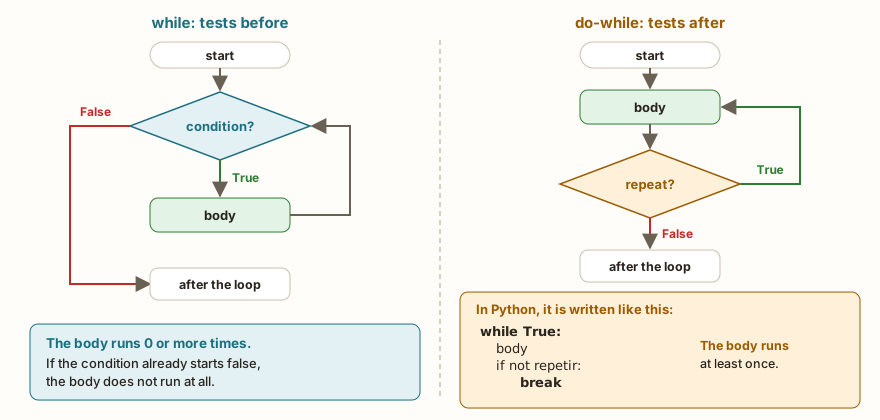
The difference between the two loops is the place of the test. In the while, the test comes before the body: if the condition is born false, the body does not run. In the do-while, the body comes first and the test decides whether there will be another pass. The figure shows the two flows, and the example shows the difference in practice, with the same initial value:
n = 0
while n > 0:
    print("plain while: runs", n)
    n = n - 1
print("---")
n = 0
while True:
    print("do-while: runs once with", n)
    n = n - 1
    if n <= 0:
        break
print("end")The output is ---, do-while: runs once with 0 and end. The first loop prints nothing, because n > 0 starts out false. The second runs the body once with n equal to 0, and only then does the if order the exit. The word break interrupts the loop on the spot, and the program continues at the first line after it.
The condition of while True is always true, so the loop only ends through the break. That is why the recipe always has the two pieces: the while True opens the loop and the if ...: break is the only exit door. Writing the second as "leave when" is usually more natural than the negation ("repeat while not"), and the figure shows the if not repetir, the condition to continue, turned into the condition to leave.
The AI that remembers your life and lives on your computer
- Long-term memory with the source of every answer
- Works offline: your data stays on your PC
- Reads PDFs, slides, photos and meeting recordings
Essential plan free forever
The recipe: validating an input
The most common use is checking what the person typed. If the value will not do, warn and ask again, as many times as needed:
while True:
    idade = int(input("Age: "))
    if 0 <= idade <= 120:
        break
    print("Invalid age, try again")
print("age accepted:", idade)With the inputs -5, 200 and 25, the program shows the invalid age message twice and ends with age accepted: 25. If the first input is 25, the warning never appears and the loop makes a single pass. The read is inside the loop, appears only once, and the if with break is the acceptance rule: the condition that describes the valid age, 0 <= idade <= 120, without any negation.
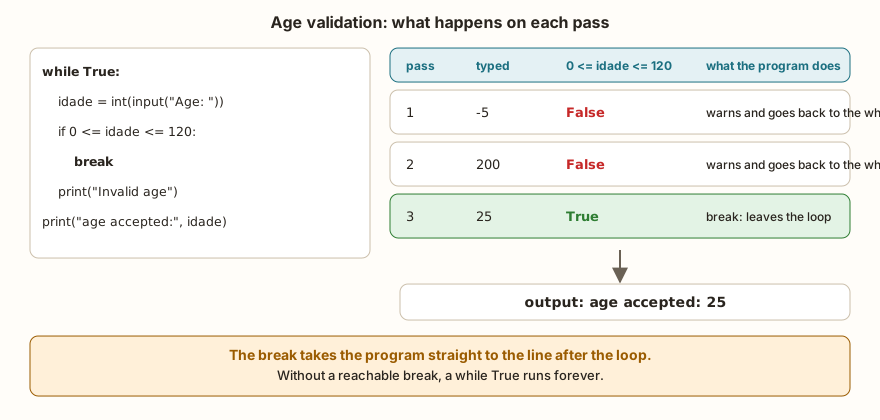
The figure follows the three passes. In the first two, the condition gives False and the program goes right past the break, falling into the warning print and going back to the top of the while. In the third, the condition gives True, the break leaves the loop and the program moves on to the final print. The chained comparison, 0 <= idade <= 120, is the same as in the article on relational and logical operators.
Three ways of writing the same idea
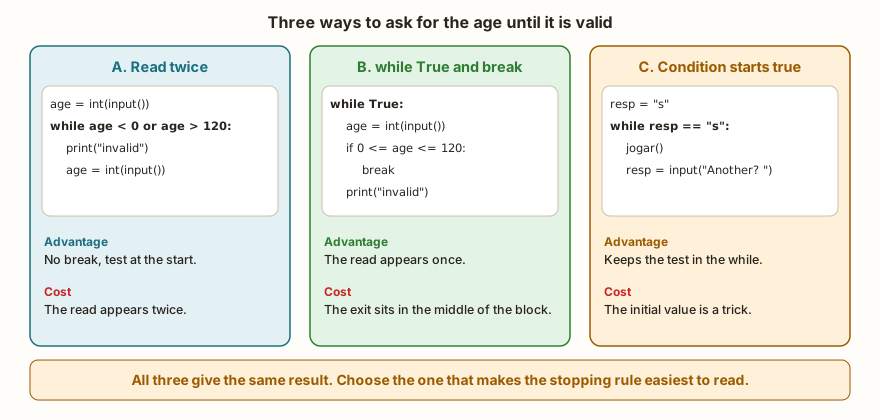
The while True with break is not the only option. There are three ways of writing a repetition that must run at least once, and each one has a cost.
A. Read twice. It is what the article on the while did with the sentinel: the read comes once before the loop and again at the end of the block.
idade = int(input("Age: "))
while idade < 0 or idade > 120:
    print("Invalid age, try again")
    idade = int(input("Age: "))
print("age accepted:", idade)The output is the same as in the example with break. The advantage is that the test stays at the top, and whoever reads knows the loop condition right away. The cost is the duplicated read: if the input message changes, it has to change in both places, and forgetting one of them is a common mistake. Notice also that the condition now describes what is invalid (idade < 0 or idade > 120), the negation of the one that was in the if of the break.
B. while True with break, shown above. The read appears once, and the price is that the exit is hidden in the middle of the block. Whoever reads has to go through the body to find the break.
C. Start with the condition true. When the decision to repeat comes from an answer by the person, you can give the test a value that already starts true:
resp = "s"
rodadas = 0
while resp == "s":
    rodadas = rodadas + 1
    print("round", rodadas)
    resp = input("Another (s/n)? ")
print("played", rodadas)The output has round 1, the question, round 2, the question, round 3, the question with the answer n and played 3. (The letters s and n are the first letters of sim and não, Portuguese for yes and no.) The initial resp = "s" is not a real answer: it is a trick to make the first test pass. It works well here because the stopping rule is simple and sits in the while, with no break at all. It does not work when the stopping condition depends on what the body calculates.
Which one to choose? When the stopping rule fits in a short condition and the read is not long, form A or C keeps the while honest. When the read involves several lines, or the stopping rule can only be evaluated after a calculation, form B is the cleanest. All three give the same result, and the criterion is clarity.
The exit in the middle of the block
The break does not have to be at the end. It can be in the middle, between what comes before it (the read, for example) and what comes after (the processing). It is the cleanest way to write the sum until zero is typed, without repeating the read:
total = 0
while True:
    n = int(input("Value (0 to stop): "))
    if n == 0:
        break
    total = total + n
print("total", total)The output ends with total 40, the same as the version with the sentinel from the article Why Repeat. The read appears once, the break discards the zero before it is added, and the total only receives valid values. The challenges Until Zero, Positive Counter and Largest Number ask for this format, and can be solved in both ways.
From the syllabus to a planned semester
- Teaching plan and calendar built automatically
- Class diary ready to paste into SIGA
- Slides and exercise lists with answer keys
Free Community edition · Windows
The menu
A menu is the do-while by nature: it shows the options, reads the choice, acts and repeats until the person chooses to quit.
saldo = 100
while True:
    print("1 balance | 2 deposit 50 | 0 quit")
    opcao = int(input("Option: "))
    if opcao == 0:
        break
    elif opcao == 1:
        print("balance", saldo)
    elif opcao == 2:
        saldo = saldo + 50
        print("deposited")
    else:
        print("invalid option")
print("goodbye, final balance", saldo)With the choices 1, 9, 2 and 0, the program shows the balance of 100, warns that option 9 is invalid, deposits another 50 and leaves with goodbye, final balance 150. The if is the one from the article on if, elif and else, and the exit option is the first in the chain, the one that runs the break. The final else covers any number that is not an option, and the menu shows itself again. It is the format of any program that sits waiting for commands.
Cautions with break
The break is simple, and that is exactly why it is worth knowing three limits of it.
Without a reachable break, the loop does not end. A while True whose exit depends on a condition that never happens runs forever. In classroom programs, a good defense is a safety counter:
tentativas = 0
while True:
    tentativas += 1
    print("attempt", tentativas)
    if tentativas == 3:
        print("I give up")
breakThe output is attempt 1, attempt 2, attempt 3 and I give up. The counter turns a potentially infinite loop into a loop with a maximum number of passes, and the same idea works for waits that may never end.
The break leaves only the innermost loop. With nested loops, the outer loop continues:
for i in range(3):
    for j in range(3):
        if j == 1:
            break
        print(i, j)
print("end")The output is 0 0, 1 0, 2 0 and end. On each pass of the outer loop, the for j prints the pair with j equal to 0 and leaves when it reaches 1. The outer loop carries on normally and makes all three passes. To leave both at once, you need a control variable that the outer loop also tests, or, when functions come into the series, a return.
The break only exists inside a loop. Outside one, the program does not even start:
breakTraceback (most recent call last):
File "main.py", line 1
SyntaxError: 'break'/'continue' outside loopPython on the computer says SyntaxError: 'break' outside loop. The two messages mean the same thing: the break is outside a for or while, usually because of wrong indentation that left it at the margin.
What changes on the ESP32
The while True is the structure of a board's main program, and there the break usually does not exist: the device works until it is switched off. The do-while appears in smaller parts of the program, the most common being waiting for an event with a time limit. The example waits for a button with a deadline of 300 ms:
from machine import Pin
import time
botao = Pin(4, Pin.IN, Pin.PULL_UP)
inicio = time.ticks_ms()
while True:
    if botao.value() == 0:
        print("pressed")
        break
    if time.ticks_diff(time.ticks_ms(), inicio) > 300:
        print("time out")
        break
    time.sleep_ms(20)
print("end")In the simulator, with no circuit, the output is time out and end. With the internal pull-up resistor, the pin stays at 1 while nobody presses the button (the subject of the article on pull-up and the floating pin), so the test botao.value() == 0 is never true and the deadline runs out. The loop has two exits, each with its own break, and the 20 ms pause inside it keeps the processor from running at full speed. The result of a loop like this is always one of two things, the event arrived or the deadline ran out, and the program needs to handle both.
The same structure works for waiting for the Wi-Fi connection. The reference solution of the challenge Connect to Wi-Fi repeats the wait while the board is not connected and leaves with break when 10 seconds have passed. The article on Wi-Fi, HTTP and MQTT shows the complete connection. Without the time limit, a network that is down would leave the board waiting forever.
In the classroom: where the do-while tends to trip people up
The cases below repeat in classes that learn the break, and in almost all of them the program runs.
The acceptance condition inverted
Whoever writes the validation rule in Portuguese ("the age must be from 0 to 120") and translates it with or instead of and creates a rule that accepts everything:
for idade in (-5, 200, 25):
print(idade, idade >= 0 or idade <= 120, 0 <= idade <= 120)The output is -5 True False, 200 True False and 25 True True. With the or, any number passes: the -5 passes the <= 120 and the 200 passes the >= 0. It is the same logic error as in the article on truth tables, now inside an if with break, and the program accepts the first input, whatever it is. The third column, with the chaining, is the one that works.
The break without the if
A loose break in the body of the loop runs on the first pass:
while True:
    print("only one pass")
    break
print("end")The output is only one pass and end. The loop is a while True with a single pass, and the symptom is the program that "only asks once". Usually the break lost the if or the indentation that put it inside it.
The error message in the wrong place
If the print("Invalid age") sits before the if, the message appears even for a valid age. The order of the body matters: check, leave if it is right, and only then warn about the error.
Forgetting the conversion
The input() returns text, and comparing a text with a number inside the validation is a type error or an if that is never true. The conversion with int() or float() goes inside the loop, together with the read, as in the article on type conversion.
A menu that does not end
The menu with an exit option that does not do the break, or that tests the option as text ("0") after converting to a number. The exit test needs to have the same type as the input.
Using while True without needing it
Not every while has to become while True. If the condition fits on the while line and the read is not long, leaving the test at the top, as in form A, is more direct. The while True with break is a tool for when the exit in the middle of the block makes the code clearer.
Exercise: the ATM
The program asks for a withdrawal amount and only accepts it if it is positive, a multiple of 10 and does not exceed the balance of 500. Each reason for refusal has its own message. When the amount is accepted, the loop ends and the withdrawal is made.
saldo = 500
while True:
    valor = int(input("Withdrawal amount: "))
    if valor <= 0:
        print("Enter a positive value")
    elif valor % 10 != 0:
        print("Only notes of 10")
    elif valor > saldo:
        print("Insufficient balance")
    else:
        break
saldo = saldo - valor
print("withdrew", valor, "balance", saldo)With the inputs 0, 35, 600 and 120, the output brings the three refusals, one per input (Enter a positive value, Only notes of 10 and Insufficient balance), and ends with withdrew 120 balance 380. Notice that the break is in the else: it only runs when no refusal applied, and it is the only way out. The % is the remainder of the division, from the article on arithmetic operators.
To extend it, add a limit of three attempts with a counter, as in the I give up example, and a blocking message when they run out.
Frequently asked questions
Why does Python not have a do-while?
The while True with break already does the job, and the language did not gain a second way of writing the same thing. Whoever comes from C or Java finds the same idea in different clothes.
Is while True bad practice?
No. It is the standard form of the do-while and of a board's main loop. What matters is that the exit exists and is reachable, or that the loop is infinite on purpose.
Can I use while 1?
It works, because 1 is true, but while True says better what is wanted, and it is the form you see in MicroPython examples.
What happens with the else of a while True with break?
The else block of a loop only runs when it ends without break. With break the else is ignored. The subject belongs to the next article in the series.
How do I leave two loops at once?
With a control variable tested by both, or by putting the loops in a function and using return. A break alone leaves only the innermost loop.
Where to go next
The Logic with Python track has challenges that can be solved with while True and break: Until Zero, Password 1234, Positive Counter and Largest Number. Try each one in both ways, reading twice and with break, and compare which one came out clearer.
The next subject is the complete set of loop control commands: break, continue and the else that for and while accept.