Fundamentals
break, continue and the else of Loops in Python
Learn to control for and while in Python with break, continue and the loop else: searches, filters, attempts and the traps that freeze the program.
By Prof. Rodrigo Faustino · Updated on · 12 min read
Metrics for this article
- Words
- 2,373
- Characters
- 12,446
- Reading time
- ~12 min
The break ends the loop on the spot, the continue abandons the rest of the current pass and moves on to the next, and the loop else is a block that runs only when the loop ends without having been interrupted by a break. The three work the same way in the for and in the while, and together they solve searches, filters and limited attempts, which are most of what is done with loops.
This article closes the repetition module. The break already appeared in the article on the do-while, and the continue in a short example in for and range. Here they are seen head on: what each command does to the flow, the else that almost nobody knows, the trap of the continue inside the while, how to leave two loops and how these commands enter ESP32 programs.
Three commands, three destinations

The figure shows a five-pass loop in three situations. With no detour, the five passes run and the loop ends normally. With a continue on pass 3, the rest of that pass is skipped and the loop goes on to 4, and the ending remains normal. With a break on pass 3, the loop ends there: passes 4 and 5 do not run, and the program jumps to after the loop.
What tells the two exits on the right apart is the else. It runs on the normal ending, in the first two rows, and does not run when the loop was interrupted, in the third. The following sections detail each command.
The AI that remembers your life and lives on your computer
- Long-term memory with the source of every answer
- Works offline: your data stays on your PC
- Reads PDFs, slides, photos and meeting recordings
Essential plan free forever
break: stopping when you have already found it
The break is for stopping the search when the answer has already appeared. Continuing the loop after that would be wasted work:
for n in range(51, 100):
    if n % 7 == 0:
        print("first multiple of 7 above 50:", n)
        break
print("end")The output is first multiple of 7 above 50: 56 and end. The loop tests 51, 52, 53, 54, 55 and 56, and the break interrupts on the sixth pass, without looking at the numbers from 57 to 99. The program continues at the first line without indentation after the for. The same idea holds for the while, as in the article on the do-while, in which the break is the exit of the while True.
continue: skipping today's pass
The continue interrupts only the current pass. Python jumps to the next pass, which in the for is the next value and in the while is the test of the condition.
for n in range(1, 8):
    if n % 3 == 0:
        continue
    print(n)
print("end")The output is 1, 2, 4, 5, 7 and end. When n is a multiple of 3, the continue skips the print and the loop goes straight to the next value. The 3 and the 6 do not appear. The challenge Multiples of 5 and Evens from 1 to 10 ask for filters like this, and can be solved with continue or with an if around the print.
By the way, the continue can almost always be replaced by an if. The choice is one of readability. When the filter is a refusal at the start of the body ("if the value will not do, move on to the next"), the continue keeps the rest of the body from being nested inside an if, and each level of indentation less is a gain in reading.
What comes after the continue or the break in the same block never runs, and Python does not warn:
for i in range(3):
    print(i)
    if i == 1:
        continue
print("never appears")The output is 0, 1 and 2, without the message. The line after the continue is dead code. If something that should happen has vanished, check whether it ended up after one of these commands.
The trap of the continue in the while
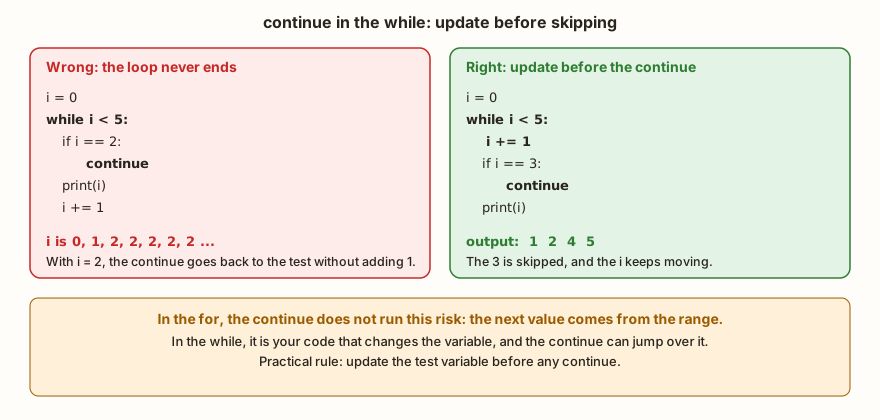
In the for, the next value comes from the range, and the continue cannot get in its way. In the while, whoever changes the test variable is the program's own code, and the continue can skip exactly that line:
i = 0
voltas = 0
while i < 5 and voltas < 8:
    voltas += 1
    if i == 2:
        continue
    print(i)
    i += 1
print("passes", voltas, "i", i)
print("---")
i = 0
while i < 5:
    i += 1
    if i == 3:
        continue
print(i)The output has 0, 1, the line passes 8 i 2, the separator and 1, 2, 4, 5. In the first version, when i reaches 2, the continue goes back to the test without passing through the i += 1, and i stays stuck at 2 forever. The voltas < 8 is a stop that cuts the loop so the example can finish: without it, the program would not end. In the second version, the i += 1 comes before the if, and the continue only skips the print. The practical rule is to update the test variable before any continue.
The else of the loop
Python allows an else: after a for or a while. The name misleads anyone thinking of the else of the if: the loop's one means "if the loop ended without break". It is the answer to "I did not find it":
for n in (3, 8, 12, 7):
    if n % 2 == 0:
        print("first even", n)
        break
else:
    print("no even number")
for n in (3, 5, 7):
    if n % 2 == 0:
        print("first even", n)
        break
else:
print("no even number")The output is first even 8 and no even number. In the first loop, the 8 is even, the break runs and the else is ignored. In the second, no value is even, the break never runs, the loop ends by itself and the else executes. The figure below highlights the column of the else.
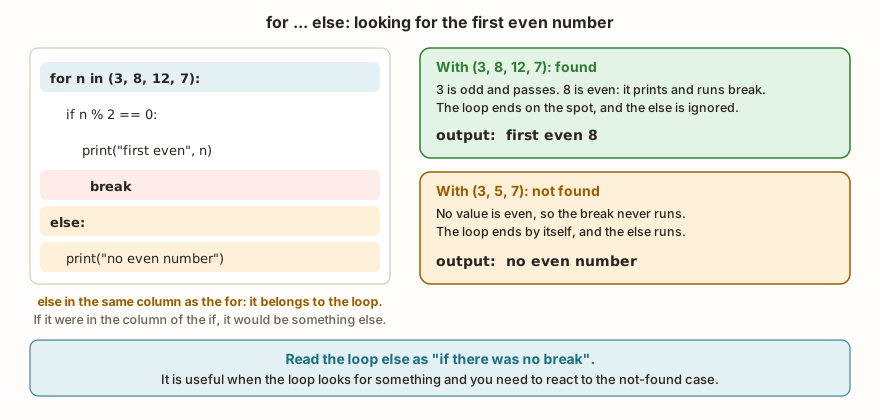
Notice the alignment. The loop's else sits in the same column as the for, and not in that of the inner if. Whoever aligns the else with the if changes the question: instead of "I did not find it", the program starts asking, on each pass, "is this value not even?". The result changes:
for n in (3, 8, 12, 7):
    if n % 2 == 0:
        print("even", n)
        break
    else:
print("odd", n)The output is odd 3 and even 8. The else here is the if's, and it runs on every pass where n is odd. The two programs look the same to the naked eye, and the only difference is the indentation of one line.
Prime numbers with for and else
The classic example of the loop else is the prime number test. A number is prime if no divisor between 2 and n - 1 divides it. The loop looks for a divisor, and the else says that it did not find one:
for n in (1, 2, 9, 13, 15, 17):
    if n < 2:
        print(n, "is not prime")
        continue
    for d in range(2, n):
        if n % d == 0:
            print(n, "divisible by", d)
            break
    else:
print(n, "prime")The output is 1 is not prime, 2 prime, 9 divisible by 3, 13 prime, 15 divisible by 3 and 17 prime. The example brings the three commands together. The continue discards the 1 without entering the inner loop. The break interrupts the search at the first divisor, and the else of the inner loop answers "prime" when the search ends without finding one. For the 2, the range(2, 2) is empty and the inner loop does not run at all, but the else runs, and the 2 comes out as prime, which is the right result.
The else of the while
The while has the same else, with the same rule:
tentativas = 0
while tentativas < 3:
    tentativas += 1
    print("attempt", tentativas)
else:
    print("else: the attempts ran out")
print("---")
n = 0
while n > 0:
    print("does not run")
else:
    print("else runs even with zero passes")
print("---")
tentativas = 0
while tentativas < 3:
    tentativas += 1
    if tentativas == 2:
        print("found at", tentativas)
        break
else:
print("else does not appear")The output has the three attempts and else: the attempts ran out, then else runs even with zero passes and, in the last part, only found at 2. The else runs when the while condition gives False, including the first time, and does not run when the break interrupts. In a while True, the only way out is the break, so the else never runs and there is no point in writing it.
The for over an empty group also executes the else, and the pass command, which does nothing, serves as a marker where the syntax requires a block:
for n in (1, 2, 3):
    pass
else:
    print("else without break")
for n in ():
    print("does not run")
else:
    print("else with empty group")
x = 5
if x > 3:
    pass
print("pass does nothing")The output is else without break, else with empty group and pass does nothing.
From the syllabus to a planned semester
- Teaching plan and calendar built automatically
- Class diary ready to paste into SIGA
- Slides and exercise lists with answer keys
Free Community edition · Windows
Leaving two loops at once
The break leaves only the loop where it is. With nested loops, the outer one continues, as in the previous article. To leave both, the most direct way is a control variable:
achou = False
for i in range(3):
    for j in range(3):
        if i * j == 4:
            achou = True
            break
    if achou:
        break
print(i, j, achou)The output is 2 2 True. The inner break interrupts the for j and sets achou. The if achou of the outer loop interrupts the for i right afterwards. When functions arrive in the series, another way out will be to put both loops in a function and use return, which leaves everything.
What changes on the ESP32
The three commands are the same as in Python on the computer. In hardware, the pair continue and break with the loop else describes reading attempts well. The example tries to read a sensor up to three times, and the else handles the case where all fail:
leituras = (None, None, 23.5)
for tentativa in range(3):
    valor = leituras[tentativa]
    if valor is None:
        print("attempt", tentativa + 1, "no reading")
        continue
    print("reading", valor)
    break
else:
    print("no reading after 3 attempts")
print("---")
leituras = (None, None, None)
for tentativa in range(3):
    valor = leituras[tentativa]
    if valor is None:
        print("attempt", tentativa + 1, "no reading")
        continue
    print("reading", valor)
    break
else:
print("no reading after 3 attempts")In the first part, the output is attempt 1 no reading, attempt 2 no reading and reading 23.5. In the second, the three attempts fail and the else prints no reading after 3 attempts. The tuple leituras plays the role of the sensor, which on the board would come from a dht or an ADC, and None means "no answer". The continue discards the bad attempt, the break accepts the good one, and the else only runs when none was good. The article on DHT22, HC-SR04 and PIR sensors shows real readings, which fail from time to time.
The same continue works for discarding out-of-range readings before calculating the average:
leituras = (512, -1, 530, 4096, 498)
soma = 0
validas = 0
for v in leituras:
    if v < 0 or v > 4095:
        print("discarded", v)
        continue
    soma = soma + v
    validas = validas + 1
print("average", soma / validas, "of", validas)The output is discarded -1, discarded 4096 and average 513.3333 of 3. The range from 0 to 4095 is that of the ESP32's analog converter (the subject of the article on ADC and attenuation), and values outside it are faulty readings. The simulator shows 513.3333, with the 32-bit float, and Python on the computer would show 513.3333333333334. If all the readings were discarded, validas would stay at 0 and the division would give an error, the same care as the if contador > 0 in the article on the while.
Common mistakes and how to recognize them
The continue outside a loop is a syntax error, and the message varies:
continueTraceback (most recent call last):
File "main.py", line 1
SyntaxError: 'break'/'continue' outside loopPython on the computer says SyntaxError: 'continue' not properly in loop for the continue and 'break' outside loop for the break. The symptom is usually the same: the command lost its indentation and ended up at the margin, outside the loop. The other errors in the article are logic errors, and Python reports none of them.
In the classroom: where these commands tend to trip people up
The cases below repeat in classes, and in all of them the program runs.
The else in the wrong column
It is the case of the odd 3 and the even 8: the else aligned with the if instead of the for. The program prints "I did not find it" on every pass, and the student thinks the loop is repeating wrongly. The check is visual: the loop's else starts in the same column as the for or the while.
The continue that freezes the while
The version of the i stuck at 2. The symptom is the program that "stops suddenly", with no error and no output. The question is: does the continue jump over the line that updates the variable?
Mixing up continue and break
The break leaves the loop, the continue only the pass. Whoever swaps one for the other finds out from the result: a program that stops too early, or that does not stop. The figure with the three rows is a good summary to review.
Code after the break or the continue
The message that never appears, the sum that does not happen. Python runs the lines in order, and what comes after one of these commands, in the same block, is ignored.
The else where it was not needed
Not every search needs an else. A variable achou, as in the example with the two loops, makes the code easier to read for those who do not know the loop else, and it is worth using when the readers of the program are a mixed group. The loop else is a clean tool, but it is one of the least known parts of Python.
Forgetting the zero case
The average with no valid readings, the search in an empty group. The for's else runs on an empty group, and the division by validas breaks if it is 0. In every loop with a filter, it is worth asking what happens when the filter refuses everything.
Exercise: how many primes up to 30
Reusing the prime test, the program goes through the numbers from 2 to 30, shows the primes and counts how many there are. The inner for looks for a divisor, the break interrupts the search and the else of the inner loop records the prime.
total = 0
for n in range(2, 31):
    for d in range(2, n):
        if n % d == 0:
            break
    else:
        print(n, end=" ")
        total = total + 1
print()
print("primes up to 30:", total)The output is the list 2 3 5 7 11 13 17 19 23 29 on one line, and then primes up to 30: 10. To improve it, replace the range(2, n) of the inner loop with range(2, n // 2 + 1), which tests only up to half of n, and confirm that the list is the same. The time saving shows up with large numbers, and it is worth measuring.
Frequently asked questions
Is the loop else the same as the if else?
No. The if's runs when the condition is false. The loop's runs when the loop ends without break. The writing is the same, and the meaning is different.
Does the continue work inside an if?
It does: it acts on the loop that surrounds the if. It almost always appears inside an if, which is what decides when to skip.
Can I use break inside an if inside a for inside another for?
You can, and it leaves only the nearest for. The outer loops keep running, unless you interrupt them too.
What is the pass for?
To fill a block that the syntax requires and that has nothing in it yet. An if without a body is an error, and an if with pass is accepted and does nothing. It is useful as a marker while you write the program.
When to use the loop else instead of a variable?
When the loop looks for something and the program needs to react to the not-found case. If the reader of the code does not know the loop else, a variable such as achou is usually clearer.
Where to go next
The Logic with Python track has challenges that use loops with filters. Positive Counter and Largest Number ask for decisions inside a loop, Evens from 1 to 10 and Multiples of 5 are good for practicing the continue. For the basics, reread the article on the while.
With this the repetition module is complete: the program already decides and repeats. The next subject opens the functions module, with def, calling a function and dividing a program into small parts.