Fundamentals
Parameters and Arguments in Python: Positional, Named, Default Values and *args
Learn to pass values to functions in Python: parameters and arguments, position and name, default values, *args and the most common traps.
By Prof. Rodrigo Faustino · Updated on · 14 min read
Metrics for this article
- Words
- 2,792
- Characters
- 15,544
- Reading time
- ~14 min
A parameter is the name that the function declares in its header, and an argument is the value that the call puts into that name. Arguments can be passed by position, in the order in which the parameters were written, or by name, with parametro=valor. A parameter can have a default value, which applies when the call sends nothing, and a parameter with an asterisk, such as *args, gathers whatever arguments are left over into a tuple.
In the previous article the functions had empty parentheses, like saudar(), and always did the same thing. With parameters, the same function works with different values on each call: blink three times or twice, greet Ana or Rui, add three numbers or five. This article shows the four ways of passing values, what changes in the body of the function, the mistakes each way causes and how this appears in ESP32 programs.
Parameter and argument
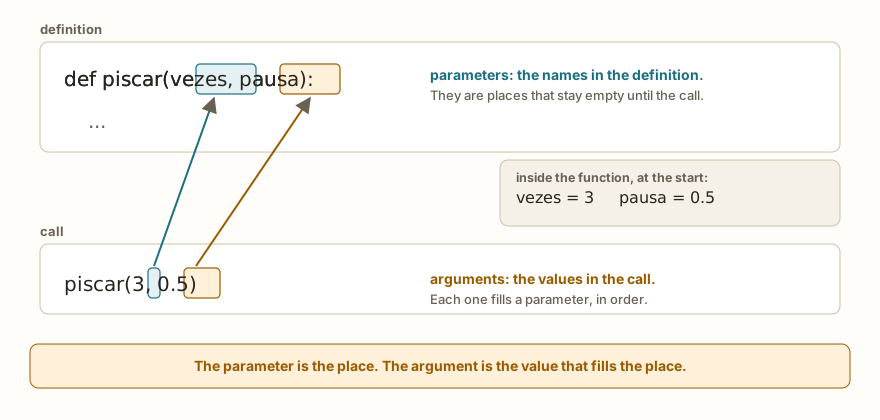
The two names confuse many people because they describe the same connection seen from different sides. The parameter lives in the definition, between the parentheses of the def, and is a name for a value that does not exist yet. The argument lives in the call, and is the real value. When the call happens, Python links each argument to a parameter, and inside the function the parameter behaves like a variable that already starts with the received value.
def piscar(vezes, pausa):
    print("blink", vezes, "times with a pause of", pausa)

piscar(3, 0.5)
piscar(2, 0.1)
v = 5
p = 0.25
piscar(v, p)The output is blink 3 times with a pause of 0.5, blink 2 times with a pause of 0.1 and blink 5 times with a pause of 0.25. The argument can be a number written on the spot, as in the first two calls, or a variable, as in the third. The name of the variable in the call does not have to be the same as the parameter: v and p arrive inside the function as vezes and pausa.
A consequence that tends to surprise: changing the parameter inside the function does not change the variable outside.
def dobrar(n):
    n = n * 2
    print("inside", n)

n = 5
dobrar(n)
print("outside", n)
x = 7
dobrar(x)
print("x remains", x)The output is inside 10, outside 5, inside 14 and x remains 7. The n inside and the n outside have the same name by coincidence and are different variables. In the call, the function received the value 5 and created its own n, which vanished when the function ended. The article on scope details the rules. For now, keep in mind that passing a value does not give the function the power to change the original variable.
The AI that remembers your life and lives on your computer
- Long-term memory with the source of every answer
- Works offline: your data stays on your PC
- Reads PDFs, slides, photos and meeting recordings
Essential plan free forever
Positional arguments
The simplest way to pass values is by position: the first argument goes to the first parameter, the second to the second, and so on.
def intervalo(inicio, fim):
    print("from", inicio, "to", fim)

intervalo(2, 10)
intervalo(10, 2)The output is from 2 to 10 and from 10 to 2. The second call gives no error, and that is the problem: with swapped arguments, the program runs and delivers a wrong result. With parameters of different types, the error usually shows up quickly, but with two numbers the swap goes unnoticed.
def dividir(a, b):
    print(a, "/", b, "=", a / b)

dividir(10, 4)
dividir(4, 10)The output is 10 / 4 = 2.5 and 4 / 10 = 0.4. When the order matters, as in division, it is worth checking the definition before calling. In functions with four or five parameters, position stops being reliable from memory, and that is where named arguments come in.
Named arguments
In the call, the argument can come with the name of the parameter, and then position decides nothing anymore:
def intervalo(inicio, fim):
    print("from", inicio, "to", fim)

intervalo(2, 10)
intervalo(fim=10, inicio=2)
intervalo(2, fim=10)The three calls give from 2 to 10. In the second, both arguments have names and the order is free. In the third, the first goes by position and the second by name, which is allowed as long as the positional ones come before the named ones.
It is worth using the name in the call when the value alone explains nothing. piscar(3, 0.5, 4) forces the reader to open the definition to know what 3, 0.5 and 4 are. piscar(vezes=3, pausa=0.5, pino=4), on the other hand, reads by itself. You already do this with built-in functions, as in print("a", "b", sep="-"): the sep is a named parameter of print, and so is end.
There are three typical mistakes with names. The first is giving the same parameter twice, by position and by name:
def piscar(vezes, pausa=0.2):
    print(vezes, pausa)

piscar(3, vezes=2)Traceback (most recent call last):
File "main.py", line 4, in <module>
TypeError: function got multiple values for argument 'vezes'The 3 went to vezes by position, and the vezes=2 tried to fill the same place. The second is using a name that the function does not have:
def piscar(vezes, pausa=0.2):
    print(vezes, pausa)

piscar(3, tempo=1)Traceback (most recent call last):
File "main.py", line 4, in <module>
TypeError: unexpected keyword argument 'tempo'The third is putting a positional argument after a named one, which Python refuses even before executing:
def piscar(vezes, pausa=0.2):
    print(vezes, pausa)

piscar(vezes=3, 0.5)Traceback (most recent call last):
File "main.py", line 4
SyntaxError: positional arg after keyword argPython on the computer says positional argument follows keyword argument and the simulator uses the short form. In all three cases the reading is the same: the error is on the line of the call, and the solution is to look at the definition.
Default values
A parameter can have a default value, written with = in the header. If the call sends nothing for it, the default takes its place:
def saudar(nome, saudacao="hello"):
    print(saudacao + ",", nome)

saudar("Ana")
saudar("Rui", "good morning")
saudar("Bia", saudacao="good night")
saudar(saudacao="hi", nome="Leo")The output is hello, Ana, good morning, Rui, good night, Bia and hi, Leo. The nome is required, and the saudacao is optional. In the first call it takes the default, in the other two it is replaced, by position and by name, and in the last one both arguments go by name, in reverse order.
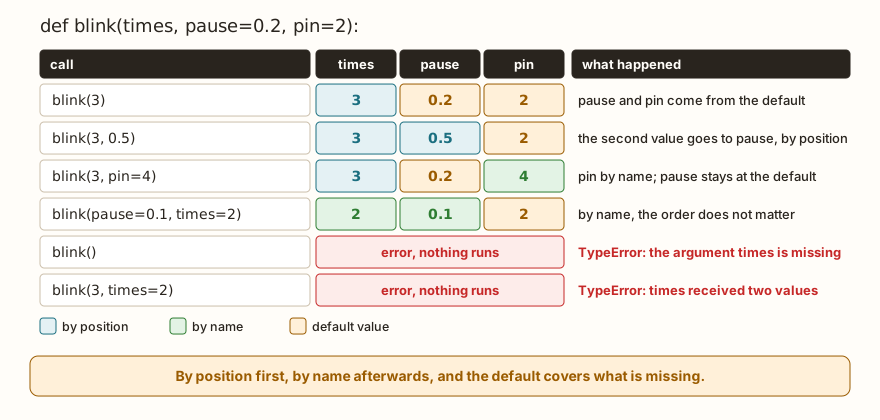
The table in the figure shows the same function, piscar(vezes, pausa=0.2, pino=2), in six calls. piscar(3) uses two defaults. piscar(3, 0.5) replaces the second value by position. piscar(3, pino=4) skips the pause and replaces only the pin, which is the great advantage of the named argument: it lets you change a default in the middle or at the end without repeating the ones before it. The last two rows are errors, the first because vezes, which has no default, is missing, and the second because vezes is repeated.
def piscar(vezes, pausa=0.2, pino=2):
    print("times", vezes, "pause", pausa, "pin", pino)

piscar(3)
piscar(3, 0.5)
piscar(3, pino=4)
piscar(pausa=0.1, vezes=2)
piscar(1, 0.3, 5)The output is times 3 pause 0.2 pin 2, times 3 pause 0.5 pin 2, times 3 pause 0.2 pin 4, times 2 pause 0.1 pin 2 and times 1 pause 0.3 pin 5, one line for each call.
There is a rule of order in the definition: required parameters come before those with a default. Writing the opposite is a syntax error:
def piscar(pausa=0.2, vezes):
print(vezes, pausa)Traceback (most recent call last):
File "main.py", line 1
SyntaxError: non-default argument follows default argumentThe reason is practical. In a call like piscar(3), Python would have no way of knowing whether the 3 is the pause or the times. With the required ones first, position always has an answer.
An everyday example is the price with optional quantity and discount:
def total(preco, qtd=1, desconto=0):
    print(preco * qtd - desconto)

total(10)
total(10, 3)
total(10, 3, 5)
total(10, desconto=2)
total(10, 3, desconto=5)The output is 10, 30, 25, 8 and 25. Without optionals, the function covers the most common case, and whoever needs more control sends only what changes.
From the syllabus to a planned semester
- Teaching plan and calendar built automatically
- Class diary ready to paste into SIGA
- Slides and exercise lists with answer keys
Free Community edition · Windows
Variable quantity with *args
Sometimes you do not know how many values will come: adding three grades, five readings or two. A parameter with an asterisk before the name gathers all the leftover positional arguments into a tuple:
def somar(*numeros):
    print(numeros, type(numeros))
    total = 0
    for n in numeros:
        total = total + n
    print("sum", total)

somar(4, 7, 9)
somar(5)
somar()
lista = [1, 2, 3]
somar(*lista)The output has four blocks of two lines. For somar(4, 7, 9), it shows (4, 7, 9) <class 'tuple'> and sum 20. For somar(5), (5,) <class 'tuple'> and sum 5. For somar(), () <class 'tuple'> and sum 0. For somar(*lista), (1, 2, 3) <class 'tuple'> and sum 6. The body of the function treats numeros as any group and uses a for, as in the articles on loops. A tuple with a single element is written (5,), with the comma, and the empty tuple, (), is accepted: calling with no argument at all is not an error.
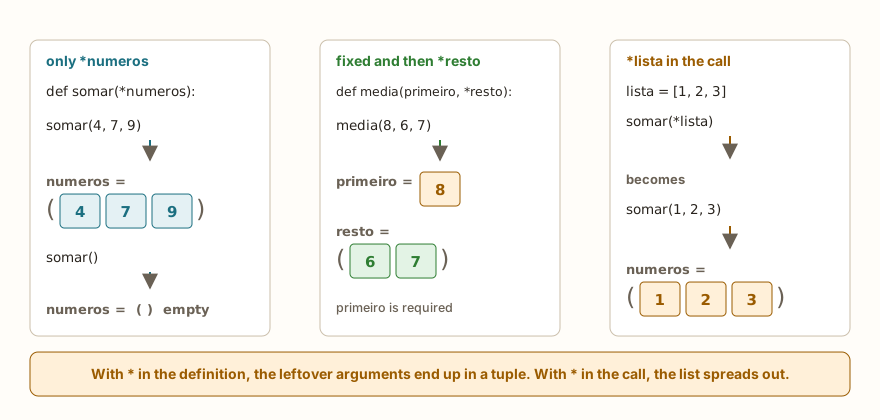
The asterisk has two meanings, depending on where it appears. In the definition, it gathers: *numeros collects the extra arguments into a tuple. In the call, it spreads: somar(*lista) hands over the items of the list as if each had been written separately, somar(1, 2, 3). The word args is just the convention, and *numeros or *notas work the same way, with whatever name best explains the content.
You can combine fixed parameters with the asterisk. The fixed ones come first and receive the first values. What is left goes into the tuple:
def media(primeiro, *resto):
    soma = primeiro
    for n in resto:
        soma = soma + n
    print("average", soma / (1 + len(resto)), "of", 1 + len(resto))

media(8)
media(8, 6)
media(8, 6, 7)The output is average 8.0 of 1, average 7.0 of 2 and average 7.0 of 3. Here the primeiro is required. Calling media() with nothing would give TypeError, which is desired: the average of zero values makes no sense, and the function refuses to calculate.
After *resto, a parameter can only be filled by name. This is useful for options that should not be confused with the values of the group:
def unir(*partes, sep="-"):
    texto = ""
    for i in range(len(partes)):
        if i > 0:
            texto = texto + sep
        texto = texto + str(partes[i])
    print(texto)

unir("a", "b", "c")
unir("a", "b", "c", sep="/")
unir(1, 2)
print("a", "b", "c", sep="-")
print("x", "y", end="!")
print()The output is a-b-c, a/b/c, 1-2, a-b-c and x y!. The print you have been using since the start of the series is built with the same idea: it accepts any number of values and has the named sep and end. A consequence is that the * takes only loose arguments, and not a whole group inside a list:
def somar(*numeros):
    print(sum(numeros))

somar([1, 2, 3])Traceback (most recent call last):
File "main.py", line 4, in <module>
File "main.py", line 2, in somar
TypeError: unsupported types for __add__: 'int', 'list'The call passed a single argument, the list, and numeros became ([1, 2, 3],), a tuple with a list inside. The sum tried to add 0 to the list and failed. The fix is to spread with the asterisk in the call, somar(*[1, 2, 3]), or to call without a list, somar(1, 2, 3). Python on the computer writes the message as unsupported operand type(s) for +: 'int' and 'list'.
There is also a version for leftover named arguments, with two asterisks, and the name used by convention is **kwargs. It gathers the named ones into a dictionary:
def mostrar(**dados):
    print(dados)
    for chave in dados:
        print(chave, "=", dados[chave])

mostrar(nome="Ana", idade=20)
mostrar()The output is {'nome': 'Ana', 'idade': 20}, nome = Ana, idade = 20 and {}. It is less common in teaching programs. It serves functions that pass options on to others, and it is enough to know that it exists.
On the ESP32
In hardware, default values make functions convenient. The data that almost never changes, such as the pause and the number of blinks, stays as a default, and whoever needs another value sends only that one. The pin, which changes from build to build, is the first and required parameter:
from machine import Pin
import time

def piscar(pino, vezes=3, pausa=0.1):
    led = Pin(pino, Pin.OUT)
    for i in range(vezes):
        led.on()
        time.sleep(pausa)
        led.off()
        time.sleep(pausa)
    print("pin", pino, "blinks", vezes)

piscar(2)
piscar(2, 2)
piscar(4, vezes=1, pausa=0.05)The Serial shows pin 2 blinks 3, pin 2 blinks 2 and pin 4 blinks 1. The function creates the Pin with the number it received, so the same function works for any LED. The Pin(pino, Pin.OUT) is also a call with two positional arguments, and the second, Pin.OUT, is the mode of the pin. Reading the documentation of a built-in function is, in large part, reading the list of parameters and discovering which ones have a default. In the articles on PWM, ADC and I2C, other built-in functions and classes appear, and it is worth checking, in each one, which arguments are required and which have a default.
Traps that Python does not report
The errors seen so far warn right away. Two cases do not.
The default value that remembers the previous call
The default value is created once, when the def runs, and not on each call. With numbers and texts, which are not changed in place, this does not show. With a list, it does:
def acumular(x, lista=[]):
    lista.append(x)
    print(lista)

acumular(1)
acumular(2)
acumular(3)
print("---")
def acumular2(x, lista=None):
    if lista is None:
        lista = []
    lista.append(x)
    print(lista)

acumular2(1)
acumular2(2)The output is [1], [1, 2], [1, 2, 3], the separator and then [1] and [2]. In the first version, the default list is always the same, and each call adds to it. The second uses None as a signal for "nothing was sent" and creates the list inside the function, which gives a new list on each call. The rule: never use an empty list, dictionary or set as a default value. Use None and create it inside.
Arguments in the wrong order
Two variables of the same type swapped places produce a wrong result and no message. What helps is naming: dividir(a=4, b=10) documents the intent, and intervalo(inicio=2, fim=10) leaves no doubt.
Wrong argument count
Without the names, the error that appears most is the count TypeError. The two directions are:
def piscar(vezes, pausa=0.2):
    print(vezes, pausa)

piscar()Traceback (most recent call last):
File "main.py", line 4, in <module>
TypeError: function takes 1 positional arguments but 0 were givendef piscar(vezes, pausa=0.2):
print(vezes, pausa)
piscar(1, 2, 3)Traceback (most recent call last):
File "main.py", line 4, in <module>
TypeError: function takes 2 positional arguments but 3 were givenPython on the computer is clearer: piscar() missing 1 required positional argument: 'vezes' in the first case and piscar() takes from 1 to 2 positional arguments but 3 were given in the second. The meaning is the same, an argument was missing or left over, and the line pointed to is that of the call.
In the classroom: where parameters tend to trip people up
These cases repeat in classes.
Parameter and argument treated as the same thing
When the student says "the parameter 5", they have mixed up the two. The checking question: is this in the def or in the call? In the def it is a parameter, in the call it is an argument.
Reading the value with input inside the function
Instead of receiving the number as a parameter, the function calls input() inside it. It works once and is good for nothing else: you cannot call it with a value that already exists, nor test it without typing. The function receives the data, and whoever reads the input is the main program.
Using an outside variable instead of receiving a parameter
The function uses largura and altura that are in the program, without receiving anything. It runs, until someone changes the name of the outside variable and the function breaks, or tries to use it on two different rectangles. The warning sign is a function that only works if a variable with a specific name exists outside it.
Changing the parameter and expecting the outside variable to change
It is the case of dobrar(n): the student sees the value change inside the function, looks at the outside variable and thinks the computer "forgot". The parameter is a copy of the value, as the example showed.
Putting the default value before the required one
The syntax error is clear, but the student usually "fixes" it by removing the default and leaving both required, and loses the benefit. The solution is to reorder: required ones first.
List as a default value
The case of acumular. The first test works, the second shows a "dirty" result that the student attributes to a defect of the computer. Whoever has been through this once remembers None forever.
Everything in *args
Whoever has just discovered the asterisk starts writing def f(*args) for everything, and the function loses its contract: nobody knows how many values it expects, or what they mean. The *args is for when the quantity really varies.
Exercise: times table and average with options
Write a function tabuada(n, ate=10) that shows the times table of n from 1 up to ate, and a function mostrar_media(*notas) that shows the average of the grades received, or no grades if none arrive.
def tabuada(n, ate=10):
    for i in range(1, ate + 1):
        print(n, "x", i, "=", n * i)

tabuada(3, 4)
print("---")
tabuada(2, ate=3)
print("---")

def mostrar_media(*notas):
    if len(notas) == 0:
        print("no grades")
        return
    print("average", sum(notas) / len(notas))

mostrar_media(8, 6, 7)
mostrar_media()The output is the times table of 3 from 1 to 4, that of 2 from 1 to 3, average 7.0 and no grades. The return without a value, in the average function, only ends the function early; the next article covers the full return. To improve it, make tabuada also accept an inicio=1 and, in the average, think about what should happen if someone sends a negative grade.
Frequently asked questions
What is the difference between a parameter and an argument?
A parameter is the name in the definition, an argument is the value in the call. In practice, the two words get mixed in conversation, and what matters is knowing which side of the connection you are talking about.
Can I mix positional and named arguments in the same call?
You can, as long as the positional ones come first. piscar(3, pino=4) works, and piscar(vezes=3, 0.5) is a syntax error.
Why is no space written around the = in defaults?
It is a style convention in Python: pausa=0.2 and sep="-" without spaces, both in the definition and in the call. It works with spaces, but it is out of custom.
Does the name have to be args?
No. What counts is the asterisk. The name args is custom, and a better name, such as notas, makes the code more readable.
How many parameters should a function have?
There is no magic number, but functions with more than four or five parameters are usually doing too much. When that happens, it is worth asking whether the function should be split in two.
Do *args and **kwargs work on the ESP32?
They worked in the simulator, and MicroPython follows the same syntax as Python on this point. The error messages for argument counts are shorter than those of the computer.
Where to go next
To practice, the challenge Rectangle Area asks for the function area(largura, altura) with two positional arguments, and Calculator with Functions asks for two functions that receive a and b. Both use return, which is the subject of the next article, but the parameters part can already be read now. If you want to review the basics, go back to the article on functions and def, and the Logic with Python track gathers all the challenges.
The next article covers return: how the function hands a value back to whoever called it, how to return more than one and why print and return are not the same thing.