Fundamentals
return in Python: Returning One or Several Values
Understand return in Python: handing back a value, how it differs from print, leaving a function early, None and returning several values with tuples.
By Prof. Rodrigo Faustino · Updated on · 14 min read
Metrics for this article
- Words
- 2,748
- Characters
- 15,121
- Reading time
- ~14 min
return ends the function and hands a value to whoever called it. That value can be stored in a variable, used in a calculation, tested in an if or passed to another function, and it is what separates a function that merely does something from a function that calculates an answer. A function can return a single value, several values at once, in the form of a tuple, or nothing, in which case it hands back None.
In the two previous articles the functions showed the result with print. That solves the exercise at hand, but it leaves the result stuck on the screen: nobody can add it, compare it or reuse it. Here we will see how to return, where the function ends, what happens when there is no return, how to return two or three values at once and how this shows up in ESP32 programs.
You already receive returned values
Since the second article in the series you have been using functions that return. int("12") hands back the number 12, len(texto) hands back the length, and input() hands back what was typed. In all of them, what appears after the call is a value that you store or use:
idade = int(input("age: "))
total = len("python") + 1On the ESP32 too: botao.value() hands back 0 or 1 and adc.read() hands back the reading. Writing your own function that returns is doing the same thing in the other direction: you decide what comes out.
From the syllabus to a planned semester
- Teaching plan and calendar built automatically
- Class diary ready to paste into SIGA
- Slides and exercise lists with answer keys
Free Community edition · Windows
return: handing back the result
The word return is followed by the expression whose value will be handed back:
def dobro(n):
    return n * 2

print(dobro(4))
x = dobro(5)
print(x)
print(dobro(3) + dobro(4))
print(dobro(dobro(2)))
print("end")The output is 8, 10, 14, 8 and end. The call dobro(4) is replaced by the value 8 in the place where it was written, and that is why it can be printed, stored in x, added to another call or used as the argument of a third. In the last line, dobro(dobro(2)) first calculates dobro(2), which gives 4, and then dobro(4), which gives 8. Reading from the inside out gets the order right.
return is not print

The most common confusion in the module is thinking that return and print do the same thing because, in the student's test, both "show the number". print writes on the screen and that is the end of it: what it hands back to the function is None. return writes nothing, and the value stays available to whoever called.
def dobro_print(n):
    print(n * 2)

def dobro_return(n):
    return n * 2

a = dobro_print(4)
print("a is", a)
b = dobro_return(4)
print("b is", b)
print(dobro_return(4) + 1)
dobro_return(4)
print("end")The output is 8, a is None, b is 8, 9 and end. The first 8 came from inside dobro_print, when it was called. The variable a ended up with None. dobro_return showed nothing, and b ended up with 8. The calculation dobro_return(4) + 1 gave 9. The last call, dobro_return(4) alone, prints nothing: the value was handed back and nobody stored it, so it was lost. That is why functions that return almost always appear inside a print, an assignment or another expression.
When a function only prints, it cannot be used in a calculation:
def dobro(n):
    print(n * 2)

print(dobro(3) + dobro(4))6
8
Traceback (most recent call last):
File "main.py", line 4, in <module>
TypeError: unsupported types for __add__: 'NoneType', 'NoneType'The two numbers 6 and 8 appear because the calls ran and printed. Then Python tries to add what they returned, which is None in both, and fails. Python on the computer writes the message as unsupported operand type(s) for +: 'NoneType' and 'NoneType'. Whenever NoneType shows up in a message, look for a function that should have had a return.
A practical rule: if the result will be used later, return it. If the goal is to show it, print it, preferably outside the function, in the main program, which decides how to show it.
return ends the function
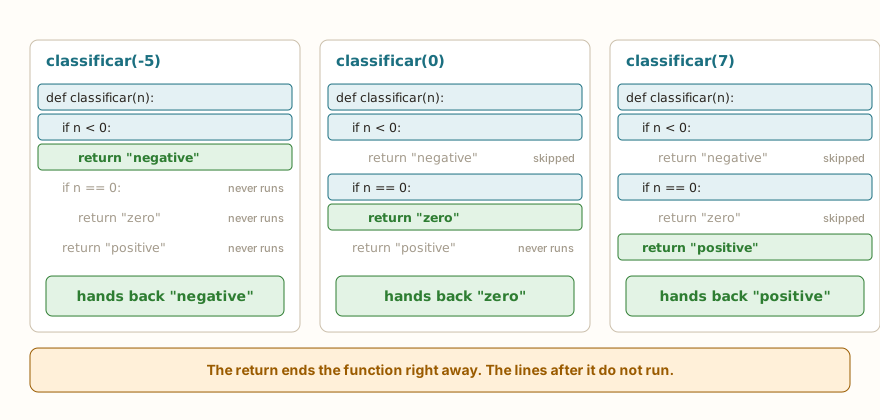
When Python reaches a return, the function ends there. The following lines of the body do not run, and the value goes back to the call.
def f():
    print("before")
    return 1
    print("after")

print(f())

def g(n):
    if n > 0:
        return "positive"
    print("not positive")

print(g(3))
print(g(-1))The output is before, 1, positive, not positive and None. In the function f, the print("after") never runs, just as already happened with break and continue. In g, the return sits inside the if: with 3 the function returns right away, and with -1 it skips it, prints the notice and ends without returning anything, which hands back None.
This behavior allows a very useful style, testing the cases one by one and returning as soon as one fits. The figure shows the function classificar in three calls, and each one ends at the first return it reaches:
def classificar(n):
    if n < 0:
        return "negative"
    if n == 0:
        return "zero"
    return "positive"

print(classificar(-5))
print(classificar(0))
print(classificar(7))The output is negative, zero and positive. Notice that there is no else or elif: after a return, what comes below only runs if the previous one did not fit, so the else would be redundant. It is the same reasoning as the elif ladder, with the flow cut by the return. The function becomes flatter, with fewer levels of indentation.
The same goes for the function that chooses between two values, like the one in the challenge Larger of Two:
def maior(a, b):
    if a > b:
        return a
    return b

print(maior(10, 20))
print(maior(45, 12))
print(maior(7, 7))The output is 20, 45 and 7. With both equal, a > b is false and the function returns b, which has the same value.
Returning a boolean
A function that answers yes or no returns True or False. The expression of the return can be the comparison itself, with no if:
def eh_par(n):
    return n % 2 == 0

print(eh_par(4))
print(eh_par(7))
if eh_par(10):
    print("10 is even")
for n in range(1, 6):
    if eh_par(n):
print(n, "even")The output is True, False, 10 is even, 2 even and 4 even. Writing if n % 2 == 0: return True and then else: return False works, but it takes more lines for the same effect. Since the call eh_par(n) is already a boolean, it fits straight into an if, like the conditions in the articles on truth tables. This pattern appears in the challenge is_even Function. Functions that answer yes or no usually have names that sound like questions, such as eh_par, esta_ligado or apertado.
The AI that remembers your life and lives on your computer
- Long-term memory with the source of every answer
- Works offline: your data stays on your PC
- Reads PDFs, slides, photos and meeting recordings
Essential plan free forever
return inside a loop
A return inside a for leaves the whole function, not just the loop. This makes the search shorter than the one with break and else, from the article on break, continue and else:
def primeiro_par(grupo):
    for n in grupo:
        if n % 2 == 0:
            return n
    return None

print(primeiro_par((3, 8, 12, 7)))
print(primeiro_par((3, 5, 7)))
r = primeiro_par((3, 5, 7))
if r is None:
print("no even number")The output is 8, None and no even number. If the loop finds an even number, the function returns right away. If the loop ends without finding one, the program reaches the final return None, which says "I did not find it". Whoever calls tests with is None. Instead of a variable achou, the returned value itself says what happened.
The indentation of the return decides everything. Inside the loop, it ends on the first pass:
def soma_ate(n):
    total = 0
    for i in range(1, n + 1):
        total = total + i
        return total

print(soma_ate(4))

def soma_ate2(n):
    total = 0
    for i in range(1, n + 1):
        total = total + i
    return total

print(soma_ate2(4))The output is 1 and 10. The first version has the return indented inside the for, and the function ends on the first pass, with total equal to 1. The second, with the return in the same column as the for, only returns after the loop ends, and the sum from 1 to 4 comes out right, 10. When a function with a loop hands back the first element instead of the total, look at the indentation of the return.
Without return, the function hands back None
When the function ends without going through a return with a value, Python hands back None, the value that means "nothing". That is the case of the function that only prints, like dobro_print. Two subtle variations of the same problem:
def soma(a, b):
    a + b

def soma2(a, b):
    return
    a + b

print(soma(2, 3))
print(soma2(2, 3))
x = print("hi")
print(x)The output is None, None, hi and None. In soma, the expression a + b is calculated and thrown away: without return, nobody receives it, and Python does not warn you. In soma2, the return is alone on a line, which hands back None and ends, and the a + b below it is dead code. And print itself also returns None, which the last print(x) shows.
The most treacherous oversight is the one on a single path:
def classificar(n):
    if n < 0:
        return "negative"
    elif n > 0:
        return "positive"

print(classificar(5))
print(classificar(0))The output is positive and None. For 0, no condition fit, and the function ended without returning. The checking question is the same as for the if: do all the paths of the function end in a return? A final return, outside the if, covers the rest.
Returning several values
A function can return more than one value, separating them with commas. What reaches the caller is a tuple:

def dividir(a, b):
    q = a // b
    r = a % b
    return q, r

resultado = dividir(7, 2)
print(resultado, type(resultado))
print(resultado[0], resultado[1])
q, r = dividir(7, 2)
print("quotient", q, "remainder", r)
q2, r2 = dividir(17, 5)
print(q2, r2)
print(divmod(17, 5))The output is (3, 1) <class 'tuple'>, 3 1, quotient 3 remainder 1, 3 2 and (3, 2). The return q, r hands back a single object, the tuple (3, 1), which can be stored whole and read by position, resultado[0] and resultado[1], or opened into two names at once, q, r = dividir(7, 2). This opening is called unpacking. The built-in function divmod does exactly this: it returns the quotient and the remainder in a tuple.
Unpacking requires the names and the values to have the same count. With too many names, Python complains:
def dividir(a, b):
    return a // b, a % b

q, r, s = dividir(7, 2)Traceback (most recent call last):
File "main.py", line 4, in <module>
ValueError: need more than 2 values to unpackPython on the computer says ValueError: not enough values to unpack (expected 3, got 2), which brings both counts. The meaning is the same: three names for two values. If values are left over, the error is too many values to unpack.
Another mistake is treating the tuple as if it were a number:
def dividir(a, b):
    return a // b, a % b

q = dividir(7, 2)
print(q + 1)Traceback (most recent call last):
File "main.py", line 5, in <module>
TypeError: unsupported types for __add__: 'tuple', 'int'The variable q holds (3, 1), and adding 1 to a tuple makes no sense. When a function returns more than one value, the question is always the same: did I keep the whole tuple or open it into names?
A function that calculates more than one statistic is a good use. The ready-made functions min, max and sum, and the *valores from the previous article, help:
def resumo(*valores):
    menor = min(valores)
    maior = max(valores)
    media = sum(valores) / len(valores)
    return menor, maior, media

mn, mx, md = resumo(7, 3, 9, 5)
print("smallest", mn, "largest", mx, "average", md)
print(resumo(4, 8))The output is smallest 3 largest 9 average 6.0 and (4, 8, 6.0). The function returns three values, and the caller chooses how to receive them. The names mn and mx avoid overwriting min and max, the ready-made functions.
On the ESP32
In hardware, return serves to turn readings into decisions. The button with a pull-up, for example, returns 0 when pressed, and a function can translate that into a direct question:
from machine import Pin

botao = Pin(4, Pin.IN, Pin.PULL_UP)
estado = botao.value()
print("state", estado)

def apertado(pino):
    return pino.value() == 0

print(apertado(botao))
if apertado(botao):
    print("pressed")
else:
print("released")The output is state 1, False and released. botao.value() is a call that returns, and the function apertado hides the detail that pressed means the value 0 (the reason is in the article on pull-up and the floating pin). In the simulator with no circuit, the pull-up keeps the pin at 1 and the button shows as released. The main program now reads if apertado(botao):, and if the button is swapped for an active-high sensor, only the function changes.
Conversions between ranges are another classic use. The ADC reads from 0 to 4095, the PWM accepts 0 to 1023, and a mapear function with a limitar next to it solves both:
def mapear(x, de_min, de_max, para_min, para_max):
    return (x - de_min) * (para_max - para_min) // (de_max - de_min) + para_min

print(mapear(2048, 0, 4095, 0, 100))
print(mapear(2048, 0, 4095, 0, 1023))
print(mapear(0, 0, 4095, 0, 1023))
print(mapear(4095, 0, 4095, 0, 1023))

def limitar(v, minimo, maximo):
    if v < minimo:
        return minimo
    if v > maximo:
        return maximo
    return v

print(limitar(-20, 0, 1023))
print(limitar(500, 0, 1023))
print(limitar(2000, 0, 1023))The output is 50, 511, 0, 1023, 0, 500 and 1023. The division // keeps everything in integers, which avoids the 32-bit float of the ESP32 in simple calculations (the article on the ADC shows the ranges and the attenuation). limitar uses the ladder of returns from the previous section, with no else.
A reading that can fail combines well with None. The function tries and returns the first good value, or None when nothing worked, and the caller decides what to do:
def tentar(leituras):
    for v in leituras:
        if v is not None:
            return v
    return None

print(tentar((None, None, 23.5)))
print(tentar((None, None)))The output is 23.5 and None. Here the tuple plays the role of the sensor, as in the article on break and continue. In a real program, the loop would call the sensor on each pass, and None would be the signal for "try again" or "give up".
Testing a function
A function that returns is easy to test: call it with a known value and compare with the expected result.
def dobro(n):
    return n * 2

assert dobro(2) == 4
print("passed")
print(dobro(2) == 4)
print(dobro(3) == 7)The output is passed, True and False. The assert prints nothing when the condition is true, and stops the program when it is false:
def dobro(n):
    return n * 2

assert dobro(3) == 7, "the double of 3 should be 6"Traceback (most recent call last):
File "main.py", line 4, in <module>
AssertionError: the double of 3 should be 6The text after the comma is the error message. Writing two or three assert lines right below the function, before using it in the program, is a habit that catches mistakes early. With functions that only print, this kind of test is not possible, because there is no value to compare.
return outside a function
return only makes sense inside a function. Written loose, in the main program, Python refuses it:
return 5Traceback (most recent call last):
File "main.py", line 1
SyntaxError: 'return' outside functionThe reason is usually a lost indentation: the return ended up in the margin, outside the def.
In the classroom: where return tends to trip people up
These cases come up again and again in classes.
print instead of return
This is the most frequent one. The exercise asks for "a function that returns the double", and the student hands in one that prints. On the screen, the result looks right. When the statement says "show the returned value", the function keeps printing twice or hands None to the outer print. The check: does the function have the word return?
Calling the function and not using the result
The student writes dobro(5) on a loose line and expects to see 10. The value was returned and nobody received it. In an interactive terminal it may show up by accident, but in a saved program it does not. The fix is print(dobro(5)) or x = dobro(5).
Two returns in a row
def f(a, b):
    return a
return bThe student thinks the function returns both. The second return never runs. To return two values, it is a single return, with a comma.
return at the wrong indentation in the loop
The case of the soma_ate that returns 1. The symptom is the result of the first element only. Look at whether the return is in the column of the for or of the body.
Forgetting one path
The function with if and elif but no else and no final return. No error, only a None that shows up somewhere far away. Test with boundary values, such as 0.
Unpacking with the wrong count
q, r, s = dividir(7, 2). The student sees the ValueError and does not understand why "the computer asked for three". The count of the names on the left must equal the count of the returned values.
Giving a built-in function's name to a variable
min, max = resumo(...) works, but it erases the functions min and max for the rest of the program. The error shows up far from there, when the next call to max(...) complains that a number "is not callable".
Exercise: summary of readings
Rewrite the summary for a list of sensor readings: the function receives as many readings as come, discards the ones that are None and returns the smallest, the largest and the average. If no reading is left, it returns None. Start with the version without None, which is already above, and add the filter.
A hint for the filter: go through valores with a for, accumulate the valid ones in a sum and count how many there were, as in the ADC average example from the article on break and continue. A return None right after the loop covers the case with no readings. To improve it, also return how many readings were discarded, which gives a tuple of four values.
Frequently asked questions
What is the difference between print and return?
print writes on the screen, and the value that the function hands to whoever called is still None. return writes nothing, and hands back the value, which can be stored, added or printed by the caller.
Can a function have more than one return?
It can, and that is common. Each path of the if can have its own. Only the first one reached runs, because return ends the function.
What does the function return if it has no return?
None. The same happens when the return has no value, or when the flow reaches the end of the body without going through any.
Can I return a list, a text or a boolean?
You can return any value. Texts, numbers, booleans, tuples and lists work the same way.
Do I need to write return(x) with parentheses?
No. return is a command, not a function. return x and return (x) do the same thing, but the first form is the usual one.
Does return a, b return a list?
No, it returns a tuple. The difference is that a tuple cannot be changed afterwards, and for unpacking that makes no difference.
Where to go next
Now the function challenges are within reach, all of them with return: Double Function and Triple Function with one parameter, Rectangle Area with two, is_even Function with a boolean, Calculator with Functions with two functions and Larger of Two with an if. If you want to review the basics, go back to the articles on defining functions and on parameters and arguments. The Logic with Python path gathers them all.
The next article deals with variable scope: where each name exists, why the n inside the function is not the n outside, when global is used and what nonlocal does.