Fundamentals
Recursion in Python: the Function That Calls Itself (and the Limit in MicroPython)
Understand recursion in Python: base case, recursive step, call stack, the recursion limit in MicroPython and when a loop is the better choice.
By Prof. Rodrigo Faustino · Updated on · 13 min read
Metrics for this article
- Words
- 2,530
- Characters
- 14,008
- Reading time
- ~13 min
A function is recursive when it calls itself. For this to work without calling forever, it needs two parts: a base case, which gives the answer directly with no new call, and a recursive step, which reduces the problem and calls the same function with something smaller. With each call Python stacks a new frame with the local variables, and when the base case is reached the values come back up the stack to the first call.
Recursion is a way of thinking: "to solve this, I solve a smaller version and combine the result". It is worth knowing because it appears in naturally repetitive problems, such as the factorial, the greatest common divisor and walking through nested structures. On the ESP32 it comes with a warning, because the memory for stacking calls is small and the depth limit is much lower than on the computer. This article shows how to write a recursive function, how to follow it on the stack, what happens when it does not stop, where the limit is in the simulator and when a loop is the best choice.
The idea: a smaller problem equal to the first
Imagine a countdown. To count from 3 down to 0, you say 3 and then do a countdown from 2 down to 0. That second countdown is the same problem, only smaller. In Python:
def contagem(n):
    if n == 0:
        print("liftoff!")
        return
    print(n)
    contagem(n - 1)

contagem(3)
print("end")The output is 3, 2, 1, liftoff! and end. The function contagem shows the number and calls contagem(n - 1), which does the same with the next number. When n reaches 0, the if answers directly, with no new call, and the chain ends. That return with no value, which the article on return introduced, ends the function.
From the syllabus to a planned semester
- Teaching plan and calendar built automatically
- Class diary ready to paste into SIGA
- Slides and exercise lists with answer keys
Free Community edition · Windows
Base case and recursive step
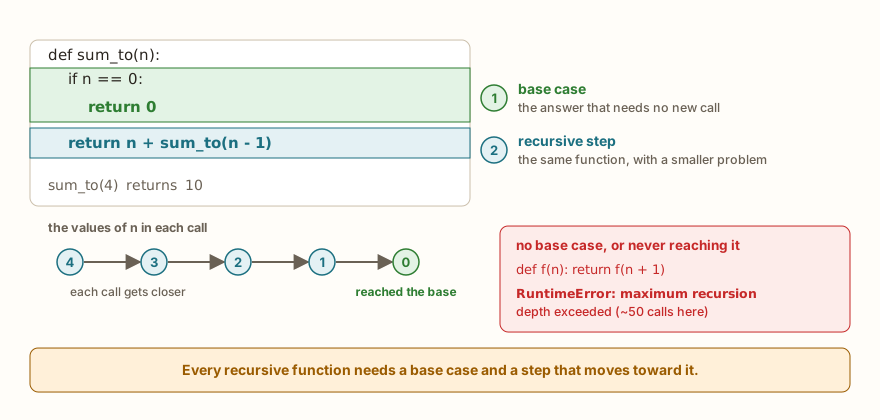
Every recursive function has the two parts in the figure. The base case is the simplest situation, for which the answer is known. The recursive step is what the function does in the other cases: it calls itself with an argument closer to the base case. The sum of the numbers from 1 up to n shows this clearly:
def soma_ate(n):
    if n == 0:
        return 0
    return n + soma_ate(n - 1)

print(soma_ate(4))
print(soma_ate(10))
total = 0
for i in range(1, 11):
    total = total + i
print(total)The output is 10, 55 and 55. The sum up to 4 is 4 plus the sum up to 3, which is 3 plus the sum up to 2, and so on until the sum up to 0, which is worth 0 (the base case). The loop at the end, with the same result, serves as a comparison: recursion repeats through calls what the loop repeats through passes.
The second condition for recursion to work is that each call gets closer to the base case. In soma_ate, n goes from 4 to 3, 2, 1 and 0, and the 0 appears. If the argument did not get closer, the base case would never be reached.
The call stack
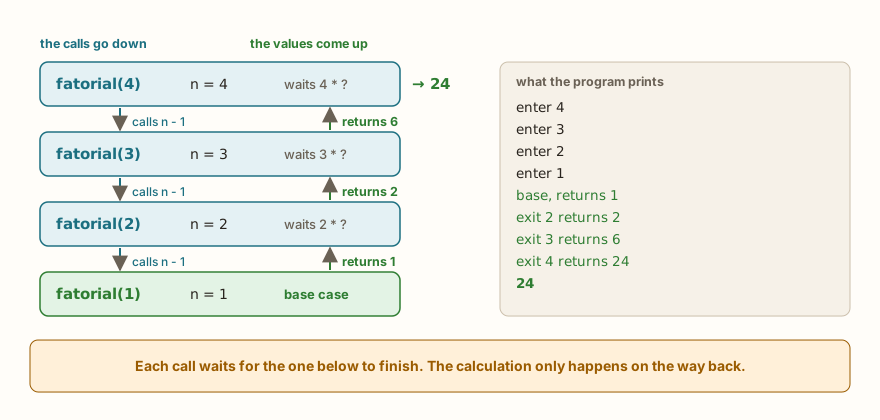
When a function calls itself, the previous call does not end: it waits. Python keeps each pending call on a stack, with the n and the other variables of that call. The factorial of n, the product from 1 up to n, shows what happens:
def fatorial(n):
    if n <= 1:
        return 1
    return n * fatorial(n - 1)

print(fatorial(1))
print(fatorial(5))
print(fatorial(10))
print(fatorial(12))The output is 1, 120, 3628800 and 479001600. To see the stack working, here is the same program with a print on entering and leaving each call:
def fatorial(n):
    print("enter", n)
    if n <= 1:
        print("base, returns 1")
        return 1
    r = n * fatorial(n - 1)
    print("exit", n, "returns", r)
    return r

print(fatorial(4))The output is enter 4, enter 3, enter 2, enter 1, base, returns 1, exit 2 returns 2, exit 3 returns 6, exit 4 returns 24 and 24. All the entries appear before any exit, and the exits come in reverse order. The multiplication n * fatorial(n - 1) is not done on the way down: each call stays stopped at the multiplication, waiting for the value from the one below. The calculation only happens on the way back. The figure shows the same sequence with the frames stacked.
This explains a practical fact: each level of recursion takes up memory while it waits. A recursion with a thousand levels has a thousand frames alive at the same time.
More examples
The power, the base raised to the exponent, is the base times the power with the exponent one smaller:
def potencia(base, exp):
    if exp == 0:
        return 1
    return base * potencia(base, exp - 1)

print(potencia(2, 10))
print(potencia(3, 4))
print(potencia(5, 0))The output is 1024, 81 and 1. The base case is the exponent 0, and any base raised to 0 is worth 1.
The greatest common divisor, by Euclid's algorithm, is recursive by nature: the GCD of a and b is the GCD of b and the remainder of a divided by b, until the remainder is zero.
def mdc(a, b):
    if b == 0:
        return a
    return mdc(b, a % b)

print(mdc(48, 18))
print(mdc(17, 5))
print(mdc(100, 75))The output is 6, 1 and 25. In an ESP32 program, the GCD has a concrete use: if one LED must blink every 500 ms and another every 300 ms, the smallest time step that serves both is mdc(500, 300), which is 100 ms, and a single timer at that step is enough. The article on programming without freezing deals with timers and states.
The sum of the digits of a number separates the last digit (n % 10) from the rest (n // 10):
def soma_digitos(n):
    if n < 10:
        return n
    return n % 10 + soma_digitos(n // 10)

print(soma_digitos(7))
print(soma_digitos(1234))
print(soma_digitos(99999))The output is 7, 10 and 45. And reversing a text uses slices, texto[1:] for everything except the first character:
def inverter(texto):
    if len(texto) <= 1:
        return texto
    return inverter(texto[1:]) + texto[0]

print(inverter("python"))
print(inverter("a"))
print(inverter(""))The output is nohtyp, a and an empty line. The base case covers the empty text and the one-character text, and the function reverses the rest and puts the first character at the end.
The AI that remembers your life and lives on your computer
- Long-term memory with the source of every answer
- Works offline: your data stays on your PC
- Reads PDFs, slides, photos and meeting recordings
Essential plan free forever
When the recursion does not stop
The classic mistake is the function with no base case. It calls itself without ever stopping, and the stack grows until Python gives up:
def contagem(n):
    print(n)
    contagem(n - 1)

contagem(3)3
2
1
0
-1
...
-48
Traceback (most recent call last):
File "main.py", line 5, in <module>
File "main.py", line 3, in contagem
File "main.py", line 3, in contagem
...
RuntimeError: maximum recursion depth exceededThe dots ... indicate repeated lines that were cut to fit in the article: in the real output, there are about 50 lines of numbers and as many of File "main.py", line 3, in contagem. What matters is the last line, RuntimeError: maximum recursion depth exceeded. Python on the computer uses the name RecursionError, which is a kind of RuntimeError, and the full message maximum recursion depth exceeded.
There are three common ways of getting recursion wrong. The first, the one we saw, is forgetting the base case. The second is writing the base case but not reaching it:
def f(n):
    if n == 0:
        return 0
    return f(n + 1)

print(f(5))Traceback (most recent call last):
File "main.py", line 6, in <module>
File "main.py", line 4, in f
File "main.py", line 4, in f
...
RuntimeError: maximum recursion depth exceededThe n + 1 moves the argument away from 0, instead of closer. The same happens with soma_ate(2.5): the sequence 2.5, 1.5, 0.5, -0.5 is never equal to 0, and the base case is not reached. When the base case is an equality, it is worth asking whether the argument can jump over it. Writing n <= 0 in place of n == 0 protects against this class of mistake.
The third is forgetting the return in the recursive step:
def soma(n):
    if n == 0:
        return 0
    n + soma(n - 1)

print(soma(3))Traceback (most recent call last):
File "main.py", line 6, in <module>
File "main.py", line 4, in soma
File "main.py", line 4, in soma
TypeError: unsupported types for __add__: 'int', 'NoneType'The call soma(n - 1) hands back None when the return is missing, and the sum n + None fails. It is the same stumble as in the article on return, now inside a recursion. Python on the computer writes unsupported operand type(s) for +: 'int' and 'NoneType'.
The recursion limit
No platform lets the stack grow forever. Python on the computer has a configured limit, which by default is about a thousand calls. The ESP32's MicroPython has a much lower limit, which depends on the available memory, because each call uses up the device's memory. The project's simulator was calibrated with a DevKit V1 to reproduce this limit. It can be measured with a function that counts how many calls it can take:
profundidade = 0
def descer():
    global profundidade
    profundidade += 1
    descer()

try:
    descer()
except RuntimeError as e:
    print("stopped at", profundidade, "calls")
print(e)The output is stopped at 53 calls and maximum recursion depth exceeded. The try and the except, which the series will still detail, catch the error so that the program can count and go on, instead of stopping with the traceback. On the computer's Python, the same program counts close to a thousand calls. At this limit, two practical effects appear in the simulator:
def fatorial(n):
    if n <= 1:
        return 1
    return n * fatorial(n - 1)

for n in (10, 20, 30, 40, 45, 50, 60):
    try:
        print(n, fatorial(n))
    except RuntimeError as e:
print(n, "error", e)The output shows the factorials from 10 to 50 (with enormous numbers: the one for 20 is already 2432902008176640000, and the one for 50 has 65 digits) and ends in 60 error maximum recursion depth exceeded. Measuring, fatorial holds up to 52 and fails at 53, and soma_ate holds up to 51 and fails at 52. The difference comes from the size of each frame: functions with more local variables use more per call and reach the limit sooner.
Two cautions are worth making here. The first is that the exact number changes with the function and with the MicroPython version, so the values above are from the simulator and serve as an order of magnitude: a few dozen calls, not hundreds. Whoever needs a firm number should measure on the board itself, with the program of the descer function. The second is that the limit affects those who use recursion to repeat long tasks: going through a thousand readings with a recursive function overflows the stack on an ESP32, and a loop solves it without trouble.
Fibonacci: the recursion that repeats work
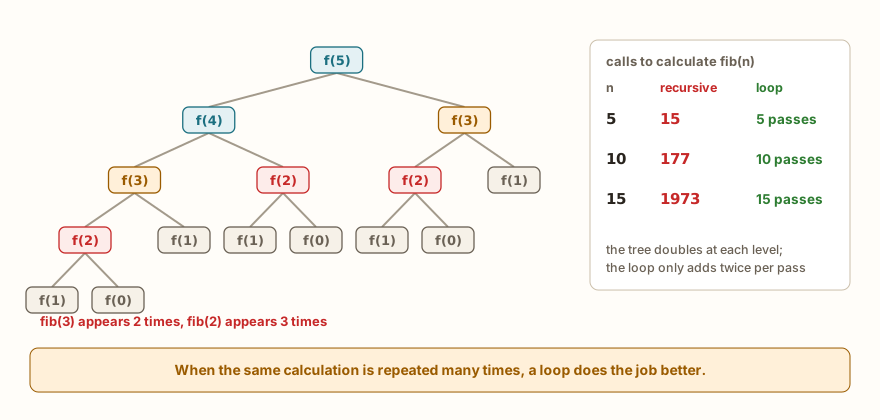
The Fibonacci sequence, in which each number is the sum of the two previous ones, is the favorite recursion of the textbooks, and also the best example of its cost:
def fib(n):
    if n < 2:
        return n
    return fib(n - 1) + fib(n - 2)

for i in range(10):
    print(fib(i), end=" ")
print()

chamadas = 0
def fib2(n):
    global chamadas
    chamadas += 1
    if n < 2:
        return n
    return fib2(n - 1) + fib2(n - 2)

for n in (5, 10, 15):
    chamadas = 0
    r = fib2(n)
print(n, r, chamadas)The output is the sequence 0 1 1 2 3 5 8 13 21 34 and the three lines 5 5 15, 10 55 177 and 15 610 1973. The second function counts how many calls were made, with a global as in the article on scope. To calculate fib(15), the program makes 1973 calls, almost 2 thousand, for a sequence of only 15 values. The tree in the figure shows why: fib(3) is calculated twice and fib(2) three times, each one from scratch, and the waste doubles at each level. The depth of the stack is small, only n levels, and what grows is the time.
The version with a loop makes one pass per value:
def fib_laco(n):
    a = 0
    b = 1
    for i in range(n):
        a, b = b, a + b
    return a

for i in range(10):
    print(fib_laco(i), end=" ")
print()
print(fib_laco(30))The output is the same sequence and 832040. fib_laco(30) makes 30 passes, and the recursive version would make more than 2.6 million calls and would overflow time and memory on an ESP32. The a, b = b, a + b is a multiple assignment: both sides are calculated before any assignment.
Recursion or loop
Everything done with recursion can be done with a loop, and vice versa. The countdown and the factorial, for example, look like this:
def contagem_laco(n):
    while n > 0:
        print(n)
        n = n - 1
    print("liftoff!")

contagem_laco(3)

def fatorial_laco(n):
    r = 1
    for i in range(2, n + 1):
        r = r * i
    return r

print(fatorial_laco(10))
print(fatorial_laco(20))The output is 3, 2, 1, liftoff!, 3628800 and 2432902008176640000. The version with a loop stacks nothing and has no depth limit. On the ESP32, it is the default choice. Recursion pays off when the problem is naturally recursive and the depth is small and known, as happens when halving the problem at each step (binary search, for example, needs a little over ten levels for a thousand elements) or when walking through a nested structure.
A practical criterion:
- Does the repetition have a size that depends on the data, like reading the readings of a sensor? Use a loop.
- Is the solution naturally written as "solve the smaller version and combine"? Recursion may be clearer, as long as the depth is small.
- Is the same calculation repeated many times, as in Fibonacci? A loop, or storing results already calculated.
- In doubt? Write the loop. It does not fail because of depth.
In the classroom: where recursion tends to trip people up
These cases come up again and again in classes.
Forgetting the base case
The most frequent one. The student writes only the step, the function calls itself and the program ends in a RuntimeError. The checking question is: in what situation does this function answer without calling itself?
The base case that never arrives
The f(n + 1) or the n == 0 with a fractional n. The student has a base case, and the program overflows anyway. The check: is the argument of the call closer to the base case than the current argument?
Forgetting the return in the step
The function hands back None and the calculation blows up far from there, in a TypeError. In recursion, the return must appear in both places: in the base case and in the step.
Expecting the calculation to happen on the way down
The student imagines that fatorial(4) multiplies 4 by 3 and then by 2, in sequence, going forward. The print on entry and exit shows that the multiplication only happens on the way back. Following the stack on paper, drawing the frames, clears up the mistake.
Using recursion for everything
After learning it, the student solves even the sum of a list with recursion. It works with five elements and overflows with a hundred. The loop would be shorter and without risk.
Recursive Fibonacci with large numbers
The program runs fine with fib(10) and seems frozen with fib(35). It is not frozen, it just repeats an enormous number of calculations. The table in the figure shows the growth.
Exercise: decimal to binary
Write a recursive function binario(n) that returns the number n in binary, as text. The idea: the last binary digit is the remainder of the division by 2, and the rest of the digits is the binary of n // 2. The base case is any number smaller than 2, which is already a digit.
def binario(n):
    if n < 2:
        return str(n)
    return binario(n // 2) + str(n % 2)

print(binario(0))
print(binario(10))
print(binario(255))The output is 0, 1010 and 11111111. binario(10) calculates binario(5) and appends the digit 0, which calculates binario(2) and appends 1, which calculates binario(1), the base case, and appends 0, which results in 1, 0, 1, 0. To improve it, redo the function with a while loop and compare, and then check with the built-in function bin(10), which returns '0b1010'. The depth here is only the number of binary digits, at most 8 for 255, which fits comfortably within the simulator's limit.
Frequently asked questions
What is a base case?
It is the simplest situation of a recursive function, in which it answers without calling itself. Without it, the recursion does not end.
Why is the recursion limit lower on the ESP32?
Each call keeps a frame with local variables in memory, and the ESP32 has far less memory than a computer. MicroPython limits the depth so as not to exhaust the device's stack.
Can I raise the recursion limit?
On the computer's Python, with sys.setrecursionlimit. In the board's MicroPython, the limit depends on memory, and the way out is to reduce the depth: use a loop, or halve the problem at each step.
Can every recursion become a loop?
It can. Some become longer, because the loop needs to store in a structure what the stack stored on its own, but it is always possible.
Is recursion faster than a loop?
In general, no. Each call has a cost, and the loop is usually equal or faster. The advantage of recursion is clarity in certain problems, not speed.
Does the path have a recursion challenge?
There is no challenge only about recursion. The function ones, such as Double Function, are solved without it, and the factorial, the GCD and the binary in this article serve as practice.
Where to go next
Reread the articles on return and variable scope, because recursion depends on both: each call has its own local variables and hands back the value with return. The Logic with Python path does not have a challenge only about recursion, and the exercises in this article fill that role.
The next article closes the functions module with lambda, map, filter and sorted with key: small functions, written on one line, and the built-in functions that receive them as an argument.