Fundamentals
Tuples and Unpacking in Python: Values That Do Not Change
Understand tuples in Python: create, access, why they do not change, the comma in (5,), unpack with a, b = b, a and the asterisk, plus loops and the ESP32.
By Prof. Rodrigo Faustino · Updated on · 14 min read
Metrics for this article
- Words
- 2,662
- Characters
- 14,102
- Reading time
- ~14 min
A tuple is an ordered sequence of values that cannot be changed after it is created. It is written with parentheses and commas, like (3, 4), and reads almost like a list: it has an index, it has slices, it has len. The difference is that there is no append, no item swap and no remove. Whoever receives a tuple knows it will be the same until the end, and that is why it serves for groups of values that go together, such as the two coordinates of a point, the pair of a pin with its name or the two values a function returns.
The article on return already used the tuple without introducing it: return q, r returns one. Here we will see how to create one, the trap of the parenthesis with a single item, why it does not change, unpacking, which is the most useful feature it brings, its use in loops and in lists of tuples, and an example with the ESP32.
Creating a tuple
vazia = ()
ponto = (3, 4)
sem_parenteses = 1, 2, 3
unico = (5,)
nao_tupla = (5)
print(vazia, ponto, sem_parenteses)
print(unico, nao_tupla)
print(type(ponto), type(unico), type(nao_tupla))
print(tuple([1, 2, 3]))
print(tuple("abc"))
print(tuple(range(3)))
print(len(vazia), len(ponto), len(unico))
print("end")The output is () (3, 4) (1, 2, 3), then (5,) 5, then <class 'tuple'> <class 'tuple'> <class 'int'>, and next (1, 2, 3), ('a', 'b', 'c'), (0, 1, 2), 0 2 1 and end.
What creates the tuple is the comma, and not the parenthesis. That is why sem_parenteses = 1, 2, 3 is already a tuple, and the parentheses only make reading clearer. The consequence is in the two middle lines. (5,) is a tuple with one item, and (5) is just the number 5 between parentheses, as in (2 + 3) * 4. For a tuple with a single item, the comma at the end is mandatory.
Like the list, the tuple is created from another sequence, with tuple(...): from a list, a text or a range.
From the syllabus to a planned semester
- Teaching plan and calendar built automatically
- Class diary ready to paste into SIGA
- Slides and exercise lists with answer keys
Free Community edition · Windows
Accessing: same as the list, with one exception
Indexes, negative indexes, slices, len, min, max, sum, in, index and count work as in lists, and + and * create new tuples:
t = (12, 45, 7, 89, 23)
print(t[0], t[-1])
print(t[1:4])
print(tuple(reversed(t)))
print(len(t), min(t), max(t), sum(t))
print(7 in t, 8 in t)
print(t.index(7), t.count(45))
print((1, 2) + (3,))
print((0,) * 3)
print(t)
print("end")The output is 12 23, (45, 7, 89), (23, 89, 7, 45, 12), 5 7 89 176, True False, 2 1, (1, 2, 3), (0, 0, 0), the original tuple and end. The sum (1, 2) + (3,) needs the (3,) with the comma, because (1, 2) + 3 is not a valid calculation and gives a TypeError.
Here there is a difference between the simulator and the computer's Python that is worth knowing. A slice with a step, like t[::-1] to reverse or t[::2] to take every other one, works on a tuple in the computer's Python, but the simulator, which imitates MicroPython, answers with an error:
t = (12, 45, 7, 89, 23)
print(t[::-1])NotImplementedError: only slices with step=1 (aka None) are supportedThe slice without a step, like t[1:4], works normally. To reverse, the way is tuple(reversed(t)), as in the third line of the previous example, or to convert to a list, slice and go back: tuple(list(t)[::-1]). This was observed in the simulator, and the rule for the board should be checked in a short program before depending on it.
Why the tuple does not change

The tuple is immutable: once created, no item is swapped, added or removed. An attempt to swap gives an error, as the error blocks further below show. What you do, when a different version is needed, is create another:
t = (10, 20, 30)
lista = list(t)
lista[1] = 25
lista.append(40)
t = tuple(lista)
print(t)
misto = ([1, 2], 3)
misto[0].append(99)
print(misto)
print("end")The output is (10, 25, 30, 40), ([1, 2, 99], 3) and end. In the first part, the tuple became a list, the list was changed and a new tuple was created with the same name. The old tuple ceased to exist, and was not changed. In the second part there is a trap: the tuple misto holds a list as its first item, and the list, that one does accept append. The tuple guarantees that the first item will always be that list, and does not guarantee that the list's contents stay still. Immutability holds for the items of the tuple, and whatever is inside them keeps following the rules of its own type.
What is something that does not change good for? Three things. The first is communicating intent: whoever reads ponto = (3, 4) understands that these are two fixed coordinates, and not a list that will grow. The second is safety: a function that receives a tuple cannot spoil what the caller has, which the articles on parameters and on lists showed to be a problem with lists. The third is serving as a key in a dictionary, which is the topic of the next article, because only values that do not change can be keys.
Unpacking: giving each item a name
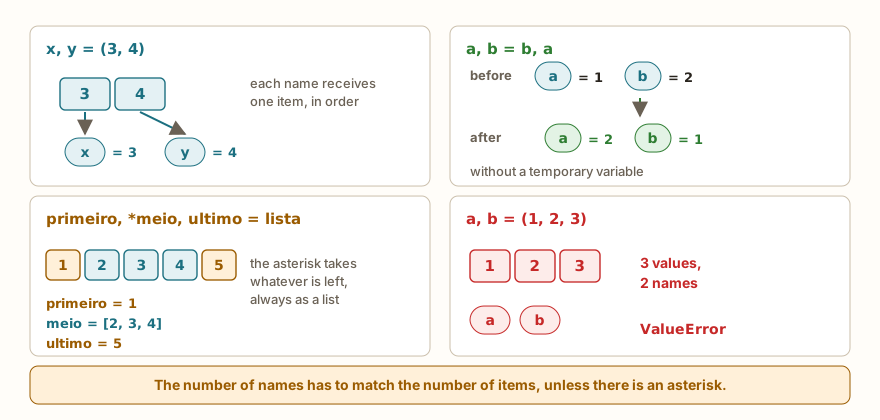
Unpacking is assigning the items of a sequence to several names at once. With the tuple, it is the most natural way of using what it holds:
x, y = (3, 4)
print(x, y)
a, b, c = 1, "two", 3.5
print(a, b, c)
a = 1
b = 2
a, b = b, a
print(a, b)
p = 1
q = 2
p = q
q = p
print(p, q)
nome, idade = ["Ana", 20]
print(nome, idade)
primeiro, *meio, ultimo = [1, 2, 3, 4, 5]
print(primeiro, meio, ultimo)
cabeca, *cauda = (10, 20, 30)
print(cabeca, cauda)
_, valor = ("ignore", 42)
print(valor)
print("end")The output is 3 4, 1 two 3.5, 2 1, 2 2, Ana 20, 1 [2, 3, 4] 5, 10 [20, 30], 42 and end.
The cases, in the order they appear:
x, y = (3, 4): each name receives an item, in order. The types can be different, as on the second line.a, b = b, a: the swap of two variables, without a temporary variable. The right side is assembled first, as the tuple(2, 1), and then unpacked intoaandb. In languages that do not have this, the swap requires a third variable.p = qand thenq = p: the wrong way of swapping. After the first line, both are worth 2, and the value 1 was lost. The output2 2is the classic sign.- Lists unpack too:
nome, idade = ["Ana", 20]works the same way. What unpacking requires is a sequence, not necessarily a tuple. - The asterisk:
primeiro, *meio, ultimohands over the first, the last, and a list with what was left in the middle. It is useful when you do not know how many items there are, and only the ends matter. - The underscore
_: by convention, the name of a variable that will not be used. The line_, valor = ...says "I ignore the first item".
The * can appear only once in the list of names, and the item it receives is always a list, even if the original was a tuple.
Receiving what a function returns
The same mechanism receives the values of a function that returns more than one, as the article on return showed:
def dividir(a, b):
    return a // b, a % b

q, r = dividir(17, 5)
print(q, r)
res = dividir(17, 5)
print(res, type(res))
print(res[0], res[1])
pontos = [(0, 0), (3, 4), (-2, 5)]
for x, y in pontos:
    print("x", x, "y", y)
for i, (x, y) in enumerate(pontos):
    print(i, x, y)
print(max(pontos, key=lambda p: p[1]))
print(sorted(pontos, key=lambda p: p[0]))
print([(y, x) for x, y in pontos])
print("end")The output is 3 2, (3, 2) <class 'tuple'>, 3 2, then three lines x 0 y 0, x 3 y 4 and x -2 y 5, then 0 0 0, 1 3 4 and 2 -2 5, and then (-2, 5), [(-2, 5), (0, 0), (3, 4)], [(0, 0), (4, 3), (5, -2)] and end.
The first part shows the two ways of receiving what dividir returns: opening it into q, r, or keeping the whole tuple and reading by index. The second part is a list of tuples, the most common format for small, organized data in Python. Let us look at it calmly.
The AI that remembers your life and lives on your computer
- Long-term memory with the source of every answer
- Works offline: your data stays on your PC
- Reads PDFs, slides, photos and meeting recordings
Essential plan free forever
List of tuples and the for loop
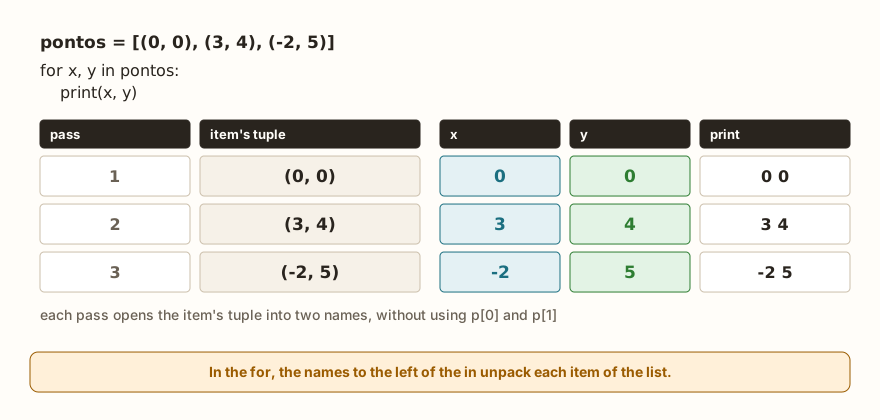
A list of tuples holds simple records: each tuple is a record, and the list is the collection. Points, pin-and-name pairs, readings with a timestamp. The for x, y in pontos in the example above unpacks each tuple of the list into the names x and y, at each pass, and the code is much more readable than the equivalent with indexes, p[0] and p[1].
The enumerate, from the article on lists, hands over pairs of position and item, and that is why it shows up together with unpacking. In for i, (x, y) in enumerate(pontos), the parentheses around x, y say that the second item of the pair is also a tuple to be opened.
The last lines of the example show the usual partner: the key from the article on lambda, map, filter and sorted. The max with key=lambda p: p[1] finds the point with the largest y, and the sorted with key=lambda p: p[0] sorts by x. The list comprehension from the previous article also unpacks: [(y, x) for x, y in pontos] swaps the coordinates of each point.
Comparing and using as a key
Tuples are compared item by item, from left to right, stopping at the first one that differs. This allows sorting lists of tuples without any key, and it is for this reason that the composite key in the article on sorted is a tuple:
print((1, 2) < (1, 3))
print((2, 0) > (1, 9))
print((1, 2) == (1, 2))
print(sorted([(2, "b"), (1, "z"), (2, "a")]))
d = {(0, 0): "origin", (3, 4): "point"}
print(d[(3, 4)])
print("end")The output is True, True, True, [(1, 'z'), (2, 'a'), (2, 'b')], point and end. The first comparison looks at the first item, which is equal, and moves on to the second. The second stops at the first item, because 2 is greater than 1, and ignores the 9. The sort puts the 1 first, and between the two 2s, it decides by the second item: "a" before "b".
The last part anticipates the subject of the next article. A dictionary holds key and value pairs, and the tuple can be a key, which makes it possible to use coordinates or pairs as the "address" of a value. A list cannot: the error is in the section that follows.
On the ESP32: fixed pairs and returned values
A project's configuration is often a fixed set of pairs, which should not be changed during execution. The tuple of tuples is a good format, and the loop with unpacking goes through it:
from machine import Pin
from time import sleep

LEDS = ((18, "green"), (19, "yellow"), (21, "red"))
acesos = []
for pino, nome in LEDS:
    led = Pin(pino, Pin.OUT)
    led.on()
    sleep(0.1)
    led.off()
    acesos.append(nome)
print(acesos)

def ler_sensor():
    temperatura = 24
    umidade = 61
    return temperatura, umidade

temp, umid = ler_sensor()
print("temp", temp, "humidity", umid)
print("end")The output is ['green', 'yellow', 'red'], temp 24 humidity 61 and end. The name LEDS in capitals is a convention for values that do not change, and the tuple reinforces the idea: no part of the program will swap an LED's pin by mistake. The loop unpacks each pair into pino and nome, turns the LED on that pin on and off and keeps the name. The function ler_sensor returns temperature and humidity at once, and whoever calls it opens the pair into two names. On the board, the two values would come from a real reading, like that of the sensors in the article on DHT22, HC-SR04 and PIR, and the function would keep the same shape.
Another place where the tuple appears is the time. The function time.localtime() returns a tuple with the components of the date and time, and it can be opened into names:
import time
ano, mes, dia, hora, minuto, segundo, dia_semana, dia_ano = time.localtime()
print(type(ano), 1 <= mes <= 12)
print(len(time.localtime()))
print("end")The output is <class 'int'> True, 8 and end. In the simulator, which imitates MicroPython, the tuple has 8 items. In the computer's Python it is a similar object, with 9 items, and so the same unpacking line would give an error there. The number of names has to match the number of items, the subject of the next section. The time and date values depend on the board's clock being right, and the program should not trust them without setting the clock first.
Common errors
The messages below are those of the simulator. The error type is usually the same on the computer's Python, and the text may change.
t = (1, 2, 3)
t[0] = 9TypeError: 'tuple' object doesn't support item assignmentIt is the error that immutability promises. The fix is to create another tuple, as in the conversion example, or to use a list from the start, if the group has to change.
t = (1, 2, 3)
t.append(4)AttributeError: 'tuple' object has no attribute 'append'The tuple does not have the methods that change the contents: append, remove, sort and similar ones give the same kind of error. The sorted(t) works, because it returns a new list.
a, b = (1, 2, 3)ValueError: too many values to unpack (expected 2)That is three items for two names. With too few items, as in a, b, c = (1, 2), the error is also a ValueError, and the simulator's message is need more than 2 values to unpack. The cure is to count the items, or to use the asterisk to keep what is left.
t = (5)
print(len(t))TypeError: object of type 'int' has no len()It is the parenthesis trap. (5) is a number, and len does not work on a number. The tuple of one item is (5,).
t = (1, 2, 3)
print(t[3])IndexError: tuple index out of rangeThe indexes of a three-item tuple go from 0 to 2, exactly as in the list.
d = {[1, 2]: "x"}TypeError: unsupported type for __hash__: 'list'A list cannot be a dictionary key, because it can change. The tuple (1, 2) can. In the computer's Python the message says unhashable type: 'list'.
What tends to show up in class
These patterns repeat in classes of any level.
The most frequent is the (5) thinking it is a tuple with one item. The program only fails further on, when someone tries to go through or measure the value, and the forgotten comma is lines away from the error.
The second is trying to change an item of the tuple with t[0] = ..., or calling append, because in the head it is "a list with parentheses". The sentence that helps is: the parenthesis does not change the type, the comma and the immutability do.
The third is swapping variables the wrong way, a = b followed by b = a, which leaves both equal. Whoever learns a, b = b, a tends to use it for everything, and that is the right use.
The fourth is unpacking with the wrong count. It works with the test data and breaks when the function returns another number of items. In general, the mistake is in the function that returns, and the message points to the line of whoever receives.
The fifth is thinking that a tuple with a list inside is fully protected. The tuple holds the list, and the list keeps changing inside, as the misto example showed. This catches even those who have been programming for a long time.
The sixth is confusing a list of tuples with a tuple of lists, which look the same on paper and behave in opposite ways: in the first, the collection grows and each record is fixed, and in the second, the opposite.
Exercise: the farthest point
Write a program that asks how many points will be read, reads the x and the y of each one, keeps each point as a tuple, shows the list, the point farthest from the origin (add the absolute values of x and y) and the list with the coordinates swapped.
quantidade = int(input("how many points: "))
pontos = []
for i in range(quantidade):
    x = int(input("x: "))
    y = int(input("y: "))
    pontos.append((x, y))
print("points", pontos)
longe = max(pontos, key=lambda p: abs(p[0]) + abs(p[1]))
print("farthest", longe)
print("swapped", [(y, x) for x, y in pontos])With the inputs 3, 1, 2, -5, 4, 0 and -1, the last three lines are points [(1, 2), (-5, 4), (0, -1)], farthest (-5, 4) and swapped [(2, 1), (4, -5), (-1, 0)]. The abs hands over the absolute value, and the sum of the two absolute values is a simple measure of distance, without a square root. To practice, also show the point closest to the origin and the number of points in which x and y have the same sign.
Frequently asked questions
What is the difference between a list and a tuple, in practice? The list is for collections that grow, shrink or change order, and the tuple is for groups of fixed values with different roles, like the pin and name pair. When in doubt, if the group is going to change, use a list.
Is the tuple faster or does it take less memory? The tuple is not chosen for performance, and this article did not measure that on the ESP32. The reason is clarity and safety: whoever reads knows the group does not change.
Can I have a tuple inside another? You can, and unpacking accepts parentheses to open the levels, as in for i, (x, y) in enumerate(pontos).
What is the * for in unpacking? To receive what was left, when you do not know how many items there are or only some positions matter. The item with the asterisk is always a list.
Is there a useful empty tuple? The () serves as the initial value of something that has no items yet and cannot change, and as the return of a function that found nothing. It is rare at the beginning, and appears with time.
Where to go next
The challenge Larger of Two practices functions that return values, the basis of what was seen about return and unpacking. To review the basics of this reading, the articles on return, lists and list operations complete this one.
The next article deals with dictionaries: keeping values by key instead of by position, counting occurrences and using the tuple as a key, which closes what was left open in this section.