Fundamentals
Dictionaries in Python: Key, Value and Counting
Learn dictionaries in Python: create, read with [] and get, change, loop with items, count words, group and the order of items in MicroPython.
By Prof. Rodrigo Faustino · Updated on · 17 min read
Metrics for this article
- Words
- 3,281
- Characters
- 18,282
- Reading time
- ~17 min
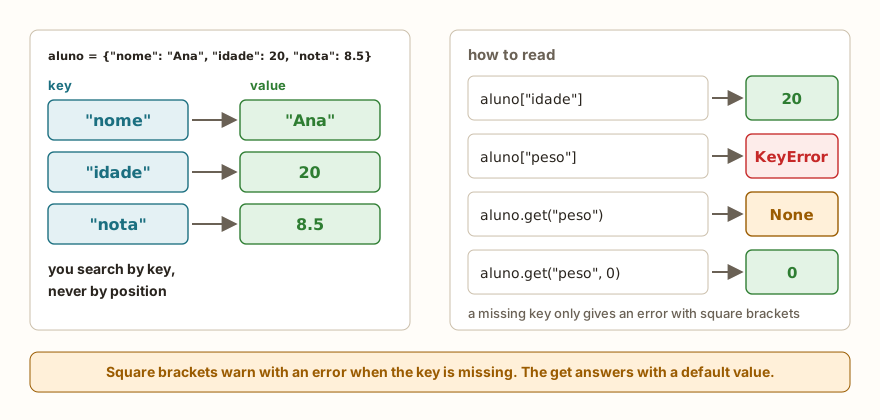
A dictionary keeps values that are found by a key, and not by a position. Instead of asking "what is at index 2?", the program asks "what is the age?", and the dictionary answers. It is written between curly braces, with key: value pairs separated by commas, as in {"nome": "Ana", "idade": 20}. It is the right structure for records, lookup tables, settings and, above all, counts.
In the previous articles, the position told what each item was: the first, the last, the one at index 3. This works well for a sequence of values of the same type and the same meaning, such as grades or sensor readings. When each value has a role of its own, or when the question is "how many times did it appear?", the key is clearer than the position number. This article shows how to create, read, change and go through dictionaries, how to count and group, an important difference in the order of items between the simulator and the computer's Python, the most common errors and uses on the ESP32.
A note on the examples: the keys and the words used as keys stay in Portuguese on purpose (nome is name, idade is age, nota is grade, peso is weight, verde is green). MicroPython stores keys in a hash table, so the order in which a dictionary is printed depends on the text of the keys, and translating them would change the outputs shown here.
Creating a dictionary
vazio = {}
aluno = {"nome": "Ana", "idade": 20, "nota": 8.5}
print(vazio, aluno)
print(type(vazio), len(aluno))
print(aluno["nome"], aluno["idade"])
print(dict(a=1, b=2))
print(dict([("x", 1), ("y", 2)]))
print(dict(zip(["a", "b", "c"], [1, 2, 3])))
print(aluno.get("nome"))
print(aluno.get("peso"))
print(aluno.get("peso", 0))
print("nome" in aluno, "peso" in aluno, "Ana" in aluno)
print("end")The output has {} and the dictionary aluno on the first line, then <class 'dict'> 3, Ana 20, and the three ways of creating from dict(...). Then come Ana, None, 0 and True False False, and finally end. The order in which the keys appear on the lines that print dictionaries deserves a section of its own, just ahead.
The empty {} creates a dictionary, and not a set: the empty set has another name, which the article on sets shows. The function dict(...) builds a dictionary in other ways: with names (dict(a=1, b=2)), with a list of pairs in tuples, like those in the previous article, or joining two lists with zip, one of keys and another of values. The len counts the pairs.
From the syllabus to a planned semester
- Teaching plan and calendar built automatically
- Class diary ready to paste into SIGA
- Slides and exercise lists with answer keys
Free Community edition · Windows
Reading a value: [] and get
There are two ways of reading, and the difference between them is what happens when the key does not exist. With square brackets, aluno["idade"] returns the value, and a missing key gives KeyError. With the get method, aluno.get("peso") returns None if the key is missing, and aluno.get("peso", 0) returns the default value you choose, in this case 0.
The question "nome" in aluno tests the keys. The last comparison in the example, "Ana" in aluno, gave False, because "Ana" is a value, and not a key. To ask about values, the way is "Ana" in aluno.values().
The choice between the two readings is about intent. If the key has to exist, and its absence is a bug, the square brackets warn loudly with the error. If absence is normal, as when counting occurrences, get avoids the if.
Changing: adding, replacing and removing
Assigning to a new key adds the pair, and assigning to a key that already exists replaces the value. There is no append, because there is no "end" or position.
d = {"a": 1}
d["b"] = 2
d["a"] = 10
print(d)
d["c"] = 3
x = d.pop("c")
print(x, d)
print(d.pop("zzz", "was not there"))
del d["b"]
print(d)
d.update({"p": 5, "q": 6})
print(d)
d.update(a=99)
print(d)
print(d.setdefault("novo", 0))
print(d.setdefault("p", 100))
print(d)
d.clear()
print(d, len(d))
print("end")The output is {'a': 10, 'b': 2}, then 3 {'a': 10, 'b': 2}, was not there, {'a': 10}, and the lines from update, which are {'a': 10, 'q': 6, 'p': 5} and {'a': 99, 'q': 6, 'p': 5}. Next come 0, 5, {'a': 99, 'q': 6, 'p': 5, 'novo': 0}, {} 0 and end.
The pop(key) removes the pair and returns the value, and with a second argument (pop("zzz", "was not there")) it returns that default instead of giving an error. The del d["b"] removes without returning anything. The update merges the pairs from another dictionary or from named arguments, replacing those that already existed. The setdefault(key, default) does two things: it returns the key's value if it exists, and if it does not exist, it creates it with the default and returns it. This will be useful for grouping, further on. The clear empties it.
The order of the items is not the insertion order
Look again at the outputs above. The dictionary in the update was built as a, then p, then q, and was printed as a, q, p. This is not a defect of the simulator.
In the computer's Python from version 3.7 on, a dictionary remembers the order in which the pairs were inserted, and prints in that order. In MicroPython, which runs on the ESP32, the dictionary is a hash table and the items appear in the order in which the table stores them, which depends on the keys and not on the writing order. The simulator copies this behavior, and so the orders that appear in the prints and loops of this article are those of MicroPython and may differ from what your computer's Python shows.
The practical consequence is a simple rule: never depend on the order of a dictionary's keys. If the program needs an order, it asks for one. sorted(d) returns the keys in alphabetical order, and sorted(d.items(), key=...) sorts the pairs by whatever you say. To read a value, the order does not matter, because the reading is by key.
The AI that remembers your life and lives on your computer
- Long-term memory with the source of every answer
- Works offline: your data stays on your PC
- Reads PDFs, slides, photos and meeting recordings
Essential plan free forever
Going through a dictionary
d = {"verde": 18, "amarelo": 19, "vermelho": 21}
for chave in d:
    print(chave)
print(list(d.keys()))
print(list(d.values()))
print(list(d.items()))
for nome, pino in d.items():
    print(nome, "->", pino)
print(sorted(d))
print(sorted(d.items(), key=lambda p: p[1], reverse=True))
print(sum(d.values()), max(d.values()), min(d, key=d.get))
print("end")The output begins with the keys verde, vermelho and amarelo, one per line, in the order of MicroPython's table. Next come ['verde', 'vermelho', 'amarelo'], [18, 21, 19] and [('verde', 18), ('vermelho', 21), ('amarelo', 19)], and then verde -> 18, vermelho -> 21 and amarelo -> 19. The last lines are ['amarelo', 'verde', 'vermelho'], [('vermelho', 21), ('amarelo', 19), ('verde', 18)], 58 21 verde and end.
A for straight over the dictionary hands over the keys. The keys() hands over only the keys, the values() only the values, and the items() hands over the pairs, each as a tuple. That is why for nome, pino in d.items() works: the tuple (nome, pino) is unpacked at each pass, as in the for x, y in pontos of the article on tuples. This is the most common way of going through a dictionary.
The last three lines show the usual partners. The sorted(d) sorts the keys, and sorted(d.items(), key=lambda p: p[1], reverse=True) sorts the pairs by value, from largest to smallest, as in the article on lambda, map, filter and sorted. The sum and max accept the values, and min(d, key=d.get) returns the key of the smallest value: the d.get serves as the criterion, and the result is verde, whose pin 18 is the smallest.
A remark: keys(), values() and items() hand over views, and not lists. To have a list, wrap it with list(...), as in the example. A view cannot be indexed, which is seen in the errors further on.
Counting: the most valuable use
Counting how many times each thing appears is the job in which the dictionary shines. The idea is one key per thing and, as the value, the count:
texto = "o gato e o rato e o gato"
contagem = {}
for palavra in texto.split():
    contagem[palavra] = contagem.get(palavra, 0) + 1
print(contagem)
for palavra, n in sorted(contagem.items(), key=lambda p: (-p[1], p[0])):
    print(palavra, n)
letras = {}
for c in "banana":
    letras[c] = letras.get(c, 0) + 1
print(letras)
print("end")The output is {'gato': 2, 'e': 2, 'o': 3, 'rato': 1}, then the lines o 3, e 2, gato 2 and rato 1, then {'a': 3, 'n': 2, 'b': 1} and end. (The sentence means "the cat and the rat and the cat", and it stays in Portuguese because its words are the keys.)
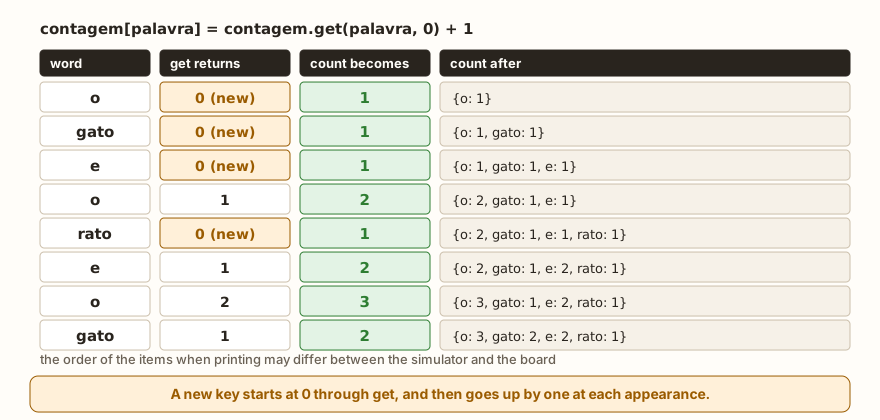
The line contagem[palavra] = contagem.get(palavra, 0) + 1 is a pattern to memorize. The get(palavra, 0) returns the current count, or 0 if the word has not appeared yet, and the + 1 adds the current occurrence. The result is stored in the same key. The figure shows the dictionary growing word by word.
The texto.split() splits the text into words and returns a list, which will be seen in detail in the article on strings. The "banana" in the second case shows that the for over a text hands over letter by letter, and that the same mold counts letters.
The final sort deserves a look. The key (-p[1], p[0]) is a tuple: first the negative of the count, so that the largest comes first, and then the word, to break ties in alphabetical order. It is the composite key from the article on sorted, and it guarantees a predictable output when two words tie, such as e and gato, both with 2. Without the tiebreaker, the order of the tied ones would depend on the dictionary's table.
The classic mistake of this calculation is to write only contagem[palavra] += 1, without the get. The first time a word appears, the key does not exist and the result is KeyError. The two ways out are get with a default, as above, or the test if palavra in contagem.
Grouping: a dictionary of lists
Another use is to keep, for each key, a list of items. It is the case of grouping students by class, readings by sensor or events by type:
alunos = [("Ana", "A"), ("Bia", "B"), ("Caio", "A"), ("Duda", "B"), ("Edu", "A")]
turmas = {}
for nome, turma in alunos:
    turmas.setdefault(turma, []).append(nome)
print(turmas)
turmas2 = {}
for nome, turma in alunos:
    if turma not in turmas2:
        turmas2[turma] = []
    turmas2[turma].append(nome)
print(turmas2 == turmas)
print("end")The output is {'A': ['Ana', 'Caio', 'Edu'], 'B': ['Bia', 'Duda']}, True and end. The for nome, turma in alunos unpacks each tuple. The turmas.setdefault(turma, []) returns the class's list, creating an empty list when the class is new, and the .append(nome) adds to the returned list. The second form does the same with an if, and the comparison turmas2 == turmas shows that the result is equal. The form with setdefault is shorter, and the one with if is easier to read when you are starting out.
Copy and dictionary comprehension
The dictionary is mutable, like the list, and the assignment b = a also only creates another name for the same dictionary:
a = {"x": 1}
b = a
b["y"] = 2
print(a, b, a is b)
c = a.copy()
c["z"] = 3
print(a, c, a is c)
print({n: n * n for n in range(4)})
d = {"a": 1, "b": 2}
print({v: k for k, v in d.items()})
print({k: v for k, v in d.items() if v > 1})
print({(0, 0): "origin", (3, 4): "point"}[(3, 4)])
duplicada = {"a": 1, "a": 2}
print(duplicada)
print("end")The output is {'y': 2, 'x': 1} {'y': 2, 'x': 1} True, then {'y': 2, 'x': 1} {'y': 2, 'x': 1, 'z': 3} False, {0: 0, 1: 1, 2: 4, 3: 9}, {2: 'b', 1: 'a'}, {'b': 2}, point, {'a': 2} and end.
The first two lines repeat the lesson from the article on lists: after b = a, changing b changes a, and the is confirms that there is only one dictionary. The copy() creates another, and the two start to change independently. The copy is shallow: values that are lists remain shared between the two copies.
The next three lines are dictionary comprehensions, the curly-brace version of the list comprehensions from the article on list operations. The form is {key: value for ... in ...}, with an optional if at the end. The first creates a table of squares, the second inverts a dictionary, swapping keys for values, and the third filters only the pairs whose value passes the test. Inverting only works when the values are all different: if two values are equal, the last one wins, and a pair disappears.
The second-to-last example shows that a tuple serves as a key. The tuple (3, 4) leads to the text point, as the previous article anticipated, and this is how something indexed by coordinate is stored. The list, being mutable, does not serve as a key, and the error is in the errors section.
The last case shows a repeated key: {"a": 1, "a": 2} gives no error, and the last value stays. This explains a common surprise: if the dictionary seems to have fewer items than you wrote, look for a duplicated key.
List of dictionaries: records
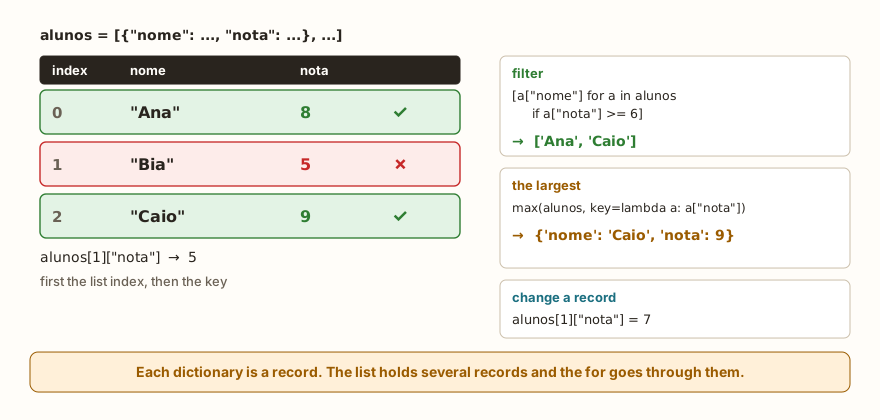
When each item of a collection has several fields, the most natural format is a list in which each item is a dictionary. Each dictionary is a record, and the whole is a small table:
alunos = [
    {"nome": "Ana", "nota": 8},
    {"nome": "Bia", "nota": 5},
    {"nome": "Caio", "nota": 9},
]
for a in alunos:
    print(a["nome"], a["nota"])
aprovados = [a["nome"] for a in alunos if a["nota"] >= 6]
print(aprovados)
media = sum(a["nota"] for a in alunos) // len(alunos)
print(media)
melhor = max(alunos, key=lambda a: a["nota"])
print(melhor)
alunos[1]["nota"] = 7
print(alunos[1])
print("end")The output is Ana 8, Bia 5, Caio 9, ['Ana', 'Caio'], 7, {'nome': 'Caio', 'nota': 9}, {'nome': 'Bia', 'nota': 7} and end. The for a in alunos hands over one dictionary per pass, and a["nome"] reads the field. The filter and the max with key follow the molds of the previous article, only now the calculation is done with a["nota"]. To change a field, first the list index and then the key: alunos[1]["nota"] = 7.
This format, a list of dictionaries, looks the same as data in JSON, which appears further below.
On the ESP32: lookup tables, configuration and readings
A dictionary becomes a lookup table when it plays the role of a chain of if and elif. Instead of testing each color name and choosing the pin, the program keeps the pin in a dictionary and reads it by key:
from machine import Pin
from time import sleep

LEDS = {
    "verde": Pin(18, Pin.OUT),
    "amarelo": Pin(19, Pin.OUT),
    "vermelho": Pin(21, Pin.OUT),
}
sequencia = ["verde", "amarelo", "vermelho", "amarelo"]
for cor in sequencia:
    LEDS[cor].on()
    sleep(0.1)
    LEDS[cor].off()
print(len(LEDS), list(LEDS))

CONFIG = {"intervalo": 5, "limite": 30, "modo": "auto"}
leitura = {"temp": 24, "umid": 61}
if leitura["temp"] < CONFIG["limite"]:
    print("normal temperature")
leitura["alerta"] = leitura["temp"] >= CONFIG["limite"]
print(leitura)
print("end")The output is 3 ['verde', 'vermelho', 'amarelo'], normal temperature, {'umid': 61, 'temp': 24, 'alerta': False} and end. The dictionary LEDS holds Pin objects as values, and the sequence of colors, which can have whatever order and repetitions you want, is gone through by each LED's name. Changing the traffic light's order becomes editing the list sequencia, and not the loop's code. The dictionary CONFIG gathers the settings in one place, with names that explain themselves, and the leitura is a record that gains a field alerta calculated from two others.
Note that list(LEDS) and leitura appear with the items out of writing order, which repeats the warning from the section on order.
A dictionary also becomes text to travel over the network. The json module converts in both directions:
import json
leitura = {"temp": 24, "umid": 61}
texto = json.dumps(leitura)
print(texto, type(texto))
volta = json.loads(texto)
print(volta, volta["temp"])
print("end")The output is {"umid": 61, "temp": 24} <class 'str'>, {'umid': 61, 'temp': 24} 24 and end. The json.dumps turns the dictionary into a text and the json.loads turns it back. This is how readings are usually sent over HTTP or MQTT, as in the article on Wi-Fi, HTTP and MQTT on the ESP32. Notice that the text also comes out in the table's order, which is not the writing order, and whoever reads on the other side receives the fields by their names, so the order does not matter.
Common errors
The messages below are those of the simulator, which imitates MicroPython. In some cases the text is different from that of the computer's Python, and I point out when it is.
d = {"nome": "Ana"}
print(d["idade"])KeyError: idadeThe key does not exist. The simulator shows the name without quotes, and the computer's Python writes KeyError: 'idade'. The cure is to decide whether absence is an error, and then keep the square brackets, or whether it is normal, and then use get or in.
d = {"a": 1}
d["b"] += 1KeyError: bThe += reads the key before adding, and the key b does not exist. It is the most common error in counts, and it is solved with d["b"] = d.get("b", 0) + 1.
d = {"a": 1}
d.append(2)AttributeError: 'dict' object has no attribute 'append'The dictionary has no append, because it has no position. To add, assign to a new key.
d = {"a": 1}
print(d[0])KeyError: 0A list's index does not work in a dictionary. The 0 here is treated as a key, and not as the position. Whoever expects "the first item" needs list(d)[0], remembering that the order is not the writing order.
d = {"a": 1}
print(d.get("x").upper())AttributeError: 'NoneType' object has no attribute 'upper'The get without a default returned None, and .upper() was called on it. Give a default of the right type, like d.get("x", ""), or test first.
d = {"a": 1, "b": 2}
for k, v in d:
print(k, v)ValueError: need more than 1 values to unpackThe for over the dictionary hands over only the keys, and the k, v tries to open each key into two names. Here the keys have a single letter, and the message says a value is missing. With longer keys, the error would be another one, of excess, because the text would be opened letter by letter. The fix is always d.items().
d = {[1, 2]: "x"}TypeError: unsupported type for __hash__: 'list'A list cannot be a key, because it can change. The tuple (1, 2) can. The computer's Python says unhashable type: 'list'.
d = {"a": 1}
print(d.keys()[0])TypeError: 'dict_view' object isn't subscriptableThe view that keys() hands over does not accept an index. Use list(d.keys())[0].
There is also a case that in the computer's Python gives RuntimeError: dictionary changed size during iteration: adding keys to a dictionary while going through that same dictionary. In the simulator, the test loop ended without an error, and even so the behavior should not be used, just like deleting items from a list inside a for. The safe way is to go through a copy, like for k in list(d):, or to build a new dictionary.
What tends to show up in class
These patterns repeat in classes of all levels.
The first is the KeyError in a count: the student writes contagem[x] += 1, the program works in the first test because the key was already there, and breaks in the second. The question that solves it is "and the first time this word appears, what does the dictionary have?".
The second is the d[0] expecting "the first item". Whoever comes from lists brings the habit of asking by position, and the dictionary answers with a KeyError: 0 that seems strange.
The third is expecting the writing order. On the computer it almost always holds, and on the ESP32 it does not. A program that works on the machine and prints the fields in another order on the board is a typical symptom, and the cure is to ask for the order with sorted.
The fourth is the confusion between in with keys and with values. The test "Ana" in aluno gives False and the student swears that Ana is there. She is, only as a value.
The fifth is the for k, v in d without the .items(), seen above.
The sixth is the repeated key, which disappears silently: the student writes two items with the same key, and the first one vanishes.
The seventh is thinking that b = a copies the dictionary, which is the same trap as with lists, and usually appears in those who have just learned the difference for lists and think the dictionary "is different".
Exercise: most common words
Write a program that asks how many words will be read, reads each one, counts how many times each word appears and shows the number of distinct words, each word with its count, from the most frequent to the least, and which is the most common.
quantidade = int(input("how many words: "))
contagem = {}
for i in range(quantidade):
    palavra = input("word: ")
    contagem[palavra] = contagem.get(palavra, 0) + 1
print("distinct", len(contagem))
ordenadas = sorted(contagem.items(), key=lambda p: (-p[1], p[0]))
for palavra, n in ordenadas:
    print(palavra, n)
print("most common", ordenadas[0][0])With the inputs 8, o, gato, e, o, rato, e, o and gato, the final lines are distinct 4, o 3, e 2, gato 2, rato 1 and most common o. The ordenadas[0][0] is the first pair of the list, and inside it the word. To practice, also show the words that appear only once, and make the program ignore upper and lower case, applying .lower() to each word before counting. Then, replace reading word by word with a whole sentence using input().split(), which the article on strings explains. What happens if the user types 0 as the quantity? Test it and protect the program.
Frequently asked questions
When do I use a dictionary and when a list? Use a list when the position or the order is what matters, and the items are of the same type. Use a dictionary when each value has a name, or when you need to find something by name quickly.
Can the key be a number? It can. Numbers, texts and tuples work. Lists and other dictionaries do not, because they can change.
Is the dictionary faster than the list for searching? Looking up a key in a dictionary does not go through the items one by one, and that is why it is the structure for lookups. This article did not measure times on the ESP32.
What is the difference between d["x"] and d.get("x")? The square brackets give KeyError when the key does not exist, and get returns None or the default you ask for.
How do I merge two dictionaries? With update, which changes the first one, and which replaces the values of repeated keys. The sum d1 + d2 does not exist and gives TypeError.
Where to go next
The challenge List Search works on the idea of looking for a value, which the dictionary solves by key. To review the basics, the articles on lists, list operations and tuples complete this one.
The next article deals with sets: collections without repetition, which answer in one line questions such as "which items are in both lists" and "which appear in only one".