Fundamentals
Matrix Operations in Python: Sum, Transpose and Diagonal
Add matrices position by position, build the transpose with loops or zip, extract the diagonals and test symmetry, with examples for the ESP32.
By Prof. Rodrigo Faustino · Updated on · 18 min read
Metrics for this article
- Words
- 3,460
- Characters
- 18,701
- Reading time
- ~18 min
With the matrix already created and gone through, the next step is doing calculations with it. Three operations show up all the time and cover a good part of what is asked in tests, exercises and projects: adding two matrices, transposing a matrix, swapping rows for columns, and taking the diagonals. All three are solved with what the previous article showed, nested loops and comprehensions, and each one teaches a new caution: the sizes need to match, the order of the indexes changes, and the diagonal only makes sense in a square matrix.
A warning before starting: Python does not do matrix arithmetic with the operators. The + between two lists joins them, the * between two lists gives an error, and none of that resembles the sum and product of mathematics. The one who does the calculation is a loop that you write. This is good news for learning, because each operation becomes an exercise in thinking about indexes, and for the ESP32, which does not need to load a numeric library to handle a small table. The examples ran in the simulator, and the results quoted are its own.
Adding two matrices
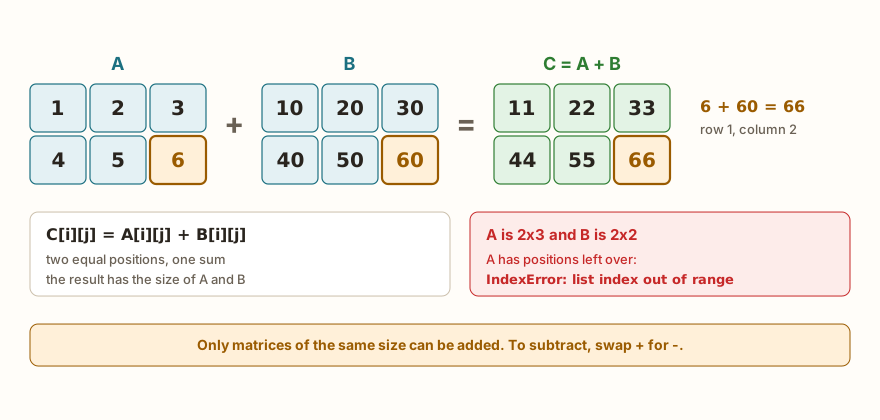
In matrix addition, each position of one is added to the same position of the other, and the result goes to that position in a new matrix. That is why the two need to have the same number of rows and columns.
a = [[1, 2, 3], [4, 5, 6]]
b = [[10, 20, 30], [40, 50, 60]]
soma = []
for i in range(len(a)):
    linha = []
    for j in range(len(a[0])):
        linha.append(a[i][j] + b[i][j])
    soma.append(linha)
print(soma)
soma2 = [[a[i][j] + b[i][j] for j in range(len(a[0]))] for i in range(len(a))]
print(soma2, soma == soma2)
soma3 = [[x + y for x, y in zip(la, lb)] for la, lb in zip(a, b)]
print(soma3)
print([[2 * v for v in linha] for linha in a])
print([[v - 1 for v in linha] for linha in b])
print(a + b)
dif = [[a[i][j] - b[i][j] for j in range(3)] for i in range(2)]
print(dif)
print("end")The output is [[11, 22, 33], [44, 55, 66]], then [[11, 22, 33], [44, 55, 66]] True, then [[11, 22, 33], [44, 55, 66]], then [[2, 4, 6], [8, 10, 12]], then [[9, 19, 29], [39, 49, 59]], then [[1, 2, 3], [4, 5, 6], [10, 20, 30], [40, 50, 60]], then [[-9, -18, -27], [-36, -45, -54]] and finally end.
The first block is the explicit form. The outer loop chooses the row i, the inner one chooses the column j, and each sum a[i][j] + b[i][j] goes into a list linha. When the inner loop ends, the finished linha is added to soma. The linha is created anew on each turn of the outer loop, and that is what prevents the asterisk error that the previous article showed: each row of the result is a list of its own.
The second block is the same loop written as a two-level comprehension, and the comparison soma == soma2 confirms that the result is equal. The third swaps the indexes for zip, which pairs the lists and hands over the elements together. The zip(a, b) produces pairs of rows, (la, lb), and the zip(la, lb) inside it produces pairs of numbers, (x, y). There is no index at all, and the reading stays close to what one says out loud: "for each pair of rows, add the pairs of numbers". The price is a caveat that we will see further on, about what zip does when the sizes do not match.
The following lines show the variations. Multiplying the matrix by a number, the so-called scalar product, is a comprehension that applies 2 * v to each value. Subtracting a number from all the elements is the same idea. The subtraction of matrices swaps the + for - in the addition formula, and gives the result dif. And what does a + b deliver? A list with the four rows, one after the other. It adds nothing: the + of lists is concatenation, as already appeared in the article on list operations, and here it just stacks the rows of b under those of a.
The choice among the three forms is a matter of style. The one with indexes is the easiest to debug and the only one that serves when the position enters the calculation. The one with zip is the shortest, and the comprehension with indexes sits in the middle. For those learning, it is worth writing the first and only then migrating to the others.
From the syllabus to a planned semester
- Teaching plan and calendar built automatically
- Class diary ready to paste into SIGA
- Slides and exercise lists with answer keys
Free Community edition · Windows
Transposing: swapping rows for columns

The transpose of a matrix is another matrix in which the rows become columns. The element that was at row i and column j moves to row j and column i. A matrix of 2 rows by 3 columns becomes one of 3 rows by 2 columns.
m = [[1, 2, 3], [4, 5, 6]]
t = []
for j in range(len(m[0])):
    linha = []
    for i in range(len(m)):
        linha.append(m[i][j])
    t.append(linha)
print(t)
t2 = [[m[i][j] for i in range(len(m))] for j in range(len(m[0]))]
print(t2, t == t2)
t3 = [list(c) for c in zip(*m)]
print(t3)
print(list(zip(*m)))
t4 = list(map(list, zip(*m)))
print(t4)
print(len(m), len(m[0]), len(t), len(t[0]))
tt = [[t[i][j] for i in range(len(t))] for j in range(len(t[0]))]
print(tt == m)
q = [[1, 2, 3], [4, 5, 6], [7, 8, 9]]
n = len(q)
for i in range(n):
    for j in range(i + 1, n):
        q[i][j], q[j][i] = q[j][i], q[i][j]
print(q)
r = [[1, 2, 3], [4, 5, 6], [7, 8, 9]]
for i in range(n):
    for j in range(n):
        r[i][j], r[j][i] = r[j][i], r[i][j]
print(r)
print("end")The output is [[1, 4], [2, 5], [3, 6]], then [[1, 4], [2, 5], [3, 6]] True, then [[1, 4], [2, 5], [3, 6]], then [(1, 4), (2, 5), (3, 6)], then [[1, 4], [2, 5], [3, 6]], then 2 3 3 2, then True, then [[1, 4, 7], [2, 5, 8], [3, 6, 9]], then [[1, 2, 3], [4, 5, 6], [7, 8, 9]] and finally end.
In the first version, the loops swapped roles relative to the sum. The outer one goes through the columns of m, with range(len(m[0])), and each turn assembles a new row of t by taking the element m[i][j] from all the rows i. In other words, the first row of t is the first column of m. It is exactly the "take a column" operation that the previous article did with a comprehension, repeated for all the columns. The second version is the same thing in two lines, and the comparison t == t2 gives True.
The third is the trick seen in Python code: zip(*m). The asterisk before the name unpacks the list into separate arguments. Writing zip(*m) with m = [[1, 2, 3], [4, 5, 6]] is equivalent to writing zip([1, 2, 3], [4, 5, 6]), and the zip joins the first element of each row, then the second, then the third. The groups it hands over are (1, 4), (2, 5) and (3, 6), which are precisely the columns. The fourth result of the example shows that each group is a tuple, the type seen in the article on tuples and unpacking. If the transpose needs to be a list of lists, each tuple is converted with list(c), in the comprehension, or with map(list, ...), as in the fifth output.
Notice the 2 3 3 2: the matrix m has 2 rows and 3 columns, and t has 3 rows and 2 columns. The dimensions are inverted, and that is where the most common error is born, which is writing in the transpose a calculation that assumes the original size. And the line tt == m shows the nicest property of the operation: transposing twice returns the starting matrix.
Transposing in place, only for a square matrix
The last two blocks show the transposition in place, without creating a new matrix, in a 3 by 3 matrix. The idea is to swap q[i][j] with q[j][i] through a double assignment, which is the swap of two values without an auxiliary variable. The first, with j in range(i + 1, n), visits only the pairs above the diagonal, and each pair is swapped once, which gives the right transpose. The second goes through the whole matrix, with j in range(n), and the result is the original matrix with no change.
The reason is that, in the second, each pair is swapped twice: once when visiting (i, j) and again when visiting (j, i). The second swap undoes the first. It is an error that gives no message at all: the program runs, prints a nice matrix, and it just is not the transpose. And the method only works if the matrix is square. In a 2 by 3 matrix, the result does not even have the right size, since the transpose takes 3 by 2 and does not fit in the same lists. For matrices that are not square, the only option is to create a new matrix.
Diagonals, trace and symmetry
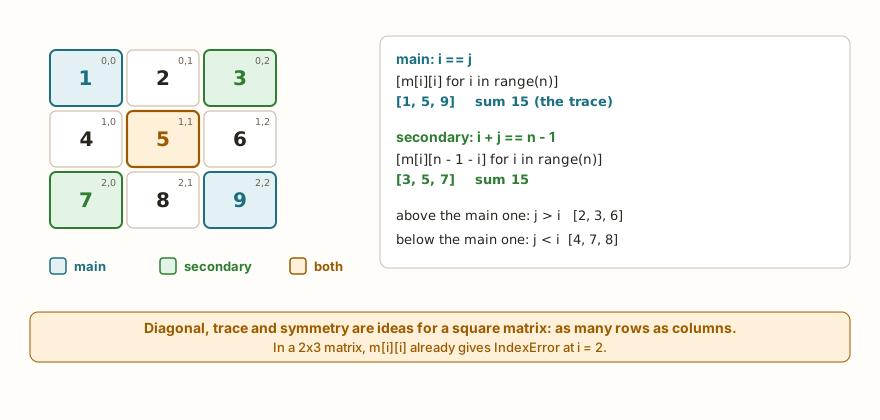
In a square matrix, with the same number of rows and columns, there are two diagonals. The main one goes from the top-left corner to the bottom-right one, and in it the row index equals the column index: i == j. The secondary one goes from the top-right corner to the bottom-left one, and in it i + j == n - 1, with n being the size of the matrix.
m = [[1, 2, 3], [4, 5, 6], [7, 8, 9]]
n = len(m)
print([m[i][i] for i in range(n)])
print([m[i][n - 1 - i] for i in range(n)])
print(sum(m[i][i] for i in range(n)), sum(m[i][n - 1 - i] for i in range(n)))
for i in range(n):
    for j in range(n):
        if i == j:
            print("main", m[i][j])
        elif i + j == n - 1:
            print("secondary", m[i][j])
acima = [m[i][j] for i in range(n) for j in range(n) if j > i]
abaixo = [m[i][j] for i in range(n) for j in range(n) if j < i]
print(acima, abaixo)
ident = [[1 if i == j else 0 for j in range(4)] for i in range(4)]
for linha in ident:
    print(*linha)
s = [[1, 2, 3], [2, 5, 6], [3, 6, 9]]
simetrica = True
for i in range(n):
    for j in range(n):
        if s[i][j] != s[j][i]:
            simetrica = False
print(simetrica)
print(m == [list(c) for c in zip(*m)])
print(s == [list(c) for c in zip(*s)])
print("end")(The names acima = above, abaixo = below, ident = identity and simetrica = symmetric.) The output is [1, 5, 9], then [3, 5, 7], then 15 15, then five lines, main 1, secondary 3, main 5, secondary 7 and main 9, then [2, 3, 6] [4, 7, 8], then four lines of the identity, 1 0 0 0, 0 1 0 0, 0 0 1 0 and 0 0 0 1, then True, False, True and finally end.
The main diagonal is the simplest to extract: [m[i][i] for i in range(n)], with a single index, repeated in both places. The secondary one uses n - 1 - i for the column, because when the row goes up, the column goes down. In a 3 by 3 matrix, row 0 uses column 2, row 1 uses 1, and row 2 uses 0. The sum of the main diagonal has a name of its own, the trace of the matrix, and here the two diagonals add up to 15.
The loop with if and elif shows a detail about the central element, the 5. It belongs to both diagonals, since 1 == 1 and 1 + 1 == 2. As the if comes first, the 5 is printed as main and the elif is never tested. This holds for every matrix of odd size. In one of even size, such as the 2 by 2 of the challenge Matrix Diagonal, the diagonals have no common element.
The two comprehensions acima and abaixo take the triangles of the matrix: the elements where j > i are above the main diagonal, and those where j < i are below it. Notice that the comprehension has two fors, written one after the other. The reading is the same as two nested loops, the outer one first, and the if at the end filters.
The identity matrix, with 1 on the diagonal and 0 elsewhere, is born from a two-level comprehension with the test 1 if i == j else 0. It appears in many matrix calculations, and is a good demonstration that the diagonal is a condition between indexes.
Finally, symmetry. A matrix is symmetric when it is equal to its transpose, that is, when s[i][j] == s[j][i] for all positions. The first test, with loops, starts from True and becomes False at the first different pair, the "flag" pattern: a variable that starts true and that a test can knock down. The second compares the matrix with the transpose made by zip. The result is False for m, which is not symmetric, and True for s, which is.
On the ESP32: images, sensors and brightness
The three operations have direct uses on board data:
SETA = [
    [0, 0, 1, 0, 0],
    [0, 1, 1, 1, 0],
    [1, 0, 1, 0, 1],
    [0, 0, 1, 0, 0],
    [0, 0, 1, 0, 0]
]
def mostrar(img):
    for linha in img:
        print("".join("#" if v else "." for v in linha))
mostrar(SETA)
print()
mostrar([list(c) for c in zip(*SETA)])
print()
mostrar([linha[::-1] for linha in SETA])
print()
mostrar(SETA[::-1])
print()
leituras = [[22.5, 60], [23.0, 58], [24.5, 55], [21.0, 62]]
medias = [sum(c) / len(c) for c in zip(*leituras)]
print(medias)
print([round(x, 1) for x in medias])
brilho = [[0, 100, 200], [50, 150, 250]]
mais = [[min(255, v + 80) for v in linha] for linha in brilho]
print(mais)
print("end")(The names mean SETA = arrow, mostrar = show, leituras = readings, medias = averages, brilho = brightness and mais = more.) The output has five blocks of drawing separated by blank lines. The first is the usual arrow: ..#.., .###., #.#.#, ..#.. and ..#... The second is the transpose: ..#.., .#..., #####, .#... and ..#... The third is the horizontal mirror, which stays the same because it is symmetric left to right. The fourth is the vertical mirror: ..#.., ..#.., #.#.#, .###. and ..#... Then come [22.75, 58.75], [22.8, 58.8], [[80, 180, 255], [130, 230, 255]] and end.
The first use is manipulating images. The same SETA from the previous article gets new versions with one line each. The transpose reflects the drawing around the diagonal, which the second block shows with an arrow that became another drawing. The horizontal mirror reverses each row, with linha[::-1], and the vertical one reverses the order of the rows, with SETA[::-1]. A note about the simulator: the slice with a step works on lists, as here, but not on texts and tuples, as seen in the article on strings.
The second use is statistics by column. Each row of leituras is a measurement, and each column is a sensor: temperature and humidity, for example, read four times. The zip(*leituras) hands over the values of each sensor together, and the comprehension calculates the average of each one, [22.75, 58.75]. The round rounds to one decimal place. The article on DHT22, HC-SR04 and PIR sensors shows how to get these readings for real.
The third use is adjusting the brightness of a grayscale image, adding 80 to each pixel and limiting the result to 255 with min, since 255 is the maximum of an 8-bit output. It is a scalar operation, only with a ceiling. The pattern min(255, ...) serves for any value that cannot go over a limit, and max(0, ...) does the same for the floor.
The AI that remembers your life and lives on your computer
- Long-term memory with the source of every answer
- Works offline: your data stays on your PC
- Reads PDFs, slides, photos and meeting recordings
Essential plan free forever
Common errors
The first error is adding matrices of different sizes. If the loop uses the dimensions of one and accesses the other, a position is missing:
a = [[1, 2, 3], [4, 5, 6]]
b = [[1, 2], [3, 4]]
soma = [[a[i][j] + b[i][j] for j in range(len(a[0]))] for i in range(len(a))]
print(soma)IndexError: list index out of rangeThe program fails on reaching column 2 of b, which does not exist. The error is a good one, because it warns. The danger is the opposite: when a loop uses the dimensions of the smaller one, it does not fail and loses data without warning. The same goes for zip, which stops at the smaller:
a = [[1, 2, 3], [4, 5, 6]]
b = [[1, 2], [3, 4]]
print([[x + y for x, y in zip(la, lb)] for la, lb in zip(a, b)])
print(list(zip(*[[1, 2, 3], [4, 5]])))
print("end")The output is [[2, 4], [7, 9]], then [(1, 4), (2, 5)] and finally end. The sum of a 2 by 3 with a 2 by 2 returns a 2 by 2, with no message, and the 3 and the 6 disappear. With zip, it is worth checking beforehand that the dimensions are equal, with len(a) == len(b) and len(a[0]) == len(b[0]).
The second error is asking for the diagonal of a matrix that is not square, using the number of columns as the limit:
m = [[1, 2, 3], [4, 5, 6]]
print([m[i][i] for i in range(len(m[0]))])IndexError: list index out of rangeThe matrix only has rows 0 and 1, but the loop goes up to column 2. The diagonal only exists up to the smaller of the two sizes, and the concept of secondary diagonal, trace and symmetry belongs to square matrices.
The third error is the trickiest, because it gives no message. It is trying to transpose a non-square matrix in place, with the swap of m[i][j] and m[j][i]:
m = [[1, 2, 3], [4, 5, 6]]
n = len(m)
for i in range(n):
    for j in range(i + 1, n):
        m[i][j], m[j][i] = m[j][i], m[i][j]
print(m)
print("end")The output is [[1, 4, 3], [2, 5, 6]] and end. The program ran, swapped two elements, and the "transpose" came out with 2 rows of 3 columns, when it should have 3 rows of 2. The 3 and the 6 were not even touched. The remedy is the transpose in a new matrix.
The fourth error is using the operators as if they were matrix operators:
a = [[1, 2], [3, 4]]
print(a * a)TypeError: unsupported types for __mul__: 'list', 'list'In the computer's Python, the message is can't multiply sequence by non-int of type 'list'. The a + 1 also fails, with unsupported types for __add__: 'list', 'int' in the simulator and can only concatenate list (not "int") to list on the computer. And the a + b, with no error at all, just concatenates. In all cases the fix is the same: a loop or a comprehension.
The fifth shows up when trying to use the result of zip as if it were a list:
m = [[1, 2, 3], [4, 5, 6]]
t = zip(*m)
print(len(t))TypeError: object of type 'zip' has no len()The zip hands over an object that can only be gone through, and only once: after a list(z), a second list(z) returns []. The message is the same in the simulator and in the computer's Python. The solution is to store the result in a list, with list(zip(*m)).
What tends to show up in class
These are patterns that repeat with people learning these operations. They are not the account of a specific class.
Adding with the wrong loop. Writing a[i][j] + b[j][i], or swapping the order of the indexes on only one side. With square matrices, the result comes out wrong with no error at all. Checking one value by hand, from a position off the diagonal, finds it quickly.
Thinking that a + b adds matrices. The result, the list with the rows stacked, looks plausible to those who do not look at the size. The clue is the len: the sum of two 2 by 3 matrices has 4 rows, and it should have 2.
Transposing with the same limits. In the transpose, the outer loop walks through the columns of the original. Whoever copies the structure of the sum, with range(len(m)) outside, ends up with a matrix of the wrong size or with an IndexError.
The double swap. The in-place transposition with range(n) instead of range(i + 1, n). The program does not change the matrix, and the person concludes that the swap does not work, instead of thinking it worked twice.
Diagonal with two loops. Going through the whole matrix with for i and for j and testing i == j works, but takes n * n steps to find n elements. The form with a single loop, m[i][i], is simpler, and understanding why it is enough is the point of the lesson.
The secondary diagonal off by one. Writing n - i instead of n - 1 - i. With i = 0, the column would be n, which does not exist, and the index error appears right on the first turn, which helps notice the "minus one".
The central element counted twice. When adding up the two diagonals of a matrix of odd size, the center goes in twice. In some problems, that is what you want, and in others it needs a discount.
Testing only with the square matrix. Many transposition and sum errors only show up with a 2 by 3 matrix. Whoever tests only with 2 by 2 or 3 by 3 does not see the difference between rows and columns.
Exercise: transpose, diagonals and symmetry
Write a program that reads the size n of a square matrix and then the n * n values, and shows the transpose, the two diagonals, the trace and whether the matrix is symmetric. The block uses entradas= to provide n = 3 and the numbers from 1 to 9.
n = int(input())
m = []
for i in range(n):
    linha = []
    for j in range(n):
        linha.append(int(input()))
    m.append(linha)
t = [[m[i][j] for i in range(n)] for j in range(n)]
print("transpose")
for linha in t:
    print(*linha)
print("main diagonal", [m[i][i] for i in range(n)])
print("secondary diagonal", [m[i][n - 1 - i] for i in range(n)])
print("trace", sum(m[i][i] for i in range(n)))
print("symmetric", m == t)
print("end")The simulator repeats the typed values in the output, one per line, and then come transpose, 1 4 7, 2 5 8, 3 6 9, main diagonal [1, 5, 9], secondary diagonal [3, 5, 7], trace 15, symmetric False and end.
The program reads n once and uses it everywhere, instead of fixed numbers, which makes it right for any size. The matrix is built row by row, with the linha created inside the outer loop. The transpose comes from a comprehension, and the symmetry is the direct comparison m == t, which compares the lists of lists element by element.
To practice, try replacing the numbers with a symmetric matrix and seeing the True; calculating the sum of the elements above the main diagonal; adding the matrix to its transpose and checking that the result is always symmetric; and changing the reading to a matrix of 2 rows by 3 columns and seeing which lines of the program stop being valid.
Frequently asked questions
How do I multiply two matrices? The product of matrices is not element by element, but the sum of the products of a row of the first by a column of the second, which takes three loops. It is outside this article. What was seen here, the product by a number, is much simpler. And the a * a between lists gives an error, as shown.
Is there a ready-made way to add matrices? Not in plain Python, nor in the simulator. On a computer, libraries such as NumPy make a + b really add, but they do not exist in the simulator. The loops and comprehensions of this article solve the small tables of a board.
Does zip(*m) work on any matrix? On any list of lists. If the rows have different sizes, it stops at the smaller one, and the leftovers vanish silently.
Is the transpose always a list of lists? No: zip hands over tuples. If you need to change the transpose afterwards, or compare it with a list of lists, convert each tuple with list. The comparison [(1, 4)] == [[1, 4]] gives False, because tuple and list are different types.
Why does the secondary diagonal use n - 1 - i? Because the indexes go from 0 to n - 1. On row 0, the column is the last one, n - 1. With each row that goes down, the column decreases by one, and n - 1 - i describes exactly that.
What is the trace? The sum of the main diagonal. It appears in many matrix formulas but, for programming, it is just a sum over m[i][i].
Where to go next
The challenges Matrix Diagonal, Matrix Sum and Zero Counter practice access to the elements and the walk with nested loops, which support everything seen here. To review the basics, the previous article, matrices with lists of lists, brings the creation, the asterisk trap and the deep copy, and the one on list operations brings the comprehensions. The Logic with Python track gathers the challenges in order.
The next article leaves data structures and enters the classic algorithms, starting with search: how to look for a value in a list, step by step, and how to measure how much work that search takes.