Fundamentals
Insertion Sort in Python and When to Use sorted()
Learn insertion sort, compare it with bubble and selection, see why it is stable and know when to use sorted() and sort() instead of writing it by hand.
By Prof. Rodrigo Faustino · Updated on · 17 min read
Metrics for this article
- Words
- 3,224
- Characters
- 17,992
- Reading time
- ~17 min
Anyone who plays cards knows insertion sort without knowing it. On receiving each card, the person fits it into the right place among the ones already in hand, shifting the larger ones to make room. The hand is always ordered, and each new card only needs to find its position. That is exactly what the algorithm does with a list: the left part stays ordered, and the next element is inserted into it.
This article is the third of the simple sorting algorithms, after bubble sort and selection sort. It shows how insertion sort works, why it does so well on almost ordered lists, why it is stable, and closes the question that has been left since the start: if Python already has sorted() and sort(), when is it worth writing the sort by hand? All the examples ran in the simulator, and the results quoted are the ones it produces.
Insertion sort: fitting in one at a time
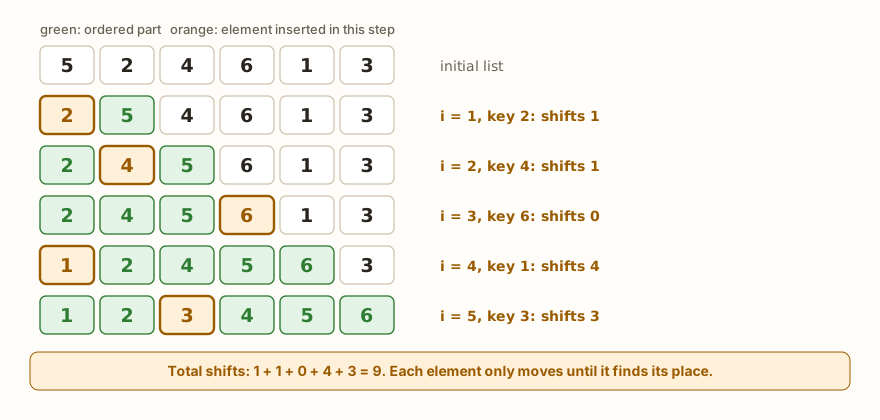
The algorithm starts by considering that the first element, alone, is already an ordered list. Then it takes the second and fits it into the right place, then the third, and so on to the last. To fit one in, the element is stored in a variable, the key, and you walk backwards through the ordered part, pushing each value larger than the key one place to the right, until you find its place. (In the code, the variable is called chave, which means key.)
def insertion(lista):
    for i in range(1, len(lista)):
        chave = lista[i]
        j = i - 1
        while j >= 0 and lista[j] > chave:
            lista[j + 1] = lista[j]
            j -= 1
        lista[j + 1] = chave
    return lista

print(insertion([5, 2, 4, 6, 1, 3]))
print(insertion([3, 3, 1]), insertion([]), insertion([7]), insertion([1, 2, 3]))

def insertion_passos(lista):
    for i in range(1, len(lista)):
        chave = lista[i]
        j = i - 1
        deslocou = 0
        while j >= 0 and lista[j] > chave:
            lista[j + 1] = lista[j]
            j -= 1
            deslocou += 1
        lista[j + 1] = chave
        print("i", i, "key", chave, "shifted", deslocou, lista)
    return lista
insertion_passos([5, 2, 4, 6, 1, 3])

def insertion_conta(lista):
    comparacoes = 0
    deslocamentos = 0
    for i in range(1, len(lista)):
        chave = lista[i]
        j = i - 1
        while j >= 0:
            comparacoes += 1
            if lista[j] > chave:
                lista[j + 1] = lista[j]
                deslocamentos += 1
                j -= 1
            else:
                break
        lista[j + 1] = chave
    return comparacoes, deslocamentos
print(insertion_conta([5, 2, 4, 6, 1, 3]))
print(insertion_conta([1, 2, 3, 4, 5]))
print(insertion_conta([5, 4, 3, 2, 1]))
print("end")The output starts with [1, 2, 3, 4, 5, 6] and [1, 3, 3] [] [7] [1, 2, 3]. The step by step is i 1 key 2 shifted 1 [2, 5, 4, 6, 1, 3], i 2 key 4 shifted 1 [2, 4, 5, 6, 1, 3], i 3 key 6 shifted 0 [2, 4, 5, 6, 1, 3], i 4 key 1 shifted 4 [1, 2, 4, 5, 6, 3] and i 5 key 3 shifted 3 [1, 2, 3, 4, 5, 6]. The counts are (12, 9), (4, 0) and (10, 10), and finally end. (In the names, deslocou = shifted, comparacoes = comparisons and deslocamentos = shifts.)
It is worth reading the insertion function line by line:
for i in range(1, len(lista))goes through the elements from the second on. The one at index 0 does not need to be handled, since alone it is ordered.chave = lista[i]stores the value that will be fitted in. This step is essential, and the next section shows what happens without it.j = i - 1points to the last element of the ordered part, the immediate neighbor of the key.while j >= 0 and lista[j] > chavewalks backwards while there are still elements and while the element looked at is larger than the key. The order of the two conditions matters: thej >= 0comes first because, ifjwere-1, thelista[j]would look at the last element of the list, and not at a nonexistent element.lista[j + 1] = lista[j]shifts the larger one one place to the right, andj -= 1moves on to the next.lista[j + 1] = chavewrites the key into the hole that is left. When the loop stops,jpoints to the first element that is not larger than the key, or to-1if there is none, and the key's place is right after it.
Shifting instead of swapping
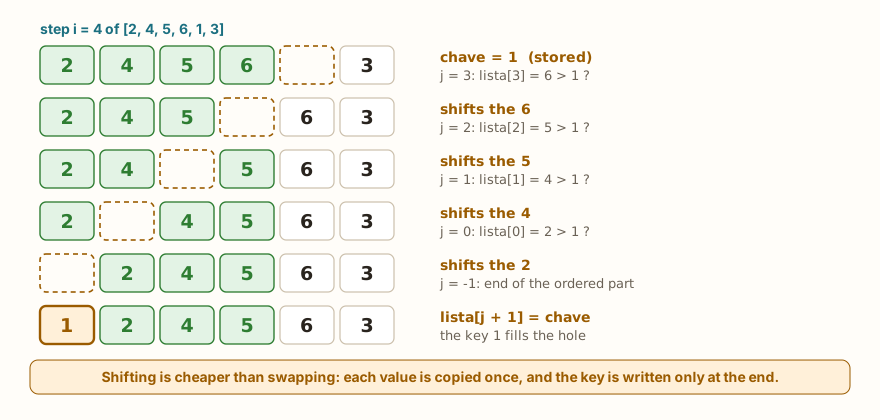
There is a subtle difference compared with bubble sort. Bubble swaps two neighbors at each step, which touches two positions. Insertion shifts: it copies a value to the position beside it, and only at the end writes the key. The figure shows step i = 4 of the example list, where the key is the 1. The 1 is stored, which leaves a hole at position 4. The 6 moves into the hole, the 5 into the hole that the 6 left, and so on, until the hole reaches position 0. Then the key drops into it. Each value is copied once, and the key is written once, which takes less writing work than a sequence of swaps.
The results of the insertion_passos function show how the work varies. The 6, at step i = 3, was already in the right place and shifted zero values. The 1, in the next step, was smaller than all those in the ordered part and went all the way to the start, shifting four. The total, 9 shifts and 12 comparisons, is well below the maximum possible.
From the syllabus to a planned semester
- Teaching plan and calendar built automatically
- Class diary ready to paste into SIGA
- Slides and exercise lists with answer keys
Free Community edition · Windows
The three side by side
def bubble(lista):
    c = t = 0
    n = len(lista)
    for i in range(n - 1):
        trocou = False
        for j in range(n - 1 - i):
            c += 1
            if lista[j] > lista[j + 1]:
                lista[j], lista[j + 1] = lista[j + 1], lista[j]
                t += 1
                trocou = True
        if not trocou:
            break
    return c, t
def selection(lista):
    c = t = 0
    n = len(lista)
    for i in range(n - 1):
        m = i
        for j in range(i + 1, n):
            c += 1
            if lista[j] < lista[m]:
                m = j
        if m != i:
            lista[i], lista[m] = lista[m], lista[i]
            t += 1
    return c, t
def insertion(lista):
    c = d = 0
    for i in range(1, len(lista)):
        chave = lista[i]
        j = i - 1
        while j >= 0:
            c += 1
            if lista[j] > chave:
                lista[j + 1] = lista[j]
                d += 1
                j -= 1
            else:
                break
        lista[j + 1] = chave
    return c, d
n = 100
ordenada = list(range(1, n + 1))
quase = list(range(1, n + 1))
quase[10], quase[11] = quase[11], quase[10]
quase[50], quase[51] = quase[51], quase[50]
quase[90], quase[91] = quase[91], quase[90]
invertida = list(range(n, 0, -1))
for nome, base in [("ordered", ordenada), ("almost", quase), ("reversed", invertida)]:
    print(nome, "bubble", bubble(base[:]), "selection", selection(base[:]), "insertion", insertion(base[:]))
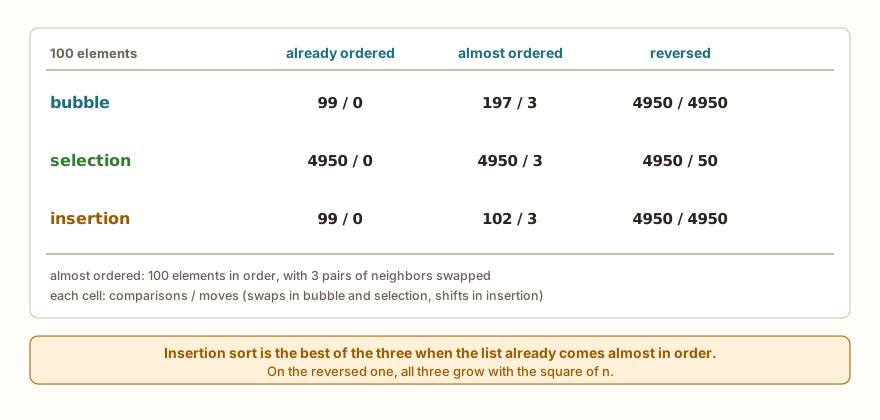
print("end")The output has three lines: ordered bubble (99, 0) selection (4950, 0) insertion (99, 0), then almost bubble (197, 3) selection (4950, 3) insertion (102, 3), then reversed bubble (4950, 4950) selection (4950, 50) insertion (4950, 4950), and finally end. (The variables ordenada, quase and invertida hold the ordered, almost ordered and reversed lists.) In each pair, the first number is the comparisons and the second, the moves: swaps in bubble and selection, shifts in insertion.
The middle case, almost ordered, is the most revealing. The list has 100 elements in order, with three pairs of neighbors swapped. Insertion makes 102 comparisons, one per element plus three for the fixes. Bubble with early stop needs more passes and makes 197. Selection, which always scans everything, makes 4950. All three make only 3 moves, because there are only three pairs out of place.
Almost ordered lists show up more often than it seems. A record of readings to which one new value arrives at a time, a list that was sorted yesterday and received a few items today, a ranking that changes little each round. In these cases, insertion sort does work proportional to the size of the disorder, and not to the size of the list.
In the worst case, the reversed list, all three grow with the square of n: 4950 comparisons for 100 elements. Selection still has the advantage of swapping little, 50 times, and the other two move 4950 times. None of the three is a choice for large unordered lists, and that is what the next article tackles.
Stability: insertion sort keeps the order of ties
A sort is stable when elements with the same key come out in the same order in which they went in. This matters when you sort by one field and want the rest of the order to be preserved, such as sorting students by grade and keeping alphabetical order among those who tie. The article on lambda, map, filter and sorted showed that MicroPython's sorted() is not stable. Insertion sort written by hand, with the strict > comparison, is:
def insertion_por(lista, chave_fn):
    for i in range(1, len(lista)):
        item = lista[i]
        k = chave_fn(item)
        j = i - 1
        while j >= 0 and chave_fn(lista[j]) > k:
            lista[j + 1] = lista[j]
            j -= 1
        lista[j + 1] = item
    return lista
palavras = ["pera", "uva", "banana", "kiwi"]
print(insertion_por(palavras[:], len))
print(sorted(palavras, key=len))
leituras = [("a", 12), ("b", 30), ("c", 12), ("d", 25), ("e", 12), ("f", 30)]
print(insertion_por(leituras[:], lambda t: t[1]))
print(sorted(leituras, key=lambda t: t[1]))
print(sorted(leituras, key=lambda t: (t[1], t[0])))
print("end")(The words pera, uva, banana and kiwi are pear, grape, banana and kiwi, and are kept in Portuguese on purpose, because the order of ties in the simulator depends on the words.) In the simulator, the output is ['uva', 'pera', 'kiwi', 'banana'], then ['uva', 'kiwi', 'pera', 'banana'], then [('a', 12), ('c', 12), ('e', 12), ('d', 25), ('b', 30), ('f', 30)], then [('e', 12), ('c', 12), ('a', 12), ('d', 25), ('f', 30), ('b', 30)], then [('a', 12), ('c', 12), ('e', 12), ('d', 25), ('b', 30), ('f', 30)] and end.
Compare the lines two by two. The insertion_por keeps pera before kiwi, and a, c and e in the original order, which is the stable order. The simulator's sorted(), which imitates MicroPython's, reverses the ties in these examples: kiwi before pera, and e, c, a. On the computer's Python, sorted() gives the same result as the insertion, and that is why the same program gives different outputs on the computer and on the board. The last line shows the way out of this problem: with a composite key (t[1], t[0]), which breaks the tie by name, sorted() gives the same answer in both places.
In the insertion_por function, the detail that guarantees stability is the strict >: the loop only shifts elements larger than the key. Equal elements are not shifted, and so the key that has just arrived stays after all the equal ones that were already there. The function also receives the key function as an argument, chave_fn, and calculates chave_fn(item) once per element, the same idea as the key of sorted().
Inserting into a list that is already ordered
The central step of insertion sort, fitting a value into an ordered list, serves on its own. When the data arrives one at a time, like readings from a sensor, you can keep a list always ordered by inserting each value in the right position, without sorting everything again:
def inserir_ordenado(lista, valor):
    pos = 0
    while pos < len(lista) and lista[pos] < valor:
        pos += 1
    lista.insert(pos, valor)

top = []
for v in [40, 15, 70, 25, 55, 10, 80]:
    inserir_ordenado(top, v)
    if len(top) > 3:
        top.pop(0)
    print(v, top)
print(top)
ordem = []
for v in [5, 1, 4, 2, 8]:
    inserir_ordenado(ordem, v)
print(ordem)
print("end")The output is 40 [40], 15 [15, 40], 70 [15, 40, 70], 25 [25, 40, 70], 55 [40, 55, 70], 10 [40, 55, 70], 80 [55, 70, 80], then [55, 70, 80], then [1, 2, 4, 5, 8] and end.
The inserir_ordenado function (insert in order) looks for the position, with a loop that walks while the elements are smaller than the value, and uses the insert(pos, valor) method, which puts the value at the given position and pushes the following ones to the right. The first use is a scoreboard of the 3 largest values: with each new reading, it goes into the ordered list, and, if the list goes over 3, the pop(0) discards the smallest, which is at the start. The list never holds more than 3 values, and ends with the three largest of the sequence, [55, 70, 80]. Notice that the reading 10, too small, went in and was immediately discarded.
The second use shows that repeating inserir_ordenado for each element is insertion sort: the list ordem ended up ordered, with no sorting function at all.
On the board, this matters for two reasons. The list is always ready for consulting, which allows, for example, taking the median at any time from the element in the middle, as the previous article did with a median filter. And memory stays limited, because only what matters is kept. The readings of a sensor, such as those in the articles on DHT22, HC-SR04 and PIR sensors, are the natural use.
The AI that remembers your life and lives on your computer
- Long-term memory with the source of every answer
- Works offline: your data stays on your PC
- Reads PDFs, slides, photos and meeting recordings
Essential plan free forever
When to use sorted() and sort()
In practice, you almost always use the ready-made functions. They are already tested, accept key and reverse, and spare you the code. The decision table is short:
print(sorted("python"))
print(sorted((3, 1, 2)))
print(sorted({"b": 1, "a": 2}))
print(sorted({3, 1, 2}))
print(sorted([3, 1, 2], reverse=True))
d = {"ana": 8.5, "bia": 6.0, "caio": 9.0}
print(sorted(d.items(), key=lambda kv: kv[1]))
print(sorted(d, key=d.get, reverse=True))
nums = [4, 2, 9, 1]
print(min(nums), max(nums), nums)
print(sorted(nums) == nums, nums == sorted(nums))
copia = nums[:]
copia.sort()
print(copia, nums)
copia.sort(reverse=True)
print(copia)
print("end")The output is ['h', 'n', 'o', 'p', 't', 'y'], [1, 2, 3], ['a', 'b'], [1, 2, 3], [3, 2, 1], [('bia', 6.0), ('ana', 8.5), ('caio', 9.0)], ['caio', 'ana', 'bia'], 1 9 [4, 2, 9, 1], False False, [1, 2, 4, 9] [4, 2, 9, 1], [9, 4, 2, 1] and end.
What each piece teaches:
- The
sorted()accepts anything that can be gone through, such as text, tuple, dictionary and set, and always returns a list. For a dictionary, it sorts the keys. - The
sorted(..., reverse=True)sorts from largest to smallest. - With
key, you sort by a criterion. Thed.items()hands over(name, grade)pairs, and thekv[1]chooses the grade. Thekey=d.getuses the dictionary's own method as the key function, and gives the names from best to worst. - The
sorted()does not change the original list: the lines withnumsshow that it stays[4, 2, 9, 1]. Thesort(), on the other hand, sorts in place and returnsNone, as the use oncopia(copy) shows. - To find just the smallest or the largest,
minandmaxare enough, and are simpler than sorting everything.
The rule of choice, then, goes like this:
- Just want the ordered list? Use
sorted(lista), orlista.sort()if you do not need the original. - Sort by a field? Use
key, and, if ties matter, a composite key, as seen above. - Just the smallest or the largest? Use
minormax, withkeyif needed. - Does the data arrive one at a time and the list needs to be always ordered? Insert each value with the idea of
inserir_ordenado. - Want to understand, or is the ordering rule unusual? Write it by hand, as an exercise, or when no
keyexpresses the criterion.
Writing the algorithm by hand is not the choice for production code. But, after having written it, it is much easier to understand what sorted() does, why it can be slow with a heavy key and why stability matters.
Common errors
The first is sorting values of different types:
print(sorted([3, "1", 2]))TypeError: unsupported types for __lt__: 'int', 'str'In the computer's Python, the message is '<' not supported between instances of 'str' and 'int'. It usually appears when the values come from input() and nobody converted them with int().
The second is passing reverse without the name:
print(sorted([3, 1, 2], True))TypeError: must use keyword argument for key functionIn the computer's Python, the message is sorted expected 1 argument, got 2. In both cases, reverse and key can only be passed by name: sorted(lista, reverse=True).
The third is using a key function that does not suit the items:
nums = [3, 1, 2]
nums.sort(key=len)TypeError: object of type 'int' has no len()The len calculates the size of texts and lists, and not of numbers. The message is the same in the simulator and on the computer.
The fourth is the classic of storing the result of sort():
lista = [3, 1, 2]
lista = lista.sort()
print(len(lista))TypeError: object of type 'NoneType' has no len()The sort() returns None, and the variable lost the list. The message is also the same in both environments. The fix is to call lista.sort() on its own, on a line, or to use lista = sorted(lista).
The fifth is asking to sort something that cannot be gone through:
print(sorted(5))TypeError: 'int' object isn't iterableOn the computer, the message is 'int' object is not iterable.
The sixth is forgetting the j >= 0 in the insertion sort loop:
def insertion_erro(lista):
    for i in range(1, len(lista)):
        chave = lista[i]
        j = i - 1
        while lista[j] > chave:
            lista[j + 1] = lista[j]
            j -= 1
        lista[j + 1] = chave
    return lista
print(insertion_erro([5, 2, 4]))IndexError: list index out of rangeWithout the test, when the key is smaller than all the elements of the ordered part, j reaches -1 and keeps going down. Python's negative indexes count from the end of the list, and so the loop looks at elements it should not, until j leaves the reach of the whole list. It is an error that happens precisely when the key is the smallest value, and so a list that only has ascending values does not reveal it.
Silent traps
Without the chave variable, the function gives no error and sorts wrong:
def insertion_sem_chave(lista):
    for i in range(1, len(lista)):
        j = i - 1
        while j >= 0 and lista[j] > lista[j + 1]:
            lista[j + 1] = lista[j]
            j -= 1
    return lista
print(insertion_sem_chave([5, 2, 4, 6, 1, 3]))
print("end")The output is [5, 5, 5, 6, 6, 6] and end. The function overwrites lista[j + 1] with lista[j] without having stored the original value anywhere, and it is lost. The result has the right size and looks "half ordered", but the 2, the 4, the 1 and the 3 vanished, and the 5 and the 6 repeat. It is the same kind of error as the swap done with two assignments, in the previous article: to move a value without losing the other, you need to store it first. Here, the one that stores it is the chave.
What tends to show up in class
These are patterns that repeat with people learning insertion sort. They are not the account of a specific class.
Forgetting the chave. It produces [5, 5, 5, 6, 6, 6] and the person does not understand where the repeats came from. The question that helps is: where is the value I am moving stored?
The order of the while conditions. Writing lista[j] > chave and j >= 0. When j is -1, the first condition already looks at lista[-1], the last element, and the result stops being reliable. The limit condition always comes first.
Writing the key in the wrong place. Writing lista[j] = chave instead of lista[j + 1] = chave. After the loop, j points to the element before the key's place, and the right position is the next one.
Confusing sort() with sorted(). Whoever uses lista = lista.sort() loses the list. Whoever uses sorted(lista) without storing the result thinks the list was sorted, and it stays as it was.
Expecting the same order of ties on the computer and on the board. The program passes the tests on the computer and behaves differently on the ESP32. The composite key, which eliminates the ties, solves it.
Thinking that writing by hand is "more correct". Some people prefer their own algorithm out of distrust of sorted(). The opposite is usually true: the ready-made function has less chance of having a limit error.
Sorting on every reading. A program that calls sorted() on the whole list on every new sensor reading redoes all the work. Inserting the new value in the right position, as in the scoreboard of the 3 largest, does far less.
Mixing types in the list. A value that came as text in the middle of numbers brings the sort down with TypeError. Converting at reading time avoids it.
Exercise: sorting words by length
Write a program that reads the quantity n of words, then the n words, and sorts them by length with insertion sort, showing the list and the shortest and the longest. The block uses entradas= to provide 4 words: casa, sol, abacaxi and uva (house, sun, pineapple and grape, kept in Portuguese because the length of each word is what matters).
n = int(input())
palavras = []
for i in range(n):
    palavras.append(input())
for i in range(1, n):
    atual = palavras[i]
    j = i - 1
    while j >= 0 and len(palavras[j]) > len(atual):
        palavras[j + 1] = palavras[j]
        j -= 1
    palavras[j + 1] = atual
print(palavras)
print("shortest:", palavras[0], "longest:", palavras[-1])
print("end")The simulator repeats the typed values in the output, one per line, and then come ['sol', 'uva', 'casa', 'abacaxi'], shortest: sol longest: abacaxi and end.
The only change compared with insertion sort on numbers is that the comparison uses len(palavras[j]) > len(atual), the length of the words, instead of the words themselves. Since the comparison is strict, sol and uva, which have 3 letters, stay in the order in which they were typed: sol before uva. This is stability in action.
To practice, try: sorting from largest to smallest, changing only the comparison; sorting alphabetically without using len; swapping the insertion for sorted(palavras, key=len) and seeing, in the simulator, whether the ties come out in the same order; and counting how many shifts were made.
Frequently asked questions
Why is insertion sort better on almost ordered lists? Because each element only moves until it finds its place. In an almost ordered list, most are already in place and do not move at all. The work is proportional to the disorder, as the 102 comparisons for 100 elements showed.
Is insertion sort stable? With the strict > comparison, yes: equal elements do not pass one another. If the comparison were >=, the equal ones would be shifted for nothing, and the input order would no longer be preserved.
Why can the simulator's sorted() reverse ties? Because the simulator reproduces MicroPython's sorting algorithm, which is not stable, as the article on sorted with key explains. The computer's Python uses another and is stable.
Should I use sorted() or sort()? The sorted() returns a new list and keeps the original. The sort() sorts the list itself and returns None. Choose by whether you need to keep the original order.
Is insert expensive? It pushes all the following elements one place to the right, which costs more the larger the list. For the small lists of a board, it is perfectly acceptable.
Is there anything faster than these three algorithms? There is. The next article presents merge sort and quick sort, which divide the list into smaller parts and sort large lists much faster.
Where to go next
The challenges List Search, Largest in the List and Reversed List practice the walk and the shifting of elements that insertion sort uses. To review the basics, it is worth going through the articles on lists, linear and binary search, bubble and selection sort and lambda, map, filter and sorted, and through the Logic with Python track.
The next article deals with merge sort and quick sort: what it means to divide and conquer, how recursion enters sorting and why these algorithms are faster on large lists.